The core model within any LLM agent possesses broad general knowledge but lacks specialized expertise. To build a truly performant and effective agent, we must move beyond basic prompting and fundamentally optimize this core. This optimization process involves refining the model’s parameters to instill specialized skills, structured reasoning, and ultimately, a more efficient computational footprint.
Before we dive into the solutions, let’s look under the hood. An LLM is a giant digital brain defined by billions of parameters. Its sheer size is the source of its intelligence, but it also creates three major performance challenges.
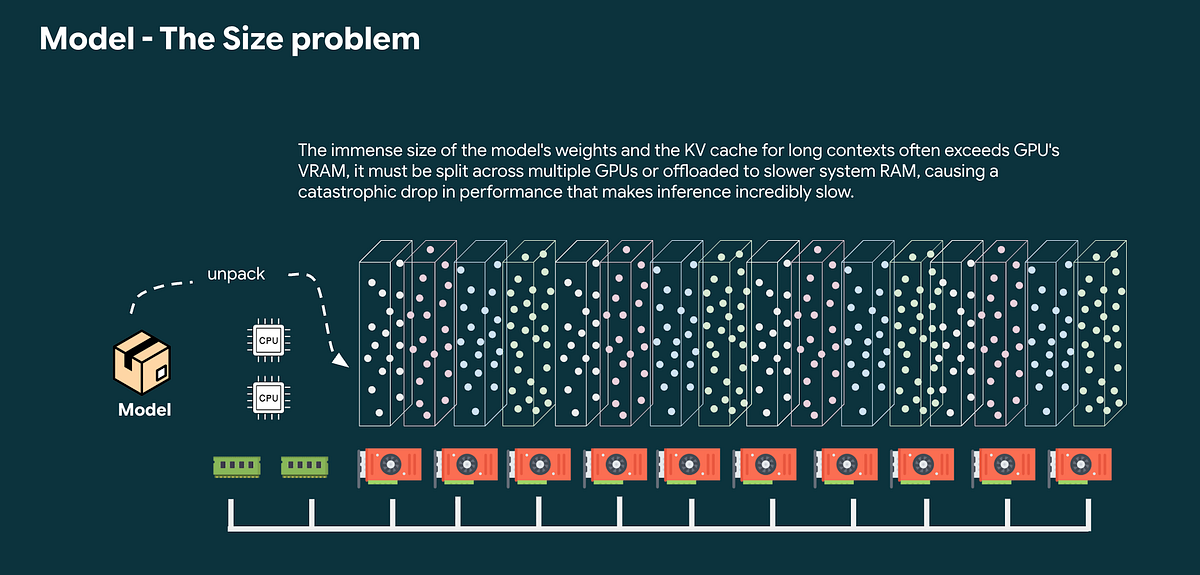
First, there’s a size problem. This digital brain is enormous. Loading it into a computer’s high-speed GPU memory (VRAM) is like trying to fit an encyclopedia set onto a small desk. It requires expensive hardware just to hold the model.

Second, there’s a speed problem. To generate a single word, the entire brain must perform a massive, complex calculation. It’s a deep, computational marathon for every token, making the process slow and energy-intensive.
Finally, there’s the context problem. To get the right answer from a generic model, we often need to provide lots of context in the prompt. The more context you provide, the longer the model takes to generate a response because the computational cost increases with input length. By fine-tuning a model, you can “bake” that context directly into its parameters, allowing for shorter prompts and faster, cheaper inference.
To solve these problems, we’ll go over three optimization procedures: Parameter-Efficient Fine-Tuning, Quantization, and Pruning.
- Quantization shrinks the model by reducing the precision of its weights, making it smaller and faster.
- Pruning carefully removes unnecessary neural connections for a leaner, more efficient agent.
- Parameter-Efficient Fine-Tuning (PEFT) allows us to teach the model new skills cheaply by training only a tiny fraction of its parameters.
The result is an agent that is just as smart but is also fundamentally leaner, faster, and more affordable to operate.
Performance Optimization via Quantization
One of the biggest barriers to deploying LLMs is their enormous size. Quantization is a fundamental technique designed to tackle this head-on.
The Memory Bottleneck: Why Performance Demands a Smaller Model
Large AI models have an insatiable appetite for GPU VRAM. When a model is too large to fit, you get an “Out of Memory” (OOM) error. Even if it barely fits, performance is crippled by the “memory wall.” The GPU, capable of trillions of calculations per second, is left waiting for data to arrive from slower system memory. This increases latency, making real-time applications unusable.
How Quantization Solves the Performance Problem
Quantization directly attacks this memory bottleneck. By converting the model’s weights from a high-precision format like 32-bit floats (FP32) to a lower-precision one like 8-bit integers (INT8), the model’s memory footprint is drastically reduced by as much as 75%.

At its core, quantization is a method of “smart rounding.” It maps a wide range of high-precision numbers to a much smaller set of low-precision numbers. This is done using two key parameters: a scale factor and a zero-point.
Think of a beautiful, high-resolution digital photograph of a sunset. In its original form, it displays millions of distinct colors. This rich, continuous spectrum is like the hyper-precise numbers (weights) in an AI model.
Now, imagine you must display this photo on a simple screen that only has a palette of 256 colors. You can’t just randomly discard colors, you need a precise mapping system. This is the exact challenge of quantization. In the world of AI, this “mapping” is not just about saving storage space, it’s a critical technique for overcoming fundamental hardware limitations and unlocking performance.
Why Quantization Works Without Breaking the Model
It seems counterintuitive that reducing precision wouldn’t significantly harm the model’s answers. While there is a minor impact, modern quantization is cleverly designed to minimize it. It’s not just “rounding”. It’s a targeted optimization.

The key is that not all weights and activations in a neural network are of equal importance. Some parameters, often called “outliers,” have a disproportionately large impact. Naively compressing these critical values can lead to a significant drop in performance.
Modern methods, like Activation-aware Weight Quantization (AWQ), use statistical analysis to identify these crucial components. AWQ protects the precision of weights that have the most significant impact on the model’s output, ensuring the most salient parts of the model are preserved.
During inference time, you’re performance are significantly improved by
- Load the Small Model: The system loads the small, quantized weights into GPU VRAM. This is faster and uses significantly less memory.
- Perform Ultra-Fast Math: The core computations (the matrix multiplications) are now performed using highly efficient integer arithmetic (e.g., INT8 math).
- Simple Dequantization: When necessary, the model performs a very simple and fast “dequantization” step. This is not a complex calculation, it’s just a basic mathematical operation: High-Precision Value ≈ (Low-Precision Value — Zero-Point) * Scale-Factor
Putting It Into Practice
So, how do you get started? Fortunately, you don’t always have to perform these complex procedures yourself. The open-source community has embraced quantization, and platforms like Hugging Face are filled with pre-quantized models. Many come in formats like GGUF, which is optimized for running efficiently on CPUs.
However, if you need more control or a pre-quantized model isn’t available, you can use powerful libraries like llm-compressor. Here’s a look at the code:
recipe = [
SmoothQuantModifier(smoothing_strength=0.8),
GPTQModifier(scheme="W8A8", targets="Linear", ignore=["lm_head"]),
]oneshot(
model="TinyLlama/TinyLlama-1.1B-Chat-v1.0",
dataset="open_platypus",
recipe=recipe,
output_dir="TinyLlama-1.1B-Chat-INT8",
max_seq_length=512,
num_calibration_samples=512,
)
The first step, SmoothQuantModifier, is a clever preparatory move that makes the model easier to compress accurately by smoothing out problematic “outlier” activation values.
The second step, GPTQModifier, performs the main compression. It uses the W8A8 scheme to convert both weights and activations to 8-bit integers for a massive speed boost, focusing this process on the Linear layers where it matters most. And it’s told to ignore the sensitive lm_head (the final output layer) to preserve the model’s accuracy.
Finally, the oneshot command executes this entire recipe, using a sample dataset for calibration to create a new, permanently smaller, and highly optimized mode
Next, we’ll discuss Pruning, another powerful technique for creating a leaner, more efficient agent.
A quick note: This blog is designed for agent developers, application developers, and architects to better understand what’s happening under the hood. I’m simplifying a lot of complex details to focus on the performance implications you need to consider when tuning or creating a high-performance AI agent, rather than providing a deep dive for data scientists.
Source Credit: https://medium.com/google-cloud/anatomy-of-a-high-performance-agent-giving-your-ai-agent-a-brain-transplant-dc499e6d153f?source=rss—-e52cf94d98af—4
About the Author