Architecting a Multi-Layered Security Stack: Beyond Basic IAM in Google Cloud
In the evolving landscape of cloud security, relying solely on standard “Allow” permissions is a vulnerability. Modern enterprises require a Defense in Depth strategy that layers identity, network, and policy controls to ensure data remains secure even if one layer is compromised.
Based on a comprehensive security architecture analysis, this article explains how to build a robust security stack using IAM, Deny Policies, VPC Service Controls (VPC-SC), and the emerging Principal Access Boundaries (PAB).
The Three Layers of Defense
To understand this architecture, we must first categorize our controls into three distinct layers:
- Resource Control (IAM): Who can access a specific GCP project or resource?
- Network Control (VPC-SC): Which network can interact with my data?
- Identity Perimeter (PAB): Is this identity allowed to exist or act within this boundary?
Let’s deep dive into how these components function individually and how they converge into a target solution.
1. IAM & Organization Policies: The Foundation
> “Who can access?”
The first layer is the standard Identity and Access Management (IAM) we are all familiar with. Its primary function is Granting Access — explicitly telling the system, “Identity A can do Action B.”
Roles and Responsibilities In a structured enterprise environment, IAM responsibilities are often split to maintain governance:
- Project Teams: Manage permissions at the Folder or Project level (Appcode). This includes adding or deleting permissions throughout the application lifecycle.
- Central Platform (PCP) Team: Manages the core infrastructure and higher-level governance.
Organization Policies Alongside IAM, Organization Policies act as broad constraints. These can be applied at the organization level or configured specifically per Business Unit (BU) for different deployment types (e.g., Standard vs. Export Control). These guardrails can limit resources deployment ( ie: no public ip on vm, limitation of GCP services … ) and over rules IAM permissions.
2. Deny Policies: The Hard Guardrails
> “Restricting permissions regardless of role.”
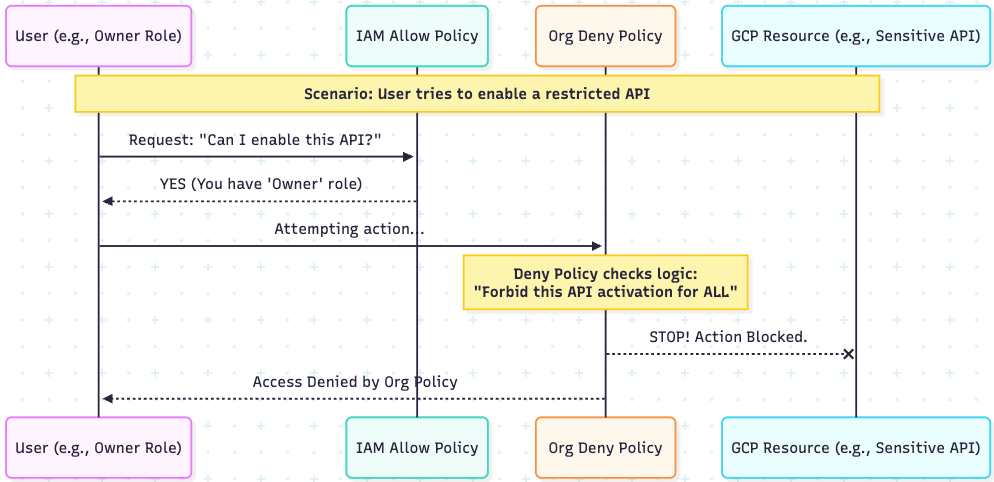
While IAM “Allows,” Deny Policies introduce a necessary “Stop” mechanism.
- Primary Function: Prevent Access. It explicitly states, “You cannot do Y.”
- The Logic: Deny policies always override IAM Allow policies.
- Use Case: These are essential for deploying organization-wide blocks, such as preventing the activation of specific APIs or restricting administrative actions. Even if a user has an “Owner” role, a Deny Policy ensures they cannot perform actions deemed unsafe by the security team.
3. VPC Service Controls (VPC-SC): The Network Perimeter
> “Preventing Data Exfiltration.”
VPC Service Controls (VPC-SC) provide an additional security layer specifically designed to mitigate data exfiltration risks. This layer focuses on the network level by controlling ingress and egress traffic for Google Cloud APIs.
By defining a Service Perimeter, you can protect specific resources and services. Projects located inside the perimeter can communicate freely with protected GCP APIs, while projects outside the perimeter are blocked by default. For external projects or clients requiring access, you can configure Ingress and Egress rules or Access Levels to allow authorized traffic through the perimeter boundary.
The architecture proposes two distinct models for VPC-SC based on data sensitivity:
A. The Standard Model Used for standard business data across divisions (e.g., Commercial, D&S, AH).
- Use Case: Used for standard business data across divisions (e.g., Commercial, D&S, AH).
- Scope: One perimeter per Business Unit (BU). This provides a balance between security and operational flexibility by allowing projects within a BU to share resources.
- Traffic Rules: Communication is allowed by default between all resources within the perimeter. No specific ingress rules are required for internal traffic; however, access from the internet or other BUs requires defined Access Levels.
- Protection: Primarily blocks data exfiltration to any location or project outside the BU’s defined perimeter.
B. The Export Control Model Used for highly sensitive data requiring stricter isolation
- Use Case: Used for highly sensitive or regulated data requiring stricter isolation (e.g., ITAR, EAR, or highly confidential IP).
- Scope: One perimeter per application. This is a micro-segmented approach that is significantly more granular than the BU level.
- Traffic Rules: Strictly denies all traffic by default. It allows ingress only from specific, verified resources and identities required for that single application to function.
Services Covered: In both models, restrictions apply to critical data services, including Cloud Storage, Cloud SQL, and BigQuery, ensuring that data cannot be moved to unauthorized buckets or datasets.
Pay attention: Not all Google Cloud services are supported by VPC-SC, though the list of compatible services is expanding.
The Scalability Challenge
The Export Control Model can be difficult to maintain at scale if you attempt to configure complex ingress and egress rules just to identify principals. Managing these rules for every user or service account creates operational friction. Strategic Shift: Instead of overloading VPC-SC with identity rules, it is more efficient to define one perimeter per application for network containment only, and delegate traffic control to Principal Access Boundaries.
4. Principal Access Boundaries (PAB): The Identity Perimeter
> “Is this identity eligible?”
This is the cutting-edge layer of the security stack. Principal Access Boundaries (PAB) address a gap left by IAM and VPC-SC: controlling the eligibility of the identity itself.
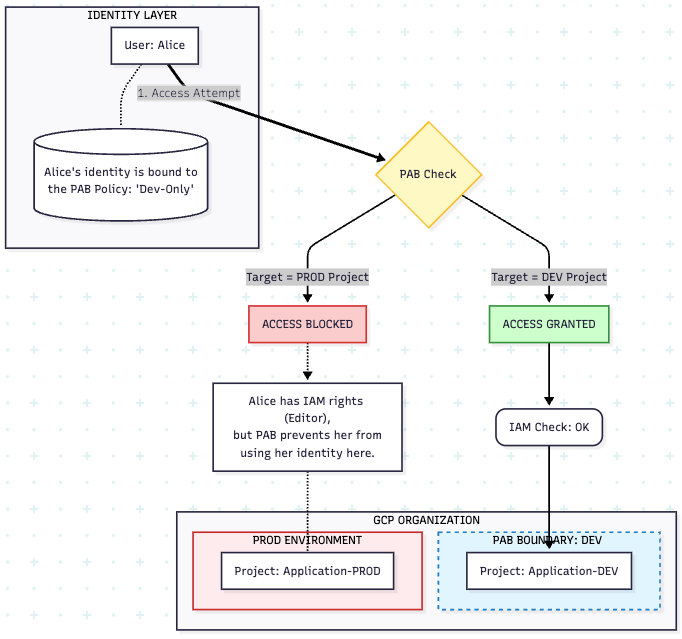
- Primary Function: Limit Eligibility. It states, “Identity A can ONLY exist/act in Environment Z.”
- The Golden Rule: Even if an identity has IAM permissions, PAB can block access if the identity is outside its authorized boundary.
- Implementation: PAB policies define an IAM perimeter. You create boundary rules on resources (Organization, Folder, or Project IDs) and bind specific principals to them.
This acts as a firewall for identities, ensuring that unauthorized users cannot even attempt to authenticate against a resource, regardless of their permissions.
The principal sets allowed in PAB are:
- all service accounts and workload identity pools in a specified project.
- all service accounts and workload identity pools in a specified folder.
- Organization’s principal set ( All identities in all domains associated with your Google Workspace customer ID, All workforce identity pools in your organization, All service accounts and workload identity pools in any project in the organization)
- all identities in a specified workforce identity pool.
- all identities in the specified workload identity pool.
5. The Target Solution: Convergence
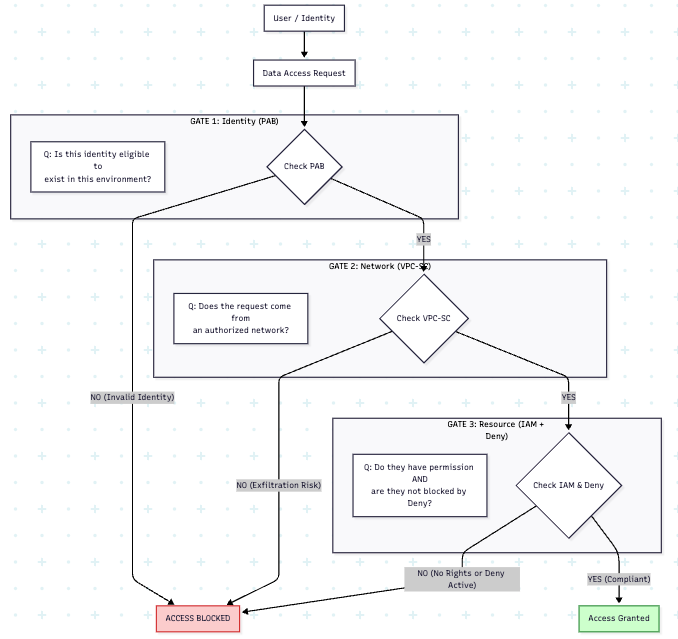
The ultimate goal is to simplify configuration while maximizing security. By combining these technologies, we achieve a “Target Solution”:
- Control Access via IAM Allow policies and Deny policies.
- Control Identity Perimeters using Privileged Access Manager (PAM) and PAB policies.
- Control Data Exfiltration via VPC-SC.
The “Simplification” Benefit One of the key advantages of introducing PAB is the simplification of VPC-SC. In complex environments, VPC-SC ingress/egress rules can become unmanageable. By offloading the “Identity verification” aspect to PAB, VPC-SC can focus purely on what it does best: network containment.
Architecting a Multi-Layered Security Stack: Beyond Basic IAM in Google Cloud was originally published in Google Cloud – Community on Medium, where people are continuing the conversation by highlighting and responding to this story.
Source Credit: https://medium.com/google-cloud/architecting-a-multi-layered-security-stack-beyond-basic-iam-in-google-cloud-11ade68fbc8f?source=rss—-e52cf94d98af—4
About the Author