Authors: Hardik Shah, Tabatha Lewis
Keeping your vector embeddings in sync with your operational data can be a painful, multi-step process. Traditionally the onus was on developers to keep the embedding up to date. A typical workflow might look like, querying data from the database, extracting it to pass to an external embedding model, pushing the returned embeddings back into the database. This is a process that developers have to maintain throughout the lifecycle of the application, it’s no one and done process. It has to be robust to handle various failure scenarios and fast to serve real-time semantic search applications.
One approach is to do this row by row with a trigger, which can work for a demo application with O(1000) records, but once you need to scale to O(million) rows, you start hitting performance bottlenecks.
In this post, we’ll explore how AlloyDB’s new embedding generation feature, Auto vector embeddings, provides a robust, reliable and low latency solution compared to row-by-row embedding generation.
Auto vector embeddings for large tables
Last month, AlloyDB introduced a fully managed, built-in capability to generate and manage vector embeddings at scale.
Instead of writing an external script to loop through your data, you can now offload the entire text embedding generation to AlloyDB AI using a single line of SQL. Behind the scenes, AlloyDB will automatically:
- Identify rows that need to be embeddings (including new inserts and updates).
- Efficiently batches the data.
- Call the embedding model (e.g. Google’s text-embedding-005) in parallel.
- Update the embedding data in your database.
Get Started
Getting started is super easy! You first need to call the run ai.initialize_embeddings function, which will set up the background automation. You simply need to specify the target table, column, embedding column and embedding model to get started
In case you haven’t yet turned on this preview feature, you can do so by upgrading to preview as mentioned in the official documentation
Let’s walk through an example using an open source dataset.
1. Prepare your table
Let’s say you have created a table reviews, with a score column representing review score, a review_title column for the title of the review, a review_description column containing the text you want to embed, and a review_description_embedding column to store the corresponding embeddings of the review_description column.
CREATE TABLE reviews (
    score INT,
    review_title TEXT,
    review_description TEXT,
    review_description_embedding vector(768) -- Matching the dimension of your chosen model
);
2. Load the dataset
To demonstrate the feature and benchmark the performance at scale, we will use a product review data set from Kaggle: Amazon Reviews(CC0 public domain license). This dataset has a large volume of text data which is perfect to demonstrate large scale embedding generation.
We loaded the data test.csv containing 400k reviews data with ~400 characters per review description into AlloyDB using the built-in, high-speed CSV import feature, which simplifies moving large, external datasets directly into your database with minimal effort and high efficiency.
3. Generate Embeddings
Now the fun part! All you need to do is use the ai.initialize_embeddings command to link your text column to the embedding column.
CALL ai.initialize_embeddings(
  model_id => 'text-embedding-005', -- the model id you have registered to model endpoint management
  table_name => 'reviews', -- the name of the table
  content_column => 'review_description', -- the name of the column you want to embed
  embedding_column => 'review_description_embedding', -- the name of the column storing the embeddings. This column should correpsond to the content_column.
  incremental_refresh_mode => 'transactional' -- optional, the mechanism you want to use to update your embeddings
);
Here we have opted for transaction mode, which will backfill the existing data and incrementally update embeddings as you update your data. You can also set the incremental_refresh_mode to ‘None’, this option is great for bulk updates. Essentially you manually call the SQL function ai.refresh_embeddings() to update all entries.
Note: You can choose to not use incremental embedding management by specifying incremental_refresh_mode as ‘None’. For full documentation and parameters, check out the official guide.
Now you are ready to go!
AlloyDB begins processing the rows in the table.
You can track the progress of embedding generation by querying ai.embed_gen_progress_view()
Upon completion of the embedding generation, it will show the percent_progress as 100% with total time taken as seen below

Any new INSERT or UPDATE to product_description automatically triggers an embedding generation for that specific row.
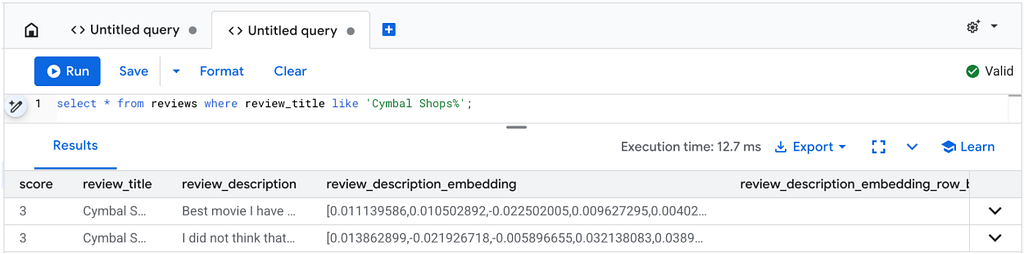
Lets insert a couple of synthetic rows as below to see incremental generation in action
INSERT INTO reviews(score, review_title, review_description) VALUES (3, 'Cymbal Shops', 'Best movie I have seen, I love the emphasis on skincare');

INSERT INTO reviews(score, review_title, review_description) VALUES(3, 'Cymbal Shops: The SQL', 'I did not think that this could get any better. One of the few movies that the SQL actually outdoes the original ');
Now we can see that the embeddings have automatically been generated in our table.
Performance in Action
To demonstrate the difference this makes, we ran a comparison between a standard row by row update vs AlloyDB’s built-in auto-embedding generation.
Test Setup
- Dataset: 400k rows of amazon reviews
- Model: text-embedding-005
- Environment: AlloyDB Primary Instance [n2-highmem-64]
In order to generate data row by row, we used
UPDATE reviews SET review_description_embedding = ai.embedding('text-embedding-005', review_description);
Results
Standard row by row vector embedding generation above gave us the rate of 23 rows per second. This improves to ~1550 rows per second using auto vector embedding generation giving us a 67X speedup
Tuning for Scale: Batch Size Analysis
One of the critical levers for performance when generating embeddings at scale is batch size.
When you call an embedding API, sending one string at a time is inefficient. However, sending too many at once can hit model token size limits causing calls to error out. AlloyDB allows you to tune this via the batch_size parameter in the initialize_embeddings function. However, this is a hint to the execution and AlloyDB may dynamically adjust this based on inputs.
We conducted a series of custom runs to find the “sweet spot” for throughput on Vertex AI models.
Here we ran a series of runs and varied discrete batch sizes in the range [10, 30, 50, 70, 90] using the following SQL command:
CALL ai.initialize_embeddings(
  model_id => 'text-embedding-005',
  table_name => 'reviews',
  content_column => 'review_description',
  embedding_column => 'review_description_embedding',
  incremental_refresh_mode => 'transactional' ,
  batch_size => 30
);
Summary of Runs
Here are the performance results from the runs

- Currently AlloyDB defaults batch size to 50 out of the box.
- As the batch size is increased or decreased compared to the default value of 50, we observe that the time taken goes up(rows per second goes down).
- While defaults work great out of the box, AlloyDB still gives users the control to tune the perfect configuration for your unique model and dataset.
Quota limits
One thing users need to be aware of is the model quota limits that can potentially affect performance, especially when running large-scale batch operations. Exceeding your quota can lead to throttled requests and slower backfill times.
To review the recommended AlloyDB quotas, consult the Before you begin section in the documentation. For comprehensive details on locating and managing your Vertex AI quotas, please refer to the Check and request quotas for Vertex AI guide.
Conclusion
Generating embeddings no longer require specialized ETL scripts and maintenance to achieve high performance. By moving this logic into AlloyDB, you simplify your architecture and gain massive performance improvements through internal batching and optimization.
Get Started today!
Beyond the For-Loop: Generating Database-Driven Embeddings at Scale with AlloyDB was originally published in Google Cloud – Community on Medium, where people are continuing the conversation by highlighting and responding to this story.
Source Credit: https://medium.com/google-cloud/beyond-the-for-loop-generating-database-driven-embeddings-at-scale-with-alloydb-47142da4748d?source=rss—-e52cf94d98af—4
About the Author