In Part 1, we established the structural foundations of NCC using Mesh and Star topologies. In Part 2, we unlocked the power of Transitivity in the case of PSA and PSC.
In this part we look at the fundamentals of how Routes are propagated behind the scenes: NCC Route Propagation.
While Topology defines who is connected, Route Propagation determines what traffic is actually allowed to flow within the different spokes of an NCC Hub. Remember behind the scenes all that NCC does it to propagate the routes among spokes based on the topology defined.
In this final part of this series, we will look at how NCC handles route propagation for Mesh and Star topologies, how to exclude specific CIDR ranges, and how Hybrid routes are dynamically injected into the cloud.
1. Route Propagation in Mesh Topology
In an NCC Mesh topology, the philosophy is “All-for-One and One-for-All.” When you attach VPCs as spokes to a Mesh Hub, the Hub automatically learns all subnets from every spoke and re-advertises them to every other spoke.
The Scenario
Let’s imagine three VPCs:
- VPC A (Sales): 10.1.0.0/16
- VPC B (HR): 10.2.0.0/16
- VPC C (Eng): 10.3.0.0/16
How Propagation Works
- Ingest: The NCC Hub “listens” to the local subnet routes of A, B, and C.
- Aggregate: The Hub builds a central routing table containing 10.1.0.0/16, 10.2.0.0/16, and 10.3.0.0/16.
- Propagate: The Hub pushes these routes back into the routing tables of all the Spoke VPCs.
Resulting Route Table for VPC A:
Similarly the Routing table for VPC B and C will have NCC routes define for the other two networks to enable connectivity between all spoke VPCs.
In this model, if you add a new subnet to VPC C (e.g., 10.3.50.0/24), NCC automatically updates the route tables of A and B within seconds.
2. Route Propagation in Star Topology
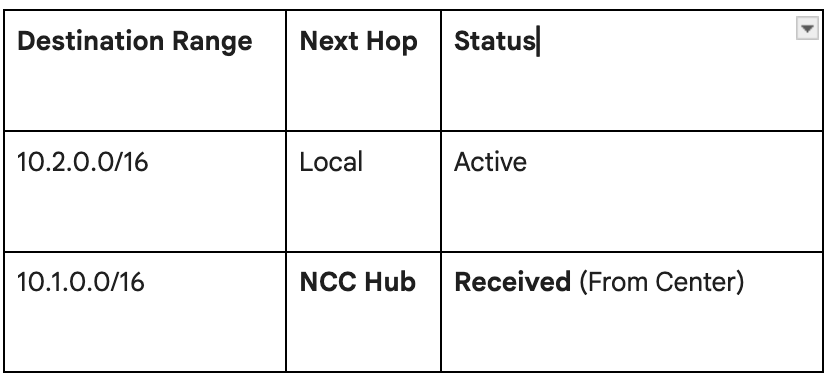
Star Topology introduces hierarchy. We have Center Spokes (Management/Hub VPCs) and Edge Spokes (Workload VPCs). The routing logic here is asymmetric to ensure isolation.
The Scenario
- VPC A (Center — Security/Shared Services): 10.1.0.0/16
- VPC B (Edge — Workload 1): 10.2.0.0/16
- VPC C (Edge — Workload 2): 10.3.0.0/16
How Propagation Works
The NCC Hub enforces strict rules based on the spoke type:
- Center-to-Edge: Routes from the Center Spoke (A) 10.1.0.0/16 are sent to all Edge Spokes.This enables edge spokes to connect to the center VPC A.
- Edge-to-Center: Routes from Edge Spokes (B, C) are sent to the Center Spoke. This enables the center spoke to connect to all the edge spokes.
- Edge-to-Edge (Blocked): Routes from Edge Spoke B are NOT sent to Edge Spoke C, and vice versa, preventing communication between edge spokes
Resulting Route Table for VPC B (Edge):
Resulting Route Table for VPC A (Center):
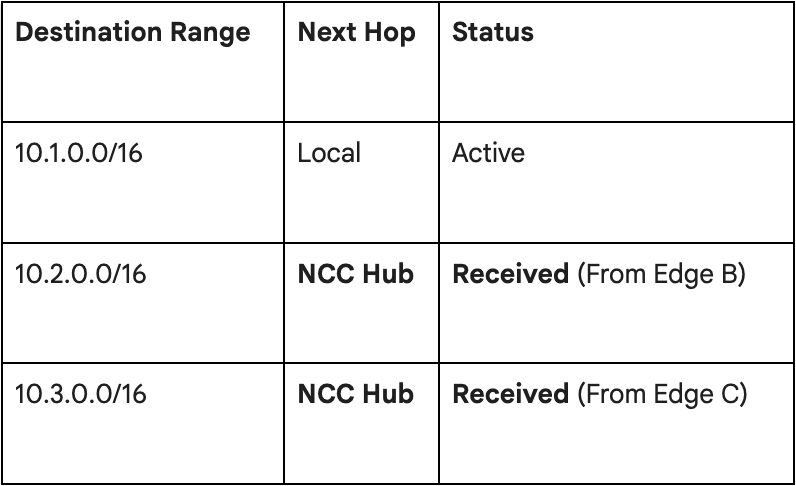
This creates a logical hub-and-spoke routing table without needing to configure complex firewall rules to block lateral movement between workloads; the network simply doesn’t know the route exists.
3. Granular Control: Include and Exclude Export Filters
Sometimes, “All or Nothing” isn’t enough. You might have a sensitive subnet in a VPC that should not be advertised to the rest of the network, even in a Mesh topology. NCC handles this via Export Filters.
The Scenario
- VPC A: Has a general subnet 10.1.1.0/24 and a strictly private “Compliance” subnet 10.1.99.0/24.
- VPC B: Needs to access 10.1.1.0/24 but must not see 10.1.99.0/24.
The Configuration
When attaching VPC A as a spoke to the NCC Hub, you configure the export limits:
- Default: Export all ranges.
- Custom (Exclude): exclude-export-ranges = 10.1.99.0/24
The Result
The NCC Hub receives advertisements from VPC A. It filters out 10.1.99.0/24 as this was specified in the excluded range.
When the Hub propagates routes to VPC B, VPC B’s routing table will show 10.1.1.0/24, but 10.1.99.0/24 will be completely invisible. Traffic destined for the compliance subnet from VPC B will be dropped because no route exists.
Hybrid Route Propagation (Dynamic BGP)
You can attach an Interconnect from on-prem or a VPN connection to a NCC hub. Attaching to the NCC hub enables route propagation of the VPN or Interconnect dynamic routes . The way the routes are propagated is different in Mesh and Star Topologies
Dynamic Propagation in Mesh
If you attach a Cloud VPN (connected to On-Prem 192.168.0.0/16) to a Mesh Hub as a spoke:
- Cloud Router learns 192.168.0.0/16 via BGP from the on-prem router.
- NCC Hub automatically ingests this dynamic route.
- NCC Hub propogates this route into VPC A, VPC B, and VPC C simultaneously.
If you add a new subnet on-premise (192.168.50.0/24), BGP updates the Cloud Router, and NCC instantly propagates the new route to all Cloud VPCs. No manual intervention is required.
Dynamic Propagation in Star
In a Star topology, Hybrid Spokes (VPN/Interconnect) routes are propagated based on whether these routes are attached to the center/edge group.
If you attach a Cloud VPN (connected to On-Prem 192.168.0.0/16) to a Mesh Centre spoke:
- Cloud Router learns 192.168.0.0/16 via BGP from the on-prem router.
- NCC Hub automatically ingests this dynamic route in the center spoke.
- NCC Hub-> Propagates to Edge Spokes (VPC B, C)
This allows your Edge workloads (VPC B & C) to reach on-premise data centers securely.
Conclusion
Network Connectivity Center represents a huge shift from Connection-based management (managing individual peering links) to Intent-based management (defining topologies and letting the Hub manage the routes).
By understanding how Route Propagation works — and utilizing features like Star topology isolation and Export Filters — you can build a cloud network that is:
- Scalable: Add spokes without touching existing routing tables.
- Secure: Isolate workloads and hide sensitive subnets easily.
- Dynamic: Let BGP and NCC handle the heavy lifting of route updates.
This concludes our deep dive three part series on NCC. Whether you are migrating from a sprawling VPC Peering mesh or building a greenfield landing zone, NCC provides the modern control plane required for enterprise-grade Google Cloud networking.
NCC: Mastering Route Propagation was originally published in Google Cloud – Community on Medium, where people are continuing the conversation by highlighting and responding to this story.
Source Credit: https://medium.com/google-cloud/ncc-mastering-route-propagation-868d3428ca72?source=rss—-e52cf94d98af—4
About the Author