From Monolithic AI to Distributed Intelligence: Why Multi-Agent Systems Matter
Building Distributed Multi-Agent Systems with Google’s AI Stack series:
- Part 1: From Monolithic AI to Distributed Intelligence: Building Your First Multi-Agent System ← You are here
- Part 2: Making Agents Talk: Agent-to-Agent (A2A) Protocol Deep Dive
- Part 3: Building the Orchestrator: Coordinating Agents with the AgentTool Pattern
- Part 4: Scaling Multi-Agent Workflows: Solving the Token Limit Problem
- Part 5: External Tool Integration via Model Context Protocol (MCP)
- Part 6: Deploying to Cloud: Cloud Run and Vertex AI Agent Engine
Introduction
Imagine you’re building an AI system to create complete social media campaigns. Your agent needs to:
- Research market trends and competitors
- Write engaging social media copy
- Generate visual design concepts
- Review quality and provide feedback
- Create project timelines and tasks
You could build a single, monolithic AI agent to do all of this. But should you?
In this 6-part series, I’ll show you why the answer is no — and demonstrate how to build a distributed multi-agent system using Google’s AI stack. We’ll explore:
- Google Agent Development Kit (ADK) for building agents
- Agent-to-Agent (A2A) Protocol for communication
- Model Context Protocol (MCP) for external tool integration
- Vertex AI Agent Engine for managed orchestration
- Cloud Run for scalable agent deployment
By the end of this series, you’ll have learned from a real system that generates complete social media campaigns — and you’ll be able to apply these patterns to your own projects.
Part 1: Why Multi-Agent Systems Matter
The Problem with Monolithic AI Agents
Single Agent Approach
class MonolithicCampaignAgent:
    def create_campaign(self, brief):
        # Research the market
        research = self.research_market(brief
)        # Write social media posts
        posts = self.write_posts(research)
        # Generate visual concepts
        visuals = self.design_visuals(posts)
        # Review quality
        feedback = self.review_quality(posts, visuals)
        # Create timeline
        timeline = self.create_timeline(feedback)
        return {
            'research': research,
            'posts': posts,
            'visuals': visuals,
            'feedback': feedback,
            'timeline': timeline
        }
This looks clean, but it has serious problems:
Problem 1: Lack of Separation of Concerns
All functionality lives in one agent. A bug in the research logic can affect the entire system. Changes to the visual generation require redeploying everything.
Problem 2: No Independent Scaling
Need more copywriting capacity? You have to scale the entire agent, including the expensive research and visual generation components.
Problem 3: Prompt Complexity
Your system instruction becomes a massive document trying to teach one LLM how to:
- Research like a market analyst
- Write like a copywriter
- Design like a visual artist
- Review like a creative director
- Plan like a project manager
The result? A confused agent that’s mediocre at everything.
Problem 4: Limited Flexibility
Want to use the copywriter for a different project? You can’t — it’s tightly coupled to the campaign workflow.
Problem 5: Testing Nightmare
How do you test just the visual generation? You can’t, without running the entire pipeline.
The Multi-Agent Solution
Instead of one agent doing everything, we create specialized agents that each do one thing extremely well:
┌─────────────────────────────────────────────┐
│         🎬 Creative Director                │
│         (Orchestrator)                      │
│    - Routes requests intelligently          │
│    - Coordinates specialists                │
│    - Passes context between agents          │
└──────────┬──────────────────────────────────┘
           │
           │ A2A Protocol (HTTPS)
           │
    ┌──────┴───────┬───────┬────────┬──────┐
    │              │       │        │      │
┌───▼───┐  ┌──────▼──┐ ┌──▼────┐ ┌─▼───┐ ┌▼─────┐
│ 🔍    │  │ ✍️      │ │ 🎨    │ │ ⭐  │ │ 📋   │
│Research│  │Copywriter│ │Designer│ │Review│ │Planning│
│Agent   │  │Agent    │ │Agent   │ │Agent │ │Agent  │
└────────┘  └─────────┘ └────────┘ └─────┘ └──────┘
Benefits
Separation of Concerns
- Each agent has one responsibility
- Bugs are isolated
- Independent updates and improvements
Independent Scaling
- Scale copywriter separately from designer
- Cost-efficient resource allocation
- Match capacity to demand
Specialized Expertise
- Each agent has focused instructions
- Better quality output
- Clear responsibilities
Flexibility and Reusability
- Use copywriter in other projects
- Mix and match agents
- Compose new workflows easily
Easier Testing
- Test each agent independently
- Mock dependencies
- Clear success criteria
Enter Google’s Agent Development Kit (ADK)
Building a multi-agent system from scratch is complex. You need:
- Agent runtime and lifecycle management
- Communication protocols
- Tool integration
- Session management
- Deployment infrastructure
Google ADK provides all of this out of the box.
What is ADK?
The Agent Development Kit is a framework for building, deploying, and managing AI agents. It provides:
- Agent Types: LlmAgent for simple agents, Agent for complex orchestration
- Built-in Tools: Google Search, code execution, and more
- Remote Agent Support: Call agents over HTTP via A2A protocol
- Session Management: Built-in state management
- Cloud Integration: Deploy to Vertex AI Agent Engine
Core Concepts
1. Agents
from google.adk.agents import Agent

agent = Agent(
    name="brand_strategist",
    model="gemini-2.5-flash",
    instruction="You are a brand strategist...",
    description="Market research and trend analysis",
    tools=[google_search]
)
2. Tools
Tools extend agent capabilities:
from google.adk.tools import google_search

# Built-in tool
tools = [google_search]

# Custom tool
@function_tool
def analyze_sentiment(text: str) -> dict:
    """Analyze sentiment of text"""
    # Your implementation
    return {"sentiment": "positive", "score": 0.85}
3. Sessions
Sessions maintain conversation context:
from google.adk.sessions import InMemorySessionService

session_service = InMemorySessionService()
4. Runners
Runners execute agents:
from google.adk import Runner

runner = Runner(
    app_name="my_agent",
    agent=agent,
    session_service=session_service
)
async for event in runner.run_async(
    user_id="user_123",
    session_id="session_456",
    new_message=Content(parts=[Part(text="Hello!")])
):
    print(event.text)
Introducing AI Creative Studio: A Real-World Example
Throughout this series, we’ll build AI Creative Studio — a distributed multi-agent system for creating complete social media campaigns.
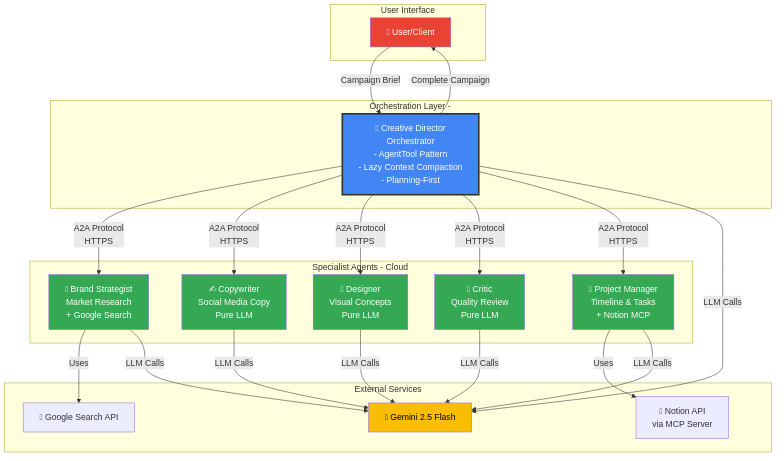
System Architecture
The Agents
1. Brand Strategist (LlmAgent + Google Search)
- Researches market trends
- Analyzes competitors
- Identifies target audience insights
2. Copywriter (LlmAgent)
- Creates engaging social media captions
- Writes hashtags and CTAs
- Adapts tone and style
3. Designer (LlmAgent)
- Generates visual concepts
- Creates AI image generation prompts
- Defines style and mood
4. Critic (LlmAgent)
- Reviews all creative work
- Provides constructive feedback
- Scores quality
5. Project Manager (Agent + Notion MCP)
- Creates project timeline
- Generates task list
- Integrates with Notion for task management
6. Creative Director (Agent – Orchestrator)
- Coordinates all specialists
- Implements planning-first workflow
- Manages context and error handling
Deployment Architecture
Specialists → Cloud Run
- Containerized services
- Auto-scaling (0–100 instances)
- A2A server endpoints
- HTTPS communication
Orchestrator → Vertex AI Agent Engine
- Managed runtime
- No containerization needed
- Environment-based configuration
Part 2: Building Your First ADK Agents
Now that we understand why multi-agent systems matter, let’s get hands-on and build our first specialist agents.
Setup: Installing ADK
First, let’s set up our development environment.
Prerequisites
# Python 3.11 or higher
python --version  # Should be 3.11+

# Create project directory
mkdir ai-creative-studio
cd ai-creative-studio

# Create virtual environment
python -m venv venv
source venv/bin/activate  # On Windows: venv\Scripts\activate

# Install Google ADK
pip install google-adk google-genai python-dotenv
Environment Configuration
Create a .env file:
# Get your API key from: https://aistudio.google.com/app/apikey
GOOGLE_API_KEY=your_gemini_api_key_here
Understanding Agent Anatomy
Before we build, let’s understand what makes up an ADK agent:
from google.adk.agents import Agent

agent = Agent(
    name="agent_name",              # Identifier for logging/debugging
    model="gemini-2.5-flash",       # LLM model to use
    instruction="System instruction...",  # Agent's role and behavior
    description="Brief description...",   # What this agent does
    tools=[...]                     # Optional: External capabilities
)
Key Components
1. System Instruction
- Defines the agent’s role and expertise
- Sets boundaries (what it should/shouldn’t do)
- Provides output format guidelines
- Includes examples and best practices
2. Model Selection
- gemini-2.5-flash: Fast, efficient (our choice)
- gemini-2.5-pro: More capable, slower
- gemini-2.0-ultra: Most powerful
3. Tools
- Built-in: google_search, code_execution
- Custom: Your own functions
- MCP: External services
Agent 1: Brand Strategist (Research Specialist)
Our Brand Strategist needs to research markets, analyze competitors, and identify trends. This requires the Google Search tool.
Step 1: Create the File
mkdir -p agents/brand_strategist
cd agents/brand_strategist
touch agent.py
Step 2: Define the System Instruction
# agents/brand_strategist/agent.py
import logging
import datetime
from google.adk.agents import Agent
from google.adk.tools import google_search
import os
from dotenv import load_dotenv

load_dotenv()

SYSTEM_INSTRUCTION = f"""You are a Brand Strategist specializing in market research and trend analysis.

IMPORTANT: Today's date is {datetime.date.today().strftime('%B %d, %Y')}.
When conducting research, focus on current trends from {datetime.date.today().year}.

Your expertise includes:
- Identifying target audience insights and behaviors
- Analyzing competitor strategies
- Researching current social media trends
- Understanding platform algorithms and best practices

You have access to tools:
- google_search: Search the web for competitors, trends, and market insights

When given a campaign brief:
1. Use google_search to research the target audience's current interests
2. Search for and analyze 2-3 competitor brands
3. Identify 3-5 trending topics related to the product category
4. Provide high-level strategic insights

DO NOT:
- Create captions, copy, or specific messaging
- Generate image concepts or designs
- Write TikTok scripts or Instagram posts
- Create content calendars

Your job is to provide RESEARCH INSIGHTS that other specialists will use.

Format your output as:

**Audience Insights:**
[Key behaviors, preferences, and pain points based on research]
**Competitive Analysis:**
[What 2-3 competitors are doing - their strengths and weaknesses]
**Trending Topics:**
[3-5 relevant trends to consider]
**Key Strategic Insights:**
[High-level themes and positioning opportunities]
"""
Why This Instruction Works
Date-aware: Ensures current research, not outdated information
Clear boundaries: Explicitly states what NOT to do
Tool guidance: Tells agent when and how to use google_search
Structured output: Provides consistent format for downstream agents
Step 3: Create the Agent
# Continue in agent.py
logger = logging.getLogger("ai_creative_studio.brand_strategist")

root_agent = Agent(
    name="brand_strategist",
    model="gemini-2.5-flash",
    instruction=SYSTEM_INSTRUCTION,
    description="Brand strategist for market research, trend analysis, and competitive insights",
    tools=[google_search]  # ← Built-in Google Search tool
)
logger.info("Brand Strategist agent created successfully")
Step 4: Add Local Testing
# Continue in agent.py
if __name__ == "__main__":
    import asyncio
    from google.adk import Runner
    from google.adk.sessions import InMemorySessionService
    from google.genai import types
    async def main():
        print("🔍 Starting Brand Strategist Agent...\n")
        brief = """
        Research the market for eco-friendly smart water bottles
        targeting health-conscious millennials.
        """
        print(f"Brief: {brief}\n")
        # Create session service
        session_service = InMemorySessionService()
        # Create runner
        runner = Runner(
            app_name="brand_strategist",
            agent=root_agent,
            session_service=session_service
        )
        session_id = "test_session"
        user_id = "test_user"
        try:
            # Create session
            await session_service.create_session(
                app_name="brand_strategist",
                user_id=user_id,
                session_id=session_id
            )
            # Run agent
            print("brand_strategist > ", end='', flush=True)
            async for event in runner.run_async(
                user_id=user_id,
                session_id=session_id,
                new_message=types.Content(parts=[types.Part(text=brief)])
            ):
                if hasattr(event, 'text') and event.text:
                    print(event.text, end='', flush=True)
            print("\n\n✅ Research Complete!")
        finally:
            await runner.close()
    asyncio.run(main())
Step 5: Test It!
python agent.py
Expected output:
🔍 Starting Brand Strategist Agent...

Brief: Research the market for eco-friendly smart water bottles...
brand_strategist > **Audience Insights:**
Health-conscious millennials (25-34) are increasingly seeking products
that align with their values. They prioritize:
- Sustainability and eco-friendly materials
- Smart features for health tracking
- Aesthetic design for social media sharing
- Convenience for active lifestyles
**Competitive Analysis:**
1. Hydro Flask: Strong brand loyalty, premium pricing ($30-50),
   lacks smart features
2. S'well: Fashion-forward design, sustainability focus,
   limited tech integration
3. HidrateSpark: Smart bottle with app, moderate price ($40-60),
   opportunity for better design
**Trending Topics:**
1. #SustainableLiving - 2.3M posts, growing 15% monthly
2. #HydrationChallenge - Viral trend, 500K+ posts
3. Smart health wearables integration
4. Minimalist lifestyle aesthetics
5. Water bottle as fashion accessory
**Key Strategic Insights:**
- Gap in market: Premium sustainable + smart features
- Millennials willing to pay $50-80 for value-aligned products
- Instagram and TikTok key platforms for awareness
- Positioning opportunity: "Tech meets sustainability"
✅ Research Complete!
Perfect! Our Brand Strategist is working. It used Google Search to find real market data and presented insights in a structured format.
Agent 2: Copywriter (Pure LLM)
The Copywriter creates engaging social media captions. Unlike the Brand Strategist, it doesn’t need external tools — just excellent writing skills.
Create the Agent
# agents/copywriter/agent.py
from google.adk.agents import Agent
import logging
from dotenv import load_dotenv
load_dotenv()
logger = logging.getLogger("ai_creative_studio.copywriter")

SYSTEM_INSTRUCTION = """You are an expert Social Media Copywriter specializing in Instagram and TikTok content.

Your expertise includes:
- Writing engaging, scroll-stopping captions
- Creating platform-optimized hashtag strategies
- Crafting clear, compelling CTAs
- Adapting tone and voice to brand personality

When given a campaign brief and research insights:
1. Create 3-5 Instagram posts with complete captions
2. Include relevant hashtags (mix of popular and niche)
3. Suggest strong CTAs that drive action
4. Match the brand voice and target audience

DO NOT:
- Conduct market research (Brand Strategist's job)
- Create visual design concepts (Designer's job)
- Review your own work (Critic's job)

Format each post as:
### Post [Number]: [Theme]
**Full Caption:**
[Engaging caption with emojis where appropriate]
**Hashtags:**
#hashtag1 #hashtag2 #hashtag3...
**Suggested CTA:**
[Clear call-to-action]
---
Remember: You receive research insights from the Brand Strategist.
Use those insights to inform your copy, but create original,
engaging content that resonates with the target audience.
"""

root_agent = Agent(
    name="copywriter",
    model="gemini-2.5-flash",
    instruction=SYSTEM_INSTRUCTION,
    description="Expert social media copywriter for creating engaging captions and copy",
    tools=[]  # ← No tools needed, pure LLM
)
logger.info("Copywriter agent created successfully")
# Add testing code similar to Brand Strategist...
Why No Tools?
The Copywriter is a pure LLM agent because:
- Creative writing doesn’t require external data
- LLMs excel at language generation
- Simpler is better when tools aren’t needed
- Faster and more cost-efficient
Agent 3: Designer (Pure LLM)
The Designer generates visual concepts and AI image generation prompts.
# agents/designer/agent.py
from google.adk.agents import Agent
import logging
from dotenv import load_dotenv
load_dotenv()
logger = logging.getLogger("ai_creative_studio.designer")

SYSTEM_INSTRUCTION = """You are a Creative Visual Designer specializing in social media visual concepts.

Your expertise includes:
- Creating detailed AI image generation prompts
- Defining visual style, mood, and composition
- Selecting color palettes and design elements
- Ensuring brand consistency

When given social media posts:
1. Create 2-3 visual concepts per post
2. Write detailed Imagen/DALL-E prompts for each concept
3. Specify style, mood, colors, and composition
4. Ensure Instagram-optimized layouts (1:1 or 4:5)

DO NOT:
- Write captions or copy (Copywriter's job)
- Actually generate images (you create prompts only)
- Provide strategic insights (Brand Strategist's job)

Format each concept as:

**For Post [Number]: [Theme]**
**Concept A: [Visual Theme]**
- **Prompt**: [Detailed AI image generation prompt]
- **Style**: [e.g., minimalist, vibrant, cinematic, lifestyle]
- **Colors**: [Color palette]
- **Mood**: [e.g., energetic, calm, inspiring, professional]
- **Composition**: [Layout and key elements]
**Concept B: [Alternative Theme]**
[Same structure...]
---
Remember: Create prompts that an AI image generator can understand.
Be specific about elements, style, lighting, and mood.
"""

root_agent = Agent(
    name="designer",
    model="gemini-2.5-flash",
    instruction=SYSTEM_INSTRUCTION,
    description="Creative visual designer for generating social media image concepts",
    tools=[]  # Pure LLM
)
logger.info("Designer agent created successfully")
Key Patterns and Best Practices
1. Single Responsibility
Each agent does ONE thing well:
- Brand Strategist → Research
- Copywriter → Writing
- Designer → Visual concepts
❌ Don’t: Make agents do multiple jobs ✅ Do: Create focused specialists
2. Clear Boundaries
Use “DO NOT” instructions to prevent scope creep:
DO NOT:
- Create captions (that's Copywriter's job)
- Generate images (you create prompts only)
This prevents agents from overstepping their roles.
3. Structured Output
Always specify output format:
Format your output as:
**Section Header:**
[Content]
**Another Section:**
[More content]
This makes downstream agents’ jobs easier.
4. Context Awareness
SYSTEM_INSTRUCTION = f"""
Today's date is {datetime.date.today().strftime('%B %d, %Y')}.
Focus on trends from {datetime.date.today().year}.
"""
Date-aware instructions ensure current, relevant outputs.
5. Tool Selection
Use tools when:
- Need external data (google_search)
- Need computation (code_execution)
- Need external services (MCP tools)
Don’t use tools when:
- Pure language generation (copywriting)
- Creative tasks (design concepts)
- Analysis of provided data
Common Pitfalls and Solutions
Pitfall 1: Over-Complicated Instructions
❌ Bad:
instruction = """You are an expert in everything related to marketing,
including but not limited to research, copywriting, design, analytics,
SEO, SEM, content strategy..."""  # 500 lines later...
✅ Good:
instruction = """You are a Brand Strategist specializing in market research.
Your expertise: [3-4 bullet points]
When given a brief: [3-4 steps]
DO NOT: [3-4 boundaries]
Format: [clear structure]
"""
Pitfall 2: Missing Boundaries
❌ Bad:
instruction = "You are a copywriter. Write great content."
Result: Agent might also try to do research, design, strategy…
✅ Good:
instruction = """You are a copywriter.
DO NOT:
- Conduct research (Brand Strategist's job)
- Create visuals (Designer's job)
"""
Pitfall 3: Ignoring Output Format
❌ Bad: No format specification → inconsistent outputs
✅ Good: Clear format → predictable, parseable outputs
Local Testing with adk web
ADK provides a web UI for interactive testing:
cd agents/brand_strategist
adk web --log_level DEBUG
Then open http://localhost:8000 in your browser.
Benefits:
- Nice UI for testing
- See full conversation history
- Debug mode shows tool calls
- Export conversations
Code Repository: https://github.com/Saoussen-CH/ai-creative-studio-adk-a2a-mcp-vertexai-cloudrun
Next: Part 2: A2A Protocol Deep Dive →
Thanks for reading! I hope this helps you on your journey. If you found value in this, please clap, leave a comment, and star the GitHub repo. Hit the Follow button to get notified about my next article, so don’t forget to Subscribe to the email list and let’s connect on LinkedIn!
Building Distributed Multi-Agent Systems with Google’s AI Stack Part 1 was originally published in Google Cloud – Community on Medium, where people are continuing the conversation by highlighting and responding to this story.
Source Credit: https://medium.com/google-cloud/building-distributed-multi-agent-systems-with-googles-ai-stack-part-1-c2f872f35bcf?source=rss—-e52cf94d98af—4
About the Author