Part 6 of a 8-part series on building enterprise-grade MLOps systems
Complete Series:
- Article 1: Architecture Overview
- Article 2: Tools & Workflows for ML Teams
- Article 3: Infrastructure as Code
- Article 4: Reusable KFP Components
- Article 5: Production Training Pipeline
- Article 6: Production Prediction Pipeline (You are here)
- Article 7: CI/CD for ML
- Article 8: Model Monitoring & Continuous Training
Introduction
In the previous article, we built a sophisticated training pipeline that takes raw data and produces a champion model in Vertex AI Model Registry. Now it’s time to put that model to work by generating predictions at scale.
Running predictions in production requires:
- Finding the right model: Always use the current champion
- Preprocessing consistency: Apply the same transformations as training
- Scalability: Handle millions of predictions efficiently
- Monitoring: Detect when data distributions shift
- Reliability: Fail fast and fail clearly
In this article, we’ll explore:
- Prediction pipeline architecture and design
- Complete code walkthrough
- Batch prediction with BigQuery
- Model monitoring and skew detection
- Running predictions in different scenarios
By the end, you’ll understand how to build a prediction pipeline that reliably serves your trained models.
Prediction Pipeline Architecture
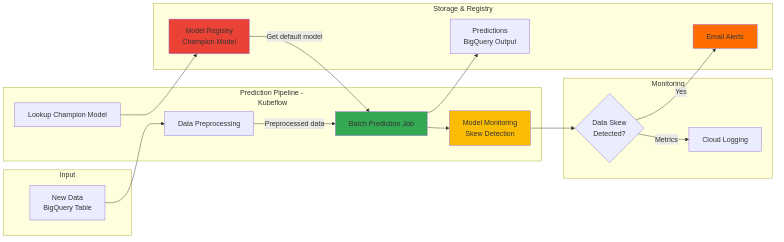
Our prediction pipeline is simpler than training but equally critical:
1. Lookup Champion Model (Model Registry)
         ↓
2. Preprocess Data (BigQuery SQL - same as training)
         ↓
3. Batch Prediction (BigQuery → BigQuery)
         ↓
4. Monitor for Skew (Training-serving skew detection)
         ↓
5. Alert on Issues (Email alerts if skew detected)
Key design decisions:
- BigQuery → BigQuery: Input and output both in BigQuery for seamless integration
- Same preprocessing: SQL preprocessing identical to training (consistency)
- Built-in monitoring: Vertex AI automatically compares to training data
- Scalable: Horizontal scaling with multiple replicas
Step 1: Lookup Champion Model
The prediction pipeline starts by finding the current production model:
champion_model = lookup_model_op(
    model_name="taxi-traffic-model",
    location=location,
    project=project,
    fail_on_model_not_found=True,  # Must exist for predictions!
).set_display_name("Look up champion model")
What happens:
- Query Vertex AI Model Registry for models with display name taxi-traffic-model
- Filter for the default version (the champion)
- Extract model URI and training dataset metadata
- Pass to batch prediction step
Critical: Setting fail_on_model_not_found=True ensures the pipeline fails fast if no model exists, preventing silent failures.
Step 2: Data Preprocessing
Goal: Transform raw prediction data into features matching training format.
prep_query = generate_query(
    input_file=queries_folder / "ingest_pred.sql",
    source=bq_source_uri,
    dataset=f"{project}.{dataset}",
    table_="prep_prediction_table",
    start_timestamp=timestamp,
    use_latest_data=use_latest_data,
)

prep_op = BigqueryQueryJobOp(
    project=project,
    location="US",
    query=prep_query,
).set_display_name("Ingest & preprocess data")
Why Same SQL as Training?
Training preprocessing:
SELECT
  EXTRACT(DAYOFWEEK FROM trip_start_timestamp) AS dayofweek,
  EXTRACT(HOUR FROM trip_start_timestamp) AS hourofday,
  trip_miles,
  trip_seconds,
  SAFE_DIVIDE(trip_miles, trip_seconds) * 3600 AS trip_distance,
  company,
  payment_type,
  fare AS total_fare  -- Label for training
FROM ...
Prediction preprocessing:
SELECT
  EXTRACT(DAYOFWEEK FROM trip_start_timestamp) AS dayofweek,
  EXTRACT(HOUR FROM trip_start_timestamp) AS hourofday,
  trip_miles,
  trip_seconds,
  SAFE_DIVIDE(trip_miles, trip_seconds) * 3600 AS trip_distance,
  company,
  payment_type
  -- NO label column (we're predicting it!)
FROM ...
Critical for consistency: If preprocessing differs between training and prediction, the model will fail or produce garbage predictions.
Step 3: Batch Prediction
Goal: Generate predictions for thousands/millions of rows at scale.
model_batch_predict_op(
    model=champion_model.outputs["model"],
    job_display_name="taxi-fare-predict-job",
    location=location,
    project=project,

    # Input: BigQuery table
    source_uri=f"bq://{project}.{dataset}.prep_prediction_table",
    source_format="bigquery",
    # Output: BigQuery table
    destination_uri=f"bq://{project}.{dataset}",
    destination_format="bigquery",
    # Resource configuration
    machine_type="n2-standard-4",
    starting_replica_count=3,
    max_replica_count=10,
    # Monitoring configuration
    monitoring_training_dataset=champion_model.outputs["training_dataset"],
    monitoring_alert_email_addresses=["team@example.com"],
    monitoring_skew_config={"defaultSkewThreshold": {"value": 0.001}},
).after(prep_op).set_display_name("Run prediction job")
Batch Prediction Workflow
- Job Submission: Vertex AI creates a batch prediction job
- Resource Allocation: Provisions 3–10 VMs (based on data size)
- Model Loading: Loads SavedModel on each VM
- Parallel Processing: Each VM processes a partition of the data
- Predictions: Each row gets a prediction
- Output: Writes predictions to BigQuery
Output table structure:
SELECT * FROM `my-project.taxi_trips_dataset.predictions_2024_01_15`
Horizontal Scaling
starting_replica_count=3,   # Start with 3 VMs
max_replica_count=10,       # Scale up to 10 if needed
How scaling works:
- Small dataset (< 10k rows): 3 VMs sufficient
- Medium dataset (100k rows): Scales to ~5 VMs
- Large dataset (1M+ rows): Scales to 10 VMs
Cost optimization:
- Use n2-standard-2 for small datasets
- Use n2-standard-4 for medium datasets
- Use n2-standard-8 for large datasets
Step 4: Model Monitoring and Skew Detection
Over time, data distributions shift:
Example scenario:
Training data (Jan-Mar 2024):
  - Average trip: 5.2 miles
  - Payment: 60% credit card, 40% cash
  - Peak hour: 8 AM

Production data (Nov 2024):
  - Average trip: 7.8 miles  ← Shift!
  - Payment: 75% credit card, 25% cash  ← Shift!
  - Peak hour: 9 AM  ← Shift!
When distributions shift, model accuracy degrades. Model monitoring catches this.
Training-Serving Skew Detection
Vertex AI automatically compares:
- Training data distribution (saved during training)
- Prediction data distribution (from batch prediction)
Skew metrics:
monitoring_skew_config={
    "defaultSkewThreshold": {"value": 0.001},
    # Or per-feature thresholds:
    # "skewThresholds": {
    #     "payment_type": {"value": 0.005},
    #     "trip_distance": {"value": 0.01},
    # }
}
How skew is calculated:
For categorical features (e.g., payment_type):
Skew = L-infinity distance between distributions

Training: {cash: 0.4, credit: 0.6}
Prediction: {cash: 0.25, credit: 0.75}

Skew = max(|0.4-0.25|, |0.6-0.75|) = max(0.15, 0.15) = 0.15
If skew > threshold (0.001), alert is triggered.
Alert Configuration
monitoring_alert_email_addresses=["ml-team@example.com"],
notification_channels=[
    "projects/my-project/notificationChannels/email-channel",
    "projects/my-project/notificationChannels/slack-channel",
]
Alert email example:
Subject: Model Monitoring Alert - Skew Detected
Model: taxi-traffic-model (v5)
Feature: payment_type
Skew: 0.15 (threshold: 0.001)
Training distribution:
  cash: 40%
  credit: 60%
Prediction distribution:
  cash: 25%
  credit: 75%
Recommended action: Retrain model with recent data.
View details: https://console.cloud.google.com/vertex-ai/...
Complete Prediction Pipeline Code
Now let’s see how it all fits together:
from kfp import compiler, dsl
from components import lookup_model_op, model_batch_predict_op
from google_cloud_pipeline_components.v1.bigquery import BigqueryQueryJobOp
from pipelines.utils.query import generate_query
import pathlib

# Monitoring configuration
ALERT_EMAILS = ["ml-team@example.com"]
NOTIFICATION_CHANNELS = []
SKEW_THRESHOLDS = {"defaultSkewThreshold": {"value": 0.001}}
@dsl.pipeline(name="taxifare-batch-prediction-pipeline")
def pipeline(
    project: str,
    location: str,
    bq_location: str,
    bq_source_uri: str = "bigquery-public-data.chicago_taxi_trips.taxi_trips",
    dataset: str = "taxi_trips_dataset",
    timestamp: str = "2022-12-01 00:00:00",
    use_latest_data: bool = True,
    model_name: str = "taxi-traffic-model",
    machine_type: str = "n2-standard-4",
    min_replicas: int = 3,
    max_replicas: int = 10,
):
    """
    Prediction pipeline which:
     1. Looks up the default model version (champion)
     2. Preprocesses data using BigQuery SQL
     3. Runs batch prediction job (BigQuery → BigQuery)
     4. Monitors for training-serving skew
    Args:
        project: GCP project ID
        location: Vertex AI location (e.g., us-central1)
        bq_location: BigQuery location (e.g., US)
        bq_source_uri: Source BigQuery table
        dataset: Dataset for staging tables
        timestamp: Optional fixed timestamp for predictions
        use_latest_data: Whether to use latest data (default: True)
        model_name: Model display name in registry
        machine_type: VM type for batch prediction
        min_replicas: Minimum number of prediction workers
        max_replicas: Maximum number of prediction workers
    """
    queries_folder = pathlib.Path(__file__).parent / "queries"
    # Step 1: Preprocess data using same SQL as training
    prep_query = generate_query(
        input_file=queries_folder / "ingest_pred.sql",
        source=bq_source_uri,
        dataset=f"{project}.{dataset}",
        table_="prep_prediction_table",
        start_timestamp=timestamp,
        use_latest_data=use_latest_data,
    )
    prep_op = BigqueryQueryJobOp(
        project=project,
        location="US",
        query=prep_query,
    ).set_display_name("Ingest & preprocess data")
    # Step 2: Lookup champion model from registry
    champion_model = lookup_model_op(
        model_name=model_name,
        location=location,
        project=project,
        fail_on_model_not_found=True,  # Must exist!
    ).set_display_name("Look up champion model")
    # Step 3: Run batch prediction with monitoring
    model_batch_predict_op(
        model=champion_model.outputs["model"],
        job_display_name="taxi-fare-predict-job",
        location=location,
        project=project,
        # Input/Output configuration (BigQuery → BigQuery)
        source_uri=f"bq://{project}.{dataset}.prep_prediction_table",
        destination_uri=f"bq://{project}.{dataset}",
        source_format="bigquery",
        destination_format="bigquery",
        # Instance configuration
        instance_config={"instanceType": "object"},
        # Resource configuration (horizontal scaling)
        machine_type=machine_type,
        starting_replica_count=min_replicas,
        max_replica_count=max_replicas,
        # Monitoring configuration
        monitoring_training_dataset=champion_model.outputs["training_dataset"],
        monitoring_alert_email_addresses=ALERT_EMAILS,
        notification_channels=NOTIFICATION_CHANNELS,
        monitoring_skew_config=SKEW_THRESHOLDS,
    ).after(prep_op).set_display_name("Run prediction job")

if __name__ == "__main__":
    compiler.Compiler().compile(
        pipeline_func=pipeline,
        package_path="taxifare-prediction-pipeline.yaml"
    )
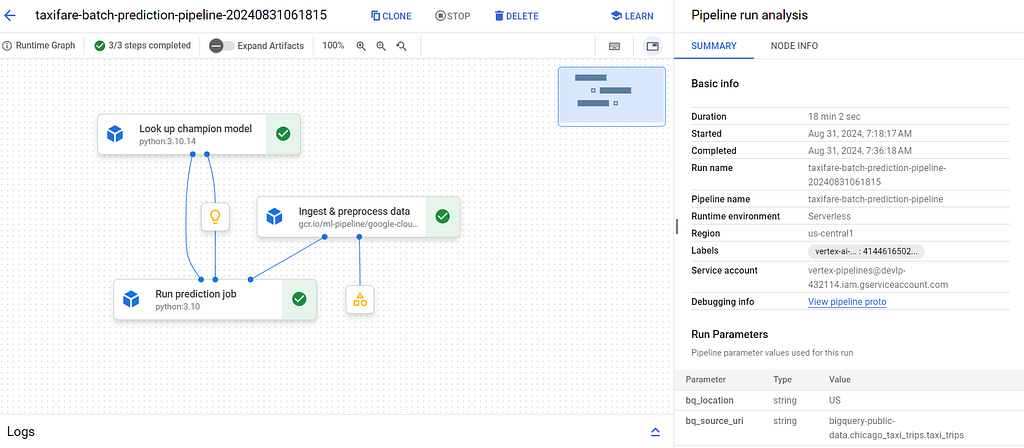
Pipeline Execution DAG on Vertex AI pipeline
Key Design Decisions
1. Simple Linear Flow Unlike the training pipeline with its complex DAG, the prediction pipeline is deliberately simple:
- No parallel branches
- No conditional logic
- Fail fast if any step fails
2. Preprocessing Consistency
# Same SQL template as training!
prep_query = generate_query(
    input_file=queries_folder / "ingest_pred.sql",
    # ...
)
The ingest_pred.sql has identical feature engineering as ingest.sql (training), just without the label column.
3. Dynamic Champion Lookup
champion_model = lookup_model_op(
    model_name=model_name,
    fail_on_model_not_found=True,
)
Never hardcode model versions. Always use the current champion dynamically.
4. Built-in Monitoring
monitoring_training_dataset=champion_model.outputs["training_dataset"],
The training dataset metadata (saved during training) is automatically used for skew detection.
5. Scalability by Default
min_replicas=3,
max_replicas=10,
Automatically scales based on data volume:
- Small dataset: Uses 3 replicas
- Large dataset: Scales up to 10 replicas
Running the Pipeline
Compile
make compile pipeline=prediction
Run in Different Scenarios
Production run (latest data):
make prediction enable_caching=false use_latest_data=true
Or using the Python utility:
poetry run python -m pipelines.utils.run_pipeline \
  --pipeline=prediction \
  --project=my-prod-project \
  --use_latest_data=true \
  --enable_caching=false
Backfill run (historical data):
poetry run python -m pipelines.utils.run_pipeline \
  --pipeline=prediction \
  --project=my-prod-project \
  --timestamp="2024-12-01 00:00:00" \
  --use_latest_data=false
Testing run (small dataset):
poetry run python -m pipelines.utils.run_pipeline \
  --pipeline=prediction \
  --project=my-dev-project \
  --machine_type="n2-standard-2" \
  --min_replicas=1 \
  --max_replicas=1
Expected Output
Pipeline submitted: projects/123/locations/us-central1/pipelineJobs/prediction-20250113-142536

View in Vertex AI:
https://console.cloud.google.com/vertex-ai/pipelines/runs/prediction-20250113-142536
Prediction Output Format
The batch prediction creates a BigQuery table:
-- View predictions
SELECT * FROM `my-project.taxi_trips_dataset.predictions_20250113_142536`
LIMIT 10;
Using Predictions
Join with actuals (for accuracy measurement):
SELECT
  p.trip_id,
  p.predicted_total_fare,
  a.actual_fare,
  ABS(p.predicted_total_fare - a.actual_fare) AS error,
  ABS(p.predicted_total_fare - a.actual_fare) / a.actual_fare AS pct_error
FROM predictions_20250113_142536 p
JOIN actual_fares a ON p.trip_id = a.trip_id
WHERE a.actual_fare > 0
ORDER BY pct_error DESC
LIMIT 100;
Export for business use:
-- Export to Google Sheets or Data Studio
SELECT
  trip_id,
  predicted_total_fare,
  CASE
    WHEN predicted_total_fare < 10 THEN 'Low'
    WHEN predicted_total_fare < 25 THEN 'Medium'
    ELSE 'High'
  END AS fare_category
FROM predictions_20250113_142536;
Best Practices
1. Always Use Champion Model
# Good: Lookup champion dynamically
champion = lookup_model_op(model_name="taxi-traffic-model")
# Bad: Hardcode model version
model_uri = "projects/.../models/123456/versions/1"
Dynamic lookup ensures you always use the latest approved model.
2. Monitor Everything
Enable monitoring on all prediction jobs:
monitoring_training_dataset=champion_model.outputs["training_dataset"],
monitoring_skew_config=SKEW_THRESHOLDS,
3. Test Predictions in Dev First
# Test prediction pipeline in dev
make prediction enable_caching=false
# Verify predictions look reasonable
bq query --project=my-dev-project "
  SELECT prediction, trip_miles
  FROM predictions_table
  ORDER BY RAND()
  LIMIT 10
"
# Only then run in prod
4. Version Prediction Outputs
# Include timestamp in output table
destination_uri=f"bq://{project}.{dataset}.predictions_{date}"
Enables:
- A/B testing between model versions
- Historical prediction analysis
- Rollback if needed
5. Ground Truth Collection
Collect actual outcomes to measure real accuracy:
-- Join predictions with actual fares (collected later)
SELECT
  p.prediction,
  a.actual_fare,
  ABS(p.prediction - a.actual_fare) AS error
FROM predictions p
JOIN actual_fares a ON p.trip_id = a.trip_id
Use this to:
- Track accuracy over time
- Trigger retraining when accuracy drops
- Validate champion/challenger comparisons
Conclusion
Building a production prediction pipeline requires:
- Champion model lookup: Always use the current best model
- Preprocessing consistency: Exact same transformations as training
- Batch predictions at scale: Horizontal scaling with BigQuery
- Model monitoring: Automatic skew detection
- Alerting: Notify when issues arise
- Cost optimization: Right-size resources
With this prediction pipeline:
- Always uses the champion model
- Scales horizontally for large datasets
- Monitors for data drift automatically
- Alerts when issues arise
- Integrates seamlessly with training pipeline
In the next article, we’ll automate everything with CI/CD and explore production operations including continuous training, scheduled retraining, and observability.
Key Takeaways:
- Prediction preprocessing must match training preprocessing exactly
- Always lookup champion model dynamically (never hardcode versions)
- Batch predictions scale horizontally for millions of rows
- Model monitoring detects training-serving skew automatically
- Test predictions in dev before running in production
- Version prediction outputs for analysis and rollback
Next in Series: CI/CD & Production Operations
GitHub Repository: production-ready-MLOps-on-GCP
Prediction Pipeline Code:
- Prediction pipeline
- Monitoring configuration
- SQL queries
Thanks for reading! I hope this helps you on your journey. If you found value in this, please clap, leave a comment, and star the GitHub repo. Hit the Follow button to get notified about my next article, so don’t forget to Subscribe to the email list and let’s connect on LinkedIn!
Production-Ready MLOps on GCP Part 6: Prediction Pipeline(From Champion Model to Batch Predictions) was originally published in Google Cloud – Community on Medium, where people are continuing the conversation by highlighting and responding to this story.
Source Credit: https://medium.com/google-cloud/production-ready-mlops-on-gcp-part-6-prediction-pipeline-from-champion-model-to-batch-predictions-a16ee64dedf0?source=rss—-e52cf94d98af—4
About the Author