In the evolution of the modern Security Operations Center (SOC), we have reached a critical inflection point. The industry has largely accepted that “Click-Ops” — managing critical infrastructure through manual UI interactions — is no longer sustainable at scale. We have seen this transformation take hold in the Ingest and Detect phases of the security pipeline, detailed in our previous explorations of Parsers as Code and Detection as Code. By treating log parsers and YARA-L detection rules as software artifacts, we established a rigorous “Single Source of Truth” that is versioned, testable, and reliable.
Now, it is time to apply these same engineering principles to the Respond phase. As SOCs mature, the logic defining how an alert is triaged, enriched, and remediated transforms from simple checklists into complex software automation. However, in many organizations, this logic is still managed manually. SOC engineers modify live playbooks in production, tweak integration settings on the fly, and lack a comprehensive history of why a decision logic was changed three months ago. This introduces significant risk: “drift” between development and production environments, accidental breakages during critical incidents, and a reliance on personal knowledge rather than documented code.
Enter Response as Code.
In this article, we will explore how to manage Google SecOps (formerly Chronicle) SOAR playbooks using a code-centric workflow. We will leverage an automation based on GitSync (more on this later) hosted in the SecOps Toolkit open source repository to build a robust CI/CD pipeline. This approach moves your SOC away from the “Save” button and toward a disciplined, automated deployment lifecycle.
The Foundation: GitSync
To build a skyscraper, you need a solid foundation. In the context of automation for Google SecOps SOAR, that foundation is GitSync. While this article will give an overview of this solution, in case you are interested in getting more information on the GitSync PowerUp please refer to the official documentation.
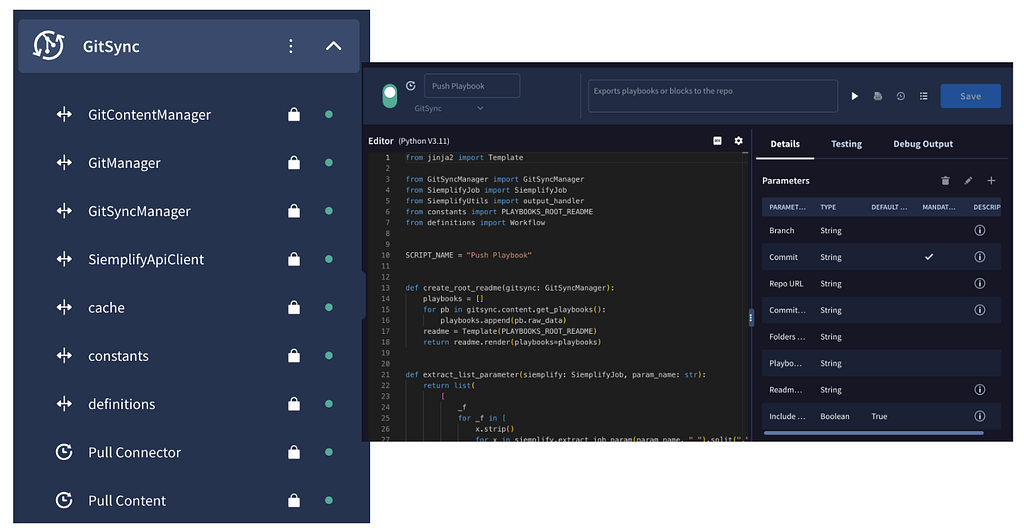
GitSync is not just a simple API wrapper; it is a Power Up integration developed by Google Cloud Professional Services that can be installed in Google SecOps from the Content Hub and lives directly within the SOAR platform. It effectively transforms your remote Git repository (GitHub, GitLab, Bitbucket) into a native file system for your SOC content, powering use cases like assets exchange between Google SecOps instances, content backup, automatic documentation and so on.
Git Sync aligns your SecOps environment with Git repositories through two-way synchronization. This allows your team to treat SOAR operations like software development — unlocking better collaboration, version history, and easier deployments for your security assets.
How It Works Under the Hood
When you execute a GitSync action (like Push Playbook) to push content from SOAR towards the target Git repository, the engine performs several critical tasks:
- Serialization: Stores SOAR objects such as Playbooks and Actions into human-readable JSON files and more file formats according to SOAR asset.
- Documentation: Uniquely, it automatically generates a README.md file for every asset. This file parses the metadata of your playbook or integration, creating self-documenting code that describes inputs, outputs, and logic flow without manual effort.
- Sanitization: By default, GitSync is configured to exclude secrets. API keys, passwords, and tokens used in your integration configurations are stripped out during the push process, ensuring your Git repository never leaks sensitive credentials.
GitSync provides granular control through specific Jobs (actions) that can be triggered manually or programmatically.
- Push/Pull Playbook: Synchronizes workflow logic.
- Push/Pull Integration: Synchronizes custom python code and settings.
- Push/Pull Connector: Synchronizes ingestion configurations.
- Push/Pull Jobs: Synchronizes the internal SOAR scheduler.
- Push Environment: A bulk action often used for initial backups or full-state migrations.
By leveraging these native primitives, we avoid the fragility of custom API scripts and ensure our “Code” representation is always 1:1 with the platform’s internal state.
The Native Approach: Multi-Tenant Promotion via GitSync
Before we dive into the target fully automated CI/CD pipeline, it is important to understand how teams have traditionally bridged the gap leveraging the GitSync capabilities. For many organizations, the first step toward automation for response involves a direct promotion workflow between a Development tenant and a Production tenant using GitSync.
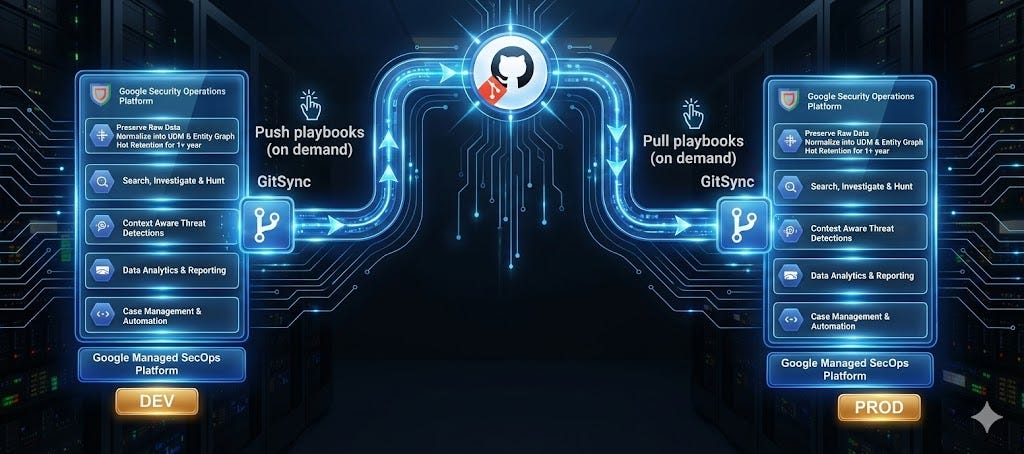
As illustrated in the diagram above, this architecture relies on a central version control repository (such as GitHub or Gitlab) acting as the source of truth. The workflow might either be manual or somehow automated and might be effective for most use cases:
- Develop & Push: Engineers build and test playbooks in the DEV tenant. Once satisfied, they manually (or programmatically via a dedicated GitHub Action) trigger a “Push Playbooks” via the GitSync integration installed on that environment, committing the code to the repository.
- Review & Merge: Standard code review practices can happen within the repository (PRs, diff checks) although the playbook defintion (huge JSON file) tends to be hard to review.
- Pull to Prod: Administrators in the PROD tenant trigger a “Pull Playbooks” via their local GitSync instance, synchronizing the live environment with the latest stable code from the repository.
This approach creates a functional “airlock” between development and production, ensuring that changes are versioned and deliberate rather than ad-hoc and performed manually by team members.
Limitations
While the GitSync-to-GitSync workflow is a robust solution that vastly improves upon the “export/import JSON” days, it is not without its architectural frictions. As organizations scale, two primary limitations often emerge:
- Administrative Overhead: GitSync must be installed, configured, and maintained individually on every tenant. If you are managing a multi-tier environment (Dev, QA, Prod) or multi-tenant environment with multiple SecOps SOAR tenants to keep in sync, keeping the GitSync configurations and system dependencies synchronized across all platforms becomes a maintenance burden.
- Network & Exposure Constraints: Because the SecOps platform initiates the connection, the Git repository generally needs to be publicly accessible (or accessible via standard internet routes). While not an issue for cloud-native setups using GitHub, this can be a blocker for highly regulated enterprises requiring connectivity to private, internal git instances (like on-prem GitLab or Bitbucket) where opening inbound firewall rules to SaaS platforms might be restricted.
To solve for these scalability and security constraints, we need to decouple the synchronization logic from the tenants themselves. This leads us to the next evolution of our architecture: the Response As Code pipeline in SecOps Toolkit.
Engineering the Solution: A Fully Automated CI/CD Pipeline
To overcome the scaling and security limitations of the native GitSync approach, we must evolve our architecture. Instead of relying on the SecOps platform to “pull” changes, we invert the control flow: we implement an external CI/CD pipeline that “pushes” content using the platform’s APIs.
This is where the SecOps Toolkit becomes the engine of our “Response as Code” strategy. This pipeline is powered by (a slightly modified version of) the GitSync code and it is available in the pipelines/response-as-code directory of the repository.
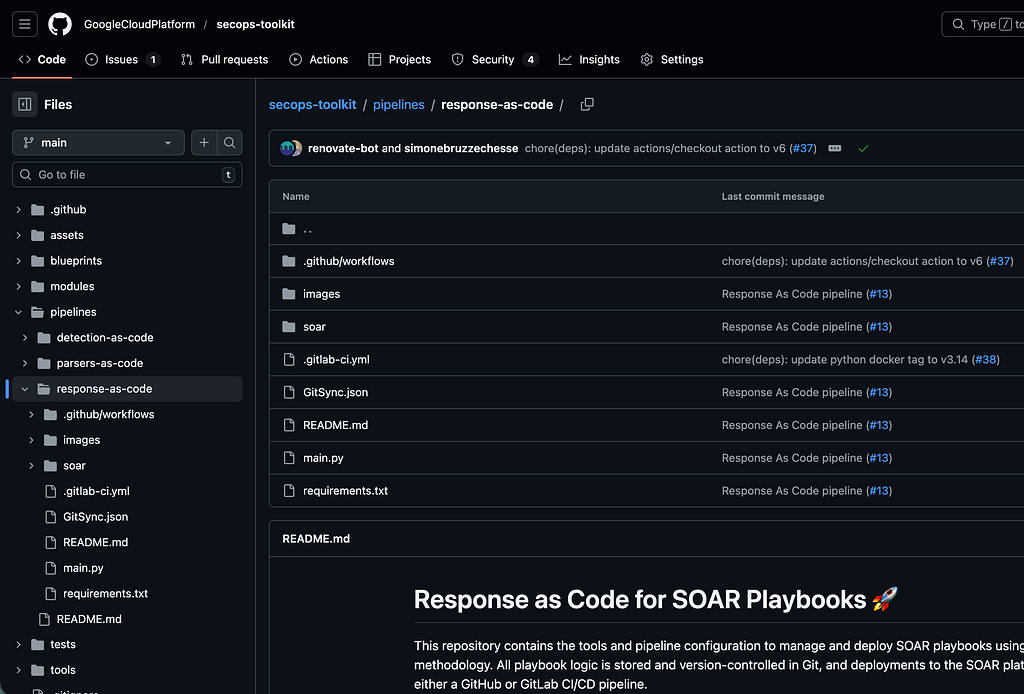
By wrapping the GitSync code into a Git repository, this allows us to decouple our content from the tenants entirely. In this architecture, the SecOps tenants (Dev and Prod) effectively become “runtime environments” without responsibilities for synchronization logic. That logic shifts to the Git repository and CI/CD runner (such as GitHub Actions, GitLab CI, or Google Cloud Build), which executes the promotion logic based on a given workflow.
This approach offers two distinct advantages over the native workflow:
- Private Repository Support: Since the connection is initiated by your CI/CD runner (which can sit behind your firewall or use self-hosted runners), your Git repository does not need to be exposed to the public internet.
- Centralized Logic: You define the promotion rules once in the pipeline configuration, rather than configuring GitSync settings on every single tenant you manage.
The Directory Structure
To make this work, we need to organize our repository not just as a storage bucket, but as a structured deployment package. The CI/CD pipeline relies on a predictable file hierarchy to understand what to deploy in the SOAR.
A typical structure for “Response as Code” looks like this:
.
├── Playbooks/ The directory containing all the exported SOAR Playbooks
│   └── Phishing_Triage/
│       ├── Phishing_Triage.json      <-- The Playbook Logic
│       └── README.md                 <-- Auto-generated documentation
├── .github: GitHub workflow definition for the CI/CD pipeline.
├── main.py: The core Python script for pulling from and syncing to the SOAR platform.
├── soar: SOAR customized library based on GitSync integration.
├── .gitlab-ci.yml: Defines the GitLab CI/CD pipeline that automates playbook deployment.
├── README.md: README file with automation documentation
└── requirements.txt: A list of required Python dependencies for the script.
The Automation Workflow
The following workflow illustrates the journey of a playbook from a developer’s idea to a production-ready automated response, moving linearly from the IDE to the Live Environment. The high level workflow is represented in the following diagram.
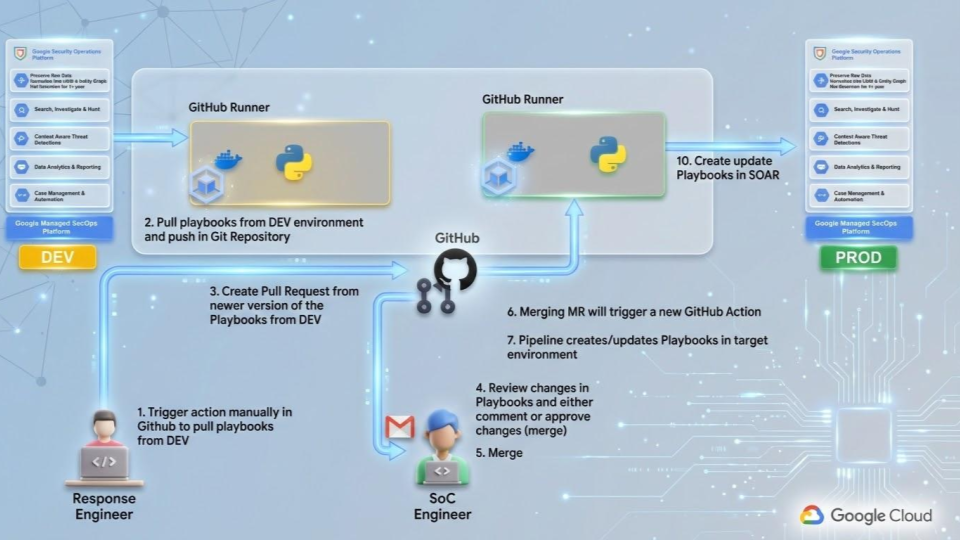
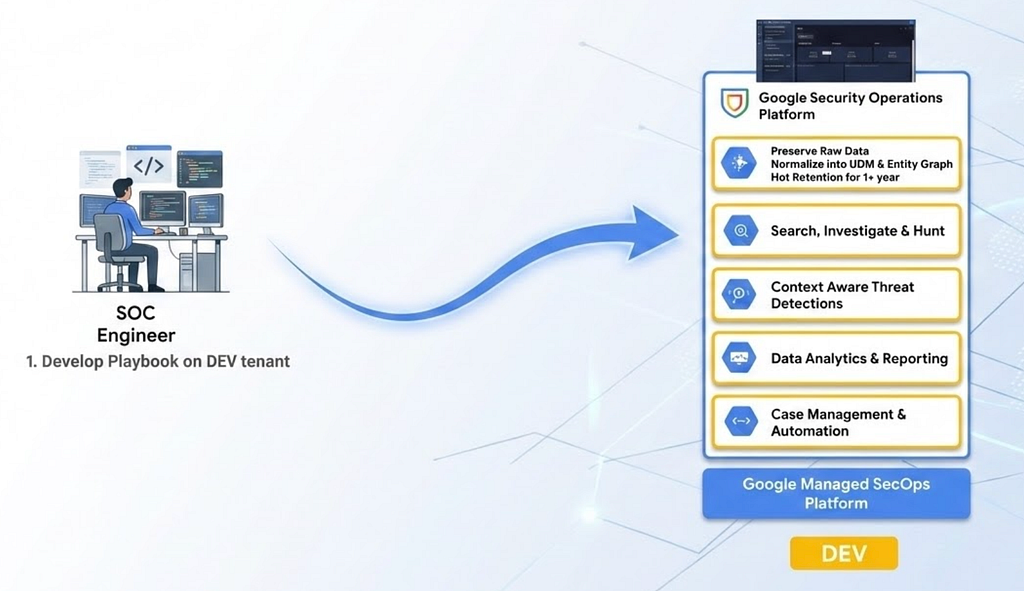
1. Development: The lifecycle begins in the DEV tenant. The SOC Automation Engineer develops or modifies Playbooks and Actions directly in the SOAR editor. To ensure logic is sound before it ever touches code, the engineer validates the flow using the “Simulated Cases” feature within the SOAR platform.
2. Automated Pull of Playbooks: Once the logic is validated, the engineer does not manually export JSON files. Instead, they trigger a manual “Dispatch” event via the GitHub Actions interface. This wakes up a GitHub Runner which executes the specific Pull Playbooks method defined in the repository.
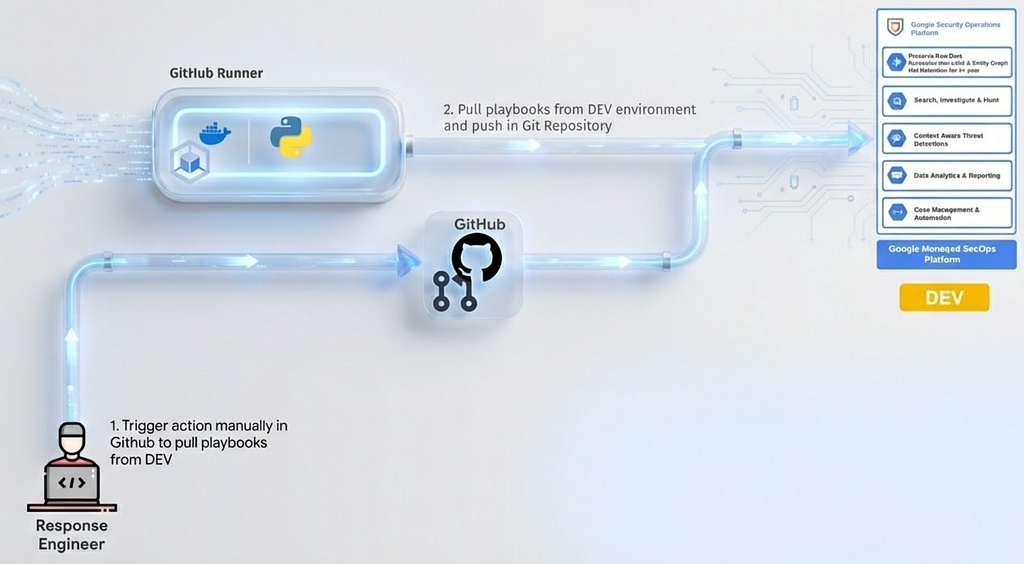
The script connect to the Development SOAR tenant API, extract the requested logic, and serialize it into human-readable JSON content as per the following example.
{
  "hasRestrictedEnvironments": false,
  "id": 0,
  "identifier": "XXXXXXX-c9be-47ac-95c0-XXXXXXXXX",
  "version": "1",
  "isEnabled": true,
  "isDebugMode": false,
  "name": "Sample Playbook",
  "creator": "Siemplify automation",
  "modifiedBy": "Siemplify automation",
  "priority": 2,
  "description": "",
  "environments": [
    "TEST"
  ],
  "categoryName": "Default",
  "categoryId": 1,
  "originalPlaybookIdentifier": "XXXXXXX-c9be-47ac-95c0-XXXXXXX",
  "creationTimeUnixTimeInMs": 1734969422174,
  "modificationTimeUnixTimeInMs": 1739265698801,
  "trigger": {
    "id": 0,
    "identifier": "XXXXXXX-065b-48f8-a791-XXXXXXX",
    "type": 8,
    "logicalOperator": 0,
    "conditions": [
      {
        "fieldName": "",
        "value": "",
        "matchType": 0
      }
    ]
  },
  "steps": [...],
  "stepsRelations": [],
  "templateName": null,
  "playbookType": 0,
  "debugData": {
    "debugBaseAlertId": null,
    "debugAlertId": null
  },
  "entityAccessLevel": 2,
  "defaultAccessLevel": 2,
  "permissions": [],
  "overviewTemplates": []
}
3. Branching and Version Control
The pipeline automatically commits these extracted definitions to a dedicated feature branch (e.g. feature/phishing-update-v2). This ensures that the Git repository remains the absolute source of truth and prevents direct overwrites of the main codebase.
4. The Quality Gate (Pull Request)
The SOC Engineer opens a Pull Request (PR) to merge their feature branch into the main branch. This is the manual gatekeeper step where a designated Response Engineer reviews the code diffs. They check for consistent naming conventions, edge-case handling, and unauthorized modifications.
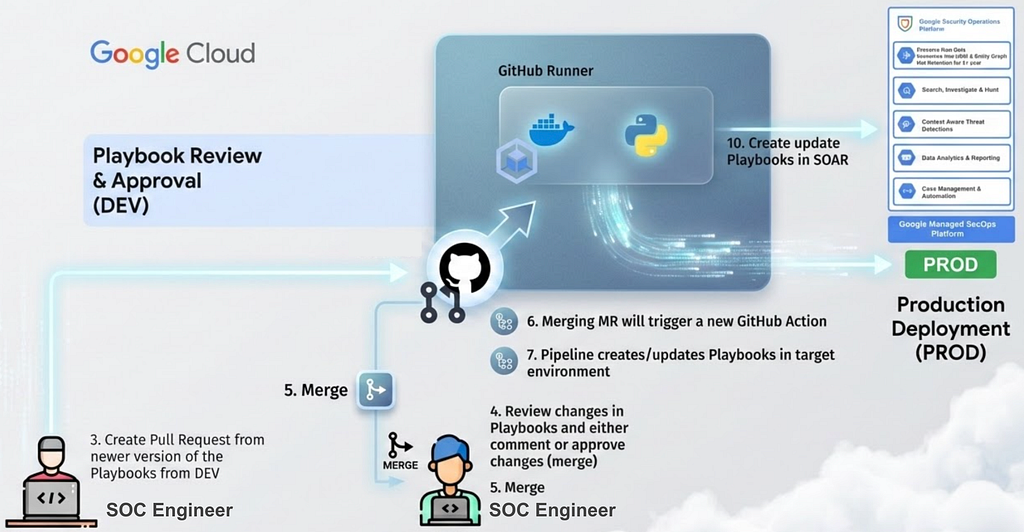
5. Automated Deployment (Merge & Push) Upon approval, the PR is merged into the main branch. This merge event acts as a trigger for the deployment pipeline. The GitHub Runner executes the corresponding Sync Playbooks utility method to synchronize the Playbooks in Production environment.
The scripts based on GitSync connect to the SecOps Production tenant’s API, creating new playbooks or updating existing ones live in the production environments. This ensures that the Production tenant always mirrors the main branch of the repository.
Architectural Assumptions and Best Practices
Implementing “Response as Code” is not merely about running a Python script; it requires adhering to a specific set of architectural rules. Based on successful deployments in the field and the constraints outlined in the reference architecture, here are the “Golden Rules” for ensuring your pipeline functions correctly.
1. The Rule of Parity
For the pipeline to succeed, the logic structure must be identical across tenants. If a playbook in DEV relies on a specific “Block” (sub-playbook) or a specific Connector, that dependency must eventually exist in PROD.
The Assumption: You are not maintaining two different versions of the automations. You are maintaining one version of the Playbook logic and Actions that lives in Git, which is currently deployed to two different places (Dev and Prod).
2. Managing Environment Variables (The “Custom List” Pattern)
A common challenge in CI/CD is handling data that must differ between environments (e.g. sending alert emails to soc-test@company.com in Dev vs. soc-emergency@company.com in Prod). Since we want the Playbook JSON to be identical in both environments, we cannot hardcode these emails.
The Solution: Use Reference Lists (Custom Lists) as pointers.
Your playbook might reference a list named SOC_Alert_Recipients.
- In the DEV tenant, you manually populate this list with test emails.
- In the PROD tenant, you manually populate this list with production emails.
3. Integration Consistency and Naming
While the specific endpoints or credentials for an integration might differ (e.g. a Test Jira Instance vs. Production Jira Instance), the Naming Convention in the SOAR platform must be exact.
The Constraint: If your playbook action is configured to use an integration instance named VirusTotal_V3_Default, that instance must exist with that exact name in both tenants.
We do not typically sync the secrets (API Keys) or the connectivity details across tenants, as these often differ fundamentally. However, we strictly enforce naming conventions so that when code promotes from Dev to Prod, the “bindings” between Playbooks and Integrations do not break.
4. The “Playground” Policy
Not every experiment belongs in the repository. It is vital to preserve a space for chaotic innovation without cluttering the main branch.
The Practice: Configure the pipeline to ignore specific folders (e.g., _Playground or _Drafts). This allows SOC engineers to test half-baked ideas in the DEV tenant without fear of them accidentally being committed to Git or pushed to Production during a bulk sync.
The Strategic Objectives
By adopting GitSync as the backbone of your SOC architecture, you achieve four critical operational objectives:
- Version Control & History: The “Save” button in a UI captures the state, but not the intent. By moving to Git, every change to a playbook is committed with a message. We gain an immutable audit trail answering: Who changed the phishing triage logic? When did they change it? And most importantly, why?
- Segregation of Duties: Directly editing production logic is a recipe for downtime. GitSync enables a strict separation of environments. Development happens in a dedicated DEV tenant, while PROD remains locked down, updated only via automated pipelines.
- Collaboration & Peer Review: In a code-based workflow, no logic reaches production without a Pull Request (PR). This forces a peer review process where senior engineers can inspect changes (via JSON diffs) before they merge. This acts as a quality gate, catching logic errors or inefficient loops before they impact live incident handling.
- Disaster Recovery: The Git repository becomes the ultimate backup. If a bad update corrupts your environment, or if you need to migrate to a new instance, your entire response logic can be restored programmatically from the code repository in minutes.
Conclusion: The Engineering Mindset
Transitioning to Response as Code is a pivotal moment for a Security Operations Center. By adopting this workflow, you move your team away from the risks of “Click-Ops”, where a single accidental click in a UI can disable a critical response workflow. Instead, you embrace a disciplined, engineering-led approach based on DevOps methodologies where:
- GitSync provides the foundation for version control
- secops-toolkit provides the blueprint
- GitHub and GitHub Actions provide the governance, safety and engine for such an automation
This architecture ensures that your automated response capabilities are treated with the same respect, rigor, and reliability as the production environment they protect.
Ready to build?
Review the reference architecture and pipeline in the SecOps Toolkit repository. Clone the code, configure your tenants, and start building your pipeline today, don’t forget to share your feedbacks in the comment or in the Issues of the GitHub repository. 🙂
Disclaimer: The code provided in the secops-toolkit repository is open source and intended as a reference implementation. Always test pipelines in a non-production environment first.
Response as Code in Google SecOps: Engineering the Modern SOC was originally published in Google Cloud – Community on Medium, where people are continuing the conversation by highlighting and responding to this story.
Source Credit: https://medium.com/google-cloud/response-as-code-in-google-secops-engineering-the-modern-soc-e6731930b3b9?source=rss—-e52cf94d98af—4
About the Author