Stop Managing Servers, Start Managing Apps: A Guide to Ending Shadow Platform Engineering
Written by Afrina & Manasa Kandula— Jan 5, 2026
For the last ten years, the industry has measured cloud success by data centers closed and VMs migrated. We treated the cloud like a slightly better version of on-premise infrastructure — just with more APIs and less hardware.
But as estates scaled from hundreds of servers to millions of resources, we hit a wall. The rapid creation of resources in the cloud has been further accelerated in recent years by AI-assisted coding technologies that encourage “vibe-coding” allowing developers to push out new services and features quicker.
The “infrastructure-first” model has turned operations into forensic investigations. When a bill spikes or a service degrades, teams waste hours asking, “What is this resource ID, and who owns it?” instead of “How do we fix the Checkout Service?”
This disconnect creates “Shadow Platform Engineering.” Your most expensive developers stop building features and start building glue code just to deploy their apps. They become “Builders” fighting against the “Gatekeepers” (Ops) who manage the landing zone.
The View from Inside Google
Internally, Google doesn’t operate this way. We don’t manage infrastructure; we manage Applications. We use a “Application-First” operating model that abstracts the machine away from the application. It is the only way to operate at our scale.
Today, we are bringing the principles of this operating model to you. We are moving the control plane up the stack to support a coherent, automated lifecycle: Day 0 (Design), Day 1 (Deploy), and Day 2 (Operate).
Day 0: The Automated Foundation
The Goal: A Landing Zone “Pre-Wired” for Applications
Traditionally, establishing a cloud landing zone meant obsessing over the “pavement” — Network, IAM, and Security boundaries. Platform engineers often spend weeks building the “landing zone” before a single application is deployed.
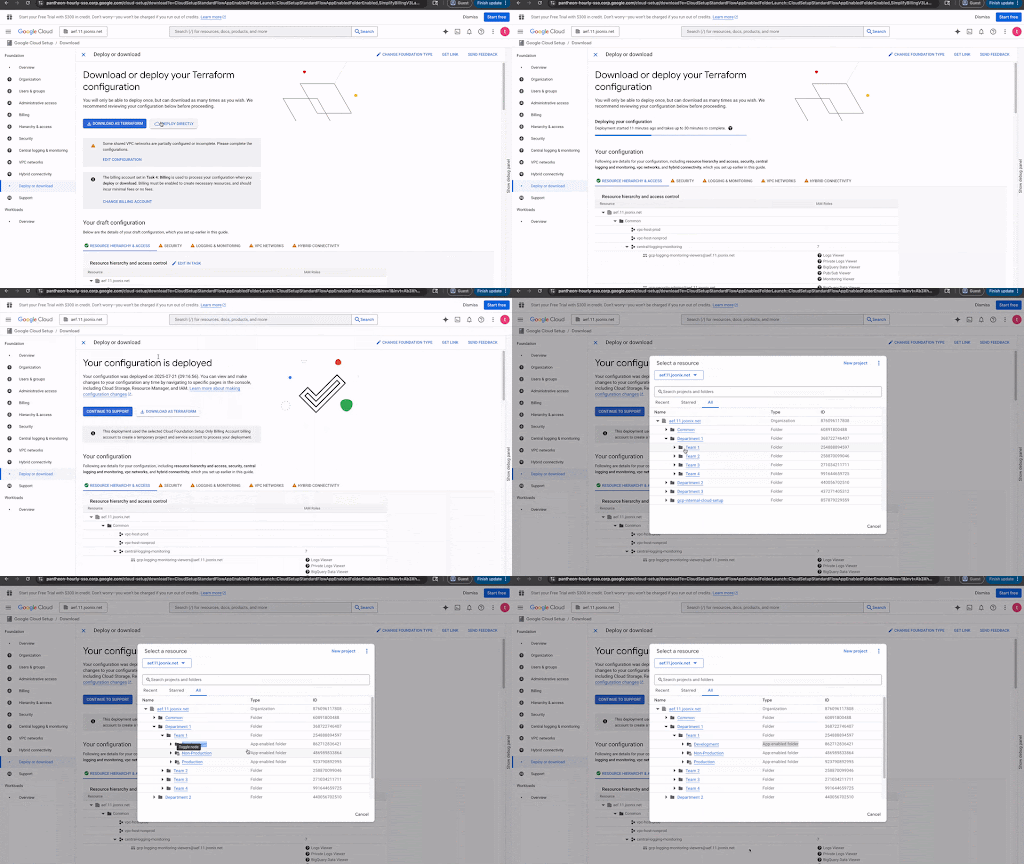
To fix this, we are launching App Management capabilities within Google Cloud Setup.
- Foundation by Default: Cloud Setup is our guided onboarding flow. Now, whether you choose the Production, Enhanced Security, or POC path, the system automatically provisions the App Hub registry plumbing. Your foundation is “application-enabled” from the start.
- Flexible Application Boundaries: This capability, powered by App Hub, allows you to group services and workloads into logical applications based on shared business functions. You can define the scope of your application management in two ways:
– Folder Scope (GA): As of November, you can use Management Projects. By enabling “App-enabled folders,” you create a dedicated space to store application metadata centrally, preventing clutter in your individual workload projects. This setup unifies resources from disparate projects into specific “Applications” based on your organizational hierarchy.
– Single Project Scope (Preview): For those who prefer to keep application management self-contained within a single Google Cloud project, project-scoped Application Management is also now available in Preview.
Day 1: The Builder’s Experience
The Goal: Guardrails, Not Gates
Standardization often fails when it becomes a bottleneck. If the “approved way” is too slow, developers will find a workaround. The solution is to provide “Golden Paths”- pre-approved templates that are easier to use than the alternative.
We are streamlining this via Application Design Center (ADC) and SaaS Runtime.
- For Enterprise Apps (ADC is GA): ADC provides a centralized catalog of architecture blueprints. Crucially, we are launching the ability for you to import your own components support, allowing you to wrap your internal Terraform modules in ADC governance and avoid being limited by Google’s opinion. Either way, this ensures that when a developer deploys, they are using a template that is secure by default.
- For Managed Services (SaaS Runtime): Building multi-tenant SaaS is exponentially harder than building single-tenant apps. SaaS Runtime is our new framework that bridges design and operation. It bakes tenancy and isolation patterns into the deployment template, ensuring that complex SaaS topologies are automatically registered and visible in App Hub from the moment they spin up.
Day 2: Context-Aware Operations
The Goal: Reducing Mean-Time-To-Discovery (MTTD)
The biggest friction in Day 2 operations isn’t a lack of data; it’s the fragmentation of it. During an outage, an SRE might have multiple tabs open: one for logging, one for metrics, and one for support tickets.
We are solving this by unifying your operational view.
1. The “Morning Coffee” Dashboard (Cloud Hub) Cloud Hub (GA) is designed to be the only tab you need open to understand the state of your estate. It doesn’t just show charts; it aggregates the “headlines” for your applications:
- “Are there active Google Cloud incidents affecting my region?”
- “Is my Checkout Service hitting a quota limit?”
- “Did a deployment fail overnight?” Instead of digging for these answers, Cloud Hub pushes them to the front, filtered specifically for the applications you care about.
2. The “Deep Dive” (Application Monitoring, GA): When Cloud Hub flashes red, you need to know why. This is where Application Monitoring (part of Google Cloud Observability) takes over. It provides the following:
- Application Monitoring View (GA): Application Monitoring automatically generates comprehensive dashboards for your application, leveraging OpenTelemetry metrics, logs, and traces to surface critical Golden Signals, correlated log data, and details on open incidents. This provides a holistic, application-centric view for quickly understanding and addressing performance and reliability issues.
- The Topology View (Preview): Because you defined your application boundaries in Day 0, Application Monitoring can now generate a visual dependency graph (see below).
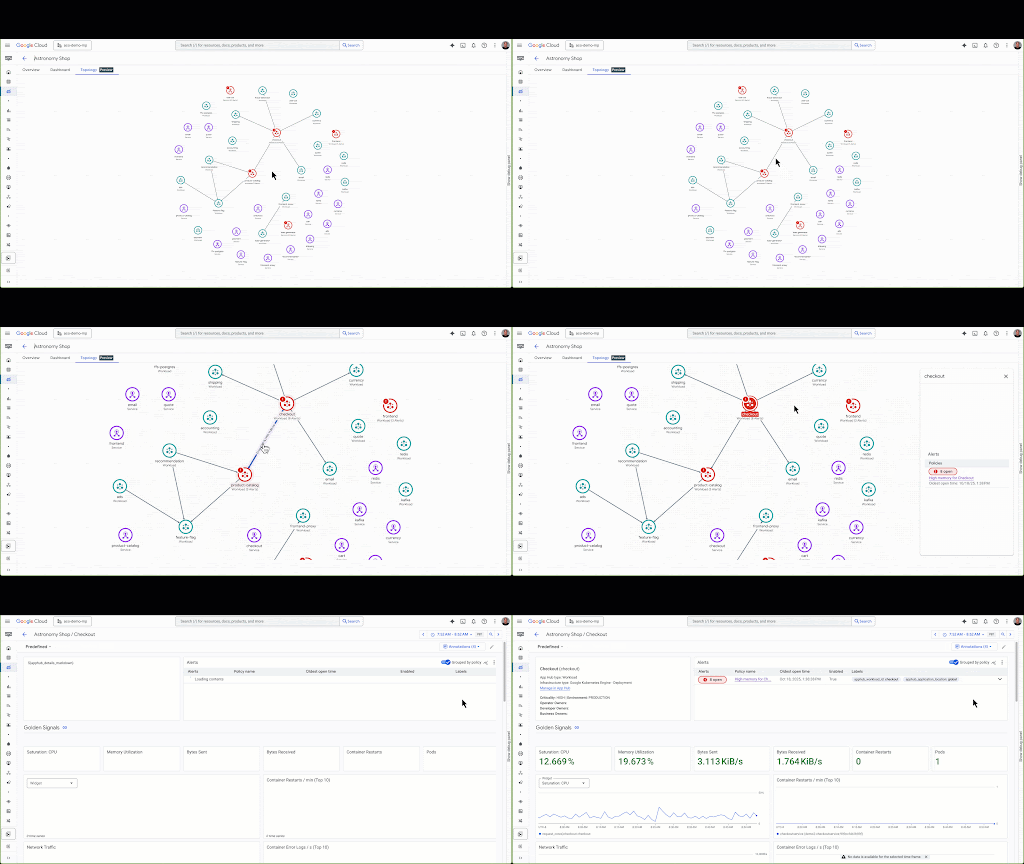
If your app degrades, you don’t need to guess which upstream service is responsible. The topology view visually highlights the failing edge — perhaps a latency spike between your API and a specific Cloud SQL instance.
You stop debugging the infrastructure and start navigating the application.
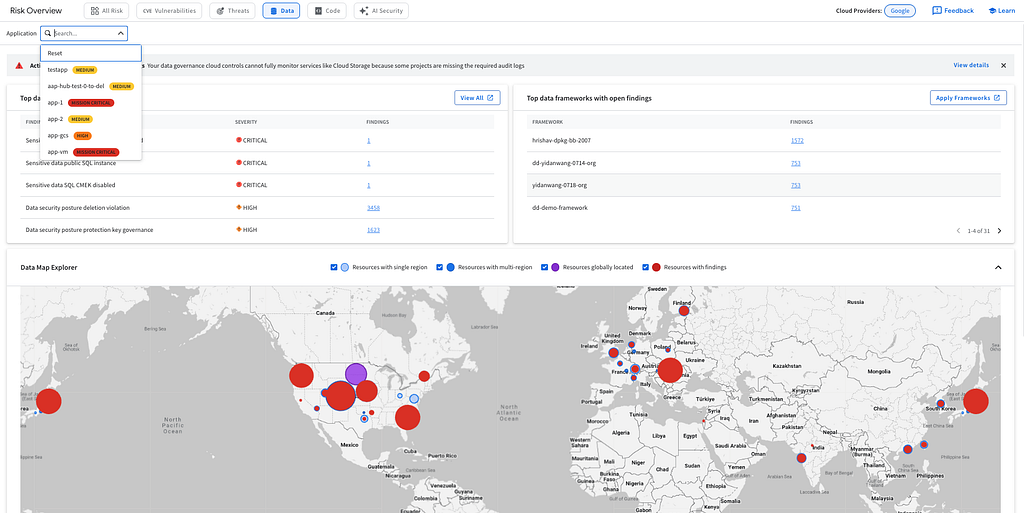
3. The Contextual Shield (DSPM): Security teams often suffer from alert fatigue because they lack business context. Data Security Posture Management (DSPM) is now GA with native App Hub support.
DSPM maps data risks to business services. If it detects PII in a storage bucket, it attributes that finding to the registered “Customer Loyalty App” and its owner. With the new Identity metadata support, it even pinpoints the specific Service Account responsible, giving you immediate context for remediation.
4. The FinOps helper: Centralized tools like the FinOps Hub and Cost Explorer shift cost management from a basic infrastructure view to an application-centric one. Furthermore, Gemini Cloud Assist serves as an AI-powered cost optimization agent that can proactively identify idle resources, explain sudden cost spikes through natural language, and generate cost reports and summaries of key insights and anomalies. This integrated approach ensures financial accountability by detecting orphaned components and preventing budget overruns before they escalate.
The Takeaway
The shift to an application-centric model is not about replacing your infrastructure; it is about organizing it to match your business reality. By formally defining your applications, you remove the ambiguity that slows down operations.
Get Started Today:
- Platform Admins: Use the new Cloud Setup flow to pre-wire your next landing zone with Management Projects.
- Security Engineers: Enable DSPM to start attributing risks to owners, not just IP addresses.
- Developers: Explore Application Design Center to stop writing plumbing and start shipping code.
- Operators: By registering your applications within App Hub, you unlock automated performance monitoring through Application Monitoring, utilizing topology insights, and OpenTelemetry for comprehensive metrics, logs, traces.
The End of “Infrastructure-First”: Why We’re Moving the Control Plane Up the Stack was originally published in Google Cloud – Community on Medium, where people are continuing the conversation by highlighting and responding to this story.
Source Credit: https://medium.com/google-cloud/the-end-of-infrastructure-first-why-were-moving-the-control-plane-up-the-stack-cd86ed133b99?source=rss—-e52cf94d98af—4
About the Author