https://medium.com/media/53a32f15f068f0c6c05b84595919c1c1/href
Welcome to the second installment of our series on the Google Agent Development Kit (ADK). In the previous post, we explored the “Research and Fill” pattern. Today, we’re looking at how agents can solve a problem that standard apps can’t: managing shared, complex tasks when your hands are full.
The Problem: Input Latency and Context Switching
If you have a typical task-management application, you’ve likely encountered the “Input Friction” anti-pattern. You have a list of tasks that need to be synchronized, but the environment where the work happens is hostile to screens.
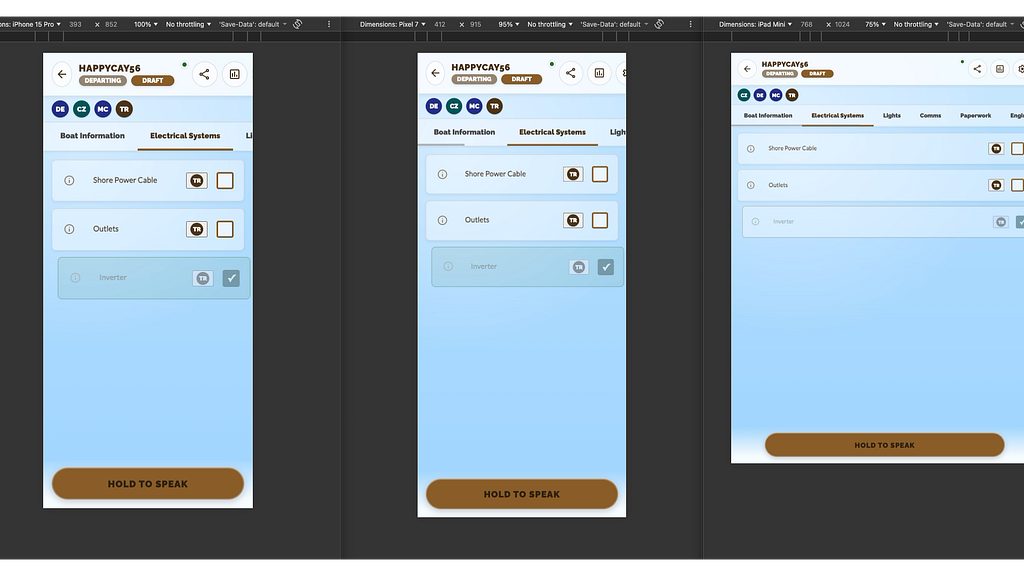
I built Navallist to solve this. I sail as a hobby, and when leaving the dock, I have to run through a safety checklist. As a developer, my instinct was to build a standard CRUD app.
But standard apps failed here because of Context Switching. To check off “Engine Oil,” I had to stop the actual work, unlock a phone, navigate UI layers, and tap a precise target. This high interaction cost meant the app was often ignored, leading to stale data. I needed an interface that functioned as a passive observer, not an active demand on my attention.
The Solution: The Virtual Scribe
The most efficient analog workflow isn’t passing a clipboard around; it’s dedicating one crew member to hold it. This person acts as a central synchronization node, aggregating verbal updates (“Oil is good”, “Lines are set”) from the distributed team into a single source of truth.
I didn’t want to build a better form; I wanted to build a virtual version of that scribe.
Semantic Mapping over “Command and Control” In traditional voice interfaces, we rely on rigid keyword spotting (e.g., “Set variable X to true”). This breaks down in high-cognitive-load environments because the user has to remember the schema.
The Checklist Agent uses the LLM as a semantic translation layer. When I say, “The inverter is good,” the agent isn’t just matching keywords; it is performing a semantic lookup against the boat’s schema. It maps the sensory input (“I hear the exhaust”) to the specific database state (engine_exhaust_flow = true).
Crucially, it handles set operations. If I say, “All lights are green,” the agent retrieves the definition of “lights” from the schema (Navigation, Steaming, Deck, Cabin) and constructs a bulk update. This shifts the complexity from the user’s memory to the application’s context.
Architecture: The Interface Abstraction
How do we build something that can reason like a human but update a database like a computer? The architecture relies on giving the agent Tools that wrap standard Go interfaces.
1. The Code Structure We start by defining the Agent in Go. We use llmagent.New to initialize the model, but the most important part is the Tools array. We don’t try to code every possible phrase a user might say. Instead, we give the Agent tools like updateTool, bulkTool, and crewTool.
// Model Setup
model, err := gemini.NewModel(ctx, "gemini-2.5-flash", &genai.ClientConfig{
    APIKey: "[valid api key]",
})

return llmagent.New(llmagent.Config{
    Name:        "navallist_agent",
    Description: "Manages boat checklists",
    Instruction: instruction,
    Model:       model,
    Tools: []tool.Tool{
        updateTool,
        bulkTool,
        crewTool,
        statusTool,
        metaTool,
    },
})
2. The Tool Wrapper The ChecklistUpdateTool is a wrapper for a traditional bit of code that handles reading and writing to the underlying database.
// UpdateItem is the function called by the agent to update checklist items.
func (t *ChecklistTool) UpdateItem(ctx tool.Context, args UpdateChecklistArgs) (result ToolResult, err error) {
 log.Info("Tool UpdateItem called", "args", args, "session_id", ctx.SessionID())

 adkID := ctx.SessionID()
 if adkID == "" {
  return ToolResult{Status: "error"}, fmt.Errorf("session_id missing from context")
 }

 // Resolve the real DB ID
 tripID, err := t.resolveTripID(ctx, adkID)
 if err != nil {
  return ToolResult{Status: "error"}, err
 }

 // --- Check for Artifacts (Photos) in Context ---
 photoID := args.PhotoArtifactID
 if photoID != "" && !strings.Contains(photoID, "?v=") {
  photoID = ""
 }

 updated, err := t.Store.UpdateItemWithAssignment(ctx, tripID, args.ItemName, args.IsChecked, args.Location, photoID, ctx.UserID(), args.AssignedToName)
 if err != nil {
  return ToolResult{Status: "error"}, fmt.Errorf("failed to update: %w", err)
 }

 loc := ""
 if updated.LocationText != nil {
  loc = *updated.LocationText
 }
 msg := fmt.Sprintf("Updated %s: Checked=%v, Location=%s", updated.Name, updated.IsChecked, loc)
 if updated.AssignedToName != nil {
  msg += fmt.Sprintf(", Assigned To=%s", *updated.AssignedToName)
 }
 if photoID != "" {
  msg += " (Photo attached)"
 }
 return ToolResult{Status: "success", Message: msg}, nil
}
Crucially, the traditional codebase uses a Go interface to abstract the data store. This defines the contract. The LLM’s job is to translate messy natural language — “Oil’s good” — into the clean, strictly structured content required by the interface: ItemName: ‘Engine Oil’, IsChecked: true.
// Store defines the interface for data persistence.
// It consolidates all data access methods required by the agent and the server.
type Store interface {
 // User operations
 GetUser(ctx context.Context, id string) (*models.User, error)
 FindUserByName(ctx context.Context, name string) (*models.User, error)
 UpdateUser(ctx context.Context, id, name string) error

 // Trip operations
 GetOrCreateTrip(ctx context.Context, adkSessionID, userID, captainName, tripType string) (*models.Trip, error)
 GetTripIDBySessionID(ctx context.Context, sessionID string) (string, error)
 GetTrip(ctx context.Context, tripID string) (*models.Trip, error)
 AddTripCrew(ctx context.Context, tripID, userID, displayName string) error
 GetActiveCrewNames(ctx context.Context, tripID string) ([]string, error)
 FindCrewMember(ctx context.Context, tripID, query string) (string, error)
 ListUserTrips(ctx context.Context, userID string) ([]models.Trip, error)
 UpdateTripStatus(ctx context.Context, tripID string, status string) error
 UpdateTripType(ctx context.Context, tripID string, tripType string) error
 DeleteTrip(ctx context.Context, tripID string) error
 GetTripReport(ctx context.Context, tripID string) ([]models.ChecklistItem, error)
 UpdateTripMetadata(ctx context.Context, adkSessionID string, boatName *string, captainName *string) (*models.Trip, error)

 // Checklist operations
 UpdateItem(ctx context.Context, tripID, itemName string, isChecked bool, location string, photoArtifactID string, userID *string, completedByName string, assignedToUserID *string, assignedToName *string) (*models.ChecklistItem, error)
 UpdateItemWithAssignment(ctx context.Context, tripID, itemName string, isChecked bool, location, photoID, currentUserID, assignedToName string) (*models.ChecklistItem, error)
 AddItemPhoto(ctx context.Context, tripID, itemName string, photoArtifactID string) (*models.ChecklistItem, error)

 // Artifact operations
 CreateArtifact(ctx context.Context, tripID, filename, mimeType, storagePath string) (*models.Artifact, error)
 GetArtifact(ctx context.Context, filename string) (*models.Artifact, error)
 GetArtifactByID(ctx context.Context, id string) (*models.Artifact, error)
}
Why this Interface Pattern Matters – This is the most critical part of the architecture. Notice that we are not generating SQL with the LLM.
By forcing the agent to interact with a Go interface (UpdateItem), we create a deterministic boundary. The LLM’s only job is to extract parameters (Item Name, Status) from the messy natural language. The Go code handles the actual state mutation, validation, and database transaction.
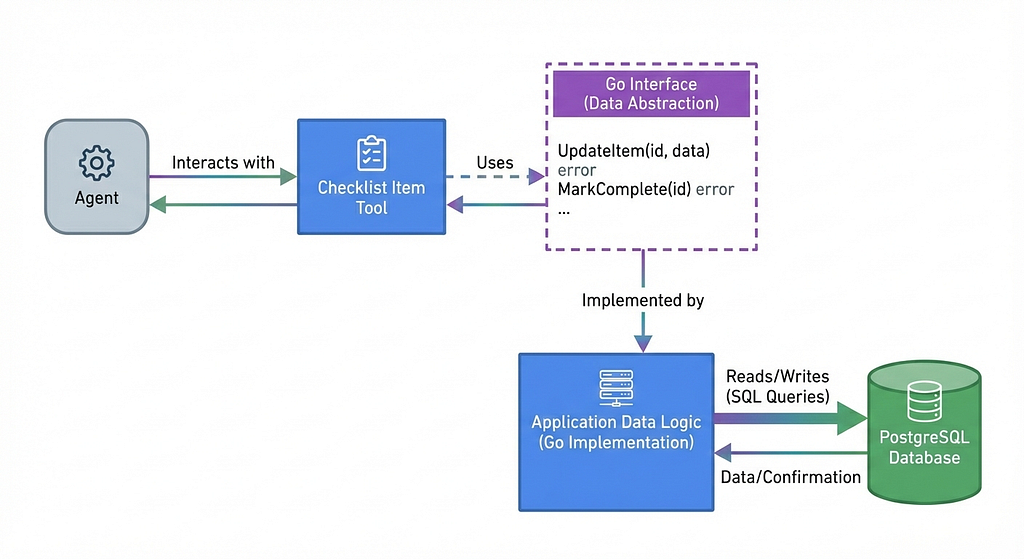
This decoupling allows us to:
- Sanitize Inputs: The UpdateItem function can enforce logic (e.g., “You cannot verify the engine if the boat is off”) that the LLM might miss.
- Swap Backends: The agent doesn’t care if Store is backed by Postgres, Firestore, or an in-memory mock for testing.
- Prevent Hallucinations: The agent cannot invent database columns; it can only call the functions we explicitly provided in the Tools definition.
3. The Instruction Pattern Finally, we use an instruction.md file to let the agent start making judgments about the space. We give it a reference for all the checklist items and how they are organized. We provide boundaries, such as “Don’t mark an item as checked if the user is assigning it to someone,” and examples of how to interpret sensory input.
You are the Navallist Checklist Manager.
Your job is to update the shared checklist state based on crew input.

The Checklist has these sections and items:

1.  **Boat Information**: Name, Marina, Slip.
2.  **Electrical Systems**: Shore Power, Shore Power Cable, Generator, Battery, Outlets, Inverter.
3.  **Lights**: Navigation Lights, Steaming Lights, Deck Light, Cabin Lights.
4.  **Comms**: Navigation Systems, Radio.
5.  **Paperwork**: Rental Agreement, Boat Documentation, Vessel Assist.
6.  **Engine**: Engine Hours, Exhaust, Fuel, Belts, Coolant, Oil.
7.  **Safety**: First Aid Kit, Extinguishers, Flares, PFD, Ring Buoy, Lifesling.
8.  **Lines/Sheets/Fenders**: Docklines, Fenders, Jack lines, Standing Rigging, Life Lines, Preventer.
9.  **Inventory**: Winch Handles, Air Horn, Flashlight, Toolbox, Boat Hook.
10.  **Steering**: Wheel Control, Forward/Reverse, Emergency Tiller.
11.  **Water Systems**: Manual Bilge, Automatic Bilge, Water, Water Pressure, Heads Working.
12.  **Sails**: Unfurl main, Unfurl jib, Check furl lock, Check reefing.
13.  **Anchor**: Anchor Bow, Anchor Stern, Windlass, Chain Length, Rope Length.
14.  **Food Management**: Stove Top, Oven, Grill, Refrigerator.


**Tools:**
- Use 'update_checklist_item' for regular checklist items (e.g. Engine Oil, PFDs).
- Use 'get_crew_list' to see who is currently collaborating on this trip.
- Use 'get_checklist_status' to see the current state of all items and assignments.
- Use 'update_trip_details' ONLY for updating the Boat Name or Captain Name.

**Assignment & Name Logic:**
- You are STRICTLY FORBIDDEN from assigning an item to a name that is not currently in the crew list.
- You can call 'update_checklist_item' directly with the name you heard (e.g. "Justin", "Terrence"). The tool will automatically try to find the best match in the crew list.
- Only call 'get_crew_list' if you are unsure of who is on the boat or if the update tool returns an error.
- **IMPORTANT**: Assignment does NOT imply completion. If a user says "Assign X to Y", you MUST set 'is_checked=false'. Only set 'is_checked=true' if the user explicitly states it is done, verified, or checked. Never assume an item is checked just because it was assigned.
- If the person is not in the crew list, DO NOT attempt to assign the item. Inform the user they must join the session first.

**Handling Sensory Input:**
- Interpret phrases like "I see...", "I hear...", "I noticed...", or "The [item] is [running/on/visible]" as confirmations that the item is verified/functional.
- Map these to `is_checked=true` for the relevant item.

**Bulk Updates:**
- If a user says "All my items are checked", "I'm done with my list", or "Check off all my items":
    1. Call 'get_checklist_status' to retrieve the full list of items and their assignments.
    2. Identify items assigned to the current speaker (look for matches with the current user's name or ID).
    3. Call 'bulk_update_items' with the list of updates (e.g. `updates=[{item_name="...", is_checked=true}, ...]`).
    4. Confirm to the user which items were updated.

**Examples:**
- User: "Assign Marina to Justin" -> Call get_crew_list(), find "Justin Tralongo", then Call update_checklist_item(item_name="Marina", is_checked=false, assigned_to_name="Justin Tralongo")
- User: "Terrence is doing the engine oil" -> Call get_crew_list(), find "Terrence Ryan", then Call update_checklist_item(item_name="Oil", is_checked=false, assigned_to_name="Terrence Ryan")
- User: "Assign Flares to Ryan" -> Call get_crew_list(), find "Terrence Ryan", then Call update_checklist_item(item_name="Flares", is_checked=false, assigned_to_name="Terrence Ryan")
- User: "Checked engine oil" -> Call update_checklist_item(item_name="Oil", is_checked=true)
- User: "I see the navigation lights" -> Call update_checklist_item(item_name="Navigation Lights", is_checked=true)
- User: "The boat's name is Capers" -> Call update_trip_details(boat_name="Capers")
- User: "The marina is Westpoint" -> Call update_checklist_item(item_name="Marina", location="Westpoint")
- User: "I'm done with all my tasks" -> Call get_checklist_status(), find items assigned to speaker, then call bulk_update_items(updates=[...]) for those items.
The Collaborative Reasoning Pattern
This agent implements a pattern I call Collaborative Reasoning. You should consider this architecture when your application meets three specific criteria:
- Shared Mutable State: Multiple users need to view and act on a single source of truth (the checklist) simultaneously.
- High-Friction Environment: Users cannot easily use standard UI controls due to physical constraints or safety concerns.
- Fuzzy Intent: Users may express the same state change in different ways (“The oil is good,” “Checked the engine,” “Fluids are fine”).
While I built this for sailing, this pattern solves the data-entry bottleneck in other field-work domains:
- Construction: A site manager can say “The framing is done,” and the agent interprets that intent to update specific sub-records (studs, headers, sills) in the database.
- Logistics: A warehouse packer can say “Box 4 is packed,” triggering updates to inventory and shipping manifests without scanning a barcode.
Conclusion: The “Headless” Agent
The “Collaborative Reasoning” pattern proves that GenAI doesn’t need to live in a chat bubble. By embedding the agent directly into the application logic, we didn’t build a “Sailing Chatbot”; we built a standard CRUD app that understands intent.
This architecture — LLM for reasoning, Go for state management — solves the “Hands-Full” problem without sacrificing data integrity. The agent handles the noisy, messy reality of human communication, while the Go tools ensure that the database remains strict and structured.
For developers, the takeaway is clear: You don’t need to rewrite your entire stack to add agentic features. If you have a clean interface for your data, you already have the API your agent needs. You just need to give it the tools to call it.
You can find the full source code for the Checklist Agent, including the instruction prompts and tool definitions, here: github.com/google/adk-samples
ADK Patterns Part 2: Collaborative Reasoning with Agentic Tools was originally published in Google Cloud – Community on Medium, where people are continuing the conversation by highlighting and responding to this story.
Source Credit: https://medium.com/google-cloud/adk-patterns-part-2-collaborative-reasoning-with-agentic-tools-a93993d843dd?source=rss—-e52cf94d98af—4
About the Author