Gemini Interactions API — One interface for models and agents
GenAI is rapidly moving from simple “prompt-and-response” patterns to complex, agentic workflows. To support this shift, Google recently introduced the Interactions API, a new unified foundation designed specifically for building with both models and agents.
In this post, I’ll introduce the core concepts of the Interactions API and walk through some of the samples available in my genai-samples repository.
What is the Interactions API?
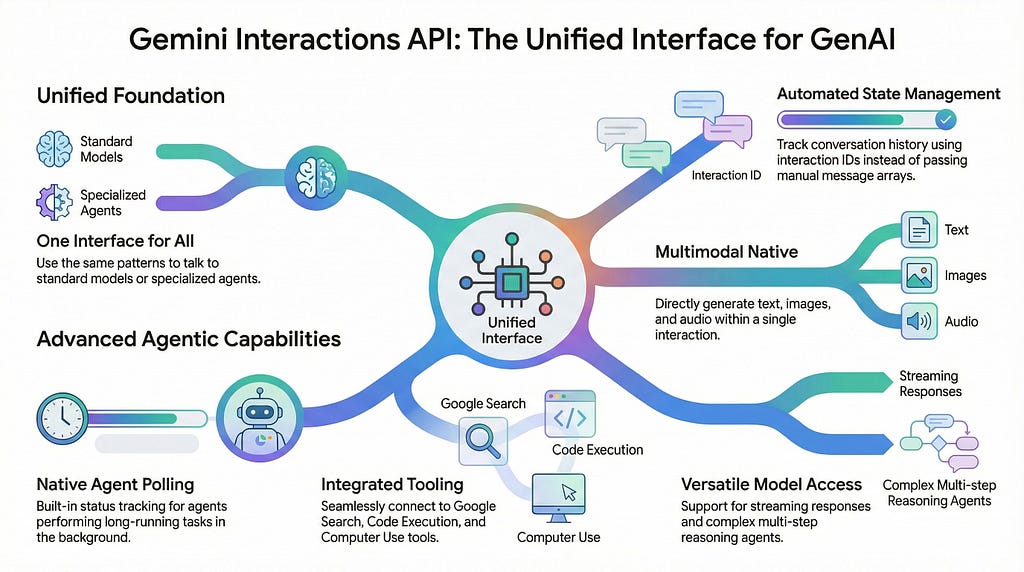
Traditionally, developers had to use the Gemini API to talk to the models and another framework like Agent Development Kit (ADK) to create and manage agents. Currently in beta, the Interactions API simplifies this by providing a single interface for:
- Unified Model & Agent Access: Use the same patterns to talk to a standard model or a specialized agent (like the Deep Research agent).
- Built-in State Management: The API can track conversation state using interaction IDs, reducing the need for manual history management.
- Multimodal Native: It handles text, images, audio, video, and even generates multimodal outputs like audio and images directly within the interaction.
To get started, you’ll need the at least the version 1.55.0 of the Python Gen AI SDK.
Samples
Let’s look at how this works in practice using the samples from my genai-samples repository.
Basic Interaction
In the past, you have used generate_content to talk to a model. While that still works, the new way is to create an interaction.
def basic_interaction():
    """Generate text using the new Interactions API."""
    client = genai.Client()

    interaction = client.interactions.create(
        model="gemini-3-flash-preview",
        input="Tell me a short joke about programming.",
        generation_config={
            "temperature": 0.7,
            "max_output_tokens": 500,
            "thinking_level": "low",
            "thinking_summaries": "auto"
        }
    )

    print(interaction.outputs[-1].text)
Streaming Interaction
The Interactions API also supports streaming responses:
def basic_interaction_stream():
    """Generate text using the new Interactions API in a streaming fashion."""
    client = genai.Client()

    prompt = "Explain quantum entanglement in simple terms."

    stream = client.interactions.create(
        model="gemini-3-flash-preview",
        input=prompt,
        stream=True
    )

    print(f"User: {prompt}")
    print("Model:")

    for chunk in stream:
        if chunk.event_type == "content.delta":
            if chunk.delta.type == "text":
                print(chunk.delta.text, end="", flush=True)
            elif chunk.delta.type == "thought":
                print(chunk.delta.thought, end="", flush=True)
        if chunk.event_type == "interaction.complete":
            print(f"\nTotal Tokens: {chunk.interaction.usage.total_tokens}")
Stateful Conversations
The Interactions API handles history for you. Instead of passing an array of messages back and forth, you can simply reference a previous interaction_id.
def chat_stateful():
    """Demonstrate stateful chat using the new Interactions API."""
    client = genai.Client()

    # 1. First turn: Establish context
    prompt = "Hi, my name is Mete."
    interaction1 = client.interactions.create(
        model="gemini-3-flash-preview",
        input=prompt
    )

    # 2. Second turn: Reference the previous ID
    prompt = "What is my name?"
    interaction2 = client.interactions.create(
        model="gemini-3-flash-preview",
        input=prompt,
        previous_interaction_id=interaction1.id
    )
    print(f"Model: {interaction2.outputs[-1].text}")
Multimodal Generation
The Interactions API isn’t limited to returning text. You can specify response_modalities to have the model generate other types of content, such as images or audio.
Here’s how you’d generate an image:
def image_generation():
    """Demonstrate image generation using the new Interactions API."""
    client = genai.Client()

    interaction = client.interactions.create(
        model="gemini-3-flash-preview",
        input="Generate an image of a cat.",
        response_modalities=["image"],
        generation_config={
            "image_config": {
                "aspect_ratio": "9:16",
                "image_size": "2k"
            }
        }
    )

    for output in interaction.outputs:
        if output.type == "image":
            print(f"Generated image with mime_type: {output.mime_type}")
            with open("cat.png", "wb") as f:
                f.write(base64.b64decode(output.data))
Here’s audio generation:
def audio_generation():
    """Demonstrate audio generation using the new Interactions API."""
    client = genai.Client()

    interaction = client.interactions.create(
        model="gemini-2.5-flash-preview-tts",
        input="Say the following: WOOHOO This is so much fun!",
        response_modalities=["audio"],
        generation_config={
            "speech_config": {
                "language": "en-us",
                "voice": "kore"
            }
        }
    )

    for output in interaction.outputs:
        if output.type == "audio":
            print(f"Generated audio with mime_type: {output.mime_type}")
            with wave.open("generated_audio.wav", "wb") as wf:
                wf.setnchannels(1)
                wf.setsampwidth(2)
                wf.setframerate(24000)
                wf.writeframes(base64.b64decode(output.data))
Agents
The API provides a native way to interact with agents such as Gemini Deep Research Agent (deep-research-pro-preview-12-2025). Unlike standard models, agents might run for a long time in the background. The Interactions API handles this with background=True and with a polling status:
def agent():
    """Demonstrate agent using the new Interactions API."""
    client = genai.Client()

    prompt = "Research the history of the Google TPUs with a focus on 2025 and 2026."
    print(f"User: {prompt}")

    # 1. Start the Deep Research Agent
    initial_interaction = client.interactions.create(
        input=prompt,
        agent="deep-research-pro-preview-12-2025",
        background=True
    )

    print(f"Research started. Interaction ID: {initial_interaction.id}")

    # 2. Poll for results
    while True:
        interaction = client.interactions.get(initial_interaction.id)
        print(f"Status: {interaction.status}")

        if interaction.status == "completed":
            print("\nModel Final Report:\n", interaction.outputs[-1].text)
            break
        if interaction.status in ["failed", "cancelled"]:
            print(f"Failed with status: {interaction.status}")
            break

       time.sleep(10)
Tools
The Interactions API also supports tools such as Google Search, Code Execution, Computer Use and more.
Here’s how you’d use Google Search:
def tool_google_search():
    """Demonstrate grounding with Google Search using the new Interactions API."""
    client = genai.Client()

    prompt = "What is the weather like today in London?"
    print(f"User: {prompt}")

    interaction = client.interactions.create(
        model=MODEL,
        input=prompt,
        tools=[{"type": "google_search"}]
    )

    # Find the text output (not the GoogleSearchResultContent)
    text_output = next((o for o in interaction.outputs if o.type == "text"), None)
    if text_output:
        print(f"Model: {text_output.text}")
Here’s how you’d use MCP:
def tool_mcp():
    """Demonstrate MCP server using the new Interactions API."""
    client = genai.Client()

    mcp_server = {
        "type": "mcp_server",
        "name": "weather_service",
        "url": "https://gemini-api-demos.uc.r.appspot.com/mcp"
    }

    today = datetime.date.today().strftime("%d %B %Y")
    prompt = "What is the weather like today in London?"
    print(f"User: {prompt}")

    interaction = client.interactions.create(
        model=MODEL,
        input=prompt,
        tools=[mcp_server],
        system_instruction=f"Today is {today}."
    )

    # Find the text output (not the GoogleSearchResultContent)
    text_output = next((o for o in interaction.outputs if o.type == "text"), None)
    if text_output:
        print(f"Model: {text_output.text}")
You can also create your own tools with function calling. Details in Tools and Function Calling documentation.
Wrapping Up
The Interactions API is a step toward a more agent-centric future. For more details, check out the following:
- Interactions API docs
- Blog: Interactions API: A unified foundation for models and agents
- Sample: Interactions API
Originally published at https://atamel.dev.
Gemini Interactions API — One interface for models and agents was originally published in Google Cloud – Community on Medium, where people are continuing the conversation by highlighting and responding to this story.
Source Credit: https://medium.com/google-cloud/gemini-interactions-api-one-interface-for-models-and-agents-986ffb16021c?source=rss—-e52cf94d98af—4
About the Author