What you’ll learn
In this four-part blog series, I’ll walk you through the step-by-step process of how I brought this project to life. Each blog post captures the journey of building and deploying Dev Signal:
-
Part 1: Tools for building agent capabilities – You’ll begin by setting up your project environment and equipping your agent with tools using the Model Context Protocol (MCP). You’ll learn how to connect to Reddit for trend discovery, Google Cloud docs for technical grounding, and a custom Nano Banana Pro tool for image generation.
-
Part 2: The Multi-Agent Architecture with long term memory – You’ll build the “brain” of the system by implementing a root orchestrator and a team of specialized agents. You’ll also integrate the Vertex AI memory bank, enabling the agent to learn and persist your preferences across sessions.
-
Part 3: Testing the agent Locally – Before moving to the cloud, you’ll synchronize the agent’s components and verify its performance on your workstation. You’ll use a dedicated test runner to simulate the full lifecycle of discovery, research, and multimodal creation, with a special focus on validating long-term memory persistence by connecting your local agent directly to the cloud-based Vertex AI memory bank.
-
Part 4: Deployment to Cloud Run and the Path to Production – Finally, you’ll deploy your service on Google Cloud Run using Terraform for reproducible infrastructure. You’ll also discuss the next steps required for a high quality secure production system.
Getting started with Dev Signal
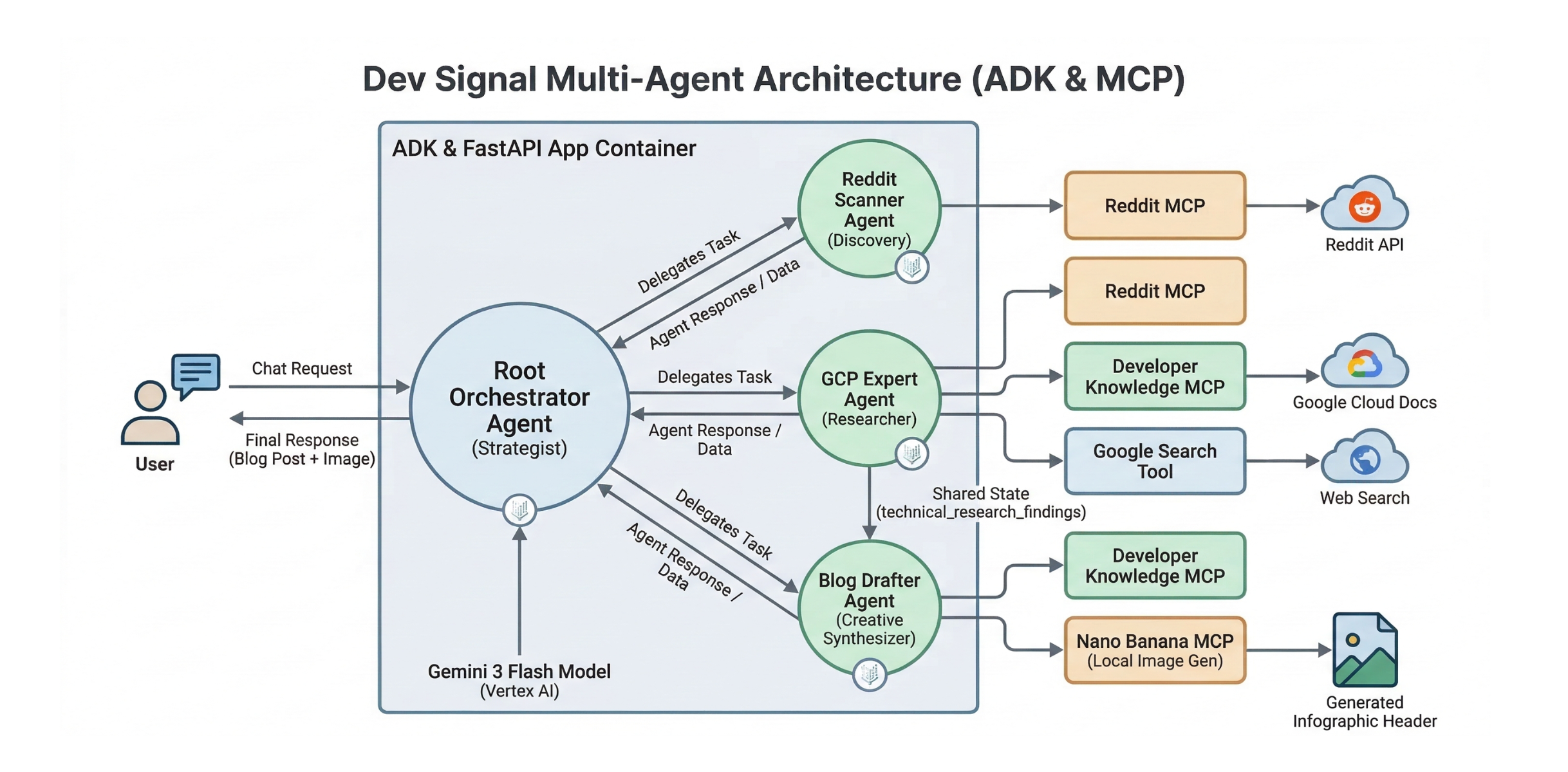
Dev Signal is an intelligent monitoring agent designed to filter noise and create value. Dev Signal operates in the following ways:
-
Discovery: Scouts Reddit for high-engagement technical questions.
-
Grounding: Researches answers using official Google Cloud documentation to ensure accuracy.
-
Creation: Drafts professional technical blog posts based on its findings.
-
Multimodal Generation: Generates custom infographic headers for those posts.
-
Long-Term Memory: Uses Vertex AI memory bank to remember your feedback across different sessions.
Prerequisites
Before you begin, verify the following is installed:
-
Python 3.12+
-
uv (Python package manager):
curl -LsSf https://astral.sh/uv/install.sh | sh -
Google Cloud SDK (
gcloudCLI) installed and authenticated. -
Terraform (for infrastructure as code).
-
Node.js & npm (required for the Reddit MCP tool).
You will also need:
-
A Google Cloud Project with billing enabled.
-
APIs Enabled: Vertex AI, Cloud Run, Secret Manager, Artifact Registry.
-
Reddit API Credentials (Client ID, Secret) – You can get these from the Reddit Developer Portal.
-
Developer Knowledge API Key (for Google Cloud docs search) – Instructions on how to get it are here.
Project Setup
The Dev Signal system was built by first running the Agent Starter Pack, following the automated architect workflow described in the Agent Factory episode by Remigiusz Samborski and Vlad Kolesnikov. This foundation provided the project’s modular directory structure, which is used to separate concerns between Agent Logic, Server Code, Utilities, and Tools.
The starter pack acts as a powerful starting point because it automates the creation of professional infrastructure, CI/CD pipelines, and observability tools in seconds. This allows you to focus entirely on the agent’s unique intelligence while ensuring the underlying platform remains secure and scalable. By building on top of this generated boilerplate with AI assistance from Gemini CLI and Antigravity, the development process is highly accelerated.
The agent starter pack high level architecture:
Source Credit: https://cloud.google.com/blog/topics/developers-practitioners/build-a-multi-agent-system-for-expert-content-with-google-adk-mcp-and-cloud-run-part-1/
About the Author