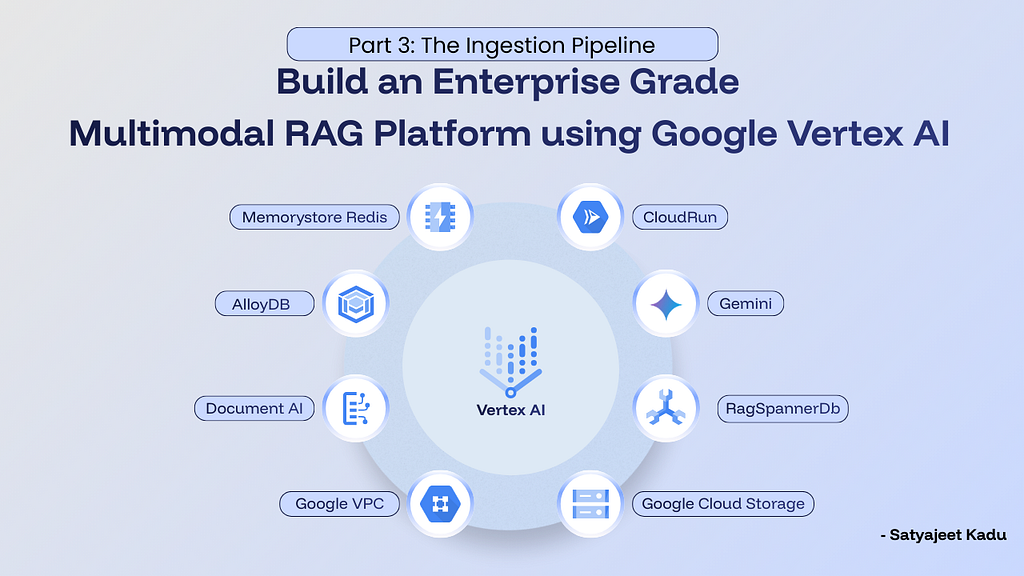
Build an Enterprise Grade Multimodal RAG Platform on Google Vertex AI | Part 3: The Ingestion Pipeline
In Part 1, we tore down the monolithic vector database approach. We established that enterprise knowledge is messy, deeply heterogeneous, and impossible to represent accurately using text-only embeddings.
In Part 2, we stopped talking and built the fortress. We spun up our “Dual Brain” infrastructure — Vertex AI RAG Engine for unstructured data and AlloyDB for structured data — and locked it all behind a secure Serverless VPC Access network.
But a secure, scalable database is completely useless if the data you feed it is garbage.
Most RAG tutorials start and end with a naive ingestion assumption: Upload file → Chunk text → Embed → Store.
At an enterprise scale, this approach breaks immediately. Let’s look at what actually happens in production:
- The PDF Table Trap: Throw a 50-page vendor agreement into a standard open-source PDF chunker, and the fee schedule gets flattened into a single, unreadable paragraph. The LLM won’t know if the $50,000 figure belongs to “Software Licenses” or “Consulting Fees,” so it just guesses and hallucinates the answer.
- The Spreadsheet Problem: When a team uploads a CSV export of last quarter’s hardware purchases, chunking those rows into text embeddings destroys the structure. You can no longer run basic math like SUM or GROUP BY. If a user asks, “What was our total spend on Dell monitors?”, a semantic vector search is going to fail miserably.
- The “Flying Blind” Video Issue: If you index a recorded Zoom meeting by just pulling the audio transcript, you miss half the meeting. When a presenter says, “As you can see on this architecture diagram, the bottleneck is right here,” your RAG bot has absolutely no idea what “this diagram” or “here” means. The context is trapped in the pixels, not the audio.
Different data types require different models, different parsers, and different storage engines. A CSV row is not a paragraph. A video is not just text with timestamps.
Where we are in the series:
Welcome to Part 3 of Building an Enterprise-Grade Multimodal RAG Platform on Google Vertex AI.
In Part 3, we focus entirely on the Ingestion Pipeline. This is where files enter the system, where intelligence begins, and where bad architectural decisions permanently degrade retrieval quality downstream.
We are going to build a Smart Router — an orchestration layer that inspects every file and routes it to the specialist pipeline best suited to handle it.
This is a 5-part series where we move from concept to production:
- Part 1 : The Architecture & “Dual Brain” Strategy.
- Part 2: Provisioning the secure Data Layer & Infrastructure (VPC, AlloyDB, Redis).
- Part 3(You are here): Building the Ingestion Pipeline (Smart Routing for Videos, PDFs, and CSVs).
- Part 4: Building the Retrieval Pipeline (RBAC, Semantic Cache, and Neural Re-ranking).
- Part 5: Going into Production (Agentic RAG, Serverless tuning, and CI/CD).
The Infrastructure Requirements
We are running our ingestion workers on Cloud Run, utilizing our secure VPC connection to talk to AlloyDB, and making calls out to Vertex AI.
Here is the production .env configuration driving this pipeline:
# =========================
# Google Cloud Core
# =========================
GCP_PROJECT_ID=your-project-id
GCP_LOCATION=asia-southeast1
GCS_BUCKET=your-gcs-bucket-vault

# =========================
# Brain A: Vertex AI RAG Engine
# =========================
RAG_EMBEDDING_MODEL=publishers/google/models/text-embedding-005
# NOTE: Provisioned in Part 2. Make sure you have your RAG_CORPUS_ID ready.

# =========================
# Brain B: AlloyDB (Private IP via VPC)
# =========================
ALLOYDB_HOST=10.x.x.x  # Provisioned in Part 2
ALLOYDB_PORT=5432
ALLOYDB_DATABASE=postgres
ALLOYDB_USER=postgres
ALLOYDB_PASSWORD=your-secure-password

# =========================
# Smart Router Controls
# =========================
USE_LAYOUT_PARSER=true
# Processor ID created in Part 2 via Document AI
LAYOUT_PARSER_PROCESSOR=projects/YOUR_ID/locations/us/processors/YOUR_PROC_ID
LAYOUT_PARSER_FALLBACK_TO_STANDARD=true

USE_LLM_PARSER_FALLBACK=true
LLM_PARSER_MODEL=gemini-2.5-flash
LLM_PARSER_MAX_REQUESTS_PER_MIN=5000

# Intelligence Models
AI_MODEL=gemini-2.5-flash
VIDEO_AI_MODEL=gemini-2.5-pro

# =========================
# Chunking Strategy Configuration
# =========================
CHUNKING_STRATEGY_DOCS_THRESHOLD_PAGES=15
CHUNKING_STRATEGY_DOCS_SEGMENT_SIZE=10
CHUNKING_STRATEGY_DOCS_OVERLAP_SIZE=2
(Note: The RAG_CORPUS_ID, LAYOUT_PARSER_PROCESSOR, and AlloyDB private IPs referenced here were all provisioned in Part 2. If you are just jumping in, refer to Part 2 for the setup guides.)
The “Direct-to-Vault” Pattern
The most common mistake engineers make when building a document ingestion API is letting the user upload the file directly to the backend server.
If a user uploads a 1.2GB MP4 recording of a board meeting to your FastAPI backend, your API worker blocks, the container’s RAM spikes, and the Cloud Run request inevitably times out.
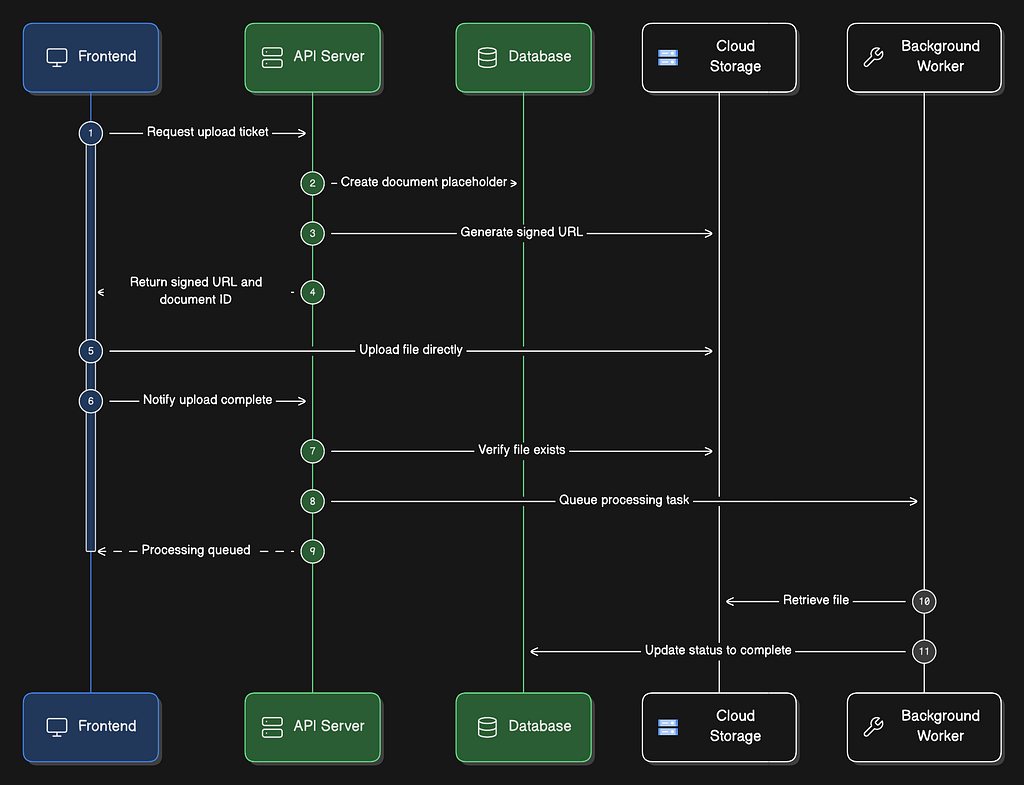
Instead, we use a Handshake Pattern (Direct-to-Vault). This keeps the backend entirely stateless and infinitely scalable. The API server never actually touches the raw file bytes.
- Request: The frontend asks the backend for an “Upload Ticket.”
- Sign: The backend generates a secure, time-bound Google Cloud Storage (GCS) Signed URL.
- Upload: The frontend uploads the massive file directly to the GCS bucket.
- Finalize: The frontend pings the backend saying, “Upload complete,” triggering the background ingestion task.
Here is how we do it:
import uuid
from datetime import timedelta
from google.cloud import storage
from fastapi import APIRouter, BackgroundTasks, HTTPException

storage_client = storage.Client()

def create_upload_session(
    self, db, user_id: str, filename: str, content_type: str,
    tenant_id: str, access_level: str
) -> dict:

    # 1. Build a logically isolated GCS path based on Tenant and Access Level
    # The 'access_level' segment enforces storage-level RBAC isolation
    # (e.g., public vs private vs project-specific)
    blob_name = f"uploads/{tenant_id}/{access_level}/{uuid.uuid4()}-{filename}"
    gcs_uri = f"gs://{GCS_BUCKET}/{blob_name}"

    # 2. Create a database placeholder (Status: UPLOADING)
    doc = Document(
        filename=filename,
        gcs_uri=gcs_uri,
        processing_status="uploading",
        uploaded_by=user_id
    )
    db.add(doc)
    db.commit()
    db.refresh(doc)

    # 3. Generate Signed URL (Valid for 15 minutes)
    blob = storage_client.bucket(GCS_BUCKET).blob(blob_name)
    url = blob.generate_signed_url(
        version="v4",
        expiration=timedelta(minutes=15),
        method="PUT",
        content_type=content_type
    )

    return {"upload_url": url, "document_id": doc.id, "expires_in": 900}

async def finalize_ingestion(self, db, document_id: int, background_tasks: BackgroundTasks):
    doc = db.query(Document).get(document_id)

    # 1. Verify file actually made it to GCS
    blob_path = doc.gcs_uri.split(f"gs://{GCS_BUCKET}/")[1]
    blob = storage_client.bucket(GCS_BUCKET).blob(blob_path)

    if not blob.exists():
        raise HTTPException(status_code=400, detail="Upload verification failed in GCS")

    # 2. Queue the heavy lifting to a background worker
    background_tasks.add_task(process_document_background, doc.id)

    return {"status": "processing_queued"}
The Smart Router Logic
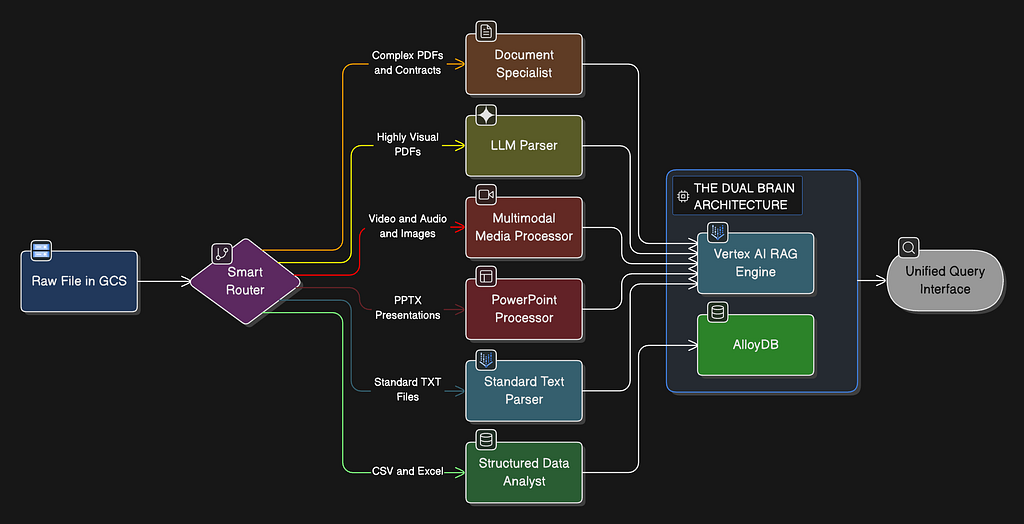
Once a file lands in Cloud Storage, the backend inspects its MIME type and extension to determine the optimal processing route.
This router fans out into 6 specialized ingestion pipelines.
from enum import Enum

class ProcessingRoute(str, Enum):
    STRUCTURED_DATA = "structured_data"  # Route D: CSV/XLSX → AlloyDB
    MULTIMODAL      = "multimodal"       # Route C: Video / Audio / Images
    POWERPOINT      = "powerpoint"       # Route E: PPTX
    LAYOUT_PARSER   = "layout_parser"    # Route A: PDFs with Document AI
    LLM_PARSER      = "llm_parser"       # Route B: Docs with visuals (Gemini)
    STANDARD        = "standard"         # Default: plain text

class IngestionService:
    def _determine_processing_route(
        self, filename: str, content_type: str, doc_type: str
    ) -> ProcessingRoute:

        # Route D: Structured Data (Highest priority to avoid text chunking)
        if filename.endswith(('.csv', '.xlsx', '.xls')):
            return ProcessingRoute.STRUCTURED_DATA

        # Route C: Multimodal Media
        if content_type and content_type.startswith(('image/', 'video/', 'audio/')):
            return ProcessingRoute.MULTIMODAL


        # Route E: Presentations
        if filename.endswith(('.pptx', '.ppt')):
            return ProcessingRoute.POWERPOINT

        # Route A: Complex Documents (Primary Document Route)
        is_document = filename.endswith(('.pdf', '.docx', '.doc'))
        if is_document and USE_LAYOUT_PARSER:
            return ProcessingRoute.LAYOUT_PARSER

        # Route B: LLM Parser (Fallback for visual docs)
        if is_document and USE_LLM_PARSER_FALLBACK:
            return ProcessingRoute.LLM_PARSER

        return ProcessingRoute.STANDARD
Note the routing order: Structured data and media types are evaluated before documents. This ensures an Excel file is never accidentally swallowed by a generic PDF text chunker.
Let’s break down exactly how each route works.
Route A: Document Specialist
The Problem: Traditional open-source PDF parsers read text from left to right. If your enterprise contract has a two-column layout, or a table of fee schedules, standard parsers flatten it into a single, unreadable string of garbage text.
The Solution: We leverage the Vertex AI RAG Engine SDK, directing it to use Google’s Document AI Layout Parser. This processor uses computer vision to “look” at the document before parsing it. It identifies headers, keeps tables structured as HTML/Markdown, and respects column boundaries.
import vertexai
from vertexai import rag

vertexai.init(project=GCP_PROJECT_ID, location=GCP_LOCATION)

# Route A: Layout Parser Implementation
response = rag.import_files(
    corpus_name=RAG_CORPUS_ID,  # The RagManagedDb corpus from Part 2
    paths=[gcs_uri],            # Direct GCS path
    transformation_config=rag.TransformationConfig(
        rag.ChunkingConfig(
            chunk_size=1024,
            chunk_overlap=256
        )
    ),
    # Activate Document AI structure awareness
    layout_parser=rag.LayoutParserConfig(
        processor_name=LAYOUT_PARSER_PROCESSOR,
        max_parsing_requests_per_min=120
    ),
    max_embedding_requests_per_min=900
)
(If the Layout Parser fails or hits a quota limit, our system relies on the LAYOUT_PARSER_FALLBACK_TO_STANDARD=true flag to ensure the document still gets indexed).
Route B: LLM Parser (Gemini Fallback)
What if the document is an engineering manual filled with architecture diagrams? Layout Parser preserves tables, but it ignores images. For highly visual PDFs, we route to the LLM_PARSER. This uses Gemini to read the document, extracting text while simultaneously generating semantic descriptions of any diagrams it sees.
# Route B: LLM Parser Implementation
response = rag.import_files(
    corpus_name=RAG_CORPUS_ID,
    paths=[gcs_uri],
    transformation_config=rag.TransformationConfig(
        rag.ChunkingConfig(chunk_size=1024, chunk_overlap=256)
    ),
    llm_parser=rag.LlmParserConfig(
        model_name=LLM_PARSER_MODEL, # gemini-2.5-flash
        max_parsing_requests_per_min=int(LLM_PARSER_MAX_REQUESTS_PER_MIN)
    )
)
(We strictly use gemini-2.5-flash here to keep ingestion costs highly optimized.)
⚡ Interlude: Physical Chunking for Massive Documents
If a user uploads a 150-page Master Services Agreement, standard “token-based” chunking is dangerous. It splits context arbitrarily, often severing the definition of a term on page 3 from its usage on page 98.
For documents exceeding CHUNKING_STRATEGY_DOCS_THRESHOLD_PAGES=15, we intercept the file and perform Physical Chunking. Using pypdf, we physically slice the large PDF into smaller, overlapping PDFs (e.g., Pages 1–10, Pages 9–18) before sending them to Vertex AI.
from pypdf import PdfReader, PdfWriter

async def process_pdf_chunks(self, db, doc, local_file_path, storage_client):
    reader = PdfReader(local_file_path)
    total_pages = len(reader.pages)

    start = 0
    chunk_num = 1

    # Sliding Window: 10 pages long, 2 page overlap
    while start < total_pages:
        end = min(start + int(CHUNKING_STRATEGY_DOCS_SEGMENT_SIZE), total_pages)

        writer = PdfWriter()
        for page_num in range(start, end):
            writer.add_page(reader.pages[page_num])

        # Save chunk to a hidden GCS folder
        chunk_gcs_path = f"_chunks/{doc.id}/part_{chunk_num}.pdf"
        upload_to_gcs(writer, chunk_gcs_path)

        # Process this specific chunk via Route A
        trigger_route_a(chunk_gcs_path)

        # Slide forward by 8 (10 segment - 2 overlap)
        start += (int(CHUNKING_STRATEGY_DOCS_SEGMENT_SIZE) - int(CHUNKING_STRATEGY_DOCS_OVERLAP_SIZE))
        chunk_num += 1

        if end >= total_pages:
            break
This guarantees that the LLM Retriever gets a perfectly coherent, 10-page visual context window, preserving document integrity at scale.
Route C: Multimodal Media (Video, Audio, Images)
You cannot generate text embeddings for an .mp4 file. To make a video searchable, you must first extract its semantic meaning.
For long-form video (like a 45-minute Zoom recording or a product demo), we use Gemini 2.5 Pro.
Why Pro and not Flash? Because Gemini 2.5 Pro possesses a massive 1-Million token context window. It can ingest a full hour of video in a single pass without breaking a sweat.
We don’t just want transcription. We want visual comprehension.
from google.genai.types import Part

async def process_video(self, file_content, content_type, filename, gcs_uri=None):
    # Pass the GCS URI directly. No need to download the massive file locally!
    video_part = Part.from_uri(file_uri=gcs_uri, mime_type=content_type)

    prompt = """Analyze this video comprehensively.

    1. **AUDIO TRANSCRIPTION**: Transcribe spoken content with [MM:SS] timestamps. Identify speakers (Speaker A, Speaker B).
    2. **VISUAL CONTENT**: Describe key scenes, on-screen text, charts, diagrams. Include timestamps.
    3. **CHAPTERS**: Break the video into logical sections.
    4. **SUMMARY**: Provide a concise 3-5 sentence summary.

    Format output exactly as:
    ---AUDIO TRANSCRIPTION---
    [00:00] Speaker A: "Welcome to the all-hands."

    ---VISUAL CONTENT---
    [05:20] Slide showing Q3 revenue growth chart (up 15%).

    ---CHAPTERS---
    [00:00 - 05:00] Introduction and Q2 Review.
    """

    # Vertex AI Best Practice: Always put the media Part BEFORE the text prompt
    response = client.models.generate_content(
        model="gemini-2.5-pro",
        contents=[video_part, prompt]
    )

    return response.text
The output of this function is a highly structured Markdown document. This document is what we insert into Vertex AI RAG Engine. Now, if an executive asks your RAG bot, “At what point in the meeting did they show the Q3 revenue chart?”, the system can accurately point to [05:20], even if the speaker never explicitly said “Q3 revenue” out loud.
(Note: For standalone images and simple audio files, we route to gemini-2.5-flash for high-speed, cost-effective processing).
Route D: Structured Data (CSV / XLSX → AlloyDB)
This is the holy grail of enterprise RAG.
If a user uploads a spreadsheet containing 5,000 IT asset purchases, chunking it into text paragraphs will destroy it. The LLM will never be able to answer, “What was our total spend on Dell laptops last month?”
We treat structured files as Database Tables, bypassing Vertex AI RAG entirely and routing them to our “Brain B”: AlloyDB.
Step 1: Semantic Schema Inference
Before we insert rows into PostgreSQL, the system needs to know what the data means. A column named amt is ambiguous. Is it USD? Quantity? A duration?
We use gemini-2.5-flash with Structured JSON Output to sample the first 50 rows and infer a semantic schema.
from pydantic import BaseModel
from typing import List
import pandas as pd

class ColumnDefinition(BaseModel):
    name: str
    inferred_type: str      # e.g., "USD Currency", "City", "Status Enum"
    description: str
    sample_values: List[str]

class TableSchemaAnalysis(BaseModel):
    table_description: str
    columns: List[ColumnDefinition]

def analyze_dataframe(self, df: pd.DataFrame, filename: str) -> dict:
    # Convert just the head to markdown for rapid LLM analysis
    sample = df.head(50).to_markdown(index=False)

    prompt = f"""
    Analyze this dataset sample from '{filename}'.
    Create a 'Semantic Schema' to help an AI agent query this later.
    Infer types, define columns clearly, and summarize the dataset purpose.

    Data Sample:
    {sample}
    """

    response = client.models.generate_content(
        model="gemini-2.5-flash",
        contents=prompt,
        config=types.GenerateContentConfig(
            response_mime_type="application/json",
            response_schema=TableSchemaAnalysis,
            temperature=0.1
        )
    )

    return TableSchemaAnalysis.model_validate_json(response.text).model_dump()
Step 2: Autonomous Embeddings in AlloyDB
Once we understand the schema, we use pandas to insert the data into AlloyDB. But here is the magic: we don’t write cron jobs or python scripts to generate vectors. We let the database do it.
Using AlloyDB’s google_ml_integration, we tell PostgreSQL to automatically generate and maintain embeddings for the data natively.
-- Executed via SQLAlchemy in python

-- 1. Insert rows into a new PostgreSQL table
-- df.to_sql(table_name, engine, if_exists='replace')

-- 2. Enable Google ML Integration to auto-embed the rows
CALL ai.initialize_embeddings(
    model_id         => 'text-embedding-005',
    table_name       => 'public.supply_chain_data',
    content_column   => 'content',  -- A concatenated string of the row's data created on insert
    embedding_column => 'embedding',
    incremental_refresh_mode => 'transactional'
);

-- 3. Create a ScaNN index for ultra-fast, highly accurate Google vector search
CREATE INDEX IF NOT EXISTS "idx_supply_chain_scann"
ON public."supply_chain_data"
USING scann (embedding cosine)
WITH (num_leaves = 100);
By putting structured data in AlloyDB, we enable Hybrid Search later on. Our retrieval agent can execute exact SQL queries (SUM(amt) WHERE status=’PAID’) for analytics, and execute cosine similarity vector searches against the exact same table for conceptual queries.

Route E: PowerPoint Processor (PPTX)
PowerPoints are a notoriously hybrid format. They are essentially text outlines mashed together with heavy visual charts. Sending a PPTX to a standard parser drops the images; sending it purely as images to Gemini wastes tokens on basic text.
Our pipeline uses a composite approach:
- Use python-pptx to programmatically extract titles, bullet points, and speaker notes.
- Iterate through the shapes. If the shape is a picture (a chart, a screenshot), extract the image blob and send it to Gemini 2.5 Flash for an immediate visual description.
from pptx import Presentation
from pptx.enum.shapes import MSO_SHAPE_TYPE
import io

async def process_powerpoint(self, file_content: bytes, filename: str, gcs_uri=None):
    prs = Presentation(io.BytesIO(file_content))
    output = []

    for slide_idx, slide in enumerate(prs.slides, 1):
        output.append(f"--- SLIDE {slide_idx} ---")

        for shape in slide.shapes:
            # 1. Extract raw text frames
            if shape.has_text_frame:
                output.append(shape.text_frame.text)

            # 2. Extract and analyze embedded images
            elif shape.shape_type == MSO_SHAPE_TYPE.PICTURE:
                image_bytes = shape.image.blob
                # Send bytes to Gemini Flash for rapid visual description
                description = await gemini_describe_image(image_bytes)
                output.append(f"[Image Description: {description}]")

        # 3. Don't forget the speaker notes!
        if slide.has_notes_slide:
            output.append(f"[Speaker Notes: {slide.notes_slide.notes_text_frame.text}]")

    return "\n".join(output)
This synthesized text document is then pushed into the Vertex AI RAG Corpus, ensuring every chart and speaker note is searchable.
Summary
If you take anything away from Part 3, let it be this: Preprocessing is the most critical phase of RAG.
We have moved far beyond the “file upload” tutorials. We now have an enterprise ingestion engine that acts as an intelligent traffic controller:
- Direct-to-Vault prevents server crashes and keeps your compute layer stateless.
- Layout Parser (Route A) respects the tabular and column structures of complex contracts.
- Multimodal Pipeline (Route C) unlocks the massive knowledge trapped in Zoom recordings and Town Hall videos.
- AlloyDB Ingestion (Route D) ensures financial spreadsheets are treated as queryable databases, not text paragraphs.
- Physical Chunking preserves the integrity of massive, 100+ page documents.
We have successfully translated messy, real-world enterprise files into clean, semantically rich vectors and SQL tables.
What’s Next: Part 4 — The Federated Neural Router & Governance
Now that our Dual Brains are filled with structured and unstructured intelligence, how do we search them securely and efficiently?
In Part 4, we will shift our focus to Retrieval, Governance, and Optimization.
We will break down how to map logical Knowledge Vaults to physical Vertex AI Corpora. We will build a Federated Neural Router to fan out queries across our databases asynchronously using asyncio.gather.
We’ll enforce strict Role-Based Access Control (RBAC) so users only see what they are authorized to see. Finally, we’ll wrap the whole retrieval chain in a Redis Semantic Cache and an AI Sentinel Layer to reduce our query latency from seconds down to sub-milliseconds.
The data is ready. In Part 4, we teach the system how to think securely.
Build an Enterprise Grade Multimodal RAG Platform on Google Vertex AI | Part 3: Ingestion Pipeline was originally published in Google Cloud – Community on Medium, where people are continuing the conversation by highlighting and responding to this story.
Source Credit: https://medium.com/google-cloud/build-an-enterprise-grade-multimodal-rag-platform-on-google-vertex-ai-part-3-ingestion-pipeline-4af7bd3b85e0?source=rss—-e52cf94d98af—4
About the Author