Here is a scenario known by virtually every professional video team. You are sitting on a massive archive of footage, and somewhere within those hours is exactly the clip you need; a rainy crowd shot, a player scoring, or a specific comedic beat. Yet, your current storage system can only offer the filename and the upload date. The search process reverts to the manual, tedious method: someone opens a laptop, hits play, and starts scrubbing.
It is 2026. We should no longer be relying on manual scrubbing to find assets.
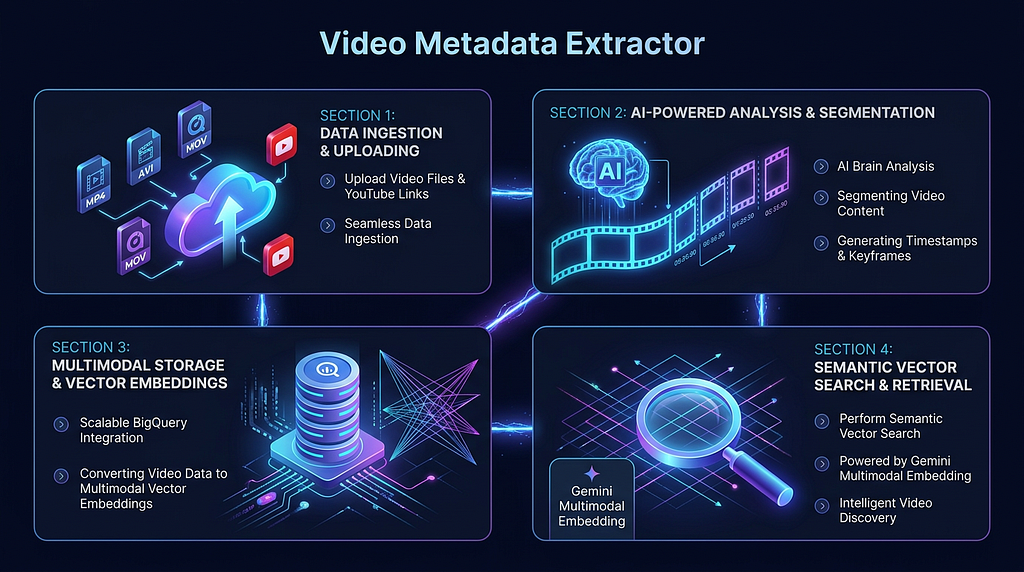
This challenge led to the development of the open-source Video Metadata Extractor sample application, available on GitHub. This project employs a multimodal AI pipeline to process videos, segmenting them into scenes with semantic labels. The resulting metadata is stored in a vector database, enabling search capabilities via natural language text or images.
The critical component enabling this semantic retrieval is Google’s newest embedding model, Gemini Embedding 2, which was released on Vertex AI in March 2026.
The Shift from File Deserts to Semantic Indexing
Most traditional video management tools are fundamentally metadata deserts. They can report on your files — size, duration, and date — but they have no understanding of the content inside the videos.
The solution is conceptually straightforward: every scene in a video should be treated as a row in a database. This scene gets a semantic type, a timestamp range, a natural language description, and a vector fingerprint to capture its meaning. Indexing your entire library this way suddenly allows you to search it with the ease of any other database query.
The pipeline operates in three distinct stages:
Stage 1: Scene Understanding with Gemini 3.1 Pro
First, the video is passed to Gemini 3.1 Pro, which automatically segments it into coherent scenes. For each segment, the model returns a type (e.g., Hook, Action, Comedic Beat), a timestamp, and a natural language summary.
The most powerful feature at this stage is behavioral prompt injection. You can attach a custom instruction to any video upload, telling the model exactly what domain-specific features to identify.
- A sports team might instruct the model to “identify moments where the ball crosses the goal line”.
- A content creator may use “find scenes with high comedic energy”.
- A safety reviewer can prompt it to “flag any graphic or policy-violating content”.
This means the infrastructure remains the same, but the prompt itself serves as the business logic, providing a completely different analytical lens.
Stage 2: Embedding with Gemini Embedding 2
Each scene, including its summary, thumbnail, and audio context, is then passed to gemini-embedding-2-preview. This maps the scene into a 3,072-dimensional vector.
The breakthrough of this model is the unified space for all modalities. Text, images, video, and audio all embed into the same geometry. This is why a query like “crowd celebrating in the rain” will land in vector space adjacent to a matching video clip. Cross-modal retrieval works instantly, eliminating the need for complex alignment hacks
Stage 3: Storage and Search with BigQuery
The resulting vectors and metadata are stored in BigQuery, which features native VECTOR_SEARCH support. This allows queries to run a cosine similarity check across your entire library in milliseconds.
For local development without a GCP project, the system conveniently falls back to SQLite, offering full semantic search capabilities without requiring cloud deployment.
Why Gemini Embedding 2 Changes the Game
Before unified models, building reliable cross-modal search was a significant technical challenge, often requiring separate text and image embedding models with a subsequent layer to align the results. Gemini Embedding 2 resolves this at the model level.
Key differentiators include:
- Unified Multimodal Space: Text, images, video, audio, and even PDFs all share the same 3,072-dimensional geometry.
- Custom Task Instructions: You can specify the embedding’s purpose; retrieval, classification, or clustering; and the model adapts its output. Using RETRIEVAL_DOCUMENT for indexing and RETRIEVAL_QUERY for searching yields a marked improvement in result quality.
- Audio Extraction from Video: The model processes both the visuals and the audio track when indexing a video clip, ensuring scene embeddings capture what was heard as well as what was seen.
- MRL Support: Matryoshka Representation Learning (MRL) support means you can generate efficient, flexible-sized vectors. These vectors can be truncated to smaller sizes without significantly affecting accuracy.
Searching the Indexed Library
Once your video assets are indexed, the dashboard provides two powerful ways to retrieve content, leveraging the unified embedding space:
- Text Search: Type in a natural language description and receive a ranked list of matching scenes, complete with the source video, timestamp, scene type, and a similarity score.
- Image Search: Upload a reference frame, a screenshot, or even a mood board. The system embeds the image query in the same vector space as the indexed scenes and returns semantically similar moments. You are searching by meaning, not by matching pixels.
Real-World Applications
The design of the Video Metadata Extractor is domain-agnostic; the same pipeline that surfaces comedic beats for a creative director can flag safety violations for a moderation team.
Scenarios where this solution provides immediate, significant time savings:
- Short-Form Repurposing: Automatically surfaces “Hook” scenes and precise clip timestamps for platforms like TikTok or Reels, bypassing the need for manual review of the full video.
- Archival Retrieval: News and documentary teams can query years of accumulated B-roll footage using a simple sentence instead of endlessly scrolling through files.
- Sports Highlights: Prompt the model to detect key plays across hours of multi-camera feeds, yielding accurate timestamps in seconds.
- Content Moderation: Sensitive scenes are flagged with exact timestamps, ensuring human reviewers only need to watch the identified, flagged moments, rather than the entire video.
The underlying principle is clear: human review is not scalable, but AI indexing is.
Getting Started
For Local Setup, you can get the system running with a single command:
make start-all
This command handles dependency installation, BigQuery schema initialization, and spins up the FastAPI backend and Next.js frontend. The dashboard will be accessible at http://localhost:3000.
For Cloud Run Deployment, use the following commands:
chmod +x deploy_cloudrun.sh
./deploy_cloudrun.sh
The volume of video footage being produced is only increasing as generation costs fall. Soon, the ability to semantically index and retrieve that footage will shift from a competitive edge to a fundamental infrastructure requirement; just as database indexing is today.
Links
- GitHub: Video Metadata Extractor
- Vertex AI Gemini models
- Gemini Embedding 2 docs Vertex AI
- Sunil Kumar on LinkedIn
Building a Multimodal Search Pipeline to Query Video Footage Scene-by-Scene with Gemini Embedding 2 was originally published in Google Cloud – Community on Medium, where people are continuing the conversation by highlighting and responding to this story.
Source Credit: https://medium.com/google-cloud/building-a-multimodal-search-pipeline-to-query-video-footage-scene-by-scene-with-gemini-embedding-2-c96dc2010ab5?source=rss—-e52cf94d98af—4
About the Author