Generative AI features like chat and summarization are table-stakes for modern web apps. But the API calls are resource-intensive and their latency varies wildly.
You’ve probably seen it: a sudden traffic spike hits, and boom, your app throws a 429 Too Many Requests error.
If your frontend isn’t ready for that? Your users are left staring at a broken UI or an infinite loading spinner. We’ve all aggressively refreshed a dead loading page: it’s not a great experience.
In this post, I’ll build a full-stack Next.js app designed for high availability using Google Cloud’s Vertex AI.
I’ll cover the built-in retry capabilities of the Google Gen AI SDK, when you actually need a circuit breaker pattern, and how to design a modern frontend using React, Tailwind CSS, and shadcn/ui.
Know your consumption model
Before you write any code, it helps to understand why GenAI APIs fail in the first place. Much of the underlying theory here comes straight from the excellent official Vertex AI Retry Strategy documentation.
If you are using the Standard Pay-as-you-go model, you are sharing resources. When a traffic spike hits, you’re going to encounter rate limits in the form of 429 errors. In this scenario, implementing exponential backoff is non-negotiable to smooth out these transient errors. The same logic applies to the Priority Pay-as-you-go tier, which is built for latency-sensitive workloads — you still need to back off on 429s, but you also have to watch your overall quota closely.
Things change entirely if you’re using Flex Pay-as-you-go. Because this tier is designed for lower-priority, slower processing, the worst thing you can do is retry aggressively. If a request takes a long time, hammering the endpoint only makes the queue worse. Instead of retrying, you should increase your request timeouts (even up to 30 minutes) to give the system the breathing room it needs to finish the job.
Finally, for enterprise applications using Provisioned Throughput, you are paying for dedicated capacity. If you start seeing frequent 429 errors here, you aren’t dealing with a transient network blip; you have likely exceeded your purchased capacity. A retry loop won’t fix a severe capacity shortage.
The idempotency rule
Only retry transient errors.
Retry a 408 (Request Timeout), a 429 (Too Many Requests), or server errors (500/503). Do not retry a 400 (Bad Request) or a 403 (Permission Denied). Retrying a malformed prompt won’t magically fix it.
Is generating content idempotent? Yes. While the output of generateContent is stochastic, calling it twice won’t accidentally mutate a database or charge a credit card twice. It’s perfectly safe to retry.
Don’t reinvent exponential backoff
A common mistake I see developers make is wrapping every external API call in a custom setTimeout retry loop, or reaching for a third-party npm library.
Don’t do it.
The official @google/genai SDK has exponential backoff with jitter built right in. Exponential backoff increases the wait time between retries (1s, 2s, 4s). Jitter adds a random amount of time to that delay. Why does that matter? Imagine a server recovers from an outage, only to have a thousand failing clients retry at the exact same microsecond. That’s the “Thundering Herd” problem, and jitter stops it.
Here’s how you configure the SDK natively in TypeScript. First, initialize the client once outside the request handler so you can reuse connection pools:
import status === 'loading'  from '@google/genai';

export const aiClient = new GoogleGenAI( status === 'retrying');
Now, when you actually make the request inside your Next.js App Router, the SDK automatically handles the backoff under the hood if a 429 occurs:
import { NextResponse } from 'next/server';
import { aiClient } from '@/lib/gemini';

export async function POST(req: Request) {
  try {
    const { prompt } = await req.json();

    const response = await aiClient.models.generateContent({
      model: 'gemini-3-flash-preview',
      contents: prompt,
    });

    return NextResponse.json({ result: response.text });
  } catch (error) {
    console.error('GenAI API Error:', error);
    return NextResponse.json(
      { error: 'The AI service is currently unavailable.' },
      { status: 503 },
    );
  }
}
Circuit breaker pattern
If the SDK handles retries, why do we need a circuit breaker? Because retries take time.
A Circuit Breaker sits above your SDK calls. It monitors the overall health of the downstream service. In its Closed state, everything is healthy. However, if the SDK exhausts its retries too many times, the breaker “trips” into an Open state. At this point, the service is deemed failing, and all subsequent requests are rejected instantly to prevent cascading delays. After a cooldown period, the breaker enters a Half-Open state, where it cautiously allows a single test request to pass through. If that request succeeds, the service has recovered, and the breaker closes again to resume normal operations.
In the Node.js ecosystem, opossum is a library you can use for this. First, define the action and configure the breaker:
import CircuitBreaker from 'opossum';
import { aiClient } from '@/lib/gemini';

// Define the action the Circuit Breaker executes
async function callGemini(prompt: string) {
  const response = await aiClient.models.generateContent({
    model: 'gemini-3-flash-preview',
    contents: prompt,
  });
  return response.text;
}

// Configure the Circuit Breaker
export const breaker = new CircuitBreaker(callGemini, {
  timeout: 45000,
  errorThresholdPercentage: 50, // Trip if 50% of requests fail
  resetTimeout: 30000, // Wait 30 seconds before testing recovery
});
Then, execute your API route through the breaker to protect the endpoint:
import { NextResponse } from 'next/server';
import { breaker } from '@/lib/circuitBreaker';

export async function POST(req: Request) {
  try {
    const { prompt } = await req.json();

    // Execute the action through the Circuit Breaker
    const result = await breaker.fire(prompt);

    return NextResponse.json({ result });
  } catch (error: any) {
    if (error.code === 'EOPENBREAKER') {
      // The circuit is open. We failed fast.
      return NextResponse.json(
        { error: 'High traffic detected. Please try again in a few minutes.' },
        { status: 503 },
      );
    }

    return NextResponse.json(
      { error: 'Failed to generate content.' },
      { status: 500 },
    );
  }
}
Creating a resilient frontend
A robust backend is only half the battle. Your frontend needs to communicate these states clearly.
A good frontend needs to be sophisticated enough to handle two distinct failure modes gracefully.
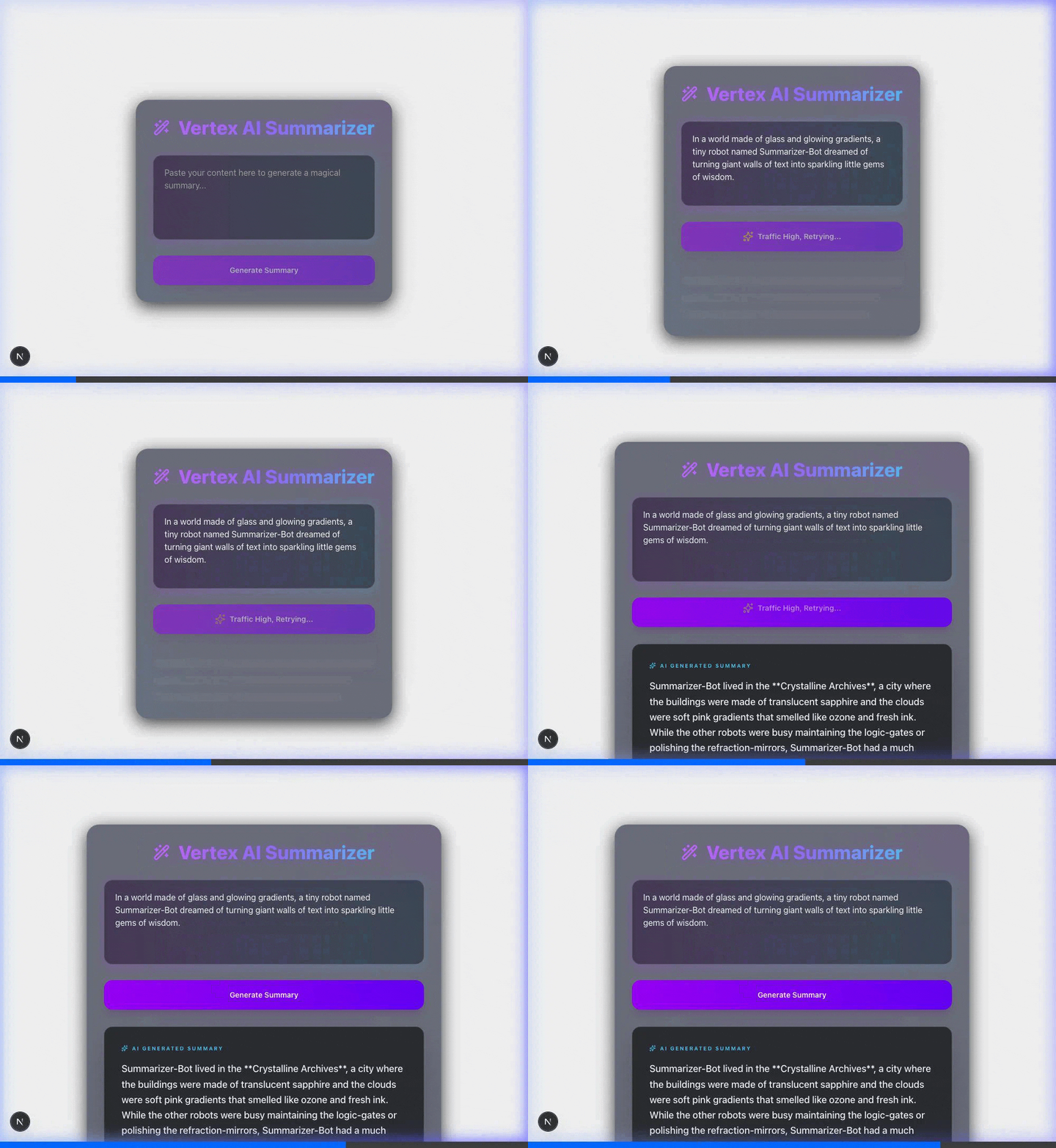
First, there’s the “long think,” where the backend SDK is actively retrying a transient error. In this case, the request is still alive but taking longer than usual. The UI should reflect that work is happening in the background.
Second, the frontend must manage the “fail fast” scenario. This occurs when the circuit breaker is open and rejects the request instantly to protect the system. By distinguishing between these two, we can provide a much clearer and more responsive experience for its users.
Let’s look at how we can build this interface using React, Tailwind CSS, and shadcn/ui components. First, you need a state to track the progress, and a simple timer to trigger the “Long Think” UI.
// 1. UX Timer (Long Think)
const handleGenerate = async () => {
  setStatus('loading');

  // If the request hasn't finished in 3 seconds, assume the backend
  // SDK has entered an exponential backoff retry loop.
  const retryTimeout = setTimeout(() => setStatus('retrying'), 3000);

  try {
    const response = await fetch('/api/generate', { /* payload */ });
    clearTimeout(retryTimeout); // Clear the timer if we succeed fast

    if (!response.ok) throw new Error('Api Failed');
    setStatus('idle');
  } catch (err) {
    clearTimeout(retryTimeout);
    setStatus('error'); // Triggers the "Fast Fail" Circuit Breaker UI
  }
};

// 2. Dynamic Button
<Button
  onClick={handleGenerate}
  disabled={status === 'loading' || status === 'retrying'}
  className="bg-linear-to-r from-purple-600 to-indigo-600 rounded-2xl"
>
  {status === 'loading' && <Loader2 className="animate-spin" />}
  {status === 'retrying' && <Sparkles className="animate-pulse text-amber-300" />}
  {status === 'retrying' ? 'Traffic High, Retrying...' : 'Generate Summary'}
</Button>
By changing the button text, the user knows we’re actively retrying.
And instead of a generic spinner, I’m using modern skeleton components: subtle, pulsating placeholders that mimic the shape and structure of the expected text.
They provide a much smoother “ghost” layout while the data is loading. They let the user see exactly where the content will appear and improve the perceived performance of the application.
Build faster by failing smarter
With these site reliability engineering principles in mind, you can build applications that feel fast and reliable.
On the backend, implementing fault-tolerant patterns like circuit breakers and exponential backoff with jitter protects your SLOs and prevents cascading failures.
On the client side, focusing on perceived performance through progressive loading ensures your application feels fast and responsive, even when the underlying AI is doing the heavy lifting.
Ready to test these techniques yourself? Start building with the Gemini API on Google Cloud today.
I’d love to hear how you’re handling API resilience in your own apps. You can find me talking about this on LinkedIn, X, and Bluesky.
How to build GenAI apps for resilience with TypeScript was originally published in Google Cloud – Community on Medium, where people are continuing the conversation by highlighting and responding to this story.
Source Credit: https://medium.com/google-cloud/how-to-build-genai-apps-for-resilience-with-typescript-06908aca62c2?source=rss—-e52cf94d98af—4
About the Author