In my previous post, we looked at how to break down the silos between SAP and analytics teams by moving data into Google Cloud. But even with perfect structured data, there is a limit to what a row in a table can tell you.
Consider a high-volume consumer goods operation — like a frozen food manufacturer — managing thousands of customer return claims. While SAP records the financial transaction, the “truth” of why a product failed is often buried in unstructured documents, such as a customer-uploaded photo. Verifying these claims requires manual inspection to distinguish between different types of issues, such as a crushed box or a “thermal stress” failure where the product melted in transit. When you are processing thousands of these returns a day, manual verification is a bottleneck.
Some of the most critical business insights aren’t stored in a database — they are trapped in photos, PDFs, and sensor logs. Today, we are taking the next step: giving your SAP data a pair of eyes. By using BQML and Gemini, we can now perform evidence-based quality audits on physical products using nothing but the SQL your team already speaks.
Bridging the Gap: Getting SAP Data into BigQuery
To automate a visual audit, we have to merge two very different worlds: the unstructured evidence found in a customer’s photo and the structured context found in your SAP digital core. Before our AI can reason through a photo, it needs a rock-solid data foundation to stand on.
Building on the integration strategies we’ve established, there are several ways to bring critical SAP data into BigQuery, for example:
- Google BigQuery Toolkit: A development kit based on the ABAP SDK for Google Cloud. While this is technically an ETL process, it is a powerful, ABAP-native way to push data directly into BigQuery while maintaining SAP security and governance.
- The upcoming Delta Share connector between SAP Business Data Cloud (BDC) and BigQuery: This represents our strategic new partnership with SAP. It allows us to share SAP data and metadata using the Delta Share protocol. The advantage here is significant: we can access the data without physically storing a second copy, enabling a more live, federated approach to analytics.
Building the Foundation: SAP Views
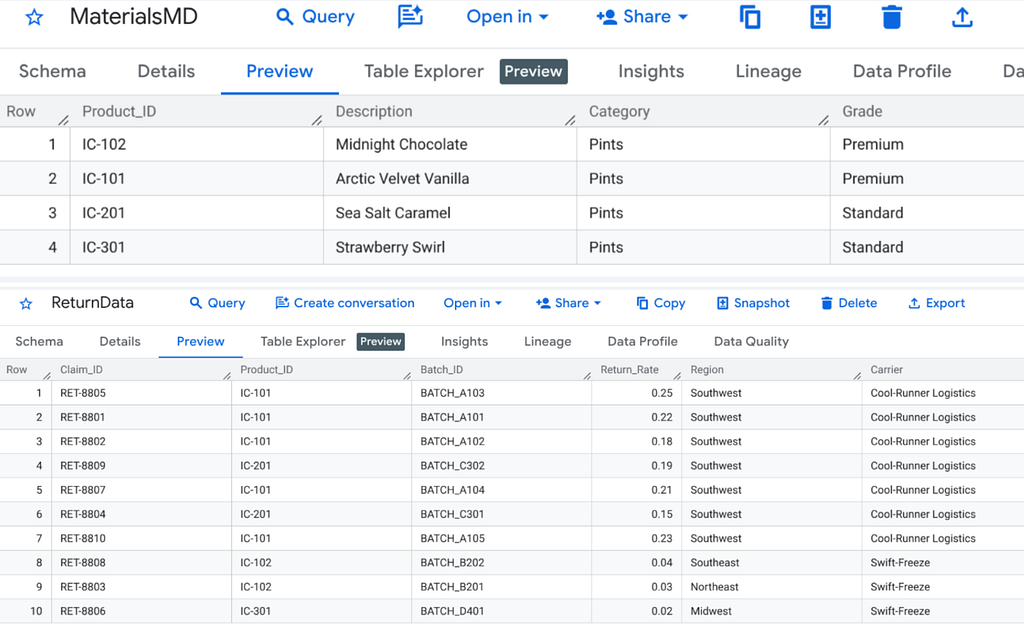
Once the data is accessible, we create semantic views that represent our business entities — so called data products. In this demonstration, we rely on two key views: MaterialsMD (Material Master Data) and ReturnData (Transactional Claims). Depending on your architecture, these joins can happen on the SAP side via SAP BDC — with the resulting delta shared with BigQuery — or modeled directly within BigQuery.
For instance, our MaterialsMD view joins general material data (MARA) with descriptions (MAKT) to provide human-readable context. Our ReturnData view aggregates sales header (VBAK) and item data (VBAP) for return orders, enriched with batch IDs and carrier information.
- Example: Creating MaterialsMD from mirrored SAP tables
CREATE VIEW `IceCreamClaims.MaterialsMD` AS
SELECT
 m.MATNR AS Product_ID,
 t.MAKTX AS Description,
 m.MATKL AS Category,
 'Standard' AS Grade
FROM `sap_raw.MARA` m
JOIN `sap_raw.MAKT` t ON m.MATNR = t.MATNR
WHERE t.SPRAS = 'E';
Here is the content of the MaterialsMD and ReturnData tables used here:
The Visual Component: What the AI Sees
For our audit, we maintain a bucket of customer-uploaded photos. To enable automated reconciliation, the image URIs are structured to include the SAP Batch Number, creating a direct link between our physical evidence and our digital records. This allows the AI to evaluate specific Visual Signatures and map them back to the original SAP return data:
- Thermal Stress (Melted): We look for “geometric shrinkage” — the characteristic dark gap or void between the ice cream and the container wall that occurs after a product melts and refreezes.
- Packaging Damage: We look for structural failure, such as the round rim of a cup being flattened into an oval or side walls buckling.
- Normal/No Damage: Healthy products where the container remains cylindrical and the ice cream fills the container to the edges.
Registering the Evidence: Object Tables
To process these, we use BigQuery Object Tables. This creates a metadata index that treats files in a Cloud Storage bucket as a queryable table without moving the files. We need this because it allows us to query the file path and pass it directly to our AI model alongside our structured SAP data.
CREATE OR REPLACE EXTERNAL TABLE `IceCreamClaims.CustomerPhotos`
WITH CONNECTION `your-connection-id`
OPTIONS (
 object_metadata = 'SIMPLE',
 uris = ['gs://icecreamclaims/*.png']
);
Deploying the Inspector: Gemini via BQML
Next, we register our AI model. We use Gemini 2.5 Flash here because it is exceptionally fast and cost-effective for high-volume visual “spot checks.” Registering the model inside BigQuery allows the SQL engine to handle all communication with the model for us.
CREATE OR REPLACE MODEL `IceCreamClaims.gemini_vision`
REMOTE WITH CONNECTION `your-connection-id`
OPTIONS (endpoint = 'gemini-2.5-flash');
From Automation to Decision Support: The “Evidence Scorecard”
In a real enterprise environment, a simple “Damage Found” or “No Damage Found” often isn’t enough. A Quality Manager needs to know why a verdict was reached to trigger the correct follow-up in SAP — whether that’s a carrier insurance claim or a warehouse audit.
We achieve this using a streamlined, two-layer single SQL query that handles both the data handshake and the AI reasoning in a single pass.
SELECT
  r.Batch_ID,
  m.Description,
  ai_results.result AS Photo_Description,
  ai_results.uri AS Photo_URL
FROM AI.GENERATE_TEXT(
  MODEL `IceCreamClaims.gemini_vision`,
  (
    SELECT *,
      """Analyze this ice cream claim. Provide a concise evaluation.

        Start with: Final verdict: [Probable thermal stress / Probable package damage / Both / No damage]
        Then add: Reasoning:
        Thermal stress: [Max 15 words on melting/shrinkage]
        Package damage: [Max 15 words on structural integrity].""" AS prompt
    FROM `IceCreamClaims.CustomerPhotos`
  ),
  STRUCT(0.5 AS temperature)
) AS ai_results
INNER JOIN `IceCreamClaims.ReturnData` AS r
  ON ai_results.uri LIKE CONCAT('%/', r.Batch_ID, '.%')
INNER JOIN `IceCreamClaims.MaterialsMD` AS m
  ON r.Product_ID = m.Product_ID
Deconstructing the Logic
This query leverages the AI.GENERATE_TEXT syntax to bridge the gap between BigQuery and Vertex AI.
The Integrated Inference: We use a subquery to pair the analysis prompt with every record in the CustomerPhotos table. This creates a streamlined “package” where each image is sent to Gemini with its specific instructions in a single pass.
Object Table: Because we are querying an Object Table, the model consumes the file metadata directly. This removes the need for base64 encoding or complex data movement. The URI serves as the unique identifier that links the physical image to the analytical result.
The Contextual Handshake: The INNER JOIN happens after the AI has generated its verdict. By linking the photo’s URI to the SAP Batch_ID, we stitch the visual evidence back to the digital core. This ensures the Quality Manager sees the AI’s reasoning alongside the material description and batch history.
We are merging structured SAP data, unstructured physical evidence, and AI intelligence within a single, standard SQL statement — effectively removing the traditional requirements for model training, custom python pipelines, or complex embeddings.
The Outcome: Operational Intelligence
This query returns a “Verdict-First” report. For a case of melting, the output looks like this:
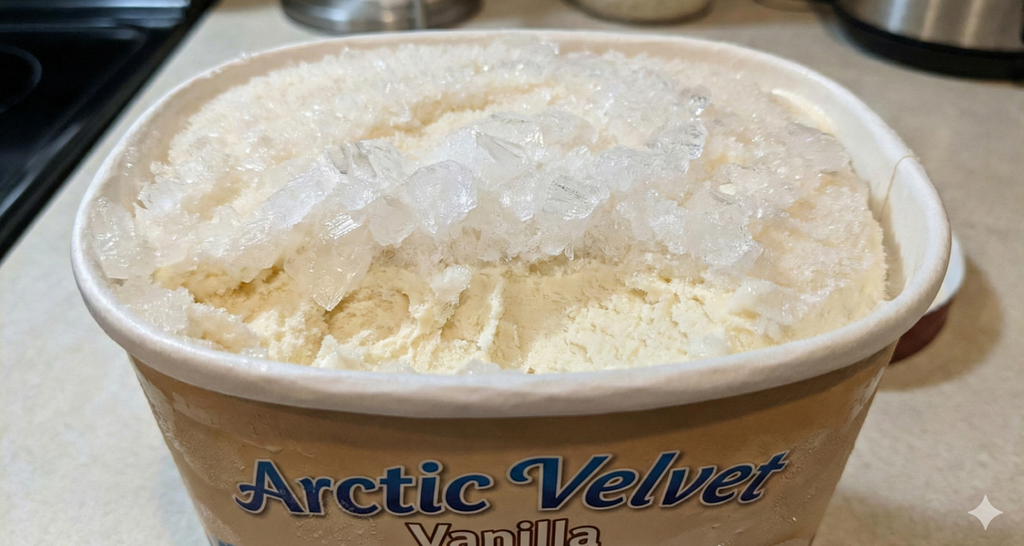
Final verdict: Probable thermal stress
Reasoning:
Thermal stress: Significant ice crystal formation and melting/refreezing are visible on the surface.
Package damage: No visible signs of structural damage to the container.
When surfaced in a dashboard, this allows a Quality Manager to move from manual review to exception-based management. If the verdict flags “Probable Thermal Stress”, they can immediately initiate a batch block in SAP. If it identifies “Package Damage”, they can trigger a targeted investigation into the carrier linked to that specific return record.
Extrapolating the Pattern
This example is just one flavor of what is possible. By moving the AI to the data in BigQuery, we didn’t just save on integration costs; we gained the ability to iterate on our business logic in seconds using SQL.
Whether you are auditing PDF Certificates of Analysis against SAP QM specs or reconciling maintenance photos against SAP PM logs, you are closing the loop between the SAP digital core and the physical world. We aren’t just doing analytics; we are building an autonomous supply chain that can see.
The best way to appreciate the simplicity of this architecture is to see it in action. If you are ready to build a similar multimodal scenario yourself, this hands-on codelab provides concrete, step-by-step instructions on how to bridge structured data and generative AI using the same SQL-first approach we have explored here. Try the Codelab.
SAP + Google Cloud: Unifying Structured and Visual Data via SQL in BigQuery was originally published in Google Cloud – Community on Medium, where people are continuing the conversation by highlighting and responding to this story.
Source Credit: https://medium.com/google-cloud/sap-google-cloud-unifying-structured-and-visual-data-via-sql-in-bigquery-1349ff97a1b5?source=rss—-e52cf94d98af—4
About the Author