The rise of agentic AI has transformed how we interact with LLMs. We’ve moved beyond simple text generation to systems that can plan, reason, and most importantly — execute actions. One of the most powerful capabilities an agent can have is the ability to write and run code. Whether it’s for data analysis, scraping a website, or performing complex calculations, code execution turns Generative AI into Functional AI.
Very quickly, tools empowered AI agents to do much more than just generating content. They evolved into autonomous workers capable of performing complex tasks through discovery, planning and execution (and relentless trial and error).
However, granting an AI the ability to execute arbitrary code on your machine or shared infrastructure is terrifying from a security perspective. How do you prevent the agent from accidentally (or maliciously) deleting files, uploading sensitive information to untrusted services, or consuming infinite compute?
We need an environment where the agent can do whatever it wants, but only inside a sandbox that is isolated from the rest of the system.
BentoRun, a Model Context Protocol (MCP) server designed to solve this exact problem. By leveraging the power of Google Cloud Run and the robust isolation of gVisor, BentoRun provides a secure scalable shared environment for AI-driven code execution.
In this post, we’ll dive deep into how BentoRun works, why we chose gVisor for isolation, and how you can deploy your own instance to supercharge your AI agents.
What is BentoRun?
BentoRun is an open-source example of an MCP server that exposes a tool for executing arbitrary Python code in a secure sandbox. If you’re familiar with the Model Context Protocol, you know it acts as a universal standard for connecting AI models to external tools and data. BentoRun implements this standard to offer a execute_python tool that any MCP-compliant client (like Antigravity, Claude Code, Gemini CLI, or you own agent) can use.
But unlike a simple local Python script, BentoRun executes every request in a fully isolated sandbox.
Key Features:
- Rigorous Isolation: Uses gVisor to create a userspace kernel boundary, ensuring untrusted code cannot compromise the host.
- Session Persistence: While the execution environment is ephemeral, the workspace (files) can be persisted within a session, allowing agents to write code, save data, and then read it in subsequent steps — perfect for iterative debugging or multi-step analysis.
- Controlled Networking: Allows agents to install packages (pip) and fetch data from the internet, but runs within a permissionless container to prevent access to cloud resources.
- Scalable Architecture: Built on Google Cloud Run, it scales to zero when not in use and scales up instantly to handle concurrent agent sessions.
The Secret Sauce: gVisor Integration
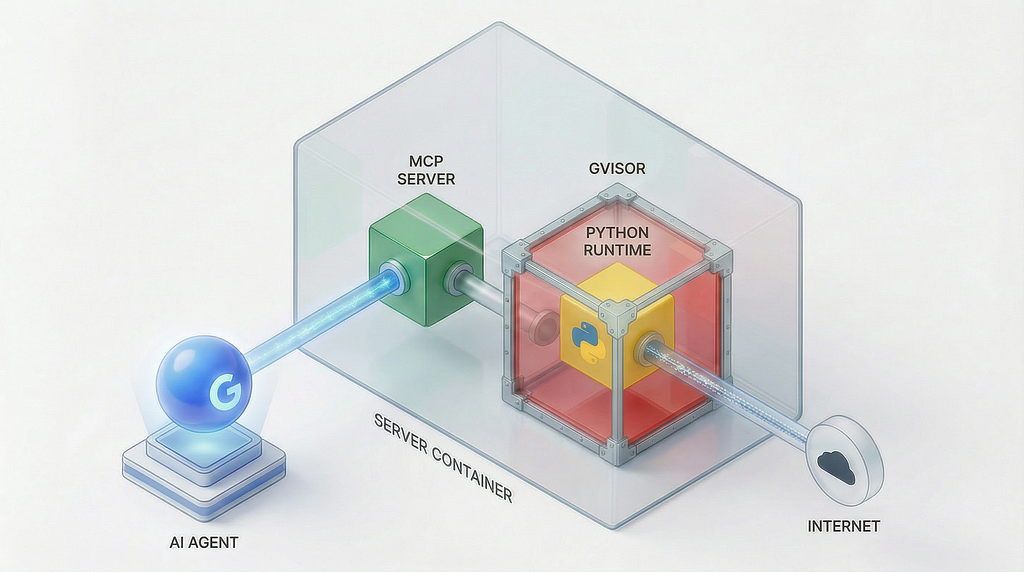
At the heart of BentoRun’s security model is gVisor, an application kernel for containers open-sourced by Google.
Traditional containers (like Docker’s runc) rely on Linux namespaces and cgroups for isolation. While effective for resource management, they share the same host kernel. If a malicious script in a container finds a kernel vulnerability, it can “escape” the container and gain control over the host system. For an AI agent executing unknown code, this risk is unacceptable. You literally don’t know what code the agent will generate. A sophisticated prompt injection attack can trick the LLM into generating malicious code.
What makes gVisor special
gVisor takes a different approach. It intercepts application system calls and handles them in a distinct, user-space kernel called the Sentry.
- Attack Surface Reduction: The application interacts with the Sentry, not the host Linux kernel. The Sentry implements the Linux API but is written in memory-safe Go.
- Defense in Depth: Even if an attacker compromises the application, they are still trapped within the Sentry’s sandbox.
- Filesystem Proxy: File operations are mediated by a separate process called the Gofer, ensuring the sandbox can only access files it is explicitly allowed to see.
By using gVisor, BentoRun provides Deep Defense. The AI’s code runs in a sandbox that is effectively a lightweight virtual machine, but with the startup speed and flexibility of a container.
Architecture Deep Dive
BentoRun is built in Python using FastMCP, and runs on Google Cloud Run.
The Execution Flow:
— MCP Client Request: An AI agent (e.g., in Gemini CLI) sends an execute_python tool call.
— Session Management: BentoRun’s SessionManager identifies the active session. If it’s a new session, it initializes a temporary workspace.
— OCI Bundle Generation: The server dynamically generates an OCI (Open Container Initiative) bundle for the request. This configures:
- Mounts: Read-only system paths (/bin, /lib) and a writable workspace bind-mount.
- Capabilities: Dropping all unnecessary Linux capabilities (no CAP_SYS_ADMIN).
- Resource Limits: Setting strict RAM and CPU limits via rlimit.
— runsc Execution: Instead of using Docker (which would require a heavy Docker-in-Docker setup), BentoRun invokes runsc (the gVisor runtime) directly.
- runsc starts the Sentry process.
- The Sentry loads the Python interpreter.
- The code executes within this isolated kernel.
— Output Streaming: stdout, stderr and certain files are captured and returned to the agent.
This architecture allows BentoRun to execute code inside a Cloud Run container, without needing privileged access to the underlying node or a complex VM setup. It’s “Sandboxes all the way down”: Cloud Run Instance (microVM) -> Application -> runsc (Nested gVisor) -> User Code.
Code Execution Lifecycle
When an agent requests code execution, BentoRun performs a precise choreography to ensure security and performance:
- Script Injection: The Python code from the agent is written to a temporary file (e.g., .script_uuid.py) inside the session’s workspace.
- Credential Injection: If the agent provides Google Cloud credentials (like an access token), BentoRun injects a helper script to monkey-patch google.auth.default(). This ensures that if the user’s code tries to use GCP libraries, it automatically uses the provided ephemeral token without needing complex configuration.
- Async Streaming: The server launches runsc and attaches to its stdout and stderr pipes.
- Artifact Detection: BentoRun monitors a special output/ directory in the workspace. Any file written here (images, dataframes, PDFs) is automatically detected, read, and returned to the agent as a binary resource (image or resource). This allows the agent to generate code that produces files and “see” them immediately.
Example: Building a Research Agent with ADK
To demonstrate the power of BentoRun, let’s look at how we can use it with the Agent Development Kit (ADK).
We’ll define an agent that has access to Google Search (for finding information) and BentoRun (for processing it).
Full ADK sample code is here.
# ... imports ...
from google.adk.agents import LlmAgent
from google.adk.tools.mcp_tool.mcp_toolset import McpToolset, StreamableHTTPConnectionParams

def get_bentorun_mcp_tools():
    """Connects to the BentoRun MCP Server."""
    server_url = os.getenv("BENTORUN_MCP_URL")
    return McpToolset(
        connection_params=StreamableHTTPConnectionParams(
            url=server_url,
            timeout=30,
            ... # More parameteters here to handle authentication
        ),
    )
# Define the Agent
root_agent = LlmAgent(
    model="gemini-3-flash-preview",
    name='research_agent',
    instruction="""
    You are a researcher.
    1. Search for data on the web.
    2. Write Python code to analyze it and generate a chart.
    3. Save the chart to the `output/` directory.
    """,
    tools=[
        GoogleSearchAgentTool(...),
        get_bentorun_mcp_tools(),
    ],
    # process_artifacts callback handles saving images returned by BentoRun
    after_tool_callback=save_artifacts_callback
)
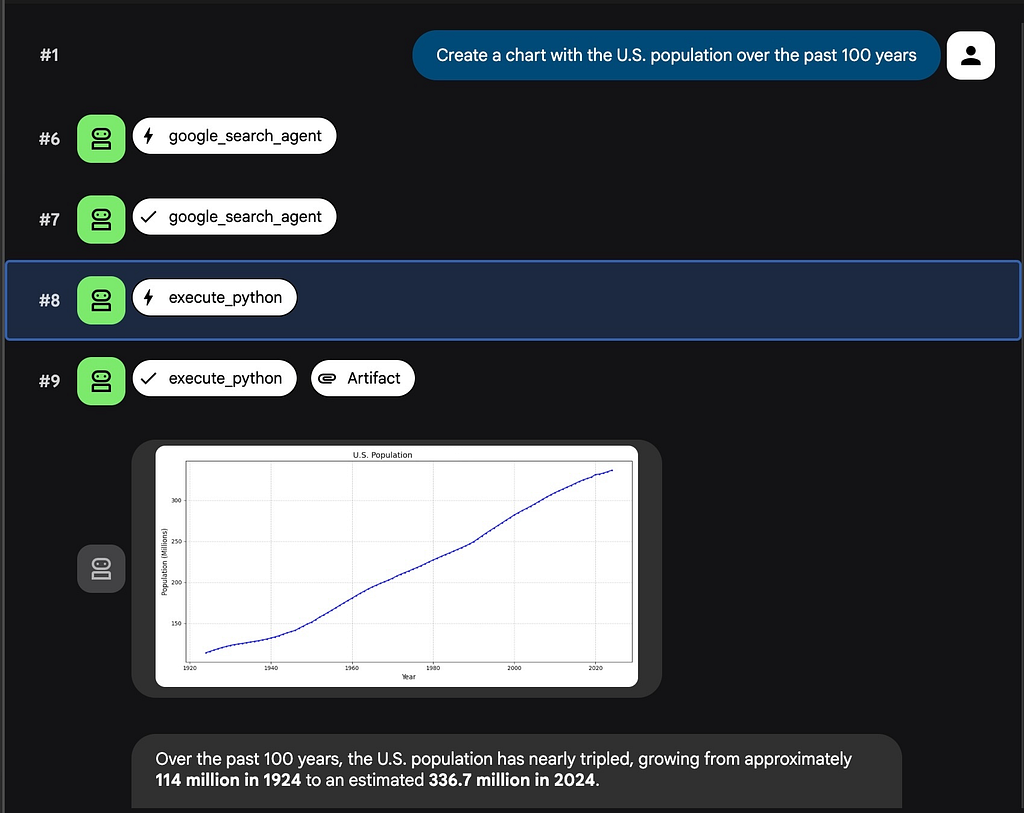
In this flow, if you ask the agent “Create a chart of the U.S. population over the past 100 years.”, the flow will likely be:
- The agent searches for “Create a chart of the U.S. population over the past 100 years.”, and retrieves data sources.
- The agent writes a Python script to execute in BentoRun MCP:
import matplotlib.pyplot as plt

# ... data retrieved from the web using Google Search tool ...

# Sort years and get corresponding population values
years = sorted(data.keys())
populations = [data[year] for year in years]

# Initialize the plot
plt.figure(figsize=(12, 6))
plt.plot(years, populations, marker='o', linestyle='-', color='b', markersize=2)

# Set titles and labels
plt.title('U.S. Population', fontsize=14)
plt.xlabel('Year', fontsize=12)
plt.ylabel('Population (Millions)', fontsize=12)

# Enable grid lines
plt.grid(True, linestyle='--', alpha=0.7)

# Format y-axis to show in millions (e.g., 300 instead of 300,000,000)
plt.gca().get_yaxis().set_major_formatter(plt.FuncFormatter(lambda x, p: format(int(x/1_000_000), ',')))

# Adjust layout and save the chart
plt.tight_layout()
plt.savefig('output/us_population_100_years.png')
print("Chart saved to output/us_population_100_years.png")
- BentoRun executes the code, captures us_population_100_years.png, and returns it.
- The Agent intercepts the image in after_tool_callback, and saves it to the session's artifacts.
- The user sees the chart instantly.
Getting Started
Ready to give your AI agent a secure pair of hands? Deploying BentoRun is straightforward.
Prerequisites
- A Google Cloud Project with billing enabled.
- gcloud CLI installed and authenticated.
Deployment Steps
- Clone the Repository:
git clone https://github.com/vladkol/bentorun.git
cd bentorun
- Configure Environment: Copy env.template to .env and set your Project ID.
cp env.template.env
# Edit .env to set GOOGLE_CLOUD_PROJECT
- Deploy: Run the included deployment script. It handles building the container and deploying to Cloud Run.
./deploy.sh
- This will output your new MCP Server URL (e.g., https://mcp-bentorun-xyz.run.app/mcp).
Usage with Gemini CLI or Claude Code
Our MCP Server in Cloud Run is protected with IAM-based authentication. To be able to use the server, you need:
- Have logged in to gcloud CLI with gcloud auth login.
- Have Cloud Run Invoker (roles/run.invoker) role assigned to your user (if you deployed the server yourself, most likely you already have it).
- Pass your identity token to the MCP server. You can get it by running gcloud auth print-identity-token -q.
To automate the last step, we use mcp-remote MCP proxy tool with a combination of shell commands.
{
  "mcpServers": {
    "bento-run-mcp": {
      "env": {
        "BENTORUN_MCP": "MCP_SERVER_URL"
      },
      "command": "/bin/sh",
      "args": [
        "-c",
        "ID_TOKEN=$(gcloud auth print-identity-token -q) && npx -y mcp-remote --header \"Authorization: Bearer $ID_TOKEN\" $BENTORUN_MCP"
      ]
    }
  }
}
Replace MCP_SERVER_URL with the URL of the deployed BentoRun MCP Server (e.g https://mcp-bentorun-python-NUMBER.REGION.run.app/mcp). Do not forget to add that “/mcp” at the end.
Now, when you ask your agent to “analyze this data” or “scrape this page,” it can seamlessly offload the Python execution to your secure cloud sandbox.
Conclusion
As we build more autonomous agents, the line between “generating text” and “executing actions” blurs. Security cannot be an afterthought. BentoRun demonstrates that you don’t need to choose between safety and capability. By combining the serverless scalability of Cloud Run with the strict isolation of gVisor, we can give our agents the tools they need to be truly useful, without handing them the keys to the castle.
Check out the code on GitHub and start building safer agents today!
Secure Code Execution for the Age of Autonomous AI Agents was originally published in Google Cloud – Community on Medium, where people are continuing the conversation by highlighting and responding to this story.
Source Credit: https://medium.com/google-cloud/secure-code-execution-for-the-age-of-autonomous-ai-agents-d52e7acd6c5d?source=rss—-e52cf94d98af—4
About the Author