As AI agents become deeply integrated into our development workflows, an architectural debate has emerged: Skills vs. Tools.
When giving an AI agent the ability to interact with external systems (like databases, APIs, or cloud infrastructure), do we stand up a persistent Model Context Protocol (MCP) Server (a “Tool”), or do we teach the agent to execute local scripts and CLI commands (a “Skill”)?
Recently, I set out to test a scenario where I wanted to replace the remote and fully-managed Google Firestore MCP Server with a completely local, dependency-free “Skill” running inside the Gemini CLI.
Let’s see how the experiment unfolded.
Note: I have nothing against the Firestore MCP Server 😊 and have no plans to replace it. I have only used it as an example to see how I could potentially replace a few of its tools with Skills.
The Problem: The Overhead of MCP
The Model Context Protocol (MCP) is fantastic. It provides a standardized way for AI models to interact with data sources. However there is this debate about letting agents load all the tools of the MCP Servers that are configured in it, resulting in tool bloat, overuse of token, etc.
What if we could look at something lighter? Could we replicate the entire functionality using a local “Skill” (a markdown file instructing the LLM on what to do) combined with native CLI commands?
The Premise: The gcloud Limitation
First up, let us see what the Google Managed Firestore MCP Server provides in terms of the tools:
🟢 firestore-mcp - Ready (14 tools)
  Tools:
  - add_document
  - create_database
  - delete_database
  - delete_document
  - delete_index
  - get_database
  - get_document
  - get_index
  - list_collections
  - list_databases
  - list_documents
  - list_indexes
  - update_database
  - update_document
My first thought was to instruct the agent to use the native Google Cloud CLI (gcloud) for the commands given above.
A quick investigation revealed a roadblock:
Control Plane (Admin): gcloud firestore databases command works perfectly for managing database instances.
Data Plane (CRUD): gcloud does not support reading, writing, or querying individual Firestore documents.
To manipulate data, the agent would have to write raw curl commands against the complex Firestore REST API, or generate ad-hoc Node/Python scripts on the fly. Generating scripts on the fly consumes massive amounts of LLM context window and introduces the nightmare of managing dependencies on the host machine.
I have not explored the Firebase CLI, so I apologize upfront if there are commands that Firebase CLI provides and my experiment of trying out Go binaries is nullified.
Additionally, I am not trying to replicate every single command that the Firestore MCP Server provides at the moment.
Go Binaries as Tools
If dynamic scripts are too slow and context-heavy, and MCP servers require too much overhead, what is the middle ground? Could I use pre-compiled Go binaries?
By writing the Firestore operations as tiny Go programs, we possibly address the following problems:
- Zero Dependencies: Go compiles down to a single, statically linked binary. No node_modules required on the host machine.
- Instant Execution: Unlike Python or Node, Go binaries have virtually zero “cold start” boot time.
- Shell Safe: The agent just runs ./bin/fs-data — action add — data ‘{“name”: “Alice”}’.
I decided to build two tiny Go CLIs: one for the Control Plane (fs-admin) and one for the Data Plane (fs-data), and then write a SKILL.mdfile to teach the AI how to use them.
Step-by-Step Guide: Building the Go-Powered Firestore Skill
Here is exactly how you can replicate this setup in your own workspace.
Step 1: Initialize the Go Module
Create a dedicated directory for your skill and initialize a Go module.
mkdir -p firestore-skill/cmd/fs-admin firestore-skill/cmd/fs-data
cd firestore-skill
go mod init firestore-skill
Step 2: Build the Control Plane (fs-admin)
Create the file firestore-skill/cmd/fs-admin/main.go. This script uses the Google Cloud Admin SDK to list and get database details.
package main

import (
 "context"
 "flag"
 "fmt"
 "log"
 "os"

 apiv1 "cloud.google.com/go/firestore/apiv1/admin"
 adminpb "cloud.google.com/go/firestore/apiv1/admin/adminpb"
)

func main() {
 // Parse command line flags
 action := flag.String("action", "list-databases", "Admin action to perform: list-databases, get-database")
 projectID := flag.String("project", "", "GCP Project ID")
 databaseID := flag.String("database", "", "Firestore Database ID (required for get-database)")
 flag.Parse()

 // Fallback to environment variable if flag is not provided
 if *projectID == "" {
  *projectID = os.Getenv("GOOGLE_CLOUD_PROJECT")
  if *projectID == "" {
   log.Fatal("Error: Must provide --project flag or set GOOGLE_CLOUD_PROJECT environment variable")
  }
 }

 ctx := context.Background()

 // Initialize the Firestore Admin Client
 client, err := apiv1.NewFirestoreAdminClient(ctx)
 if err != nil {
  log.Fatalf("Failed to create admin client: %v", err)
 }
 defer client.Close()

 // Route based on the action
 switch *action {
 case "list-databases":
  listDatabases(ctx, client, *projectID)
 case "get-database":
  if *databaseID == "" {
   log.Fatal("Error: Must provide --database flag for get-database action")
  }
  getDatabase(ctx, client, *projectID, *databaseID)
 default:
  log.Fatalf("Unknown action: %s", *action)
 }
}

func listDatabases(ctx context.Context, client *apiv1.FirestoreAdminClient, projectID string) {
 req := &adminpb.ListDatabasesRequest{
  Parent: fmt.Sprintf("projects/%s", projectID),
 }

 resp, err := client.ListDatabases(ctx, req)
 if err != nil {
  log.Fatalf("Failed to list databases: %v", err)
 }

 fmt.Printf("Databases for project: %s\n", projectID)
 fmt.Println("--------------------------------------------------")

 if len(resp.Databases) == 0 {
  fmt.Println("No databases found.")
  return
 }

 for _, db := range resp.Databases {
  fmt.Printf("Name: %s\n", db.Name)
  fmt.Printf("Type: %v\n", db.Type)
  fmt.Printf("Location: %s\n", db.LocationId)
  fmt.Println("---")
 }
}

func getDatabase(ctx context.Context, client *apiv1.FirestoreAdminClient, projectID, databaseID string) {
 req := &adminpb.GetDatabaseRequest{
  Name: fmt.Sprintf("projects/%s/databases/%s", projectID, databaseID),
 }

 db, err := client.GetDatabase(ctx, req)
 if err != nil {
  log.Fatalf("Failed to get database: %v", err)
 }

 fmt.Printf("Database Details:\n")
 fmt.Println("--------------------------------------------------")
 fmt.Printf("Name: %s\n", db.Name)
 fmt.Printf("UID: %s\n", db.Uid)
 fmt.Printf("Type: %v\n", db.Type)
 fmt.Printf("Location: %s\n", db.LocationId)
 fmt.Printf("Concurrency Mode: %v\n", db.ConcurrencyMode)
 fmt.Printf("App Engine Integration: %v\n", db.AppEngineIntegrationMode)
 fmt.Printf("Delete Protection: %v\n", db.DeleteProtectionState)
}
Step 3: Build the Data Plane (fs-data)
Create the file firestore-skill/cmd/fs-data/main.go. This handles all our CRUD operations. Notice how we use Go’s encoding/json to safely parse data passed from the LLM.
package main

import (
 "context"
 "encoding/json"
 "flag"
 "fmt"
 "log"
 "os"
 "strings"

 "cloud.google.com/go/firestore"
 "google.golang.org/api/iterator"
)

func main() {
 action := flag.String("action", "", "Data action to perform: add, get, update, delete, list-docs, list-collections")
 projectID := flag.String("project", "", "GCP Project ID")
 databaseID := flag.String("database", "(default)", "Firestore Database ID")
 collection := flag.String("collection", "", "Firestore Collection ID (optional for root list-collections)")
 docID := flag.String("doc", "", "Firestore Document ID (optional for add, list-docs, list-collections)")
 data := flag.String("data", "", "JSON data for the document (required for add, update)")

 flag.Parse()

 if *action == "" {
  log.Fatal("Error: Must provide --action flag (e.g., add, get, update, delete, list-docs, list-collections)")
 }

 if *projectID == "" {
  *projectID = os.Getenv("GOOGLE_CLOUD_PROJECT")
  if *projectID == "" {
   log.Fatal("Error: Must provide --project flag or set GOOGLE_CLOUD_PROJECT")
  }
 }

 ctx := context.Background()
 client, err := firestore.NewClientWithDatabase(ctx, *projectID, *databaseID)
 if err != nil {
  log.Fatalf("Failed to create client: %v", err)
 }
 defer client.Close()

 switch *action {
 case "add":
  requireCollection(*collection)
  addDocument(ctx, client, *collection, *docID, *data)
 case "get":
  requireCollection(*collection)
  requireDoc(*docID)
  getDocument(ctx, client, *collection, *docID)
 case "update":
  requireCollection(*collection)
  requireDoc(*docID)
  updateDocument(ctx, client, *collection, *docID, *data)
 case "delete":
  requireCollection(*collection)
  requireDoc(*docID)
  deleteDocument(ctx, client, *collection, *docID)
 case "list-docs":
  requireCollection(*collection)
  listDocuments(ctx, client, *collection)
 case "list-collections":
  listCollections(ctx, client, *collection, *docID)
 default:
  log.Fatalf("Unknown action: %s", *action)
 }
}

func requireCollection(c string) {
 if c == "" {
  log.Fatal("Error: --collection flag is required for this action")
 }
}

func requireDoc(d string) {
 if d == "" {
  log.Fatal("Error: --doc flag is required for this action")
 }
}

func addDocument(ctx context.Context, client *firestore.Client, collection, docID, dataStr string) {
 if dataStr == "" {
  log.Fatal("Error: --data flag is required for add action")
 }

 var data map[string]interface{}
 err := json.Unmarshal([]byte(dataStr), &data)
 if err != nil {
  log.Fatalf("Failed to parse JSON data: %v", err)
 }

 var ref *firestore.DocumentRef
 var res *firestore.WriteResult

 if docID == "" {
  ref, res, err = client.Collection(collection).Add(ctx, data)
  if err != nil {
   log.Fatalf("Failed to add document: %v", err)
  }
  fmt.Printf("Successfully added document with generated ID: %s\n", ref.ID)
 } else {
  ref = client.Collection(collection).Doc(docID)
  res, err = ref.Set(ctx, data)
  if err != nil {
   log.Fatalf("Failed to set document: %v", err)
  }
  fmt.Printf("Successfully set document with ID: %s\n", ref.ID)
 }
 fmt.Printf("Update time: %v\n", res.UpdateTime)
}

func getDocument(ctx context.Context, client *firestore.Client, collection, docID string) {
 docsnap, err := client.Collection(collection).Doc(docID).Get(ctx)
 if err != nil {
  log.Fatalf("Failed to get document: %v", err)
 }

 data := docsnap.Data()
 jsonData, err := json.MarshalIndent(data, "", "  ")
 if err != nil {
  log.Fatalf("Failed to marshal document data to JSON: %v", err)
 }

 fmt.Printf("Document Data (ID: %s):\n%s\n", docsnap.Ref.ID, string(jsonData))
}

func updateDocument(ctx context.Context, client *firestore.Client, collection, docID, dataStr string) {
 if dataStr == "" {
  log.Fatal("Error: --data flag is required for update action")
 }

 var data map[string]interface{}
 err := json.Unmarshal([]byte(dataStr), &data)
 if err != nil {
  log.Fatalf("Failed to parse JSON data: %v", err)
 }

 // Using Set with MergeAll to act as an update that merges with existing data
 ref := client.Collection(collection).Doc(docID)
 res, err := ref.Set(ctx, data, firestore.MergeAll)
 if err != nil {
  log.Fatalf("Failed to update document: %v", err)
 }

 fmt.Printf("Successfully updated document with ID: %s\n", ref.ID)
 fmt.Printf("Update time: %v\n", res.UpdateTime)
}

func deleteDocument(ctx context.Context, client *firestore.Client, collection, docID string) {
 ref := client.Collection(collection).Doc(docID)
 _, err := ref.Delete(ctx)
 if err != nil {
  log.Fatalf("Failed to delete document: %v", err)
 }
 fmt.Printf("Successfully deleted document with ID: %s\n", ref.ID)
}

func listDocuments(ctx context.Context, client *firestore.Client, collection string) {
 iter := client.Collection(collection).Documents(ctx)

 fmt.Printf("Documents in collection: %s\n", collection)
 fmt.Println(strings.Repeat("-", 40))

 count := 0
 for {
  doc, err := iter.Next()
  if err == iterator.Done {
   break
  }
  if err != nil {
   log.Fatalf("Failed to iterate documents: %v", err)
  }

  jsonData, _ := json.Marshal(doc.Data())
  fmt.Printf("ID: %s | Data: %s\n", doc.Ref.ID, string(jsonData))
  count++
 }
 fmt.Printf("\nTotal documents: %d\n", count)
}

func listCollections(ctx context.Context, client *firestore.Client, collection, docID string) {
 var iter *firestore.CollectionIterator

 if collection == "" {
  // List root collections
  iter = client.Collections(ctx)
  fmt.Println("Root Collections:")
 } else if docID != "" {
  // List subcollections of a specific document
  iter = client.Collection(collection).Doc(docID).Collections(ctx)
  fmt.Printf("Subcollections for document %s/%s:\n", collection, docID)
 } else {
  log.Fatalf("Error: To list subcollections, you must provide both --collection and --doc")
 }

 fmt.Println(strings.Repeat("-", 40))

 count := 0
 for {
  coll, err := iter.Next()
  if err == iterator.Done {
   break
  }
  if err != nil {
   log.Fatalf("Failed to iterate collections: %v", err)
  }
  fmt.Printf("- %s\n", coll.ID)
  count++
 }

 if count == 0 {
  fmt.Println("No collections found.")
 }
}
Step 4: Compile the Binaries
Run go mod tidy to fetch the Google Cloud SDKs, then build the binaries:
cd firestore-skill
go mod tidy
go build -o bin/fs-admin ./cmd/fs-admin
go build -o bin/fs-data ./cmd/fs-data
You now have two incredibly fast, standalone CLI tools in your bin/ folder.
Step 5: Write the SKILL.md (The AI Prompt)
Finally, we need to teach our AI agent how to use these new tools. In the firestore-skill directory, create a SKILL.md file. This acts as the prompt boundary for the LLM.
---
name: local-firestore
description: A fast, lightweight, and dependency-free alternative to the standard firestore-mcp server.
---
# local-firestore

A fast, lightweight, and dependency-free alternative to the standard `firestore-mcp` server.
It uses pre-compiled Go binaries to provide instantaneous interactions with Google Cloud Firestore Control Plane and Data Plane directly from the terminal.

## Instructions for Gemini CLI

When the user asks to read, write, or manage Firestore databases, you MUST use the `run_shell_command` tool to execute the appropriate Go binary located in the `firestore-skill/bin` directory.

### Control Plane (`fs-admin`)

Use `fs-admin` to manage database instances.

**List all databases in a project:**
```bash
./firestore-skill/bin/fs-admin --action list-databases --project [PROJECT_ID]
```

**Get details for a specific database:**
```bash
./firestore-skill/bin/fs-admin --action get-database --database [DATABASE_ID] --project [PROJECT_ID]
```

### Data Plane (`fs-data`)

Use `fs-data` to manage documents and collections.

*Note: The `--project` flag will default to the `$GOOGLE_CLOUD_PROJECT` environment variable if omitted. The `--database` flag defaults to `(default)`.*

**List all root collections:**
```bash
./firestore-skill/bin/fs-data --action list-collections
```

**List all subcollections under a specific document:**
```bash
./firestore-skill/bin/fs-data --action list-collections --collection [COLLECTION_ID] --doc [DOC_ID]
```

**List all documents in a collection:**
```bash
./firestore-skill/bin/fs-data --action list-docs --collection [COLLECTION_ID]
```

**Get a specific document:**
```bash
./firestore-skill/bin/fs-data --action get --collection [COLLECTION_ID] --doc [DOC_ID]
```

**Add a new document (Auto-generates ID if `--doc` is omitted):**
```bash
./firestore-skill/bin/fs-data --action add --collection [COLLECTION_ID] --doc [OPTIONAL_DOC_ID] --data '{"key": "value"}'
```

**Update/Merge an existing document:**
```bash
./firestore-skill/bin/fs-data --action update --collection [COLLECTION_ID] --doc [DOC_ID] --data '{"key_to_update": "new_value"}'
```

**Delete a document:**
```bash
./firestore-skill/bin/fs-data --action delete --collection [COLLECTION_ID] --doc [DOC_ID]
```

## Important Notes on Quoting
When passing JSON to the `--data` flag via `run_shell_command`, wrap the entire JSON string in **single quotes** (`'`) to ensure bash processes it correctly without evaluating double quotes inside the JSON.
Install the Skill
Assuming that you are in the parent folder that contains the firestore-skill folder, you can install the skill locally into Gemini CLI via the gemini skills install command. Give the following command:
gemini skills install ./firestore-skill
This should install the skill and if you launch gemini and then try the skills list command, you should see the skill listed. A sample listing from my environment is shown below:
 > /skills list
▄▄▄▄▄▄▄▄▄▄▄▄▄▄▄▄▄▄▄▄▄▄▄▄▄▄▄▄▄▄▄▄▄▄▄▄▄▄▄▄▄▄▄▄▄▄▄▄▄▄▄▄▄▄▄▄▄▄▄▄▄▄▄▄▄▄▄▄▄▄▄▄▄▄▄▄▄▄▄▄▄▄▄▄▄▄▄▄▄▄▄▄▄▄▄▄▄▄▄▄▄▄▄▄▄▄▄▄▄▄▄▄▄▄▄▄▄▄▄▄▄▄▄▄▄▄▄▄▄▄▄▄▄▄▄▄▄▄▄▄
Available Agent Skills:

  - local-firestore
      A fast, lightweight, and dependency-free alternative to the standard firestore-mcp server.
  - <other skills>
Testing the Skill
To test your new Go-powered Firestore Skill, you can use the following sample prompts. These are designed to trigger the run_shell_commandtool using the logic defined in your SKILL.md.
Control Plane (Admin) Tests
These prompts test the fs-admin binary to ensure the agent can discover and inspect your database infrastructure.
List all databases:
Using the local firestore skill, list all the databases in my project.
Get specific database details
Check the details of the ‘(default)’ database using the fs-admin tool in the firestore-skill directory.
Data Plane (CRUD) Tests
These prompts test the fs-data binary. Notice how the agent must handle JSON strings and shell quoting.
Create/Set a document
Use the local firestore skill to create a document in a collection called ‘blog-test’ with the ID ‘post-1’. Set the data to {“title”: “My First Post”, “views”: 0, “tags”: [“go”, “ai”]}.
Retrieve a document
Fetch the data for the document ‘post-1’ in the ‘blog-test’ collection using the fs-data binary.
Update/Merge data
Update the ‘post-1’ document in ‘blog-test’. Change the ‘views’ to 10 and add a new field status: “published”. Use the update action to merge the data.
List documents in a collection
Show me a list of all documents currently in the ‘blog-test’ collection.
Discovery & Subcollections
These prompts test the agent’s ability to navigate the hierarchy of your database.
List root collections
List all the root-level collections in my Firestore database using the local skill.
List subcollections
Check if the document ‘post-1’ in the ‘blog-test’ collection has any subcollections. Use the list-collections action.
Cleanup
Delete a document
I’m done with the test. Delete the document ‘post-1’ from the ‘blog-test’ collection using the local firestore skill.
Pro-Tip for Verification
When you run these prompts, watch the tool call output in the Gemini CLI.
You should see it executing a command like:
./firestore-skill/bin/fs-data — action add — collection blog-test — doc post-1 — data ‘{“title”: “My First Post”, “views”: 0, “tags”: [“go”, “ai”]}’
If the agent says it “can’t find the tool,” remind it:
The binaries are located in ./firestore-skill/bin/. You may need to compile them first if they aren’t there. (I have already compiled them for you, so it should work out of the box!)
In Summary
By utilizing Go binaries triggered by a markdown-based skill, we aimed to replicate the same functionality as a dedicated MCP server.
Via this approach:
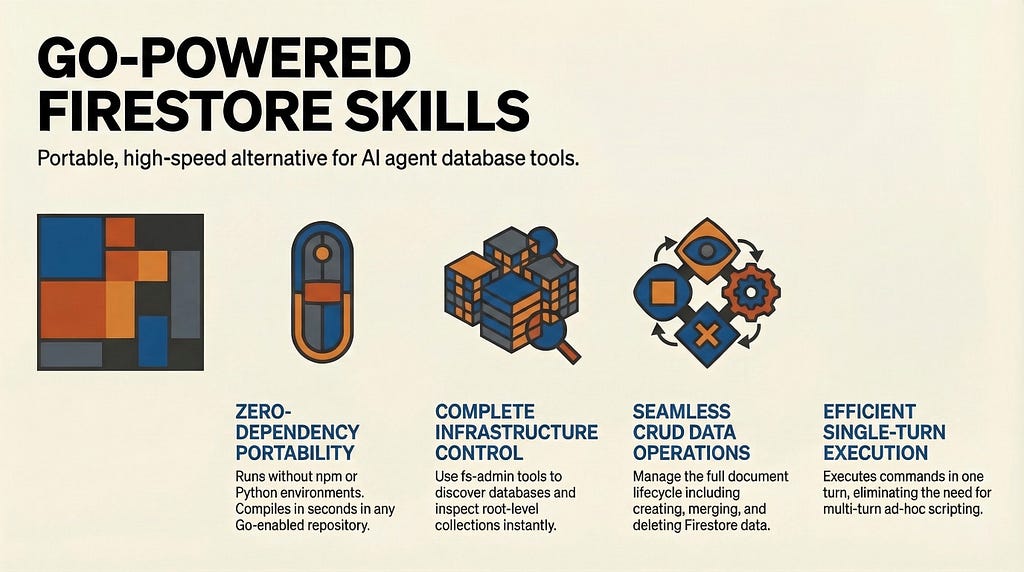
- We can drop this skill folder into any repository. If Go is installed, it compiles in seconds and runs without the need for any npm install or Python virtual environments.
- The agent only needs one turn to execute a command, compared to the multiple turns required to write and execute ad-hoc scripts.
I still believe that tools are essential and a strict typing leads favourably to several scenarios. While the skills approach looks portable, it might have trouble scaling to centrally managed environments that would like to control how to work with agents.
This approach was more of an exercise to see what is possible and folks that are more experienced in this area can give their inputs to help us understand better.
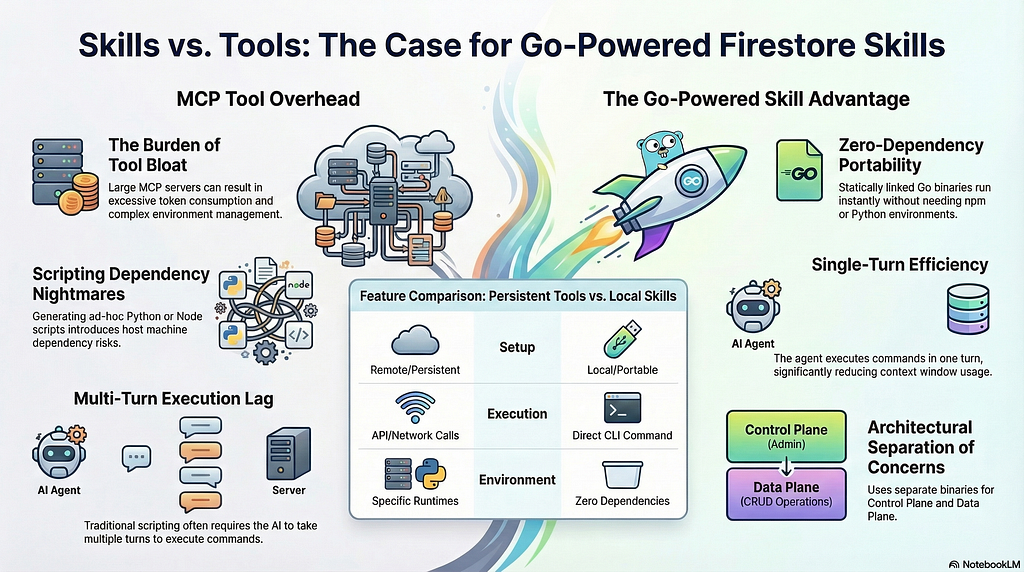
Infographic
Here is an infographic (courtesy NotebookLM) that summarizes the article.
Skills vs. Tools: Replacing the Google Firestore MCP Server with Skills (+ Go Binaries) was originally published in Google Cloud – Community on Medium, where people are continuing the conversation by highlighting and responding to this story.
Source Credit: https://medium.com/google-cloud/skills-vs-tools-replacing-the-google-firestore-mcp-server-with-skills-go-binaries-b190aa48966c?source=rss—-e52cf94d98af—4
About the Author