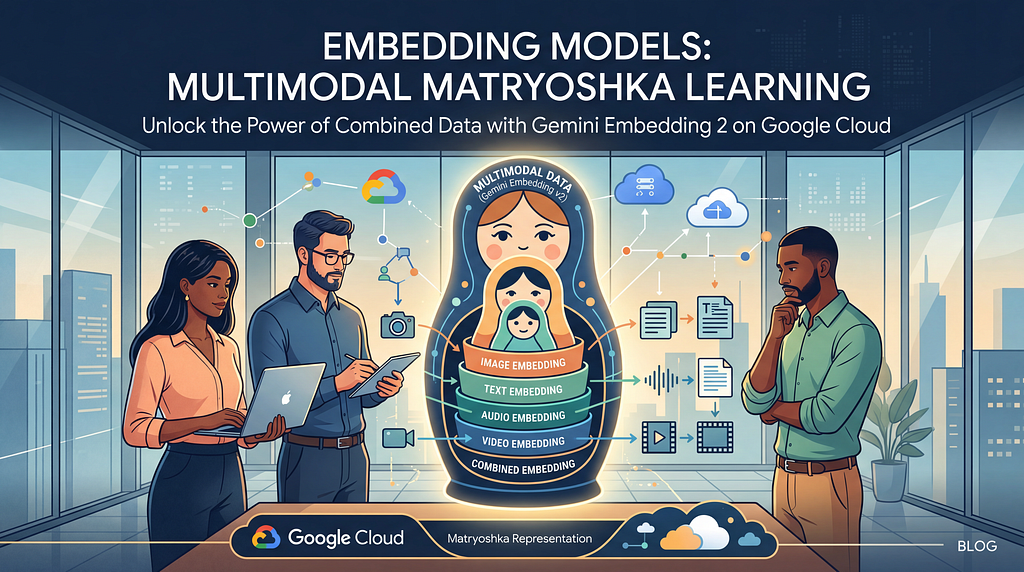
Embedding models typically understand one thing at a time. Text goes into one model. Images into another. And then audio requires a transcription step.
If you want to make all of that data searchable together, you need to manually stitch it together. Even then, you might miss subtle interconnections across the data types.
Gemini Embedding 2 is now in preview, and it collapses that entire stack into a single API call.
What’s new in Gemini Embedding 2
gemini-embedding-2-preview is Google’s first “natively” multimodal embedding model.
Previous multimodal embedding approaches such as CLIP typically pair a vision encoder with a text encoder and then align them with contrastive learning. Because separate encoders align the data at the end of the process, they miss out on the deep cross-modal connections formed when modalities interact in the network’s intermediate layers.
Gemini Embedding 2 is built on the Gemini foundation model itself, inheriting its multimodal understanding from the ground up. Text, images, video, audio, and documents are projected into a single joint embedding space through a shared transformer architecture. The model processes:
- Text with up to 8,192 input tokens: that’s a 4x increase over the previous 2,048 limit
- Images up to 6 per request, in PNG or JPEG
- Video up to 120 seconds, in MP4 or MOV
- Audio natively, without intermediate transcription
- Documents as PDFs, up to 6 pages
The part that really matters is that you can send interleaved modalities in a single request. An image alongside its text caption. A video clip with a spoken narration. The model captures the relationships between modalities in that combined input, producing a single embedding that represents the joint meaning.
Pick your dimension, keep your quality
If you’ve worked with embeddings in production, you know there is a trade-off between vector quality and infrastructure cost. Higher dimensions capture more nuance, but also drive higher memory and storage requirements.
Matryoshka Representation Learning (MRL) solves this by restructuring how the model encodes information during training. Rather than distributing the semantic signal uniformly across all 3,072 dimensions, the model’s default output, MRL forces the most important information into the earliest dimensions. The training loss is computed simultaneously across multiple nested sub-dimensions (say, 768, 1536, 3072), so the model learns a coarse-to-fine hierarchy.
https://medium.com/media/bf8e26b1e8d0a4b9419f02b0e7ae6ea6/href
The practical result is that you can truncate the vector and still get strong performance. Just pass in an output_dimensionality parameter:
from google import genai
from google.genai import types

client = genai.Client()

result = client.models.embed_content(
    model="gemini-embedding-2-preview",
    contents="What is the meaning of life?",
    config=types.EmbedContentConfig(output_dimensionality=768)
)
One thing to keep in mind: dimensions below 3072 aren’t normalized by default. You’ll want to normalize them yourself before computing similarities, or you’ll get distorted distance metrics. The embeddings documentation walks through this.
By the way, MRL also gives you a powerful two-stage retrieval pattern. In the first pass, you can use smaller vectors (say 256 dimensions) to quickly pull the top k candidates from your index. In the second pass, you can re-rank those candidates against the full 3072 dimension vectors fetched from slower storage. That gives you the accuracy of a large model with the latency profile of a tiny one.
What to expect when you migrate
The reality is that switching embedding models means re-indexing your data. Vectors from gemini-embedding-001, text-embedding-005, or any other model live in a different coordinate space than vectors from gemini-embedding-2-preview. You can’t mix them in the same index or compare them with any distance metric.
You also need to watch out for similarity threshold drift. Every embedding model distributes vectors differently across the latent space, so the cosine similarity scores your RAG pipeline relies on for filtering will shift (e.g. from 0.6 to 0.7). You’ll need to recalibrate those thresholds through A/B testing against your evaluation data before cutting over.
The migration playbook
For teams with existing embedding infrastructure, here’s the approach I’d recommend:
- Shadow index first. Keep your production system running on the current model. In parallel, run a background job that re-embeds your corpus through gemini-embedding-2-preview into a separate index. Use the Batch API for this. You’ll get higher throughput at half the cost.
- A/B test on live traffic. Once your shadow index is populated, split production queries between the old and new indices. Firebase A/B Testing makes this straightforward — use a Remote Config parameter like embedding_index to control which retrieval endpoint each user hits, and let Firebase handle the traffic split and statistical analysis. Compare results using retrieval quality metrics and human evaluation on a sampled subset. This is where you’ll recalibrate your similarity thresholds and hybrid search weights.
- Roll out gradually. 5% → 20% → 50% → 100%. If your retrieval service runs on GKE or Cloud Run, canary deployments with Google Cloud Deploy make this traffic-shifting smoother. Only deprecate the old index after the new one has been stable under full production load for at least a week.
For new projects: just start here
If you’re building something from scratch, the decision is straightforward. Use gemini-embedding-2-preview. Start with 768 dimensions. Scale up to 1536 or 3072 if your retrieval benchmarks demand it.
For your vector store, AlloyDB with the pgvector extension is a great choice. You get vector search alongside your relational data, and the embedding output is a standard float array regardless of whether the input was text, an image, or a video clip. AlloyDB’s ScaNN index adds tree-quantization and automatic dimension reduction, compounding the storage savings from MRL.
Use task types at embedding time. This is easy to overlook, but important for quality. Setting task_type to RETRIEVAL_DOCUMENT when indexing and RETRIEVAL_QUERY when searching tells the model to optimize its output for that asymmetric retrieval pattern. There are eight task types covering classification, clustering, semantic similarity, and more.
The biggest advantage of starting on Gemini Embedding 2 today is the multimodal foundation you’ll start with. Even if your first phase only indexes text, you can ingest images, audio, video, and PDFs into the same index without re-architecting anything. That’s the kind of forward-compatibility that saves you a migration down the road.
Start building
The Gemini Embedding 2 intro notebook walks through text, image, and multimodal embedding with working code you can run in Colab. The Vertex AI documentation covers API limits, pricing tiers, and integration patterns. And the announcement blog from Google gives the full picture of what’s new and where this is heading.
Embeddings don’t always get the same attention as the generative models that sit on top of them, but they’re the essential layer that determines whether your AI system retrieves the right information. Upgrading that layer is one of the highest-leverage things you can do. I’d love to hear what you’re building with it: find me on LinkedIn, X, or Bluesky and let’s compare notes!
What you need to know about the Gemini Embedding 2 model was originally published in Google Cloud – Community on Medium, where people are continuing the conversation by highlighting and responding to this story.
Source Credit: https://medium.com/google-cloud/what-you-need-to-know-about-the-gemini-embedding-2-model-c7721a89a067?source=rss—-e52cf94d98af—4
About the Author