Networking Considerations
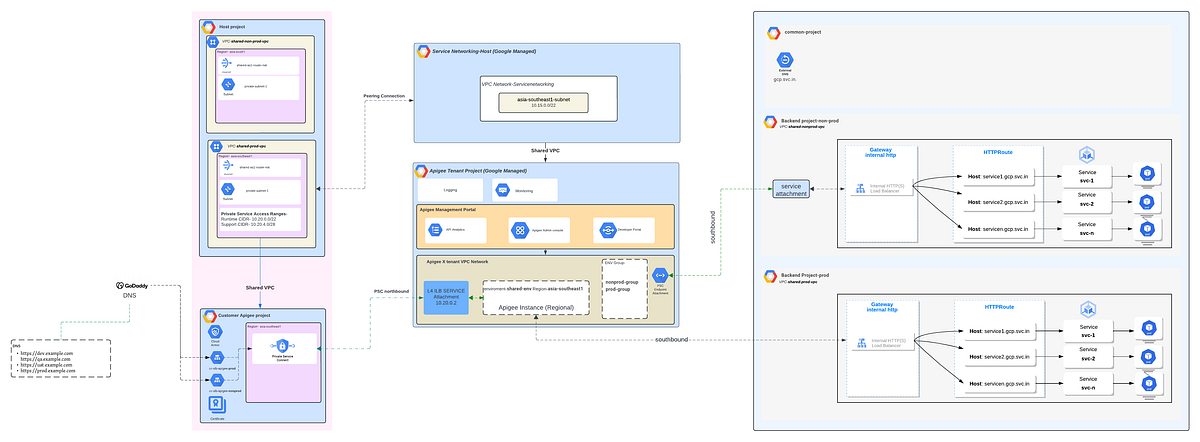
We have two VPC’s one is Prod (prod-vpc) and another for non-prod (non-prod vpc).The Apigee instance is deploying under prod-vpc which means workloads deployed in prod has direct communication between Apigee Instance and Backend Services whereas for non-prod there is no direct communication so here we have three options lets talk which will work here.
- VPC Peering for Apigee X the transitive peering is especially challenging because the Apigee X tenant project is peered with the customer project meaning that any additional peering to the customer project e.g for a backend service will face the transitive peering problem. Hence this option is out of picture.
- VPN as a replacement for the second peering connection to the backend or from the consumer to the hub VPC. But its costly solution.
- Private Service connect to make a backend service that is running in non-prod VPC available and consume it from prod-vpc VPC by apigee .This solutions looks feasible considering cost effective solution.
Target Endpoints (Backends)
We have a setup with over 250 services spread across two GCP projects — one for non-prod and the other for prod. Each project operates within its own VPC, and these services are running on GKE clusters exposed by internal load balancers via the GKE Gateway. Why the gateway? Because with services spanning multiple namespaces, GKE Gateway is the ideal choice over traditional GKE ingress!
Now, here’s where it gets interesting: our non-prod services need to act as the backends for Apigee, which is deployed in the prod VPC. To bridge this, we’ll set up Private Service Connect (PSC), allowing the internal load balancers in the non-prod VPC to be published as private services, which Apigee in the Apigee project can then consume. This setup will provide Apigee with endpoints that are accessible within the prod VPC.

When you create an endpoint attachment, you get a 7.X.X.X IP address for Apigee to access your non-prod backend. But remembering IPs is a hassle, right? That’s where DNS records come in — mapping easy-to-remember domain names to endpoints simplifies communication. Since Apigee runs in a Google-managed project, these DNS records need to be in a public DNS zone to ensure smooth connectivity across environments.
Note: In your Apigee organization, you can create up to 10 endpoint attachments, each corresponding to a service attachment.
Now that we’ve covered the infra setup for enabling communication between the prod and non-prod backends, let’s move on to the exciting part — setting up API proxies using the backends we just created!
With 250 services but only 50 Apigee proxies available, we’re innovating with a strategy to maximize efficiency. Instead of a one-to-one mapping, we’re grouping 5 services per Apigee proxy, each using conditional proxy endpoints and distinct target endpoints. This clever setup lets us route traffic based on specific sub-paths, so each proxy smartly directs requests to the right service.
It’s like having a multipurpose switchboard — one proxy handles multiple services, routing requests precisely where they need to go without needing 250 individual proxies. This approach optimizes proxy use, keeps things organized , and ensures smooth routing with just a handful of proxies!
/api
default


svc-1
(proxy.pathsuffix MatchesPath "/services/path1/**") AND (request.header.host Matches "dev.example.com")


svc-2
(proxy.pathsuffix MatchesPath "/services/path2/**") AND (request.header.host Matches "dev.example.com")


svc-3
(proxy.pathsuffix MatchesPath "/services/path3/**") AND (request.header.host Matches "dev.example.com")


svc-4
(proxy.pathsuffix MatchesPath "/services/path4/**") AND (request.header.host Matches "dev.example.com")


svc-5
(proxy.pathsuffix MatchesPath "/services/path5/**") AND (request.header.host Matches "dev.example.com")
Refer to the GitHub repository for detailed proxy configuration.
Summary of Key Points:
- We covered the setup of Apigee infrastructure when backends are in a different VPC from the Apigee-deployed VPC, and how using a single Apigee instance can help keep costs effective.
- We explored setting up proxies with conditional routing, particularly when there’s a limited number of proxies — like in my case, with a PAYG intermediate setup and 50 proxies.

Source Credit: https://medium.com/google-cloud/designing-and-implementing-apigee-infrastructure-and-proxies-on-gcp-a-detailed-case-study-28cbc920063d?source=rss—-e52cf94d98af—4
About the Author