

From Scripts to Stories: Preserving Developer Flow with MCP Prompts
Written by: Twisha Bansal, Software Engineer @ Google (Linkedin)
The cursor blinked, a steady, rhythmic pulse. Alex was in the zone. That rare, magical state of flow where the code just writes itself. She was gliding through the new feature for FoodieFind, the distraction-free interface of Antigravity IDE making the complex logic feel almost weightless. Nothing could break her focus.
Ping.
A high-priority ticket notification flashed in the corner of her screen.
Subject: URGENT — VIP User’s review is missing!
Alex sighed. The zone shattered.
She knew the drill. This was the start of a 15-minute detour. The flow state was already a distant memory.
She opens the agent tab in Antigravity and gets to her investigation.
“Okay,” she muttered to herself,
“First, find the user’s ID.”
Please get the user id for my user jane.d@example.com
One ID found.
Now, the restaurant ID.
Find the restaurant ID for 'The Corner Bistro'
Another ID found.
Now find the review by user_id=123 for restaurant_id=456.
She stared at the raw row of data returned.
Now she asks the agent to analyze the data.
Analyze the results from the final tool call. Examine the `is_published`
and `moderation_status` fields and explain the review's status to the
user in a clear, human-readable sentence.
She gets the response:
Your latest review for 'The Corner Bistro' is currently not published
because it is in a pending manual review state, meaning a moderator needs
to approve it before it becomes visible.
Ah. The photo moderation service must have flagged it.
The answer was found, but her focus was gone. The elegant feature she was building now seemed like a foreign language.
A Different Timeline
But what if the story went another way? Let’s rewind.
Ping.
The same high-priority ticket. Alex sees it, but this time, she doesn’t sigh. She doesn’t even move her hands from the keyboard.
She knows her Antigravity AI assistant is ready. She simply opens her terminal, ensures her server is running, and calls a premade plan:
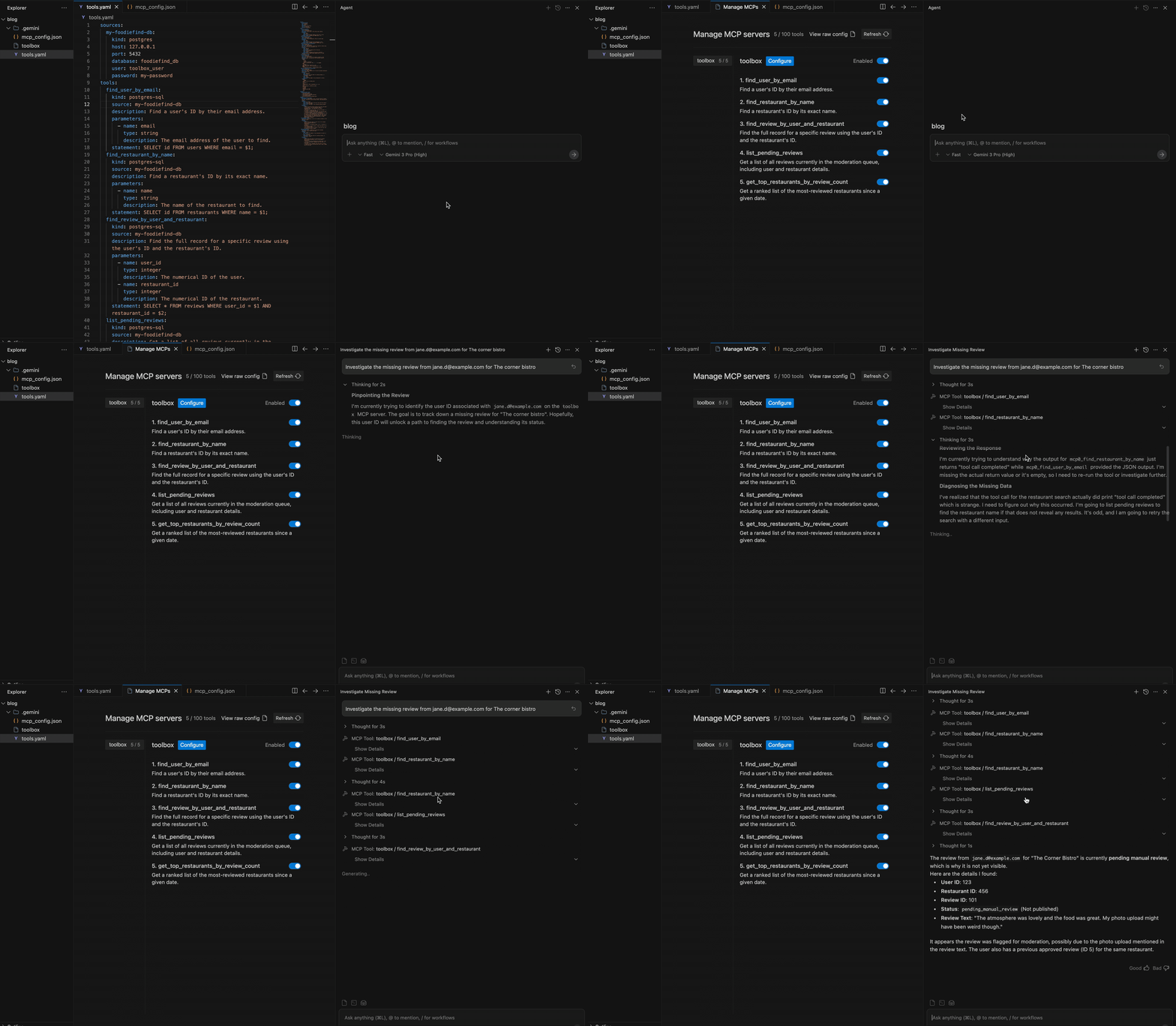
Alex read the response, updated the ticket, and turned back to her code. The cursor was still blinking. The zone was never lost.
The Secret: From a Command to a Conversation
This isn’t a fairy tale. This is the new reality of development with Prompt support in MCP Toolbox.
Alex didn’t run a simple script. She engaged an AI assistant that understood the story of her problem. This was possible because of prompts in MCP Toolbox.
Similar to tools, prompts are a building block of the the Model Context Protocol (MCP); therefore, you aren’t locked into one specific AI agent or tool. Whether you are using the Gemini CLI, Antigravity, Claude Desktop, Cursor or any other MCP-compatible client, your assistant can access these definitions and run them securely.
The Recipe: Anatomy of a Prompt
A prompt is a recipe. It’s a human-readable workflow that you, the developer, write in your tools.yaml. It teaches your AI assistant how to combine simple, secure tools to solve complex problems.
To make this work, you need two things: Tools (the ingredients) and Prompts (the recipe).
First, you define your ingredients: the secure, single-purpose tools:
tools:
  find_user_by_email:
    kind: postgres-sql
    source: my-foodiefind-db
    description: Find a user's ID by their email address.
    parameters:
      - name: email
        type: string
        description: The email address of the user to find.
    statement: SELECT id FROM users WHERE email = $1;
  find_restaurant_by_name:
    kind: postgres-sql
    source: my-foodiefind-db
    description: Find a restaurant's ID by its exact name.
    parameters:
      - name: name
        type: string
        description: The name of the restaurant to find.
    statement: SELECT id FROM restaurants WHERE name = $1;
  find_review_by_user_and_restaurant:
    kind: postgres-sql
    source: my-foodiefind-db
    description: Find the full record for a specific review using the user's ID and the restaurant's ID.
    parameters:
      - name: user_id
        type: integer
        description: The numerical ID of the user.
      - name: restaurant_id
        type: integer
        description: The numerical ID of the restaurant.
    statement: SELECT * FROM reviews WHERE user_id = $1 AND restaurant_id = $2;
Then, you write the recipe. This is the prompt. It’s the story you want the AI to follow.
A prompt entry generally consists of three parts:
- Arguments: The dynamic inputs the user provides (e.g., an email address).
- Description: A high-level objective for the AI.
- Messages: The specific logical steps to take using the tools defined above.
Here is what Alex’s prompt looks like in the YAML file:
prompts:
  investigate_missing_review:
    description: "Investigates a user's missing review by finding the user, restaurant, and the review itself, then analyzing its status."
    arguments:
      - name: "user_email"
        description: "The email of the user who wrote the review."
      - name: "restaurant_name"
        description: "The name of the restaurant being reviewed."
    messages:
      - content: >-
          **Goal:** Find the review written by the user with email '{{.user_email}}' for the restaurant named '{{.restaurant_name}}' and understand its status.
          **Workflow:**
          1. Use the `find_user_by_email` tool with the email '{{.user_email}}' to get the `user_id`.
          2. Use the `find_restaurant_by_name` tool with the name '{{.restaurant_name}}' to get the `restaurant_id`.
          3. Use the `find_review_by_user_and_restaurant` tool with the `user_id` and `restaurant_id` you just found.
          4. Analyze the results from the final tool call. Examine the `is_published` and `moderation_status` fields and explain the review's status to the user in a clear, human-readable sentence.
When Alex typed her query she wasn’t just running a script. She was handing her assistant a playbook and telling it, “Go.”
Your Story, Your Assistant
This is just the beginning. You can create prompts for any workflow, from proactive operational checks to on-demand business insights.
The new prompt support in MCP Toolbox, combined with the conversational power of MCP Clients, allows you to build an AI assistant that knows your story. It understands your app, your data, and your workflows.
It’s time to stop letting tedious tickets break your flow. It’s time to build an assistant that helps you stay in the zone.
Ready to write your own story? Get started today:
- Explore Prompt support in Toolbox.
- Get hands-on with Google’s newest agent in the Antigravity IDE.
- Dive into the MCP Toolbox Github Repo.
Your code is waiting. Don’t let the next issue stop you!
Your Command-Line Companion: A Story of a Smarter CLI was originally published in Google Cloud – Community on Medium, where people are continuing the conversation by highlighting and responding to this story.
Source Credit: https://medium.com/google-cloud/your-command-line-companion-a-story-of-a-smarter-cli-da07e9a545a4?source=rss—-e52cf94d98af—4
About the Author





