
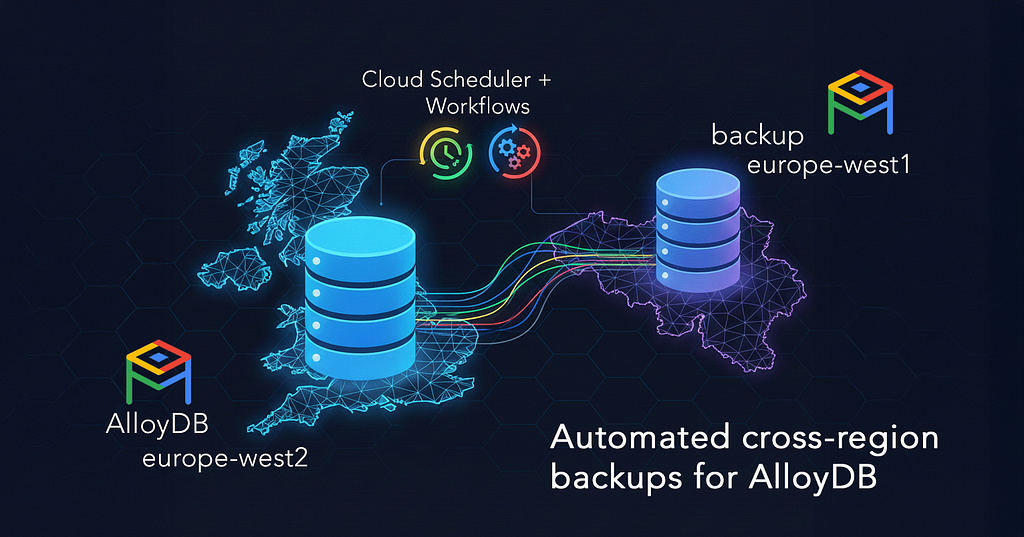
One day, I get a requirement on a project I’m working on:
— Can we have scheduled backups on AlloyDB, like we do on RDS?
— Yes sure, you have out-of-the-box incremental backups so we don’t need to do anything extra. Or we can configure scheduled backups.
— 👍
We configured the same schedule and retention as on AWS RDS and left it at that. Then, a few months later, this message comes:
— Hey team — cross-region backups — do we have those yet in the repo? It looks like AlloyDB is doing backups within-region. Is something else copying those cross-region?
Ah, did we forget to make them cross-region like on RDS?
After a little investigation, I conclude that the scheduled backups on AlloyDB do not, in fact, have an option to save the backup in a different region. Instead, on-demand backups do. But you can’t schedule them.
So what do we do?
TL;DR: Scroll down for the terraform code that configures it all 🤫
Backup Requirements:
- Weekly backup schedule: Saturday 2:00 AM Europe/London timezone
- Cross-regional storage location: europe-west1 (Belgium)
- Retention period: 12 weeks with automatic cleanup
- Geographic redundancy for disaster recovery
We’ll use 3 things:
- The AlloyDB on-demand backup API
- Cloud Workflows
- Cloud Scheduler
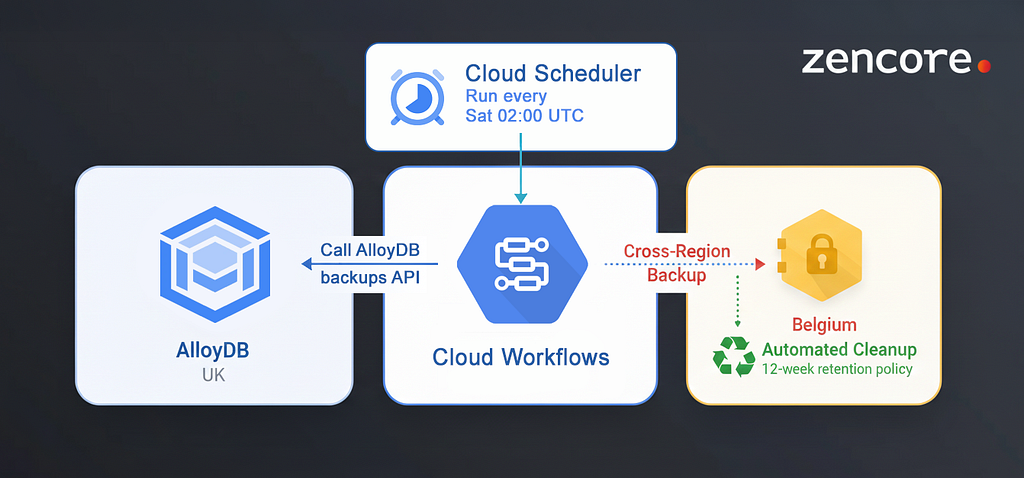
Cloud Scheduler is essentially cron-as-a-service. You can schedule jobs using familiar cron syntax (0 2 * * 6 for “every Saturday at 2 AM”), but instead of running shell scripts on a server, you're triggering HTTP endpoints, Pub/Sub messages, or App Engine tasks. We will be triggering a Cloud Workflows task that calls the AlloyDB on-demand backups API.
Cloud Workflows is an orchestrator. You define your workflow in YAML (though the documentation examples can be… sparse), and it orchestrates calls to different services, handles retries, and can even wait for external events. In our AlloyDB backup scenario, Workflows was the solution to the absent functionality: trigger the backup API, wait for it to complete, check the status, and handle any errors.
Could we have written our own service to handle it? Yep, but then we’d have to maintain the code and whatever runs the service. This particular project didn’t have a Kubernetes cluster, which would have been perfect for the task (just throw in a cron job and be done with it), so cloud-native was the most convenient solution.
The AlloyDB on-demand backups API
Here’s the call to create a backup, called my-alloydb-backup-$(date +%Y%m%d-%H%M%S) (the name needs to be unique) via CLI:
➜ curl -X POST \
  "https://alloydb.googleapis.com/v1beta/projects/my-database-project/locations/europe-west1/backups?backupId=my-alloydb-backup-$(date +%Y%m%d-%H%M%S)" \
  -H "Authorization: Bearer $(gcloud auth print-access-token)" \
  -H "Content-Type: application/json" \
  -d '{
    "clusterName": "projects/my-database-project/locations/europe-west2/clusters/my-alloydb",
    "displayName": "Backup of my-alloydb cluster",
    "description": "Cross-region backup of my-alloydb cluster from europe-west2 to europe-west1",
    "type": "ON_DEMAND"
  }'
You’ll notice that we’re formatting the name of the backup — and its region — in the HTTPs URL, and telling it which cluster to back up in the data.
In the screenshot below, the backup we created with this API call is the second one: we see the Location set to europe-west1, and Type On-demand .

The Cloud Workflows task
I’d never used Cloud Workflows, so I used Claude CLI to write a skeleton for the task, and then — of course — spent a lot of time trying to make it work.
Claude figured that I needed the Workflows HTTP function, and I went through the Workflows samples repo to familiarise myself with the syntax.
Docs and examples for Cloud Workflows leave much to be desired — for example, this sort of example for HTTP POST is available:
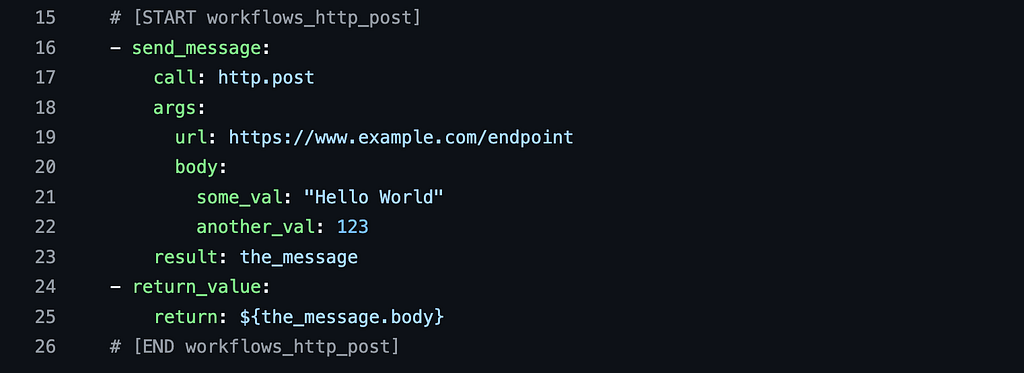
So you need to dig through the docs, feed the API reference to Gemini/Claude/chatGPT and work through a couple of iterations.
Another peculiarity was to figure out how to pass Cloud Workflows variables to the URL argument, and how to do that in Terrafrom, with variables of its own. In short, $${} is the Workflows signal to parse the contents of {} :
# Call a Cloud Workflows function
currentTime: $${sys.now()}

# Use a previously calculated variable and perform a calculation
twelveWeeksAgo: $${currentTime - 7257600}


# Combine text, Terraform variables, and Cloud Workflows functions
url: $${"https://alloydb.googleapis.com/v1beta/.../backups?
   backupId=${var.alloydb_cluster_name}-backup-" + math.floor(sys.now())}
            # 👆Terraform variable               # 👆 Cloud Workflows function
Let’s put the workflow together.
Step 1: Create a backup in the desired location
Here we call the curl from earlier, but using the http.post function:
# Call the on-demand backup API of AlloyDB to create a full backup
# in the var.backup_location region
  - createAlloydbBackup:
      call: http.post
      args:
          url: $${"https://alloydb.googleapis.com/v1beta/projects/${var.project_id}/locations/${var.backup_location}/backups?backupId=${var.alloydb_cluster_name}-backup-" + math.floor(sys.now())}
          auth:
            type: OAuth2
          body:
            clusterName: "${var.alloydb_cluster_name}"
            displayName: "Cross-region backup of the ${var.alloydb_cluster_name} cluster"
            description: "Cross-region backup of ${var.alloydb_cluster_name} cluster from ${var.region} to ${var.backup_location}"
            type: "ON_DEMAND"
Notice the name of the backup in the URL:
?backupId=${var.alloydb_cluster_name}-backup-" + math.floor(sys.now())
math.floor(sys.now()) is the most elegant way to get a URL-compatible timestamp from the functions available in Cloud Workflows. sys.now() returns a floating point value since epoch, so we needed to round it up.
Step 2: Expire old backups
Another limitation of the on-demand backups for AlloyDB is that you can’t set an expiration date for them. Oh well, let’s ask Claude to add a step to the workflow while we’re at it:
  # Get all on demand backups for this cluster
  - listExistingBackups:
      call: http.get
      args:
          url: https://alloydb.googleapis.com/v1beta/projects/${var.project_id}/locations/${var.backup_location}/backups
          auth:
            type: OAuth2
          query:
            filter: clusterName="${var.alloydb_cluster_name}"
      result: listResult
  # Figure out what the timestamp of "12 weeks ago" looks like
  - calculateExpiryDate:
      assign:
        - currentTime: $${sys.now()}
        - twelveWeeksAgo: $${currentTime - 7257600} # 12 weeks in seconds (12 * 7 * 24 * 60 * 60)
  # Delete all backups older than 2 weeks
  - deleteOldBackups:
      parallel:
        # Loop though all backups found in listExistingBackups
        for:
          value: backup
          in: $${listResult.body.backups}
          steps:
            - checkBackupAge:
                switch:
                  # Compare each backup's creation timestamp with twelveWeeksAgo from calculateExpiryDate
                  - condition: $${time.parse(backup.createTime) < twelveWeeksAgo}
                    steps:
                      # Write an INFO log that this backup will be deleted
                      - logStep:
                          call: sys.log
                          args:
                              text: $${"Backup is older than twelve weeks and will be deleted - " + backup.name}
                              severity: INFO
                      # Delete the backup
                      - deleteBackup:
                          call: http.delete
                          args:
                            url: $${"https://alloydb.googleapis.com/v1beta/" + backup.name}
                            auth:
                              type: OAuth2
                          result: deleteResult
IAM: Service Accounts and Permissions
Cloud Workflows doesn’t run as “you” — it needs its own identity to call the AlloyDB API. So we create a dedicated service account specifically for this backup task. Name it after what it does (alloydb-backup-<cluster-name>) so six months from now, when someone's auditing IAM permissions, they'll immediately know what this account is for.
Then we grant it the permissions it needs:
- workflows.invoker so Cloud Scheduler can trigger the Workflow
- alloydb.admin to create and manage backups
- logging.logWriter to write logs of each run into Cloud Logging
- monitoring.metricWriter to write metrics into Cloud Monitoring
The Cloud Scheduler job
The Cloud Scheduler job will orchestrate the backups.
This is where we define when the backup happens — using the schedule variable (your familiar cron syntax) and time_zone so "2 AM" actually means 2 AM in your region, not UTC.
The scheduler makes an HTTP POST request to the Workflows API to start an execution of our backup workflow. Notice the attempt_deadline of 320 seconds – this isn't how long the backup takes (that could be hours), it's how long Cloud Scheduler will wait for the Workflows API to accept the request before giving up and retrying.
The oauth_token block is crucial: it tells Scheduler to authenticate as our backup service account when making the API call, which is why we needed those IAM permissions earlier.
resource "google_cloud_scheduler_job" "workflow" {
  project          = var.project_id
  name             = "alloydb-${var.alloydb_cluster_name}-cross-region-backup"
  description      = "Cloud Scheduler for AlloyDB ${var.alloydb_cluster_name} Backups Workflow Job"
  schedule         = var.backup_schedule
  time_zone        = var.backup_timezone
  attempt_deadline = "320s"
  region           = var.region

  http_target {
    http_method = "POST"
    uri         = "https://workflowexecutions.googleapis.com/v1/${google_workflows_workflow.alloydb_backups.id}/executions"
    body = base64encode(
      jsonencode({
        "callLogLevel" : "CALL_LOG_LEVEL_UNSPECIFIED"
        }
    ))

    oauth_token {
      service_account_email = google_service_account.alloydb_backup.email
      scope                 = "https://www.googleapis.com/auth/cloud-platform"
    }
  }

  depends_on = [google_project_iam_member.alloydb_backup_sa]
}
The full functioning workflow for automated on-demand backups in AlloyDB, in Terraform
You can copy this code into a terraform module, and then use the module with all your AlloyDB deployments ✨
# Service account for the Workflows task to auth against AlloyDB API
resource "google_service_account" "alloydb_backup" {
  account_id   = "alloydb-bkp-${var.alloydb_cluster_name}-sa"
  project      = var.project_id
  description  = "Service account for AlloyDB cross-region backup workflow for cluster ${var.alloydb_cluster_name}"
}

# Permissions for the SA to invoke the workflow, manage the backups and white logs and metrics
resource "google_project_iam_member" "alloydb_backup_sa" {
  for_each = toset([
    "alloydb.admin",
    "logging.logWriter",
    "monitoring.metricWriter",
    "workflows.invoker",
  ])
  project = var.project_id
  role    = "roles/${each.value}"
  member  = google_service_account.alloydb_backup.member
}

# The scheduler job - the cron that will run the backup workflow
resource "google_cloud_scheduler_job" "workflow" {
  project          = var.project_id
  name             = "alloydb-${var.alloydb_cluster_name}-cross-region-backup"
  description      = "Schedule for AlloyDB Crodd-Region Backups Workflow Job for cluster ${var.alloydb_cluster_name}"
  schedule         = var.backup_schedule # e.g "0 1 * * 6" = every Saturday at 1 AM
  time_zone        = var.backup_timezone
  attempt_deadline = "320s"
  region           = var.region

  http_target {
    http_method = "POST"
    uri         = "https://workflowexecutions.googleapis.com/v1/${google_workflows_workflow.alloydb_backups.id}/executions"
    body = base64encode(
      jsonencode({
        "callLogLevel" : "CALL_LOG_LEVEL_UNSPECIFIED"
        }
    ))

    oauth_token {
      service_account_email = google_service_account.alloydb_backup.email
      scope                 = "https://www.googleapis.com/auth/cloud-platform"
    }
  }

  depends_on = [google_project_iam_member.alloydb_backup_sa]
}

resource "google_workflows_workflow" "alloydb_backups" {
  name            = "alloydb-${var.alloydb_cluster_name}-cross-region-backup"
  region          = var.region
  description     = "Workflow to create on-demand, cross-region AlloyDB backups for cluster ${var.alloydb_cluster_name}"
  service_account = google_service_account.alloydb_backup.email
  project         = var.project_id
  labels          = var.labels
  call_log_level  = "LOG_ALL_CALLS"
  source_contents = <<-EOF
  - createAlloydbBackup:
      call: http.post
      args:
          url: $${"https://alloydb.googleapis.com/v1beta/projects/${var.project_id}/locations/${var.backup_location}/backups?backupId=${var.alloydb_cluster_name}-backup-" + math.floor(sys.now())}
          auth:
            type: OAuth2
          body:
            clusterName: "${var.alloydb_cluster_name}"
            displayName: "Cross-region backup of the ${var.alloydb_cluster_name} cluster"
            description: "Cross-region backup of ${var.alloydb_cluster_name} cluster from ${var.region} to ${var.backup_location}"
            type: "ON_DEMAND"
      result: createOperation
  - listExistingBackups:
      call: http.get
      args:
          url: https://alloydb.googleapis.com/v1beta/projects/${var.project_id}/locations/${var.backup_location}/backups
          auth:
            type: OAuth2
          query:
            filter: clusterName="${var.alloydb_cluster_name}"
      result: listResult
  - calculateExpiryDate:
      assign:
        - currentTime: $${sys.now()}
        - twelveWeeksAgo: $${currentTime - 7257600} # 12 weeks in seconds (12 * 7 * 24 * 60 * 60)
  - deleteOldBackups:
      parallel:
        for:
          value: backup
          in: $${listResult.body.backups}
          steps:
            - checkBackupAge:
                switch:
                  - condition: $${time.parse(backup.createTime) < twelveWeeksAgo}
                    steps:
                      - logStep:
                          call: sys.log
                          args:
                              text: $${"Backup is older than twelve weeks and will be deleted - " + backup.name}
                              severity: INFO
                      - deleteBackup:
                          call: http.delete
                          args:
                            url: $${"https://alloydb.googleapis.com/v1beta/" + backup.name}
                            auth:
                              type: OAuth2
                          result: deleteResult
  - returnOutput:
      return:
        createBackup: $${createOperation.body}
        cleanupCompleted: true
EOF

  depends_on = [google_project_iam_member.alloydb_backup_sa]
}
Found this useful?
Drop a comment below — I’d love to hear if this sort of challenge is something you’ve faced before. And, of course:
- Please share this article with your devops bestie — sharing is caring!
- Learn more about AlloyDB from my previous post: how to set up private connectivity to your databases with Private Service Connect
- You can find lots of technical content about cloud, devops and platform engineering in this Youtube playlist containing some of my talks
- Follow and subscribe to email notifications, so you don’t miss my content. You can do so on my profile, or at the top of this page:

Automate cross-regional backups of AlloyDB with Cloud Workflows was originally published in Google Cloud – Community on Medium, where people are continuing the conversation by highlighting and responding to this story.
Source Credit: https://medium.com/google-cloud/automate-cross-regional-backups-of-alloydb-with-cloud-workflows-e78c33b6fa6a?source=rss—-e52cf94d98af—4
About the Author





