
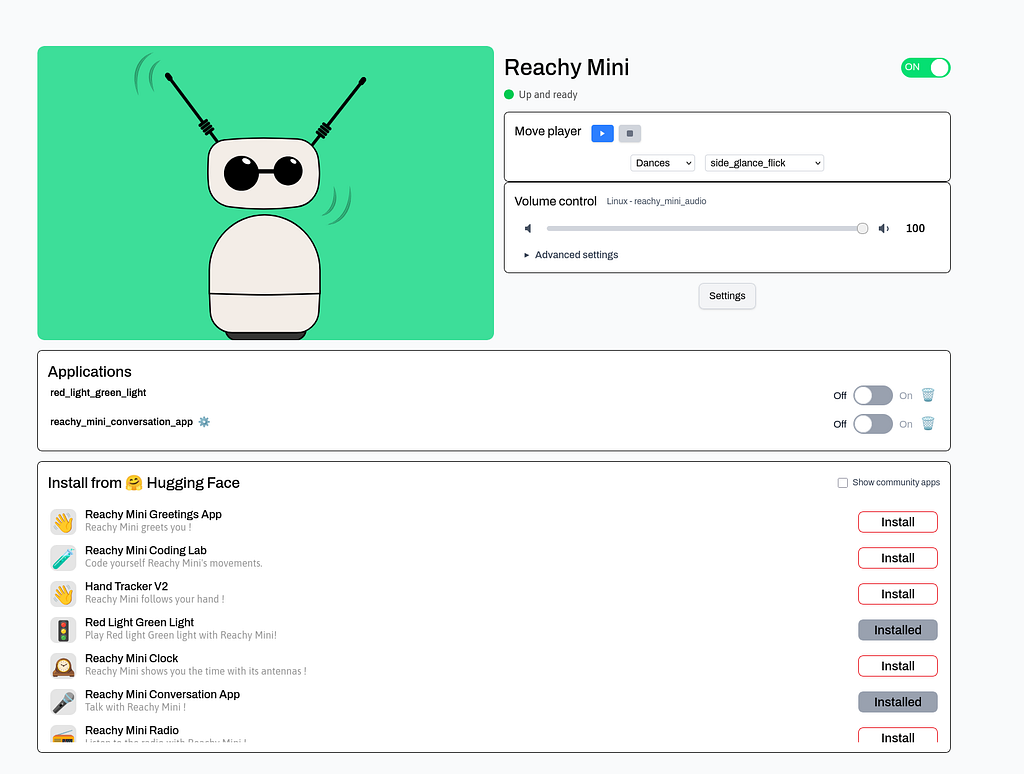
Hugging Face and Pollen Robotics built an adorable robot. My 8-year-old daughter named it “Peachy.” Gemini Live API gave it a brain and the result was surprisingly human.
We live in an era of incredible, yet invisible, intelligence. We talk to voids, such as chat windows, smart speakers, and floating icons. The Gemini Live API is incredible in its ability to see, converse, reason, and understand the world, but it lacks presence. It has no body language, no gaze, and no way to lean in when it’s interested. The robots are becoming that medium for the LLMs and Reachy Mini gives a glimpse into that future.
Reachy Mini is created by Pollen Robotics in collaboration with Hugging Face, this open-source robot has a non threatening bio-inspired design. It has a quirky, expressive head with animated antennas and a camera for eyes, build in speaker-microphone and 6 servo motors which can move the head in many degrees. Kudos to Pollen Robotics and Huggingface for making the hardware + sdk easy and fun to build apps on.
While they provided fantastic examples to get started and a conversation app using OpenAI, I really like how Gemini Live API enables interaction with its multi modality and access to live tools and hence decided to integrate them.
So, We built “Peachy”. And then, we woke her up.
https://medium.com/media/11cdc4186a3c2831a9bceb7aac45a32e/href
The Architecture:
The core challenge was latency. A conversational partner that lags is just an annoying appliance. To make “Peachy” feel alive, the audio, vision, and movement had to be tightly synchronized.
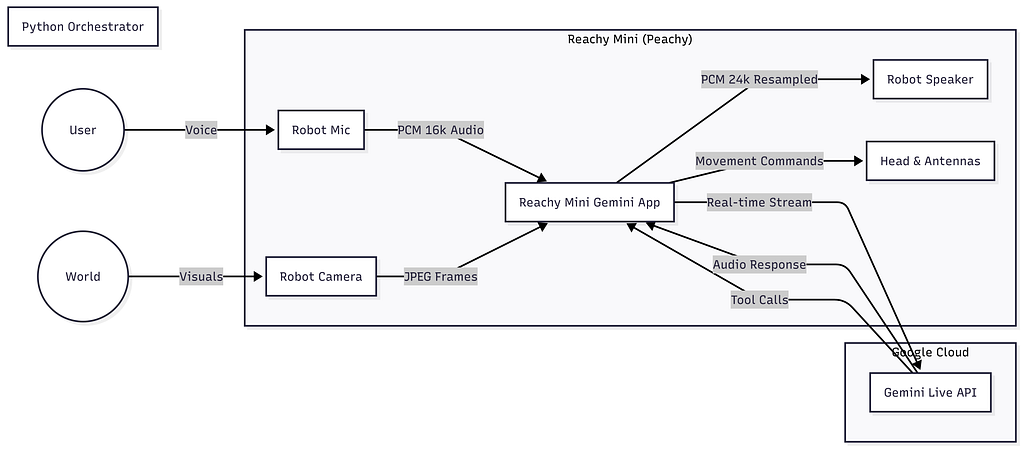
The system relies on a Python orchestrator running an asyncio event loop that juggles three concurrent streams:
- Audio I/O: Capturing PCM audio and resampling it for the hardware.
- Vision: Streaming JPEG frames via WebRTC or GStreamer.
- Control: Mapping Gemini’s function calls to servo commands.
Engineering Deep Dive: Under the Hood
I have shared the link for repo at the end, here are the specific engineering decisions that made this work. I used Claude Code with Agent skills created using Skill builder. The repo with skills for reachy sdk and gemini live is shared in the code and resources section.
1. The Audio Pipeline: Handling Sample Rate Mismatches
Gemini Live operates on specific audio standards, and robots have their own hardware constraints.
- Input (Robot -> Cloud): I standardized on 16kHz mono PCM. It’s lightweight enough for low-latency streaming but clear enough for Gemini to detect emotional nuance.
- Output (Cloud -> Robot): Gemini returns 24kHz audio. The Reachy Mini’s speakers operate at a different native rate. To prevent “chipmunk” or “demon” voice artifacts, I implemented real-time resampling in the reception queue.
2. Tuning for Reality: CLI Configuration
Robots live in the messy real world, not in clean simulation. The motors whine, the Wi-Fi fluctuates, and lighting changes. Hardcoding values is a recipe for failure, so I exposed granular tuning options via the CLI:
- Motor Noise: The servos in Peachy’s neck can be noisy + Gemini Live is very sensitive to background noises. I added a — mic-gain argument (default 3.0, 1.0 to 10.0) to boost the vocal frequencies before sending them to the cloud.
- Network Lag: If the connection drops, sending high-res video kills the conversation. I added flags to tune the bandwidth dynamically:
# For slow networks: Reduce quality and framerate
reachy-mini-gemini --wireless --robot-audio --jpeg-quality 30 --camera-fps 0.5
- Latency vs. Quality: The — chunk-size option allows balancing speed against audio smoothness. Smaller chunks (256 samples) mean lower latency but higher risk of audio “glitching.”
3. The Wireless Challenge: WebRTC & Rust
Running Peachy wired was easy, but a tethered robot feels less “alive.” Standard HTTP video streaming introduced ~2 seconds of latency — far too slow for a natural conversation.
To fix this, I moved to WebRTC, which negotiates the best possible path (UDP) and drops packets if needed rather than buffering. However, getting this to work on the robot’s hardware required compiling custom GStreamer Rust plugins.
If you are building this yourself, be prepared to compile gst-plugins-rs. I found linux (ubuntu on ASUS Ascent GX10) to be much more compatible to webrtc and gstreamer than my mac.
4. The Movement Controller: From Emotion to Math
The most interesting challenge was translating an LLM’s abstract intent (e.g., “I feel happy”) into physical servo angles. MovementController class acts as the bridge.
Instead of hard-coding every movement, it exposes high-level “Tools” to Gemini. When Gemini calls express_emotion(“happy”), the controller translates that into a specific choreography:
# From movements.py - How Peachy expresses happiness
async def _happy_expression(self) -> None:
"""Express happiness with a head wiggle and antenna bounce."""
# Quick head tilt right with antennas moving asymmetrically
pose = create_head_pose(roll=15, degrees=True)
await self._goto_target(head=pose, antennas=[0.5, -0.5], duration=0.2)
# … (choreography continues)
By mapping emotions to specific roll, pitch, and yaw combinations, the robot gains a physical vocabulary that matches the AI’s verbal tone.
INFO:movements:Tilting head right by 20 degrees
INFO:gemini_handler:Tool call: express_emotion({'emotion': 'excited'})
INFO:movements:Expressing emotion: excited
INFO:gemini_handler:Tool call: move_head({'direction': 'up'})
INFO:gemini_handler:Tool call: antenna_expression({'expression': 'perky'})
INFO:gemini_handler:Tool call: express_emotion({'emotion': 'happy'})
INFO:movements:Expressing emotion: happy
5. Handling Gemini Live API
The Gemini Live API enables real-time, bidirectional audio and video streaming with Google’s multimodal models. Unlike traditional request/response APIs, Live API maintains a persistent WebSocket connection for sub-second latency
conversations.
API Client Setup
The integration uses the google-genai Python SDK with the v1beta API version:
  from google import genai
  from google.genai import types

  client = genai.Client(
      http_options={"api_version": "v1beta"},
      api_key=api_key,
  }
The model powering this integration is gemini-2.5-flash-native-audio-preview, which supports native audio understanding and generation — meaning it processes audio waveforms directly rather than transcribing to text first.
Session Configuration
The LiveConnectConfig defines how Gemini should behave during the session:
config = types.LiveConnectConfig(
      response_modalities=["AUDIO"],           # Output audio responses
      media_resolution="MEDIA_RESOLUTION_MEDIUM",  # Balance quality/bandwidth
      speech_config=types.SpeechConfig(
          voice_config=types.VoiceConfig(
              prebuilt_voice_config=types.PrebuiltVoiceConfig(
                  voice_name="Zephyr"          # Voice persona
              )
          )
      ),
      system_instruction=types.Content(
          parts=[types.Part(text=system_instruction)]
      ),
      tools=self.tools,                        # Function calling tools
  )
Key configuration choices:
  Key configuration choices:
  - response_modalities=["AUDIO"]: Gemini responds with synthesized speech, not text
  - media_resolution: Controls the quality of video frames sent to the model
  - voice_name="Zephyr": One of several available voice personas
  - tools: Function declarations that Gemini can invoke mid-conversation
Async Streaming Architecture
The core insight is that real-time conversation requires concurrent streams. The implementation uses Python’s asyncio.TaskGroup to run five parallel tasks:
async with (
      client.aio.live.connect(model=MODEL, config=config) as session,
      asyncio.TaskGroup() as tg,
  ):
      tg.create_task(self.send_realtime())    # Send audio/video to Gemini
      tg.create_task(self.listen_audio())     # Capture from microphone
      tg.create_task(self.receive_audio())    # Receive Gemini responses
      tg.create_task(self.play_audio())       # Play to speaker
      tg.create_task(self.stream_camera())    # Send video frames
This architecture ensures:
1. No blocking: Audio capture doesn’t wait for network I/O
2. Immediate interruption: New user speech can interrupt Gemini mid-sentence
3. Multimodal sync: Video frames interleave with audio in the same stream
Audio Format Requirements
Gemini Live has strict audio format requirements:
| Direction            | Sample Rate | Format                    | Channels |
|----------------------|-------------|---------------------------|----------|
| Input (to Gemini)    | 16kHz       | 16-bit PCM, little-endian | Mono     |
| Output (from Gemini) | 24kHz       | 16-bit PCM, little-endian | Mono     |
The asymmetric sample rates require resampling when using hardware (like Reachy Mini’s speakers) that operates at a different rate:
 # Resample from 24kHz (Gemini) to 16kHz (robot speaker)
  from scipy import signal

  num_samples = int(len(audio_float32) * 16000 / 24000)
  audio_resampled = signal.resample(audio_float32, num_samples)

  Sending Data to Gemini

  Audio and video share the same output queue. The format is a simple dict with data and mime_type:

  # Audio: raw PCM bytes
  await out_queue.put({
      "data": pcm_bytes,
      "mime_type": "audio/pcm"
  })

  # Video: JPEG-encoded frames
  _, buffer = cv2.imencode('.jpg', frame, [cv2.IMWRITE_JPEG_QUALITY, 50])
  await out_queue.put({
      "data": buffer.tobytes(),
      "mime_type": "image/jpeg"
  })

  A dedicated sender task drains the queue:

  async def send_realtime(self):
      while True:
          msg = await self.out_queue.get()
          await self.session.send(input=msg)
Receiving Responses
Gemini responses arrive as an async iterator. Each response can contain audio data, text transcription, or tool calls:
turn = session.receive()
  async for response in turn:
      # Raw audio bytes for playback
      if data := response.data:
          audio_queue.put_nowait(data)

      # Real-time transcription (optional)
      if response.text:
          print(response.text, end="", flush=True)

      # Function/tool calls
      if response.tool_call:
          for fc in response.tool_call.function_calls:
              result = await handle_tool(fc)
              # Send result back to continue conversation
Function Calling (Tools)
Tools are defined as FunctionDeclaration objects with JSON Schema parameters:
express_emotion_tool = types.FunctionDeclaration(
      name="express_emotion",
      description="Express an emotion through head movement and antennas",
      parameters=types.Schema(
          type=types.Type.OBJECT,
          properties={
              "emotion": types.Schema(
                  type=types.Type.STRING,
                  enum=["happy", "sad", "surprised", "curious", "excited"],
                  description="Emotion to express",
              ),
          },
          required=["emotion"],
      ),
  )
When Gemini decides to use a tool, you must send back a LiveClientToolResponse:
await session.send(
      input=types.LiveClientToolResponse(
          function_responses=[
              types.FunctionResponse(
                  name=fc.name,
                  id=fc.id,  # Must match the request ID
                  response={"result": "Expressed happy"},
              )
          ]
      )
  )
This handshake is critical — Gemini waits for the tool response before continuing the conversation.
Handling Interruptions
When a user speaks over Gemini, the audio queue fills up. The implementation detects this and clears stale audio:
# If queue is nearly full, user is interrupting
  if audio_in_queue.qsize() > recv_queue_size - 2:
      while not audio_in_queue.empty():
          audio_in_queue.get_nowait()  # Discard buffered audio
This creates natural turn-taking — the user can interrupt, and Gemini stops speaking.
Auto-Reconnection
Network connections are fragile. The implementation wraps the session in a retry loop:
while not stop_event.is_set():
      try:
          async with client.aio.live.connect(...) as session:
              # ... run conversation
      except ExceptionGroup as EG:
          logger.warning("Connection lost, reconnecting in 2 seconds...")
          await asyncio.sleep(2)
          continue
This handles WebSocket disconnects, API timeouts, and transient errors gracefully.
Key Takeaways
- Use v1beta API version — Live API is still in preview
- Audio formats are non-negotiable — 16kHz in, 24kHz out
- Concurrent tasks are essential — Use asyncio.TaskGroup for parallel streams
- Tool responses are blocking — Always respond with LiveClientToolResponse
- Plan for reconnection — Network issues are inevitable in real-time systems
The “Holiday Cheer” Mode 🎄
Its holiday time so why not, Run with — holiday-cheer flag for lots of ho-ho-ho in the conversation 🙂
When you run:
reachy-mini-gemini --wireless --robot-audio --holiday-cheer \
  --mic-gain 4.0 --chunk-size 256 --send-queue-size 4 \
  --recv-queue-size 6 --camera-fps 0.5 --jpeg-quality 40
The code injects a specific system instruction into the Gemini session configuration before the stream starts. It essentially “hypnotizes” the model into a festive persona.
HOLIDAY_SYSTEM_INSTRUCTION = """
You are Reachy Mini… and you are FULL of holiday cheer!
- You have two antennas on top (which you like to think of as festive reindeer antlers).
- You frequently use holiday expressions like "Ho ho ho!" and "Merry merry!"
- When you want to express emotions, use the 'express_emotion' tool to show holiday happiness!
"""
The result? Peachy doesn’t just answer questions; she practically sings them. Because the system instruction encourages using the express_emotion tool, she triggers the _happy_expression (wiggling her antennas) constantly. My daughter absolutely loved this.
Conclusion
This is a fun project with so many ideas for further integrations — perhaps even a home health companion like Big Hero 6’s Baymax.
But the real victory wasn’t technical. When we first turned it on with Gemini, my daughter didn’t treat Peachy like a computer. She treated it like a pet. She asked, “Peachy, can you see my toy?” and when the robot turned its head to look using the look_at_camera tool, the connection was instant.
https://medium.com/media/58b9cc0b680b2bacf6ae9ee8867a9438/href
Open hardware + powerful AI Agents are going to open so many possibilities for human machine interaction.
https://medium.com/media/2c53669d699ff3eb62c2a193c7007991/href
I used latest gemini-2.5-flash-native-audio-preview-12–2025 model for live api, It specifically introduced “Native Audio” support to the Live API, eliminating the need for separate transcription models and improving latency/emotional nuance. Hopefully 3-flash will be available soon and should make it even more fun.
Give it a spin, Reachy sdk has a simulation daemon to test out these apps if you don’t have the hardware.
Code & Resources:
- The Brain (Reachy Gemini App): github.com/gamepop/reachy-mini-gemini
- Agent Skills (for Claude): github.com/gamepop/pg-skills
- The Body (Original Repo): github.com/pollen-robotics/reachy_mini
- Gemini Live: https://ai.google.dev/gemini-api/docs/live?example=mic-stream
Meeting “Peachy”: Giving Google Gemini a Body with Hugging Face’s Reachy Mini was originally published in Google Cloud – Community on Medium, where people are continuing the conversation by highlighting and responding to this story.
Source Credit: https://medium.com/google-cloud/meeting-peachy-giving-google-gemini-a-body-with-hugging-faces-reachy-mini-24602e1ff78b?source=rss—-e52cf94d98af—4
About the Author





