
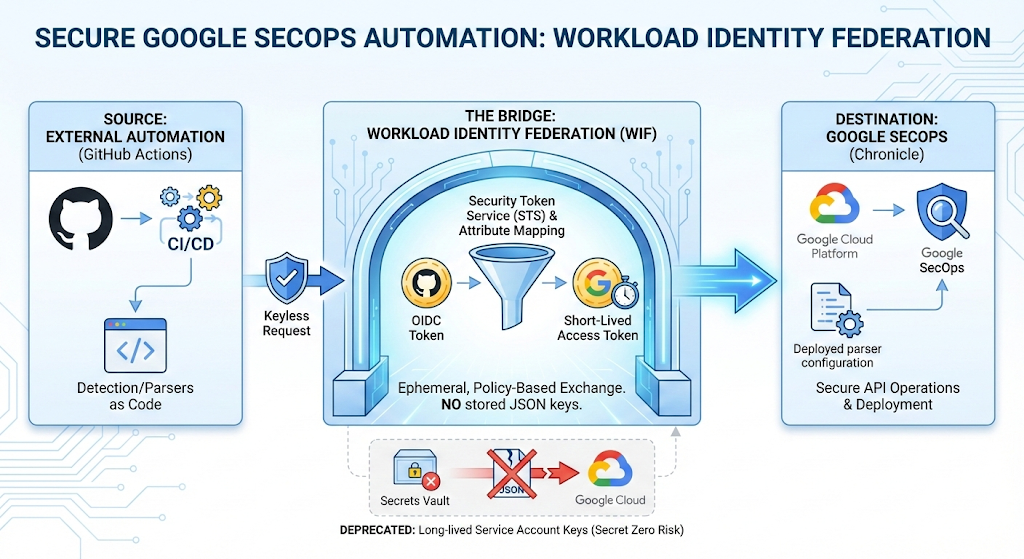
To keep pace with an expanding threat landscape, modern SOC teams are moving away from manual configurations in favor of automation like Detection as Code and Parsers as Code discussed in previous articles.
The goal is simple: treat your security stack like your infrastructure. Google SecOps (formerly Chronicle) is uniquely suited for this approach because its robust API surface offers the same capabilities of a user operating within the UI — if you can do it in the console, you can automate it via the API. Furthermore, with the new Chronicle APIs built on top of the standard Google Cloud API layer, integrating SecOps into your existing GCP ecosystem has never been more seamless.
However, these automations introduces a classic security dilemma known as the “Secret Zero” problem: How do we authenticate our external automation tools without scattering long-lived, high-privilege secrets across third-party platforms?
Historically, this required exporting a Service Account JSON key and storing it in GitHub Secrets. This approach is fraught with risk; keys do not expire automatically, are difficult to rotate, and if leaked, grant persistent access to your security data.
The solution is Workload Identity Federation (WIF). This keyless authentication mechanism allows you to interact with the Google SecOps Chronicle API securely, ensuring that your automation is as robust as the detections you deploy.
Introducing Workload Identity Federation
Workload Identity Federation (WIF) acts as a security bridge, allowing you to grant external identities access to Google Cloud resources without managing long-lived service account keys.
As reported in the official Google Cloud IAM documentation, WIF relies on a token exchange flow that translates an external credential into a Google Cloud credential. When using WIF with the Google SecOps API, the process involves Service Account Impersonation.
Below an infographic (courtesy of Nano Banana 🍌 ) of the differences between a traditional approach based on Service account keys and Workload Identity Federation.

Among all the benefits and improvements reported in the diagram it is worth emphasizing the following aspects and pros of an approach based on Workload Identity Federation:
- No “Secret Zero”: No service account keys are ever created or stored in GitHub or 3P system.
- Granular Scope (Attribute Conditions): Unlike a static key which is valid until revoked, WIF allows you to use Attribute Conditions to restrict access programmatically. For example, you can configure the Provider to only authorize tokens where the branch is refs/heads/main, preventing experimental branches from deploying to production.
- Short-Lived: The exchanged credentials are ephemeral. If a token is leaked, it is only valid for a short window (typically 1 hour).
Workload Identity Federation flow for Google SecOps
Here is the architectural flow for a GitHub Action making API request towards Google SecOps Chronicle APIs:
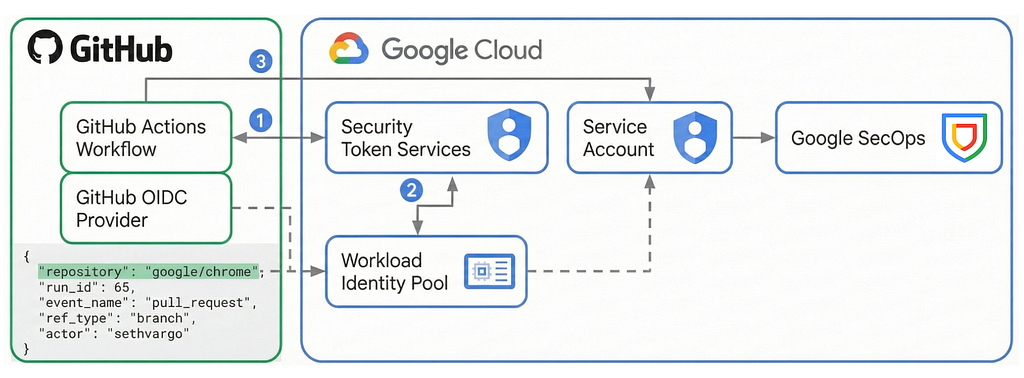
- Trust Configuration (Pools & Providers): You configure a Workload Identity Pool to organize your external workloads and a Provider (OIDC) to establish trust with GitHub.
- Attribute Mapping: This is the core translation layer. You define rules to map claims from the external token (e.g., GitHub’s assertion.repository or assertion.ref) to Google Cloud attributes (e.g., attribute.repository). This allows you to write IAM policies based on GitHub data.
- External Token Request: During the CI/CD run, the GitHub Action requests a JSON Web Token (JWT) from GitHub’s OIDC provider.
- The Exchange (STS): The automation tool sends this GitHub JWT to the Google Security Token Service (STS). STS validates the signature and checks your Attribute Conditions (e.g., “Is this repo allowed?”).
- Impersonation: Upon validation, STS returns a federated access token. The GitHub Action then automatically uses this federated token to call the IAM Credentials API, exchanging it for a short-lived Service Account OAuth 2.0 access token.
- API Execution: The pipeline uses this final Service Account token to authenticate calls to the Google SecOps Chronicle API (e.g., UpdateParser), effectively acting as the Service Account.
Check out the official documentation for a deep dive into Workload Identity Federation. Now, let’s get hands-on and set up your first demo!
Getting started with Workload Identity Federation
Before we can implement an automation in GitHub, we must configure the Google Cloud platform infrastructure. We will use gcloud commands to create a dedicated Service Account, grant it access to the Chronicle API, and configure the Workload Identity Federation pool.
Prerequisites:
- A Google Cloud Project linked to your Google SecOps instance.
- The gcloud CLI installed and authenticated or Cloud Shell (as per this example).
In Cloud Shell open the Editor and launch a new terminal from Terminal tab “New Terminal”.

1. Define Environment Variables
To make the configuration repeatable, we will define our variables first. Replace the placeholder values with your specific environment details.
# Common Environmnet variables
export PROJECT_ID="your-gcp-project-id"
export GITHUB_ORG="your-github-org"  # e.g., google
export GITHUB_REPO="your-repo-name"  # e.g., secops-parsers
export SECOPS_CUSTOMER_ID="your-customer-uuid" # Your SecOps Customer ID
# INFRASTRUCTURE NAMES
export SA_NAME="secops-cicd-sa"
export POOL_NAME="secops-github-pool"
export PROVIDER_NAME="secops-github-provider"
# Set the active project
gcloud config set project $PROJECT_ID
2. Create the Service Account
This Service Account will serve as the identity for your pipeline.
gcloud iam service-accounts create $SA_NAME \
  --display-name="SecOps CI/CD Automation Account"
3. Grant Google SecOps Permissions
We need to grant the Service Account permission to manage resources within Google SecOps.
Note: The roles below assume you are using the IAM integration for SecOps. If you are using legacy RBAC, you may need to add this email to the SecOps UI explicitly.
# Granting the Chronicle API Editor role to allow parser/rule management
gcloud projects add-iam-policy-binding $PROJECT_ID \
  --member="serviceAccount:${SA_NAME}@${PROJECT_ID}.iam.gserviceaccount.com" \
  --role="roles/chronicle.admin"
4. Create the Workload Identity Pool and provider
The pool creates a namespace for your external identities.
gcloud iam workload-identity-pools create $POOL_NAME \
  --location="global" \
  --display-name="SecOps GitHub Pool"
This configuration tells Google Cloud to trust the OpenID Connect (OIDC) tokens signed by GitHub Actions.
gcloud iam workload-identity-pools providers create-oidc $PROVIDER_NAME \
  --location="global" \
  --workload-identity-pool=$POOL_NAME \
  --display-name="GitHub Actions Provider" \
  --issuer-uri="https://token.actions.githubusercontent.com" \
  --attribute-mapping="google.subject=assertion.sub,attribute.sub=assertion.sub,attribute.actor=assertion.actor,attribute.repository=assertion.repository,attribute.repository_owner=assertion.repository_owner,attribute.ref=assertion.ref,attribute.fast_sub=\"repo:\"+assertion.repository+\":ref:\"+assertion.ref" \
  --attribute-condition="assertion.repository_owner == '$GITHUB_ORG'"
The attribute conditions can be one of the followings:
- repository: Contains the owner and repository name, for example "google/guava".
- repository_id: Contains the unique repository ID, for example "20300177".
- repository_owner: Contains the owner, which can be a username or the name of a GitHub organization, for example "google".
- repository_owner_id: Contains the unique owner ID, for example "1342004".
This is the critical security step. We will create an IAM binding that allows only the specific GitHub repository to impersonate our Service Account.
# 1. Retrieve the unique ID of the Pool
POOL_ID=$(gcloud iam workload-identity-pools describe $POOL_NAME \
  --location="global" \
  --format="value(name)")
# 2. Allow the specific GitHub repository to act as the Service Account
gcloud iam service-accounts add-iam-policy-binding "${SA_NAME}@${PROJECT_ID}.iam.gserviceaccount.com" \
  --role="roles/iam.workloadIdentityUser" \
  --member="principalSet://iam.googleapis.com/${POOL_ID}/attribute.repository_owner/${GITHUB_ORG}"
5. Output Configuration for GitHub
To configure the GitHub Action in the next step, you will need the full path of the Provider and the Service Account email. Run this command and save the output.
echo "--------------------------------------------------------"
echo "Values for GitHub Actions Secrets / Env Vars:"
echo "WIF_PROVIDER: ${POOL_ID}/providers/${PROVIDER_NAME}"
echo "WIF_SERVICE_ACCOUNT: ${SA_NAME}@${PROJECT_ID}.iam.gserviceaccount.com"
echo "--------------------------------------------------------"
Adopting “Parsers as Code” with the SecOps Toolkit
Now that our Workload Identity Federation (WIF) infrastructure is ready, we can implement the actual automation. We will use the Parsers as Code pipeline from the Google Cloud SecOps Toolkit open source repository. This pre-built solution uses GitHub Actions to automatically validate, test, and deploy parser changes whenever you update the code.
Step 1: Clone and Prepare the Repository
First, we need to get the code. While you could fork the entire toolkit, for a production environment, it is often cleaner to copy the specific pipeline into your own dedicated repository.
- Clone the SecOps Toolkit:
# Clone secops-toolkit repository
git clone https://github.com/GoogleCloudPlatform/secops-toolkit.git

# Navigate parsers-as-code folder
cd secops-toolkit/pipelines/parsers-as-code
- Initialize Your Own Repository:
Copy the contents of this folder to a new, private GitHub repository where you will manage your detection logic.
# Create a new folder for your repo
mkdir ~/my-secops-parsers
cp -r . ~/my-secops-parsers/
cd ~/my-secops-parsers
# Initialize git
git init
Before pushing the code we first need to update the workflow file.
Step 2: Configure the Workflow
The repository comes with a GitHub Action workflow file located at .github/workflows/secops.yaml. This file controls the automation. We need to tell it to use the WIF credentials we created in Part 3.
- Open the Workflow File:
Navigate to .github/workflows/ and open the secops.yaml file. - Update Environment Variables:
Look for the env section at the top of the file. You need to map these to the resources we created earlier.
- WIF_PROVIDER: The full resource path we generated in Part 3.
- WIF_SERVICE_ACCOUNT: The email of the Service Account we created (secops-cicd-sa@…).
- Example configuration in secops.yaml:
env:
  # SecOps Customer ID for Tenant
  SECOPS_CUSTOMER_ID: xxxxxxxxx-xxxxxx-xxxxxxxxx-xxxxx
  # SecOps GCP Project ID
  SECOPS_PROJECT_ID: xxxxxxxxx
  # SecOps region (e.g. eu)
  SECOPS_REGION: xx
  # The Service Account Email
  SERVICE_ACCOUNT: xxxxxxx@xxxxxx.iam.gserviceaccount.com
  # The detailed WIF Provider string from Part 3
  WIF_PROVIDER: projects/XXXXXX/locations/global/workloadIdentityPools/xxxxxxx/providers/xxxxxxxxx
  SSH_AUTH_SOCK: /tmp/ssh_agent.sock
  TF_VERSION: 1.6.5
Security Tip: For production, do not hardcode these values in the YAML. Instead, set them as GitHub Secrets (Settings > Secrets and variables > Actions) and reference them like ${{ secrets.WIF_PROVIDER }}.
After updating the workflow file let’s push the code to the remote repository.
git add .
git commit -m "Initial commit: SecOps Parsers as Code structure"
git branch -M main
git remote add origin https://github.com/xxxxxxx/xxxxxxxx.git
git push -u origin main
Step 3: The End-to-End Process
Now, let’s simulate the daily workflow of a SOC Engineer. We will add a new parser, test it, and deploy it — all without touching a JSON key.
1. Create a Feature Branch
Always work on a branch to leverage the validation logic before merging.
git checkout -b feature/add-custom-parser
2. Add Parser Code
Place your parser logic in the parsers/ directory. The toolkit expects a specific structure, usually a folder with a parser.conf file and 2 more folders for sample logs and corresponding normalized events. To test the pipeline adding a parser.conf file is enough.
Example: Create parsers/RESERVED_LOG_TYPE_3/parser.conf
filter {
    grok {
        match => { "message" => "%{IP:src_ip} -> %{IP:dst_ip}" }
    }
    mutate {
        replace => {
            "principal.ip" => "%{src_ip}"
            "target.ip" => "%{dst_ip}"
        }
    }
}
While this configuration is enough for testing the first execution of the pipeline, this might fail in case no logs have been ingested with that log type. In this example you’ll find a sample custom parser for AZURE_AD.
3. Push to GitHub
git add .
git commit -m "feat: adding custom firewall parser"
git push origin feature/add-custom-parser
After pushing to GitHub open a new Pull Request from branch feature/add-custom-parser into main, this will trigger a GitHub Action.
4. Validate changes
As soon as you open the Pull Request, navigate to the Actions tab in your GitHub repository.
- You will see a workflow (for “SecOps Parsers As Code”) running with name of the first commit (e.g., “New custom parser”).
- Authentication: Click on the “Authenticate to Google Cloud” step. You will see it successfully exchange the GitHub token for a Google access token using Workload Identity Federation.
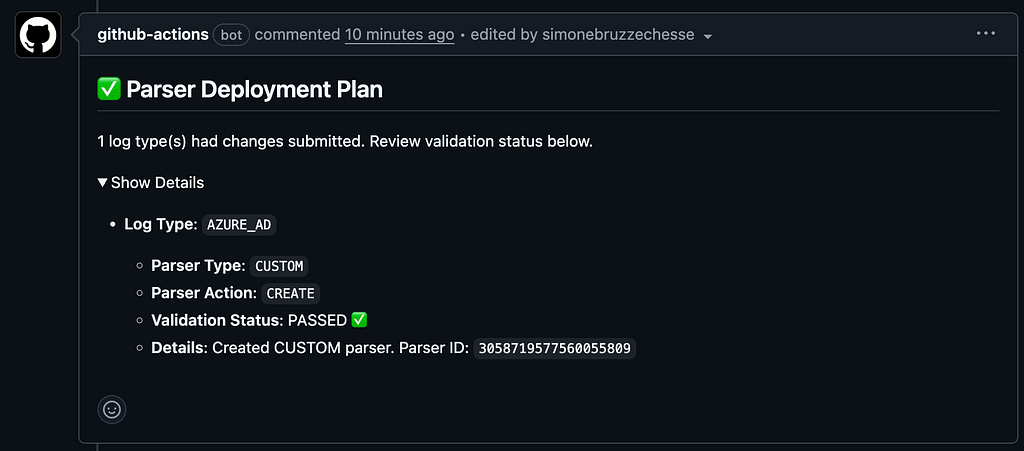
- Validation: The secops-toolkit automation will check parser against sample logs and deploy the newer version to SecOps for validation.
Below sample output of the automation:
5. Merge and Deploy
Once the validation passes (green checkmark):
- Open a Pull Request and merge it into main.
- This triggers the Deployment workflow.
- The pipeline again authenticates via WIF, assumes the Service Account identity, and runs the SecOps Parser Activate command.
- Your new parser will then be live in Google SecOps! 🚀
Conclusion
The transition to Workload Identity Federation is more than just a configuration change; it is a fundamental shift in how we secure our operational pipelines. By decoupling authentication from static secrets, we remove one of the most common attack vectors in modern cloud environments: the leaked Service Account key.
In this article, we demonstrated that securing Google SecOps automation does not require complex infrastructure. With a few GCP IAM commands and a standard GitHub Actions workflow, we achieved:
- Keyless Authentication: No sensitive JSON files stored in GitHub.
- Least Privilege: Access restricted to specific repositories.
- Adopt Parser as Code automation from SecOps Toolkit: A robust, automated pipeline for deploying parsers via Chronicle APIs.
As you scale your DevOps Engineering practice in Google SecOps, treating your security content as code is essential. Doing so with WIF ensures that your automation is as secure as the environment supervised using SecOps! 🚀
Secure Google SecOps Automations: The Definitive Guide to Workload Identity Federation was originally published in Google Cloud – Community on Medium, where people are continuing the conversation by highlighting and responding to this story.
Source Credit: https://medium.com/google-cloud/secure-google-secops-automations-the-definitive-guide-to-workload-identity-federation-5b1331db9c0c?source=rss—-e52cf94d98af—4
About the Author





