Introduction: The Serverless Security Dilemma
Cloud Run has revolutionised how we deploy microservices: it’s stateless, scalable, and abstracts away infrastructure management. However, for enterprise architects in highly regulated industries (like finance or healthcare), the default public-facing nature of serverless URLs is a non-starter.
The challenge is clear: How do you leverage the agility of Cloud Run while ensuring that service-to-service traffic never traverses the public internet?
Historically, the answer was complex VPC peering arrangements or VPNs. Today, the preferred, modern pattern is combining Serverless VPC Access with Private Service Connect (PSC). This approach allows you to expose a Cloud Run service as a private IP endpoint in your consumer’s VPC (even across different projects or organisations) without managing complex routing tables or risking CIDR overlaps.
In this deep dive, we will architect and build a fully private serverless setup.
The Architecture: Going Private
We will build a common scenario: A “Producer” organisation has a sensitive microservice on Cloud Run. A “Consumer” organisation needs to access it securely from their own VPC.

Core Components Explained
- Cloud Run (Ingress Internal): The compute engine. We will configure it to accept traffic only from internal sources, rejecting public internet requests.
- Serverless Network Endpoint Group (NEG): A Google Cloud construct that allows serverless services to be used as backends for a Load Balancer.
- Internal Regional HTTP(S) Load Balancer (iLB): The critical component that fronts the Cloud Run service, providing a private IP address inside the Producer VPC.
- Private Service Connect (PSC) Service Attachment: This is the “door” we open in the Producer VPC. It publishes the iLB so authorised consumers can connect to it privately.
- PSC Endpoint (Forwarding Rule): The “key” in the Consumer VPC. It takes an IP address in the consumer’s network and forwards traffic through the Google backbone to the Service Attachment.
Implementation Guide: Step-by-Step
Let’s define our variables. We have a producer-project and a consumer-project.
Phase 1: The Producer Side (Securing the Workload)
Step 1: Network Prerequisites In the producer-project, we need a VPC and a dedicated subnet for the load balancer.
# Create Producer VPC and Subnet
gcloud compute networks create producer-vpc --subnet-mode=custom
gcloud compute networks subnets create producer-subnet \
    --network=producer-vpc \
    --region=us-central1 \
    --range=10.1.0.0/24
Step 2: Deploy Private Cloud Run Service Deploy your container. The crucial flag is–ingress=internal, which locks the front door against the public internet.
gcloud run deploy private-service \
    --image=gcr.io/google-samples/hello-app:1.0 \
    --region=us-central1 \
    --ingress=internal \
    --allow-unauthenticated # We are relying on network security for this demo
Step 3: Create the Serverless NEG This tells our future load balancer how to route traffic to Cloud Run.
gcloud compute network-endpoint-groups create cloudrun-neg \
    --region=us-central1 \
    --network-endpoint-type=serverless \
    --cloud-run-service=private-service
Step 4: Configure the Internal Regional LB This is the most complex part. We need a backend service, a URL map, a proxy, and a forwarding rule.
Note: You must configure a firewall rule to allow Google’s health check probes to reach your LB, even though Cloud Run manages its own health.
# 1. Create Backend Service
gcloud compute backend-services create producer-backend \
    --load-balancing-scheme=INTERNAL_MANAGED \
    --protocol=HTTP \
    --region=us-central1

# 2. Add NEG to Backend Service
gcloud compute backend-services add-backend producer-backend \
    --network-endpoint-group=cloudrun-neg \
    --network-endpoint-group-region=us-central1 \
    --region=us-central1

# 3. Create URL Map & Proxy (Standard LB setup steps...)
# [Detailed gcloud commands omitted for brevity, focus on architecture flow]

# 4. Create the Internal Forwarding Rule (The private IP in Producer VPC)
gcloud compute forwarding-rules create producer-lb-fr \
    --load-balancing-scheme=INTERNAL_MANAGED \
    --network=producer-vpc \
    --subnet=producer-subnet \
    --ports=80 \
    --region=us-central1 \
    --target-http-proxy=producer-proxy
Step 5: Publish with a PSC Service Attachment Now we turn that internal load balancer into a publishable service.
gcloud compute service-attachments create my-psc-service \
    --region=us-central1 \
    --producer-forwarding-rule=producer-lb-fr \
    --connection-preference=ACCEPT_AUTOMATIC \
    --nat-subnets=producer-subnet
Success Output: You will get a long URI starting with projects/producer-project/regions/us-central1/serviceAttachments/…. Copy this URI.
Phase 2: The Consumer Side (Connecting Privately)
Step 1: Consumer Network Prerequisites In the consumer-project, we just need a VPC and a client (like a Google Compute Engine (GCE) VM) to test access.
Step 2: Create the PSC Endpoint This creates a private IP address in the consumer’s subnet that maps directly to the producer’s service attachment.
gcloud compute forwarding-rules create consumer-psc-endpoint \
    --region=us-central1 \
    --network=consumer-vpc \
    --address=192.168.1.50 \ # An unused IP in the consumer subnet
    --target-service-attachment=[PASTE_SERVICE_ATTACHMENT_URI_HERE]
Final Verification: Log into a VM in the consumer-vpc. Run a curl command to the private endpoint IP:
curl http://192.168.1.50
Result: You receive the response from the Cloud Run service. The traffic traveled entirely over Google’s private backbone, never touching the public internet.
Architectural Analysis
Pros
- Zero Trust Networking: The Cloud Run service is completely unreachable from the public internet via its default URL.
- No CIDR Overlap Issues: Unlike VPC Peering, PSC doesn’t care if the producer and consumer VPCs use the same IP ranges (e.g., both using 10.0.0.0/8).
- Cross-Organisation Boundary: You can securely share services with partners or different business units without giving them access to your entire VPC topology.
Cons
- Complexity: As shown above, it requires significantly more infrastructure components (LBs, NEGs) than a public Cloud Run deployment.
- Cost: You pay for the Internal Load Balancer and data processing charges associated with Private Service Connect.
- Regionality: This specific architecture using an Internal Regional LB is regional. Global access requires a different LB tier.
Common Roadblocks & Troubleshooting
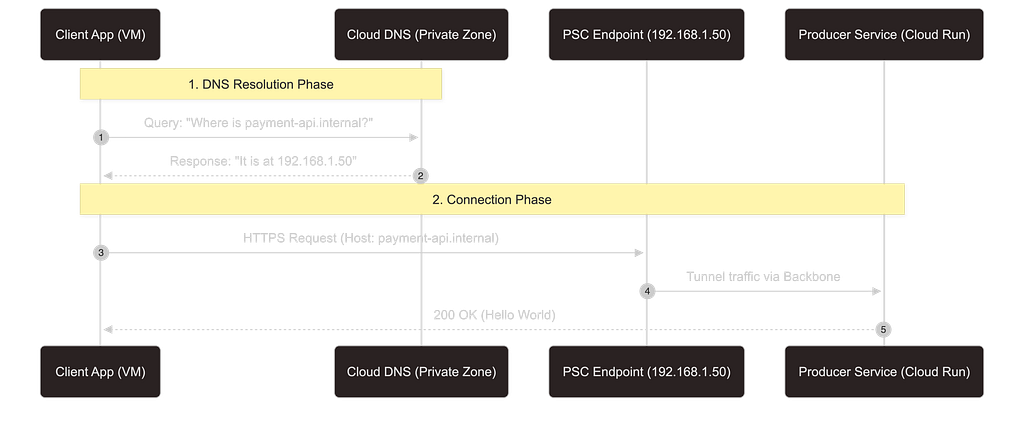
- The DNS “Gotcha”: Your consumer application likely wants to call https://payment-api.internal, not an IP like 192.168.1.50. You must configure a Cloud DNS Private Zone in the consumer VPC to map a hostname to the PSC endpoint IP. Without this, SSL validation will likely fail if you are using HTTPS.
2. Firewall Fatigue: Ensure your consumer VPC firewall allows egress to the PSC endpoint IP on the service port (e.g., TCP 80/443).
3. SSL/TLS Complexity: For end-to-end encryption, you need to manage SSL certificates on the Internal LB in the producer project. The consumer must trust the CA that signed that certificate.
Conclusion
Modernising to serverless doesn’t mean sacrificing the network security controls that enterprises demand. By combining Cloud Run’s internal ingress controls with the power of Private Service Connect, architects can build highly scalable, maintenance-free compute layers that remain completely dark to the public internet. This pattern is becoming the standard for secure, multi-tenant serverless architectures on Google Cloud.
References & Further Reading
To implement this architecture in your own environment, refer to the official Google Cloud documentation used in this guide:
- Private Service Connect: Publishing services using Private Service Connect
- Cloud Run Networking: Ingress restriction (Internal Only)
- Load Balancing: Setting up a regional internal Application Load Balancer with Cloud Run
- Serverless NEGs: Serverless Network Endpoint Groups overview
- VPC Service Controls: Secure your service perimeter
Originally published at https://lineargs.dev.
Secure Private Access for Cloud Run with Private Service Connect was originally published in Google Cloud – Community on Medium, where people are continuing the conversation by highlighting and responding to this story.
Source Credit: https://medium.com/google-cloud/secure-private-access-for-cloud-run-with-private-service-connect-b4e80016a0f6?source=rss—-e52cf94d98af—4
About the Author