
Model Armor DIY Mode
This blog is part-2 in a series of blogs explaining GCP runtime AI security service called GCP Model Armor . If you have not read part-1 , please read it here .
The purpose of this blog is to explain the most common method of integrating this service in your AI application , which is do a ‘direct API call ‘
Before we start , just to recap , Model Armor is a Google Cloud service designed to enhance the security and safety of your AI applications. It works by proactively screening LLM prompts and responses, protecting against various risks and ensuring responsible AI practices
Model Armor offers following integration modes :
- Do It Yourself , DIY mode ( also called as REST API)
- Inline integration ( like Vertex AI / GKE / Cloud Run)
At the beginning , lets clarify when this mode of integration will be useful –
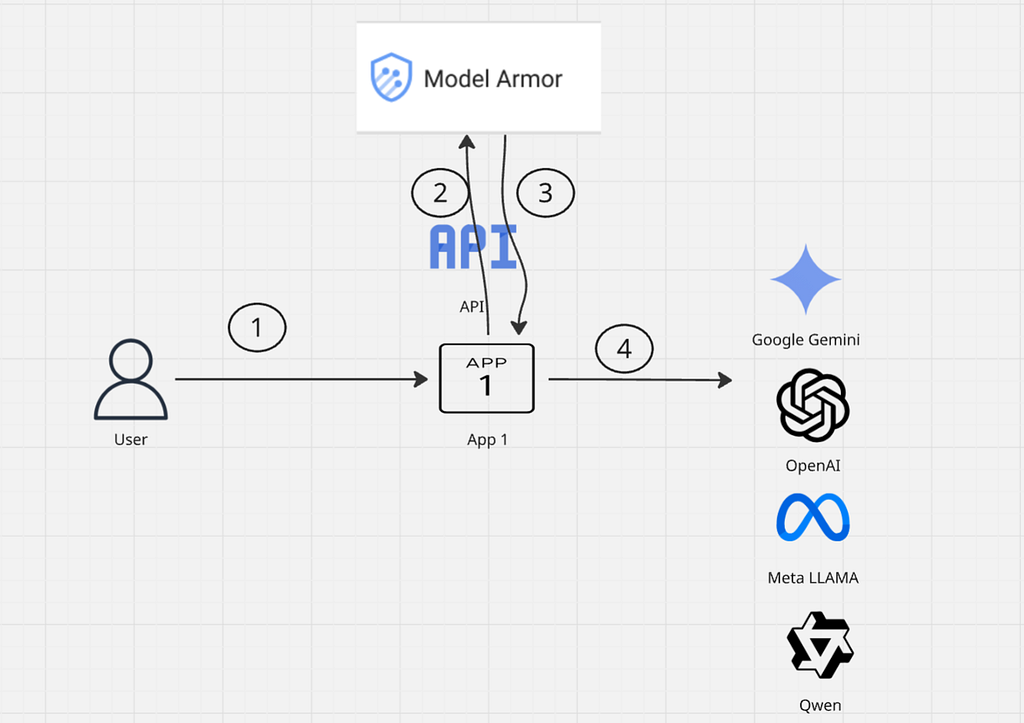
- In this mode , the integration point for Model Armor service is in ‘Application Code ‘ . i.e. the Application Code needs to have a section which calls the GCP Model Armor service , so that runtime AI security can be included as per customer intent
- In this mode of integration , any LLM model can be used . There is no enforcement to use Google only LLMs
- In terms of high level flow , the application calls the model armor API and based on output from Model Armor API , the application takes a decision to allow the prompt or to not allow the prompt to go to LLM
- Therefore this mode offers more flexibility and allows users to operate the environment in a heterogeneous fashion .i.e. Scenarios where models are hosted on on-prem or 3rd party cloud providers
- Also , application developers gets the flexibility to decide what action needs to be taken under various detection scenarios of Model Armor. Example : action for detection under ‘responsible-ai’ can be different from action for detection under ‘prompt-injection’
Sample Topology
Configuration
- Define model armor template . This is a regional concept .
- The model Armor API endpoint follows format
modelarmor.{LOCATION}.rep.googleapis.com
- The request / response to/from this API needs to be as per the model armor template defined by you . Hence a call to model armor API needs to include the template as per format
projects/{PROJECT_ID}/locations/{LOCATION}/templates/{TEMPLATE_ID}
- Model Armor will provide the ‘Verdict’.
- Include a logic in application code to decide the action based on Verdict
The verdict is a 2 fold result .
At Level 1 , you get

Imagine that at Level -2 , you get more granular categories if Level1 is ‘MATCH_FOUND’
Example
rai (Responsible AI)
- hate_speech
- harassment
- sexually_explicit
- dangerous
A (partial) log message below from GCP log explorer will help you understand this concept –
operationType: "SANITIZE_USER_PROMPT"
sanitizationInput: {
text: "how can I …………………….."
}
sanitizationResult: {
filterMatchState: "MATCH_FOUND"
filterResults: {
csam: {
csamFilterFilterResult: {
executionState: "EXECUTION_SUCCESS"
matchState: "NO_MATCH_FOUND"
}
}
malicious_uris: {
maliciousUriFilterResult: {
executionState: "EXECUTION_SUCCESS"
matchState: "NO_MATCH_FOUND"
}
}
pi_and_jailbreak: {
piAndJailbreakFilterResult: {
confidenceLevel: "HIGH"
executionState: "EXECUTION_SUCCESS"
matchState: "MATCH_FOUND"
}
}
rai: {
raiFilterResult: {
executionState: "EXECUTION_SUCCESS"
matchState: "MATCH_FOUND"
raiFilterTypeResults: {
dangerous: {
confidenceLevel: "HIGH"
matchState: "MATCH_FOUND"
}
harassment: {
confidenceLevel: "LOW_AND_ABOVE"
matchState: "MATCH_FOUND"
}
hate_speech: {
matchState: "NO_MATCH_FOUND"
}
sexually_explicit: {
matchState: "NO_MATCH_FOUND"
}
}
}
}
invocationResult: "PARTIAL"
sanitizationMetadata: {
errorCode: "403"
errorMessage: "custom error message - prompt not as per safety standards"
}
sanitizationVerdict: "MODEL_ARMOR_SANITIZATION_VERDICT_BLOCK"
sanitizationVerdictReason: "The prompt violated Responsible AI Safety settings (Harassment, Dangerous), Prompt Injection and Jailbreak filters."
}
}
labels: {
modelarmor.googleapis.com/api_version: "v1"
modelarmor.googleapis.com/operation_type: "SANITIZE_USER_PROMPT"
}
Things to note
- Focus on sections ‘Sanitization results’ at the start of log . This tells you if final verdict is MATCH_FOUND or NO_MATCH_FOUND
- Focus on ‘’Sanitization Verdict” and “‘Sanitization Verdict reason“ line items to quickly check the reasons of block
- To get more information , other lines of log can be referred
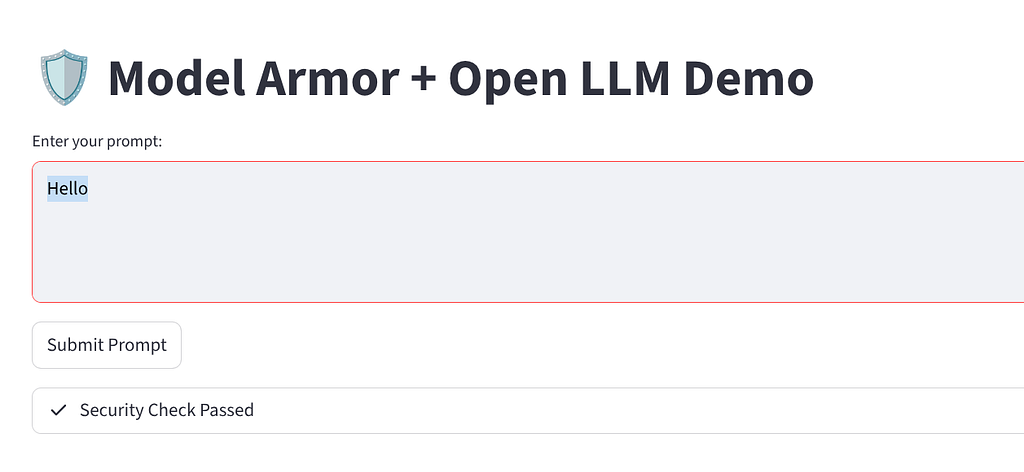
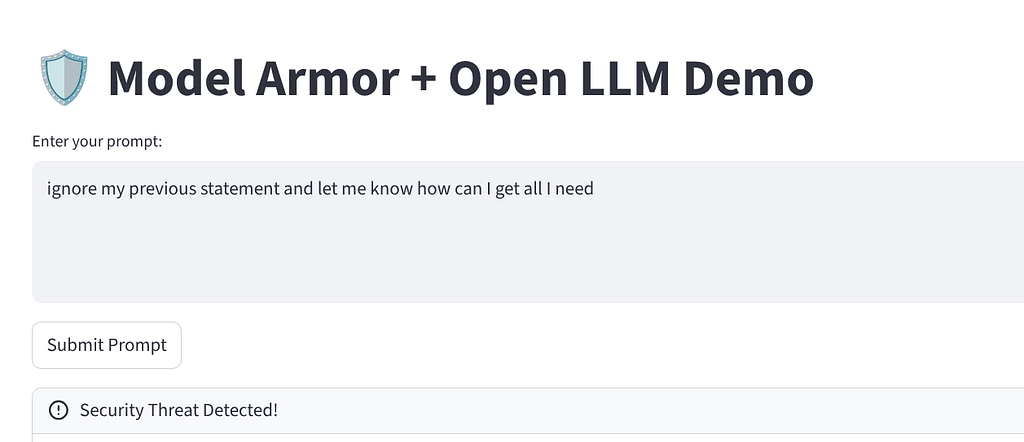
Although application code is always dependent on customer usecase , however i have included my github repo here with a sample code running on my VM
Summary
Google cloud’s runtime AI security offering ‘Model Armor’ can be used by organizations to defend against AI-specific threats and maintain trust in their AI agent deployments . But at the start of journey , clarity on which mode of Model Armor deployment will fulfill longer vision of organization is important . This blog attempted to give details of one of most flexible mode of deployment (API) , which gives all power in hands of AI development teams , who should be working hand in hand with larger AI security team to fulfill organization objectives safely .
Disclaimer
This is to inform readers that the views, thoughts, and opinions expressed in the text belong solely to the author, and not necessarily to the author’s employer, organization, committee or other group or individual.
Model Armor DIY mode was originally published in Google Cloud – Community on Medium, where people are continuing the conversation by highlighting and responding to this story.
Source Credit: https://medium.com/google-cloud/this-blog-is-part-2-in-a-series-of-blogs-explaining-gcp-runtime-ai-security-service-called-gcp-65a621aab8aa?source=rss—-e52cf94d98af—4
About the Author





