

How Google Cloud is democratizing AI inference for data teams — no MLOps expertise required
Introduction
If you’ve ever wanted to run machine learning models on your BigQuery data but dreaded the infrastructure setup, model deployment pipelines, and ongoing maintenance — this one’s for you.
Google Cloud just launched BigQuery managed inference for open models (in Preview), and it fundamentally changes how data professionals can leverage AI. The premise is simple but powerful: deploy and run any open model from Hugging Face or Vertex AI Model Garden using nothing but SQL.
No Kubernetes clusters. No endpoint management. No surprise bills from forgotten deployments.
In this guide, I’ll walk you through everything you need to know to get started, including real-world examples you can adapt for your own use cases.
The Problem This Solves
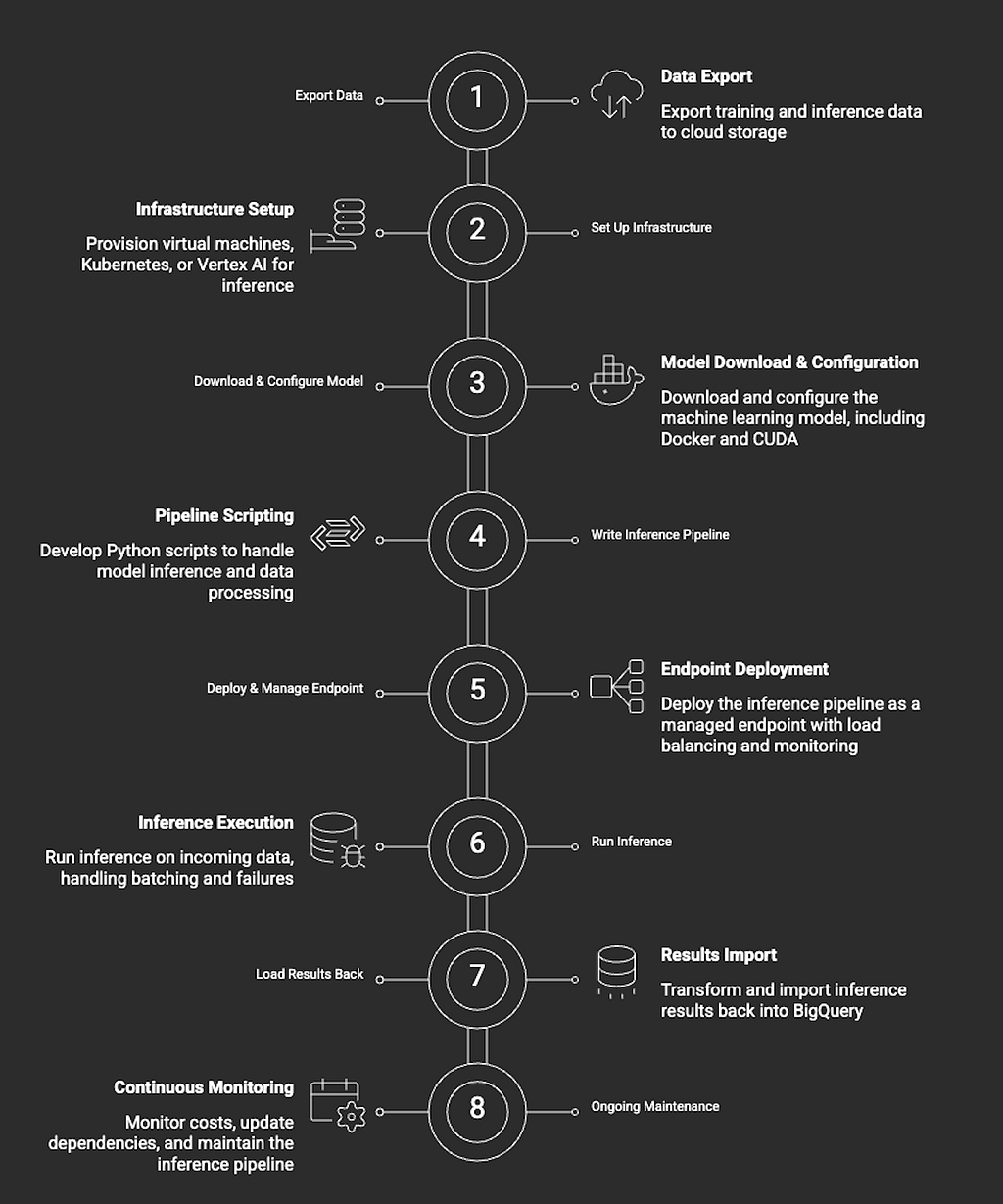
Let’s be honest about the traditional workflow for running ML inference on data warehouse data:
- Export data from BigQuery to a storage bucket
- Set up a compute environment (VM, Kubernetes, or managed service)
- Download and configure the model
- Write inference scripts
- Manage scaling, monitoring, and cost optimization
- Load results back into BigQuery
This process requires multiple tools, different skill sets, and significant operational overhead. For many data teams, this friction means AI capabilities remain out of reach — even when the models themselves are freely available.
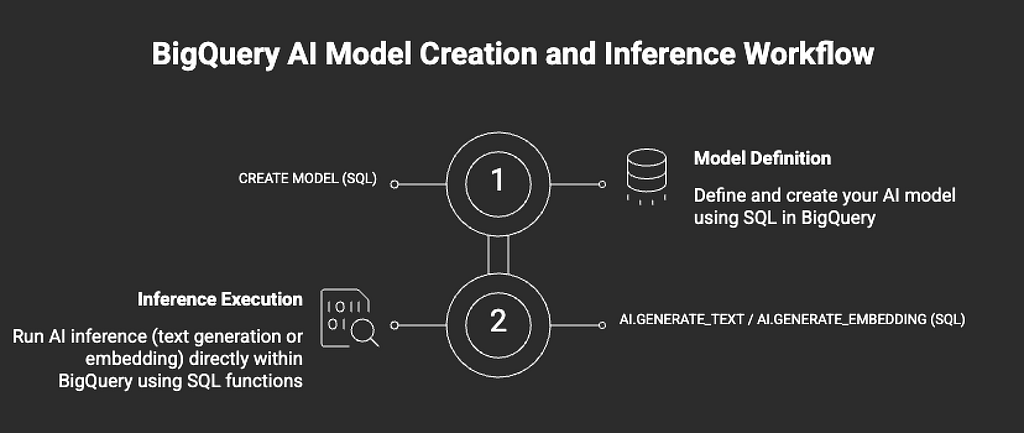
BigQuery’s managed inference collapses this entire workflow into two SQL statements.
Current workflow to achieve this:
With this new feature:
Key Features at a Glance
Before diving into the practical guide, here’s what makes this capability stand out:
Feature Benefit Single SQL deployment Create models with one CREATE MODEL statement Auto-scaling Resources scale based on workload demand Automatic resource cleanup Idle endpoints are automatically undeployed Customizable compute Choose machine types, GPU configs, and replica counts Unified billing All costs visible in your BigQuery billing Native SQL inference Use familiar AI.GENERATE_TEXT and AI.GENERATE_EMBEDDING functions
Practical Guide: Getting Started
Prerequisites
Before you begin, ensure you have:
- A Google Cloud project with BigQuery enabled
- Appropriate IAM permissions (BigQuery Admin or equivalent)
- A default BigQuery connection configured (or create one)
Example 1: Text Embeddings with Hugging Face Models
Let’s start with a common use case — generating text embeddings for semantic search or clustering. We’ll use the popular sentence-transformers/all-MiniLM-L6-v2 model from Hugging Face.
Step 1: Create the Model
CREATE OR REPLACE MODEL `your_project.your_dataset.embedding_model`
REMOTE WITH CONNECTION DEFAULT
OPTIONS (
  hugging_face_model_id = 'sentence-transformers/all-MiniLM-L6-v2'
);
That’s it. BigQuery will automatically:
- Pull the model from Hugging Face
- Provision appropriate compute resources
- Deploy the model to a Vertex AI endpoint
- Make it available for inference
Note: Initial deployment typically takes 3–10 minutes depending on model size.
Step 2: Generate Embeddings
Now let’s generate embeddings for product descriptions:
SELECT
  product_id,
  product_name,
  ml_generate_embedding_result
FROM
  AI.GENERATE_EMBEDDING(
    MODEL `your_project.your_dataset.embedding_model`,
    (
      SELECT
        product_id,
        product_name,
        product_description AS content
      FROM `your_project.your_dataset.products`
      WHERE product_description IS NOT NULL
      LIMIT 1000
    )
  );
Step 3: Store Embeddings for Vector Search
You can store these embeddings directly in a BigQuery table for later use:
CREATE OR REPLACE TABLE `your_project.your_dataset.product_embeddings` AS
SELECT
  product_id,
  product_name,
  ml_generate_embedding_result AS embedding
FROM
  AI.GENERATE_EMBEDDING(
    MODEL `your_project.your_dataset.embedding_model`,
    (
      SELECT
        product_id,
        product_name,
        product_description AS content
      FROM `your_project.your_dataset.products`
      WHERE product_description IS NOT NULL
    )
  );
Example 2: Text Generation with Gemma
Now let’s use Google’s Gemma model for text generation tasks like summarization or content creation.
Step 1: Create the Model
CREATE OR REPLACE MODEL `your_project.your_dataset.gemma_model`
REMOTE WITH CONNECTION DEFAULT
OPTIONS (
  model_garden_model_name = 'publishers/google/models/gemma3@gemma-3-1b-it'
);
Step 2: Summarize Customer Reviews
SELECT
  review_id,
  original_review,
  ml_generate_text_result AS summary
FROM
  AI.GENERATE_TEXT(
    MODEL `your_project.your_dataset.gemma_model`,
    (
      SELECT
        review_id,
        review_text AS original_review,
        CONCAT(
          'Summarize this customer review in 2 sentences: ',
          review_text
        ) AS prompt
      FROM `your_project.your_dataset.customer_reviews`
      WHERE LENGTH(review_text) > 200
      LIMIT 100
    )
  );
Step 3: Sentiment Classification
SELECT
  review_id,
  review_text,
  ml_generate_text_result AS sentiment
FROM
  AI.GENERATE_TEXT(
    MODEL `your_project.your_dataset.gemma_model`,
    (
      SELECT
        review_id,
        review_text,
        CONCAT(
          'Classify the sentiment of this review as POSITIVE, NEGATIVE, or NEUTRAL. ',
          'Only respond with one word. Review: ',
          review_text
        ) AS prompt
      FROM `your_project.your_dataset.customer_reviews`
      LIMIT 500
    )
  );
Example 3: Building a Content Tagging Pipeline
Here’s a more comprehensive example — automatically tagging support tickets with categories:
-- Step 1: Create the model (if not already created)
CREATE OR REPLACE MODEL `your_project.your_dataset.tagging_model`
REMOTE WITH CONNECTION DEFAULT
OPTIONS (
  model_garden_model_name = 'publishers/google/models/gemma3@gemma-3-1b-it'
);
-- Step 2: Tag tickets and store results
CREATE OR REPLACE TABLE `your_project.your_dataset.tagged_tickets` AS
WITH tagged AS (
  SELECT
    ticket_id,
    ticket_subject,
    ticket_body,
    ml_generate_text_result AS raw_tags
  FROM
    AI.GENERATE_TEXT(
      MODEL `your_project.your_dataset.tagging_model`,
      (
        SELECT
          ticket_id,
          ticket_subject,
          ticket_body,
          CONCAT(
            'Categorize this support ticket into one or more of these categories: ',
            'BILLING, TECHNICAL, ACCOUNT, SHIPPING, RETURNS, GENERAL. ',
            'Return only the category names separated by commas. ',
            'Subject: ', ticket_subject, ' ',
            'Body: ', ticket_body
          ) AS prompt
        FROM `your_project.your_dataset.support_tickets`
        WHERE status = 'NEW'
      )
    )
)
SELECT
  ticket_id,
  ticket_subject,
  ticket_body,
  raw_tags,
  SPLIT(TRIM(raw_tags), ',') AS tag_array
FROM tagged;
Cost Management: Best Practices
One of the biggest concerns with ML infrastructure is runaway costs. BigQuery’s managed inference includes built-in safeguards, but here’s how to optimize further:
1. Configure Idle Timeout
Set an automatic undeployment window to prevent paying for idle resources:
CREATE OR REPLACE MODEL `your_project.your_dataset.cost_optimized_model`
REMOTE WITH CONNECTION DEFAULT
OPTIONS (
  hugging_face_model_id = 'sentence-transformers/all-MiniLM-L6-v2',
  endpoint_idle_ttl = INTERVAL 2 HOUR  -- Undeploy after 2 hours of inactivity
);
2. Manual Deployment Control
For scheduled batch jobs, manually control when the endpoint is active:
-- Before your batch job: Deploy the model
ALTER MODEL `your_project.your_dataset.my_model`
SET OPTIONS(deploy_model = TRUE);
-- Run your inference queries...
-- After your batch job: Undeploy to stop costs
ALTER MODEL `your_project.your_dataset.my_model`
SET OPTIONS(deploy_model = FALSE);
3. Right-Size Your Compute
For production workloads, specify machine types and replicas:
CREATE OR REPLACE MODEL `your_project.your_dataset.production_model`
REMOTE WITH CONNECTION DEFAULT
OPTIONS (
  hugging_face_model_id = 'sentence-transformers/all-MiniLM-L6-v2',
  machine_type = 'n1-standard-4',
  min_replica_count = 1,
  max_replica_count = 3,
  endpoint_idle_ttl = INTERVAL 4 HOUR
);
4. Clean Up When Done
Don’t forget to drop models you no longer need:
DROP MODEL IF EXISTS `your_project.your_dataset.my_model`;
This automatically cleans up all associated Vertex AI resources.
Real-World Use Cases
E-commerce — Generate embeddings for product catalogs to power “similar items” recommendations, automatically summarize lengthy customer reviews, and improve search relevance by understanding query intent.
Customer Support — Classify and route incoming tickets to the right teams, generate draft responses, and monitor sentiment trends over time.
Content & Media — Auto-tag and categorize content, detect duplicates using semantic similarity, and generate summaries for long-form articles.
Data Quality — Detect PII in text fields, standardize inconsistent entries, and flag anomalies in your data.
Limitations and Considerations
While this feature is powerful, keep these points in mind:
- Preview status: The feature is in Preview, so APIs may change before GA
- Cold start latency: Initial inference after deployment can take longer; subsequent calls are faster
- Model compatibility: Not all Hugging Face models are supported; check documentation for compatible model types
- Regional availability: Ensure your BigQuery dataset and connection are in supported regions
- Quota limits: Vertex AI quotas apply; request increases for production workloads
What This Means for Data Teams
This launch represents a significant shift in how organizations can approach AI adoption:
For Data Analysts: You can now experiment with ML models without leaving your SQL environment or waiting for engineering resources.
For Data Engineers: Building ML-powered data pipelines becomes dramatically simpler — no separate ML infrastructure to maintain.
For ML Engineers: Focus on model selection and prompt engineering rather than deployment logistics.
For Organizations: Lower barrier to AI adoption means more teams can leverage these capabilities, accelerating AI initiatives across the business.
Getting Started Checklist
Here’s the quick-start checklist:
- Ensure you have a Google Cloud project with BigQuery enabled
- Verify you have the necessary IAM permissions
- Set up a default BigQuery connection (or create one)
- Start with a small test dataset (use LIMIT clauses)
- Experiment with different models from Hugging Face
- Configure endpoint_idle_ttl to manage costs
- Scale up once you’ve validated your approach
Resources
- Official Documentation: Creating automatically-deployed open models
- Tutorial: Generate text with the Gemma model
- Tutorial: Generate text embeddings with open models
- Hugging Face Model Hub
- Vertex AI Model Garden
Conclusion
BigQuery’s managed inference for open models removes one of the last major barriers between data teams and AI capabilities. By bringing the entire ML inference workflow into SQL, Google Cloud has made it possible for anyone who can write a query to leverage state-of-the-art models.
The implications are significant: faster experimentation, reduced operational overhead, and democratized access to AI across organizations.
If you’ve been waiting for the right moment to start incorporating ML into your data workflows, that moment is now.
BigQuery’s Managed Inference for Open Models: Your Warehouse is Now an AI Engine was originally published in Google Cloud – Community on Medium, where people are continuing the conversation by highlighting and responding to this story.
Source Credit: https://medium.com/google-cloud/bigquerys-managed-inference-for-open-models-your-warehouse-is-now-an-ai-engine-d83fbb6eccd1?source=rss—-e52cf94d98af—4
About the Author





