

What are AI Agents? What is ADK? How can I use them? Are they suitable for enterprise usage? Am I equipped to use it for my use cases?
There are so many questions on building AI Agents, Agent Development Kit and Deployment of AI Agents to Production. We will talk about these questions and more in this article.
What are AI Agents?
AI Agents are systems that perform tasks autonomously where they plan, reason, act, and adapt to achieve pre-determined goals. These systems are proactive and take decisions to complete the tasks specified.
A very simple example is a weather information agent that helps to address user queries on what the weather is of a location, at a certain given time of the year. Here, the AI Agent understands the user query, disambiguates if required, invokes the tool for weather information, informs the user about the same in a way understandable to the user and answer any followup question related to it.
On a very high level, AI agents can be depicted as below:
Now that we understand what AI Agents are, we would like to know how we can build them. This is where ADK — Agent Development Kit helps us.
What is ADK?
Agent development kit is an open source framework with the methods and components to develop and deploy AI Agents. The framework available in Python, Go, Java and typescript comes with components that streamline agent development, simplify its deployment and enable its scalability. The framework not only supports quick proof of concept and demos, but also is equipped with components that support productionalizing AI agents. You can use it to build any kind of agent, for example, for financial analysis, marketing campaigns, software development, learning, and many more.
The AI Agents developed using ADK can be easily deployed on varied runtime environments that it supports. AI Agents are packaged as containers and can be deployed on any environments that support containers. For example, but not limited to, below:
- Agent Engine in Vertex AI
- Cloud Run in Google Cloud Platform
- Google Kubernetes Engine
Once deployed in Production, AI Agents can be monitored, scaled, maintained and governed as required, thus, making them solve complex Enterprise problems. We will discuss on each of these aspects in detail in the later parts of this series.
Lets get started!!
Creating a simple AI Agent development in our local environment using Python.
0. Pre-requisites for Agent Creation with this Series:
- A Google Cloud Project
- Prepare your Python environment:
- Install Python 3.10 or higher
- Create a directory in your local system.
mkdir ai_agents
cd ai_agents
- Create a Python virtual environment in this directory
python3 -m venv .venv
source .venv/bin/activate
- Install ADK
pip3 install google-adk
2. Create your ADK AI Agent
adk create hello_world_agent
This presents the option to select the LLM as below:
Choose a model for the root agent:
1. gemini-2.5-flash
2. Other models (fill later)
Choose model (1, 2): 1
We will select the 1st one “gemini-2.5-flash” for this series. You can select anyone based on your and your enterprise requirements. Consequently, as we are using Gemini, we would need an API Key or Google project ID to access it. This is requested in the next step. For this series, we will select Vertex AI, where we can select the Google Cloud Project in which we will access Gemini LLM. Press Enter if you would like to select the default values provided, else provide the requested information.
1. Google AI
2. Vertex AI
Choose a backend (1, 2): 2

You need an existing Google Cloud account and project, check out this link for details:
https://google.github.io/adk-docs/get-started/quickstart/#gemini---google-cloud-vertex-ai

Enter Google Cloud project ID [<Your Project ID>]:
Enter Google Cloud region [<Default Region>]:
This creates the Agent as below:
Agent created in <Your Directory>/hello_world_agent:
- .env
- __init__.py
- agent.py
Look into the contents within each of the files.
- The .env file contains the values we selected for the environment such as the Google Cloud Project and the region in case of Vertex AI, while the API Key in case of Google AI
- The __init__.py file recognizes the hello_world_agent as a python package. This contains an import statement so that the agent is loaded and the root_agent within it is initialized.
- The agent.py contains our agent with a root_agent definition containing the model (one that we selected during creation), name of the agent, its description and the instructions that it must follow to address the user’s request.
First AI Agent
from google.adk.agents.llm_agent import Agent

root_agent = Agent(
    model='gemini-2.5-flash',
    name='root_agent',
    description='A helpful assistant for user questions.',
    instruction='Answer user questions to the best of your knowledge',
)
Lets run it as is with the default definition. Lets run the in the Terminal itself, in your local system. It is very simple:
cd ..
adk run hello_world_agent
It initializes and runs the Agent:
super().__init__()
Running agent root_agent, type exit to exit.
[user]:
You can converse with the user as below:
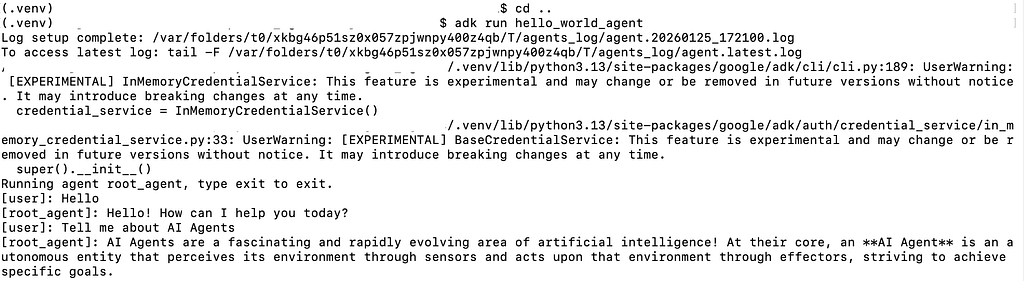
Voila!! We created a very simple agent that was run in our local environment. This agent uses the intelligence of Gemini to help with the user’s request. This is the first step to Agent Creation. We are going to achieve a lot more on our next expedition.
Agent Development Kit (ADK) was originally published in Google Cloud – Community on Medium, where people are continuing the conversation by highlighting and responding to this story.
Source Credit: https://medium.com/google-cloud/agent-development-kit-adk-c1211cf1c381?source=rss—-e52cf94d98af—4
About the Author





