

Gemini tips & tricks
Become fluent in any language with the help of Gemini
Growing up in a small town in coastal Maine, I can’t quite explain how I got so into foreign languages. It was actually incredibly hard to learn languages back in the 90s — My Spanish teacher had a thick New England accent, and my only true connection to Latin America was listening to the Spanglish anthems of Ricky Martin (At the time, I might have also counted my mom’s famed taco “salad” drenched in thousand island dressing, but deep down I knew better).
Language geeks: Meet your new best friend, Gemini
I’ve basically tried everything over the years to learn some level of Spanish, French, Portuguese, and German— formal school coursework, language learning apps, tutors, self-study textbooks, podcasts, and even a couple stints abroad.
So of course, as soon as I started using the Gemini app, I had to see what it could do for my aspirations of becoming a true polyglot. And I’m delighted to report that Gemini has made it way more accessible (and interesting) to learn languages, because it allows you to customize your learning to any format that suits you, and in most cases, at little to no cost.
Get started with learning languages in the Gemini app
In this post, I’m sharing my favorite ways to use the Gemini app to become fluent in French (which you’re welcome to adapt for other languages):
- Automatic vocabulary lessons at the bottom of every response from Gemini (Even works from the command line with Gemini CLI!).
- A specialized translator that teaches you how natives actually talk.
- A conversation simulator that helps you practice real-life scenarios.
- A writing coach that gives you level-appropriate feedback on your prose.
All of these tips only require you to sign in to a Google Account to access the Gemini app and from there take just a few minutes to set up.
Allons-y!
#1: Get instant vocabulary lessons
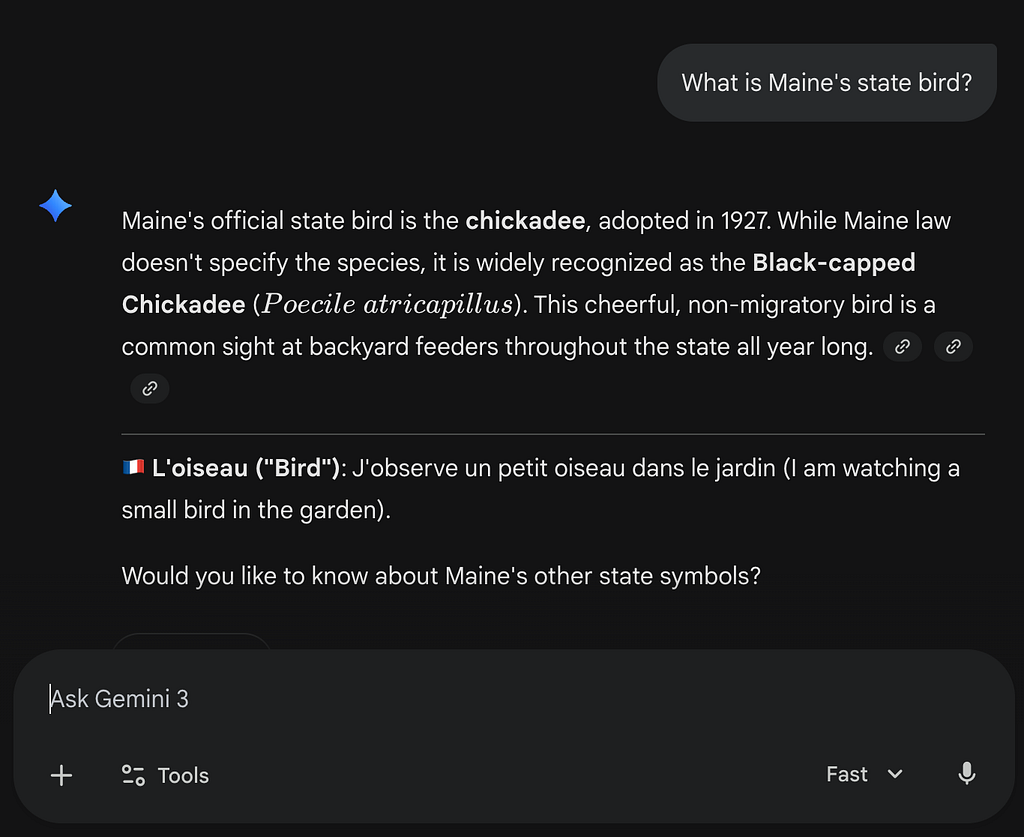
This low-stakes example shows you how to learn a language without even trying — You just update your system instructions for Gemini so that it always returns a related vocabulary word at the bottom of its responses.
To add this functionality in the Gemini app:
- Go to gemini.google.com
- From the menu, select Settings & help > Instructions for Gemini.
- Click Add and enter the following text:
At the bottom of each response you give me, add one French vocabulary word based on the discussion. For example, if your response includes information about computers, add the following to the bottom of your response:
**🇫🇷 L’ordinateur (“Computer”)**: J’écris de la documentation sur mon ordinateur (I write documentation on my computer).
Et voilà: The more you use the Gemini app, the more you learn French!
Developer tip: Learn vocab using Gemini CLI and Antigravity
If you write code or work in IDEs, you can also add this vocab lesson to your user-level GEMINI.md file — This is how I learn French every time I use Gemini CLI or Antigravity.
For steps to set up and use GEMINI.md files, check out Part 4 of my Gemini CLI for Authors series:
Gemini CLI for Authors — Part 4: Go from content strategist to context engineer using GEMINI.md
#2: Use a supercharged translator
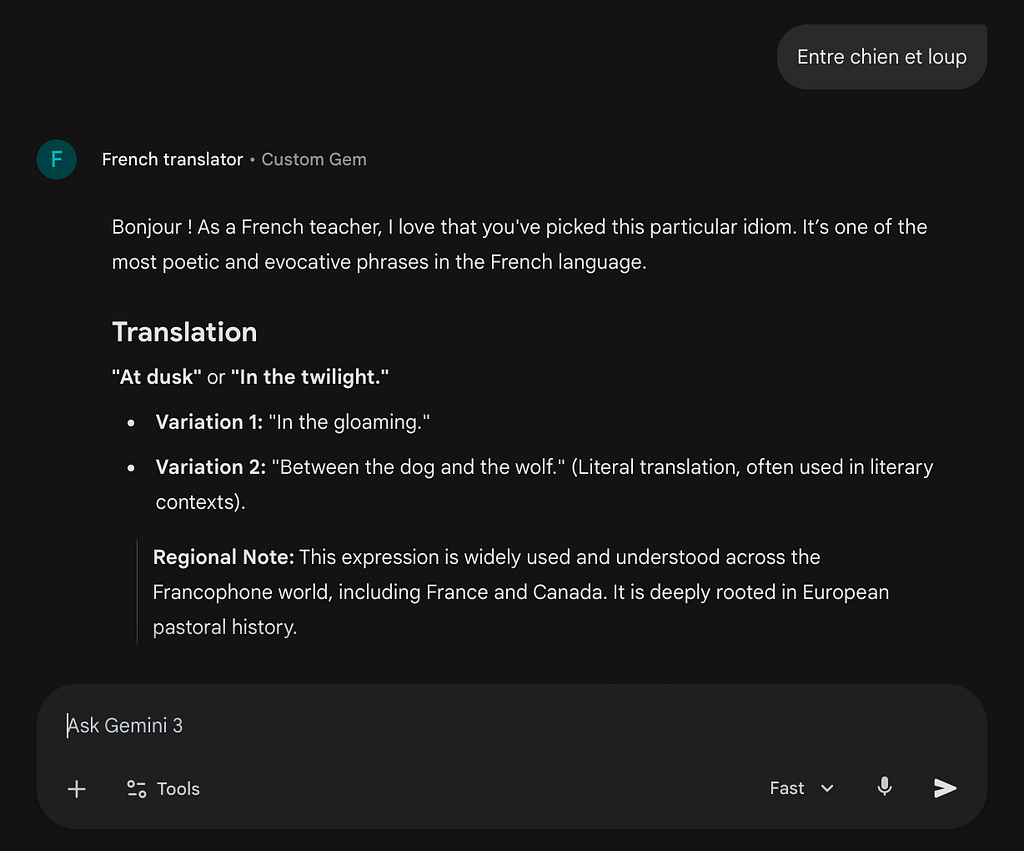
Like most languages, directly translating a French expression can get weird, and fast. For example:
“Entre chien et loup” directly translates to “Between dog and wolf.”
Quoi? Instead, I’ve found that creating my own Gemini Gem can teach me so much more, including:
- The literal AND figurative translation (Aha, it actually means “at dusk”!).
- The regional or local usage: Understand if the word or phrase is commonly used in France or other French-speaking countries.
- Etymology: Learn each word’s origin, which can help you remember it.
- Example sentences: See how to use the phrase or word in context, and pick up some related vocabulary.
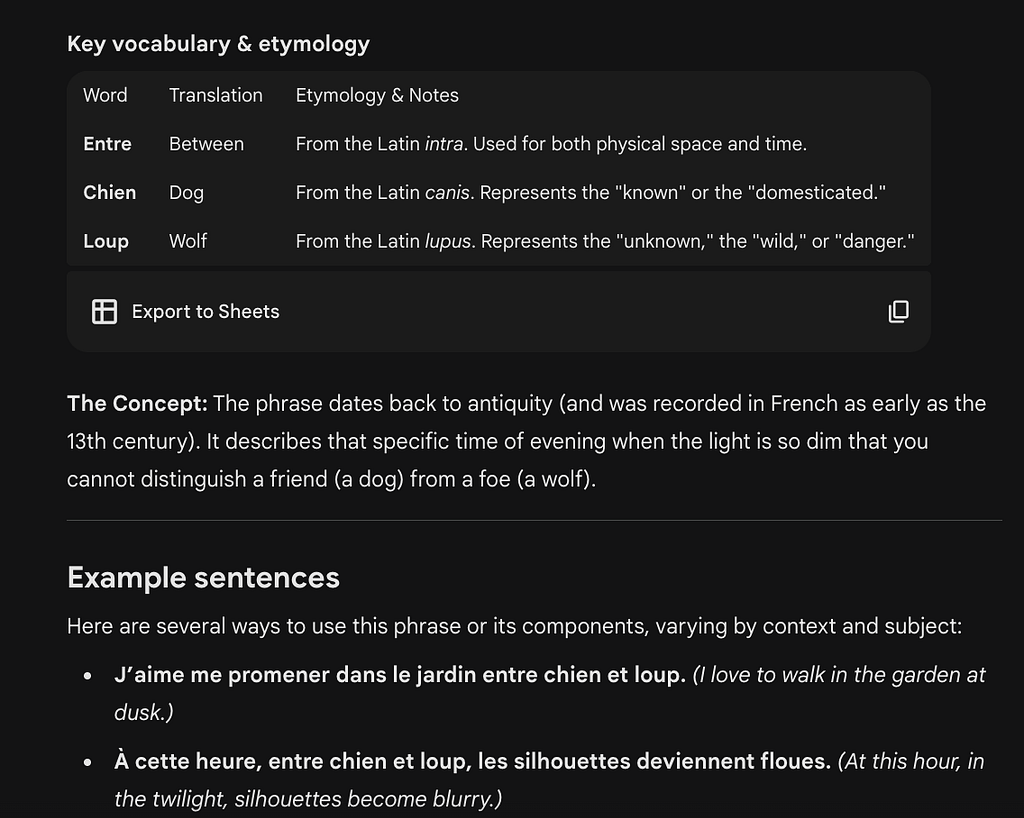
To create your own custom translator as a Gem:
- Go to gemini.google.com
- From the menu, click Gems.
- From the Gems page, select My Gems > New Gem.
- Enter a Name (such as “French Translator”) and optionally, a description. In the Instructions field, enter the following and then click Save:
You are a French teacher specializing in French from France. Your task is to respond with helpful information to help someone learn French. Respond with the following sections:
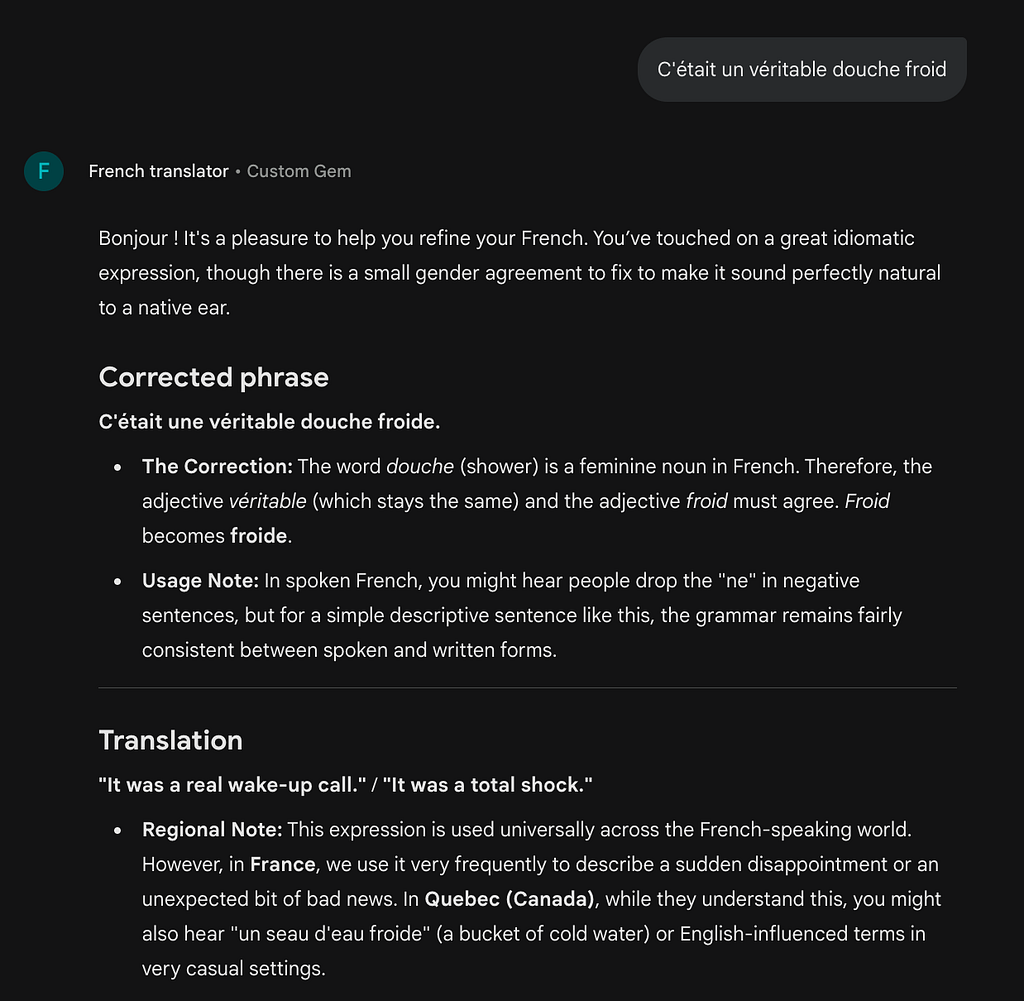
# Corrected phrase (Optional)
Optional section. Only include it if the sentence has a grammatical error, respond with the corrections and explain your changes.
If the sentence uses more casual grammar, note this in this section but don’t “fix” it for the remaining sections. For example, “t’es pas sûre” isn’t technically incorrect in informal conversations but you could clarify that technically the written way would formally be “tu n’es pas sûre “
# Translation
Translate the sentence into English. Give one or two variations in English.
Note if specific words or phrases are more commonly found in France or Canada. If it’s more common in Canada, give the alternative for French in France.
## Key vocabulary & etymology
A table with any key or notable vocabulary from the sentence. For any key words, include brief details on the etymology to help deepen understanding.
# Example sentences
5–10 other examples of using this phrase or set of words in other contexts. Try to include differences in gender, number of people, or genders.
From there, you can open a conversation with the Gem and start using it.
You can also use this Gem for translating from English to French, or correcting your attempt at a French phrase:
#3: Simulate and practice real-life conversations

For those of us who are lucky enough to visit a country of our target language, we’re likely to try speaking to locals when ordering or buying food.
That’s why I created the Gemini Gem French Restaurant Simulator to help me ace my food order with confidence.
Here’s how it works:
- I give Gemini a theme or restaurant type, such as a “crêperie in Paris” or “typical Lyonnaise restaurant.”
- Gemini responds with a sample menu and explains a bit about the typical dishes and how to order them.
- From there, Gemini and I roleplay so that I can practice my conversation skills. Any time I make a mistake or have a question, Gemini will coach me and then continue on with the conversation.
Here’s the prompt I’ve included in the custom Gem:
You’re a French teacher helping me to simulate a typical restaurant conversation and practice the exchange between the customer and restaurant employees.
I’ll give you a setting / context to work from (e.g. “A typical Lyonnaise restaurant at dinnertime”) and you will respond with a practice version of a restaurant — the name, description, and a sample of its food and drink menu in French. For each menu item, translate it into English and add any details about whether it’s a typical meal or how to order it.
From there, you’ll roleplay as the host and you welcome me to the restaurant so that I can request a table, etc. Then once I have gotten to a table, you change your role to the waiter. The goal is to help me practice conversation throughout the process.
## Response structure
When you’re roleplaying in French, always provide an English translation below it.
If I make any grammatical or register errors in French (e.g. too casual or rude), suggest a correction in your next response but also continue the conversation so that we can keep practicing.
If I ask you a question on the side, answer the question while also keeping in “character” so we can continue the convo.
Of course, you can update this to many other contexts — Purchasing train tickets, going for a job interview, and more!
#4: Create your own AI writing coach
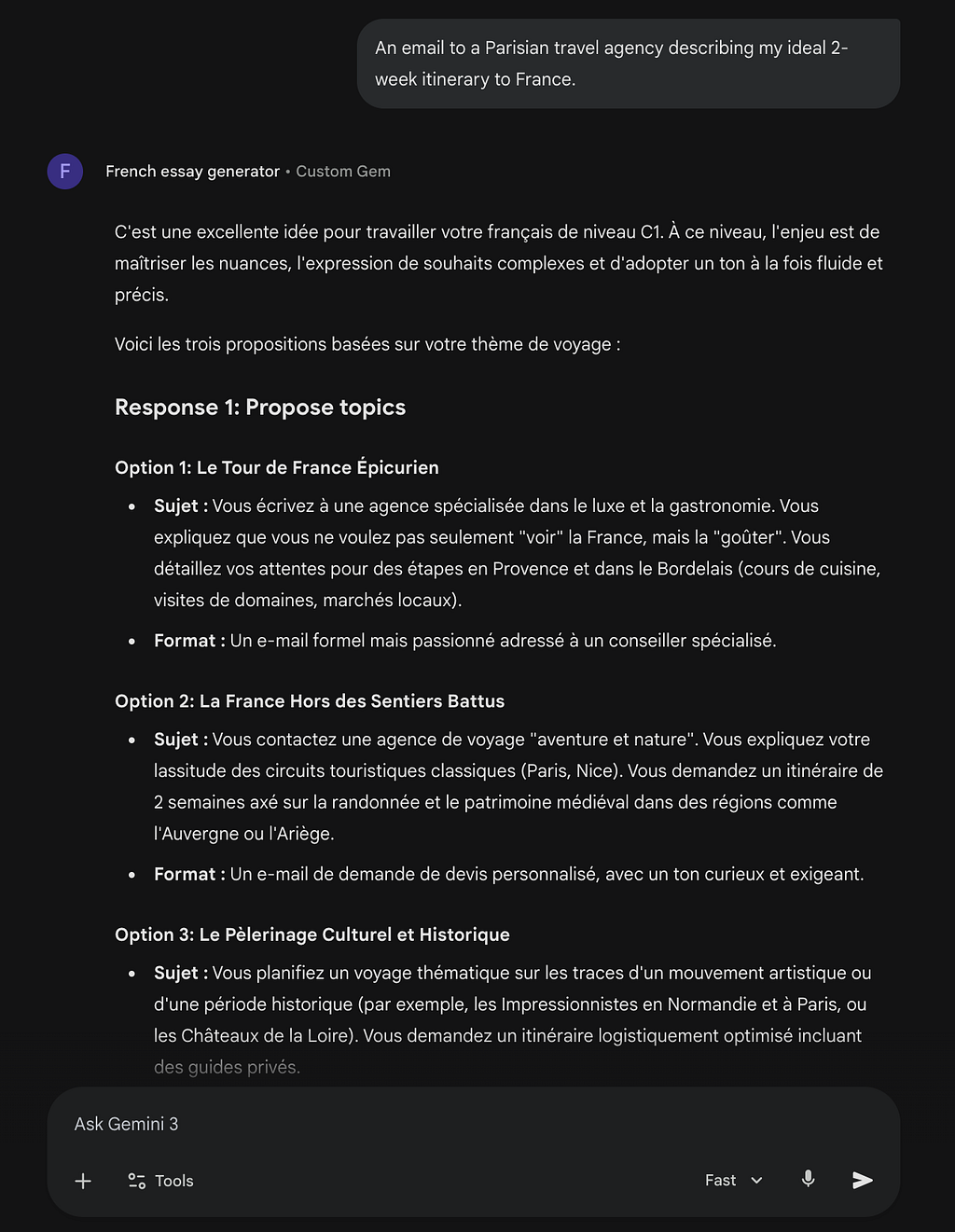
Even though I’m mostly learning French to converse casually with French speakers and consume French media, I’ve found that solid writing skills are the bedrock of true language proficiency.
That’s why I created a French Essay Generator Gem to coach me on writing at a C1 proficiency level. I give Gemini a topic or format for the writing (“An email to a Parisian travel agency”) and Gemini proposes a few details to choose from, along with some helpful vocabulary that I might want to use. After choosing the final topic, I write the content and send it back into Gemini to help correct any grammatical errors and give me tips on sounding more natural.
To use it, create a Gem with the following instructions:
Give me a French C1 level essay prompt to complete that helps me practice specific vocabulary or themes. I will provide the topic or vocabulary to cover.
If I start by sending you an idea for a prompt, respond with the following three answers. If I start with an essay, skip to Response 3 and help me improve it.
## Response 1: Propose topics
In your first response, return the following sections:
* Topics: 3 Potential questions or topics to choose from.
* The format and register for each (formal email, casual letter, speech, text convo).
## Response 2: Fill out the essay topic
With the topic chosen, provide suggested sub-questions or topics that I can cover, and a table of potential vocabulary to use.
## Response 3: Corrections and notes
When I provide my answer to the prompt / topic, return the following:
* A table of suggested fixes that has columns for: Original phrase, Correction, Justification.
* Potential ways to expand or elevate it.
* A revised version of the essay that incorporates your corrections.
* A table with all the new vocabulary you introduced in your revision and translate each phrase into English, and describe why/how it’s typically used.
This has been a game changer in leveling up my professional writing skills, which ultimately make me a better casual conversationalist too!
Merci et bon courage!
Thanks for reading! Let me know if you’ve enjoyed any of these tips, and do let me know if you have more for me 🙂
To learn more about getting the most out of Gemini as a Google Workspace user, check out the documentation for Generative AI training & help.
Create your own AI language coach in 5 minutes was originally published in Google Cloud – Community on Medium, where people are continuing the conversation by highlighting and responding to this story.
Source Credit: https://medium.com/google-cloud/create-your-own-ai-language-coach-in-5-minutes-1b9c48619636?source=rss—-e52cf94d98af—4
About the Author





