
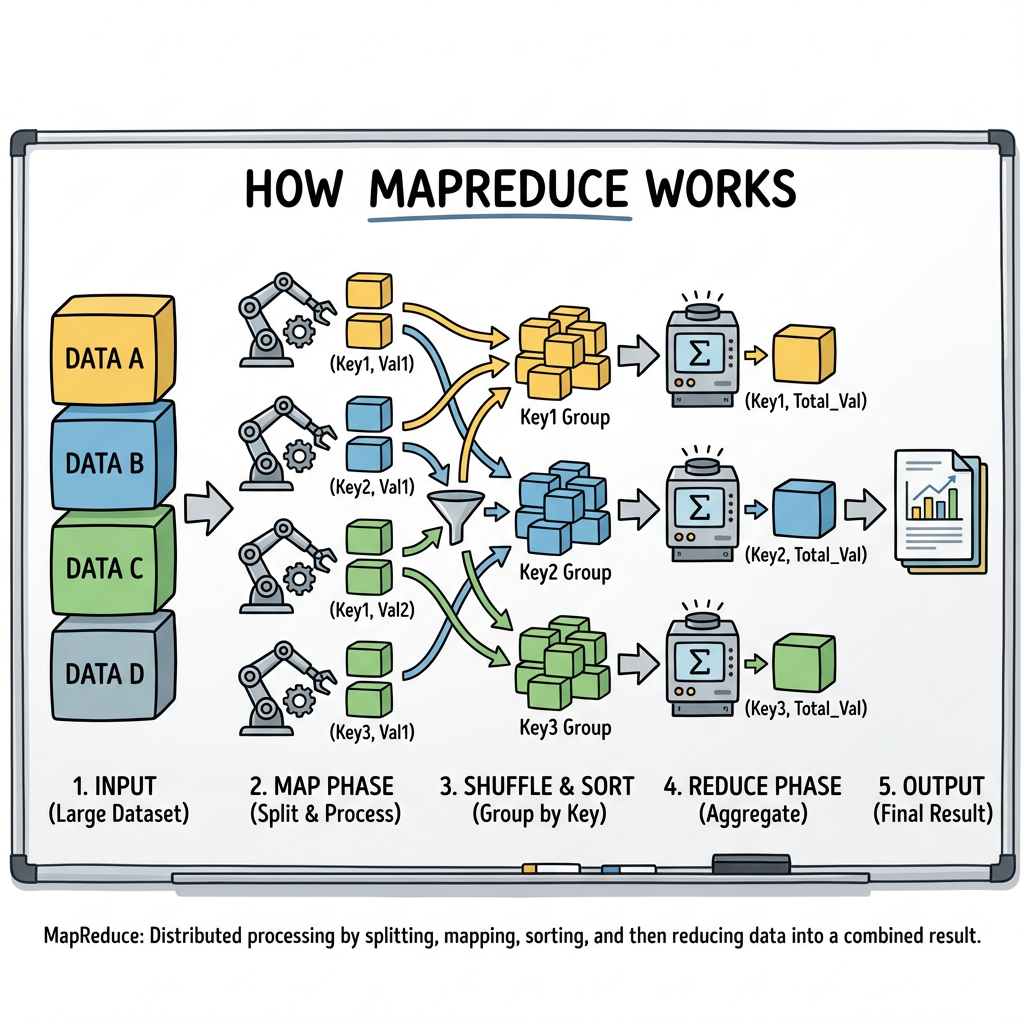
As developers, we’re constantly looking for efficient ways to process and understand vast amounts of data. This is especially true when dealing with unstructured information, like free-form text feedback. We recently faced a challenge: how to summarize and categorize a massive dataset of user comments without losing crucial insights or getting bogged down by the limitations of large language model (LLM) context windows. Our solution? A modern twist on the MapReduce framework, powered by BigQuery and LLMs such as Gemini.
The Challenge: Drowning in Data, Throttled by Context
We collected a ton of valuable free-form text feedback, initially stored in Google Sheets and then consolidated into a BigQuery table with Connected Sheets. Our goal was two-fold: classify and label each piece of feedback, and generate an overarching summary of all comments.
The immediate hurdle with LLMs was the context window. Extremely large context windows meant prohibitively long processing times, while overly short ones inevitably led to data truncation and loss of fidelity. We needed a way to process our data in manageable chunks while maintaining a comprehensive view.
Enter MapReduce: A Familiar Framework for a New Problem
We took a page from the distributed computing playbook and adapted the core principles of the MapReduce framework. For those unfamiliar, MapReduce is a programming model for processing large datasets with a parallel, distributed algorithm on a cluster. It essentially involves two main phases:
- Map: Takes a set of data and converts it into another set of data, where individual elements are broken down into key/value pairs.
- Reduce: Takes the output from the Map phase and combines those data tuples into a smaller set of tuples.
Our Multi-Pass Approach with BigQuery and LLMs
Here’s how we implemented this framework to tackle our feedback summarization challenge:
Step 1: Data Ingestion and LLM Parsing
All raw feedback, initially collected from various Google Sheets, was first linked to a BigQuery table. This provided a centralized and scalable repository for our data.
We leveraged an LLM to perform an initial parsing of the raw text. The goal here was to extract the core feedback portions, cleaning up any extraneous information and preparing the text for subsequent processing. Effectively reducing the amount of text and preparing it for our processing.

Step 2: Summarize and Tag (Map Phase)
This was where the MapReduce paradigm truly began to shine. We processed the extracted feedback in smaller, manageable chunks. For each chunk, we used an LLM to:
- Summarize: Create a concise summary of the feedback within that chunk.
- Tag: Apply relevant tags or keywords that categorized the feedback.
Think of each LLM call on a chunk as a “mapper” function, taking a piece of feedback and outputting a summary and a list of tags.
Here’s an example — we used Python to help facilitate the code as it’s a great way to programmatically do the executions.
CREATE OR REPLACE TABLE `{PH_DATASET}.f_feedback_summarized` AS
SELECT
 id,
 sentiment,
 feedback_data.domain AS Domain,
 feedback_data.category AS Category,
 feedback_data.reason AS Reason
FROM
 AI.GENERATE_TABLE(
   MODEL `{DATASET}.{MODEL}`,
   (
     SELECT
       id,
       sentiment,
       CONCAT(
         '''
         Task: Analyze the following ''', sentiment, ''' feedback.
         Identify all distinct points mentioned. If multiple issues or praises exist, break them out.


         Output Schema: Return a JSON object 'feedback_array' containing an ARRAY of objects.
         Each object must have:
         - "domain": The high-level area (e.g., Documentation, Performance, Pricing).
         - "category": The specific feature or topic within that domain.
         - "reason": A highly condensed summary of the feedback point.


         Feedback: ''',
         raw_text
       ) AS prompt
     FROM (
       -- Split positive feedback and label
       SELECT id, 'positive' AS sentiment, p_text AS raw_text
       FROM `{PH_DATASET}.f_feedback`, UNNEST(positive_feedback) AS p_text
       UNION ALL
       -- Split negative feedback and label
       SELECT id, 'negative' AS sentiment, n_text AS raw_text
       FROM `{PH_DATASET}.f_feedback`, UNNEST(negative_feedback) AS n_text
     )
   ),
   STRUCT(
     'feedback_array ARRAY<STRUCT<domain STRING, category STRING, reason STRING>>' AS output_schema
   )
 ) AS model_output,
 UNNEST(model_output.feedback_array) AS feedback_data;
A sample input might look like this:
{
    'id': '123',
    'n_text': [“I couldn’t continue with this example, there was too much noise in the example on the page, it jumped around here and there and I don’t know where to start or begin please make this easier for everyone - I don’t understand it”]
}
And a refined output looking like:
{
 'id': 123,
 'Sentiment': ‘negative’,
 'Domain': “Samples”,
 'Category': “Documentation”,
 'Reason' : “Too complex making it difficult to follow”
}
Step 3: Further Summarize and Reduce Tags (Reduce Phase)
The output from the first pass was a collection of summaries and a potentially large, granular set of tags. Our next step was to reduce and consolidate these. We grouped the summaries and their associated tags, then fed these groups back into the LLM.
The LLM’s task in this “reduction” phase was to:
- Further Summarize: Create a higher-level summary from the collection of individual summaries.
- Reduce Tags: Identify common themes and group similar tags, effectively reducing the overall number of distinct categories. For example, “UI lag,” “slow interface,” and “button unresponsive” might be reduced to a single tag like “Performance Issues.”
This iterative reduction allowed us to progressively distill the information without losing the essence.

Step 4: The Grand Summary (Final Reduce)
At this point, we had significantly reduced the volume of data. The power of MapReduce really became apparent here. If each pass reduced the data by a factor of 25 (a conservative estimate for summarization and tagging), then after three passes, we were dealing with data that was 25 * 25 * 25 = 15,625 times smaller than our initial input, allowing us to generate a truly comprehensive summary without hitting context window limits.
The final set of reduced summaries and consolidated tags were fed into the LLM one last time to generate the ultimate, high-level summary of all the feedback.
We can loop through this easily with Python (although it’s not the only way!).
sentiments = ["positive", "negative"]
levels = 3  # How many Map-Reduce passes to perform
batch_size = 25


for sentiment in sentiments:
   # Initial source for the first pass
   current_source = f"`{PH_DATASET}.f_feedback_summarized`"

   for i in range(1, levels + 1):
       target_table = f"`{PH_DATASET}.temp_{sentiment}_L{i}`"

       if i == 1:
           data_selector = "STRING_AGG(CONCAT('ID:', id, ':', Reason), ' | ')"
           filter_clause = f"WHERE sentiment = '{sentiment}'"
           task_description = "Cluster the following raw feedback items by their central topic."
       else:
           current_source = f"`{PH_DATASET}.temp_{sentiment}_L{i-1}`"
           data_selector = "STRING_AGG(CONCAT('Point: ', major_point, ' (Details: ', ARRAY_TO_STRING(details, '; '), ') (IDs: ', TO_JSON_STRING(citation_ids), ')'), ' | ')"
           filter_clause = ""
           task_description = "Merge themes that belong to the same major category while retaining all supporting details."


       REDUCE_SQL = f"""
       CREATE OR REPLACE TABLE {target_table} AS
       WITH batched_data AS (
         SELECT *, DIV(ROW_NUMBER() OVER() - 1, {batch_size}) as batch_id
         FROM {current_source}
         {filter_clause}
       )
       SELECT
         major_point, details, citation_ids
       FROM AI.GENERATE_TABLE(
         MODEL `{DATASET}.{MODEL}`,
         (
           SELECT
             batch_id,
             CONCAT(
               "### ROLE: Comprehensive Data Aggregator\\n",
               "### TASK: {task_description}\\n",
               "### INSTRUCTIONS:\\n",
               "1. **No Data Loss**: Every unique feedback point or detail provided in the input MUST be represented in the output. Do not discard information.\\n",
               "2. **Group by Category**: If two points share the same major theme or category, merge them into a single 'major_point'.\\n",
               "3. **Preserve Details**: When merging, append the specific descriptions into the 'details' array so no context is lost.\\n",
               "4. **Preserve IDs**: All 'citation_ids' from the source must be combined into the new merged citation array.\\n",
               "5. **Format**: Keep descriptions short but informative.\\n",
               "\\n### INPUT DATA:\\n", {data_selector}
             ) as prompt
           FROM batched_data
           GROUP BY batch_id
         ),
         STRUCT(
           'major_point STRING, details ARRAY<STRING>, citation_ids ARRAY<INT64>' AS output_schema,
           8000 AS max_output_tokens, -- Increased to accommodate more preserved details
           0.1 AS temperature
         )
       );
       """
The Triumphs and the Hurdles
The end results were incredibly valuable. This multi-pass MapReduce approach allowed us to efficiently process an enormous amount of unstructured feedback, generating both detailed classifications and a clear, concise overall summary. This helped our team quickly grasp the key themes and sentiments expressed by our users, informing product decisions and prioritizing improvements.
One of the main difficulties we encountered was prompt engineering. Crafting the right prompts for each LLM pass was crucial to ensure consistent output, accurate summarization, and effective tag reduction. It required iterative testing and refinement to minimize “fidelity loss” — while some data loss is inevitable in summarization, our goal was to ensure that no critical information was lost or misinterpreted.
Another challenge was managing the orchestration between BigQuery and the LLM calls. We needed to ensure that chunks were processed efficiently and that the intermediate results were correctly stored and fed into subsequent passes. This is where Python really helped with the loops and programmatic methods.
An Old Friend for New Problems
While there are certainly many ways to approach large-scale text summarization and classification, our experience demonstrated the enduring power and adaptability of the MapReduce framework. By breaking down a complex problem into smaller, manageable, and parallelizable steps, we were able to overcome the limitations of LLM context windows and extract meaningful insights from a truly massive dataset.
It’s a testament to the fact that sometimes, the best solutions to new challenges can be found by re-imagining and applying proven, “oldie but goodie” frameworks.
Try all of this out on BigQuery today.
Summarizing Too Big for Context with MapReduce and LLMs was originally published in Google Cloud – Community on Medium, where people are continuing the conversation by highlighting and responding to this story.
Source Credit: https://medium.com/google-cloud/summarizing-too-big-for-context-with-mapreduce-and-llms-6d2acc7a2ed0?source=rss—-e52cf94d98af—4
About the Author





