
Introduction
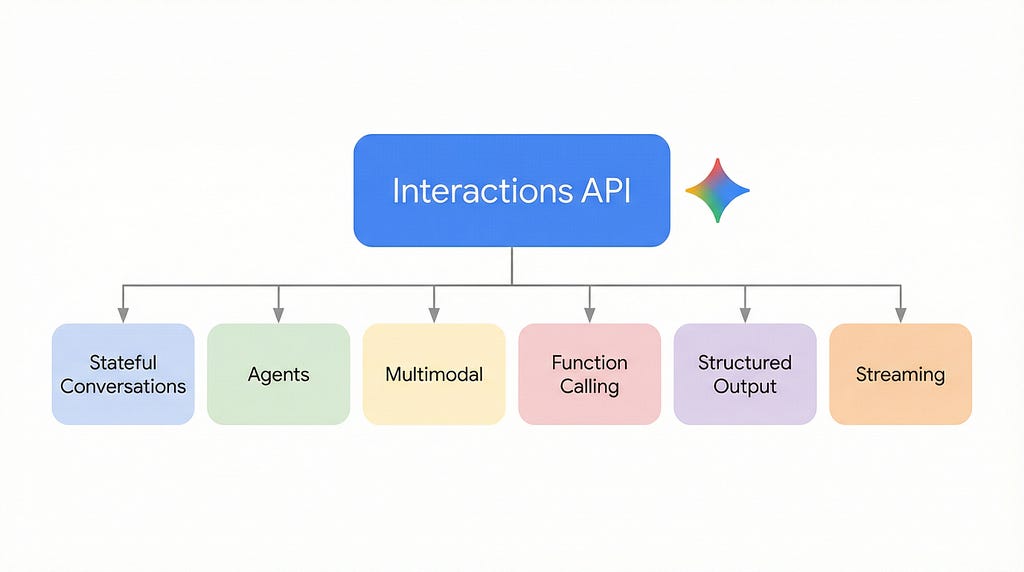
Google’s Gemini API has a new interface. The Interactions API (Beta) rethinks how developers build multi-turn, tool-heavy, and agent-driven applications — shifting state management from the client to the server.
With generateContent, you maintain a growing history array, serialize it with every request, and manage tool call loops by appending function results to that same array. The Interactions API replaces this with a single previous_interaction_id reference. But it goes further — introducing background agents, built-in persistence, and a unified surface for models and agents that generateContent doesn't support at all.
In this article, you’ll learn what’s genuinely new, what’s simpler, and what the trade-offs look like through real benchmark observations. Every code example uses a healthcare patient intake scenario to keep things concrete.
What is the Interactions API?
The Interactions API wraps every API call in a persistent resource called an Interaction — an object with an id, typed outputs, token usage, and a status field.
from google import genai

client = genai.Client()
interaction = client.interactions.create(
    model="gemini-3-flash-preview",
    input="Tell me a short joke about programming."
)
print(interaction.outputs[-1].text)
The input parameter accepts a plain string, a list of typed content objects (for multimodal), or a list of role-tagged turns (for stateless history). This replaces the Content and Part types required by generateContent.
The API works with both models (model=) and agents (agent=) through the same endpoint. Supported models include gemini-2.5-pro, gemini-2.5-flash, gemini-3-flash-preview, and gemini-3-pro-preview. The Deep Research agent (deep-research-pro-preview-12-2025) is also available.
What’s New — Capabilities generateContent Cannot Do
Four capabilities in the Interactions API have no equivalent in generateContent.

Server-side state management
Pass previous_interaction_id and the server reconstructs the full conversation context. No client-side history array needed:
r1 = client.interactions.create(
    model="gemini-3-flash-preview",
    input="Hi, I'd like to schedule a visit with my doctor.",
    system_instruction="You are a healthcare intake assistant."
)

# Server recalls Turn 1 - only the new message is sent
r2 = client.interactions.create(
    model="gemini-3-flash-preview",
    input="My name is Sarah Johnson.",
    previous_interaction_id=r1.id,
    system_instruction="You are a healthcare intake assistant."
)
Note: system_instruction, tools, and generation_config are interaction-scoped — they must be re-specified on each call. Only conversation history is persisted across the chain.
Agents and background execution
generateContent is synchronous and model-only. The Interactions API supports agents that run asynchronously:
research = client.interactions.create(
    input="Research advances in AI-assisted medical diagnostics.",
    agent="deep-research-pro-preview-12-2025",
    background=True
)

# Poll for completion - client is free to do other work
while True:
    result = client.interactions.get(research.id)
    if result.status == "completed":
        print(result.outputs[-1].text)
        break
    time.sleep(10)
Built-in persistence
Every interaction is stored by default. Retrieve any past interaction by ID within the retention window (55 days paid, 1 day free):
past = client.interactions.get("<interaction-id>", include_input=True)
Opt out with store=false. Delete by ID at any time. generateContent retains nothing after the response is returned.
Unified models + agents surface
Models and agents use the same endpoint. Chain them in a single conversation — use an agent for research, then a model for summarization, linked via previous_interaction_id. This composability is architecturally impossible with generateContent.
What’s Simpler — A Better Developer Experience
The Interactions API also streamlines tasks that generateContent already supports. Same models, same quality — simpler interface.
Multimodal input
Flat typed objects replace nested Content/Part construction:
interaction = client.interactions.create(
    model="gemini-3-flash-preview",
    input=[
        {"type": "document", "uri": "gs://bucket/report.pdf",
         "mime_type": "application/pdf"},
        {"type": "text", "text": "Analyze this lab report."}
    ]
)
Supported types: text, image, audio, video, document.
Structured output
Use response_format with a Pydantic schema to enforce JSON structure:
from pydantic import BaseModel
from typing import Literal

class PatientSummary(BaseModel):
    patient_name: str
    urgency_level: Literal["routine", "urgent", "emergent"]
    recommended_follow_up: list[str]
interaction = client.interactions.create(
    model="gemini-3-flash-preview",
    input="Extract structured data from: Patient Sarah Johnson, "
          "persistent headaches, HbA1c 7.8%...",
    response_format=PatientSummary.model_json_schema(),
)
parsed = PatientSummary.model_validate_json(interaction.outputs[-1].text)
Function calling
Same tool definition pattern, but previous_interaction_id eliminates re-sending history when returning results:
interaction = client.interactions.create(
    model="gemini-3-flash-preview",
    input="Look up patient SJ-2026-4412.",
    tools=[ehr_lookup_tool],
)

for output in interaction.outputs:
    if output.type == "function_call":
        result = execute_function(output.name, output.arguments)
        interaction = client.interactions.create(
            model="gemini-3-flash-preview",
            previous_interaction_id=interaction.id,
            input=[{"type": "function_result", "name": output.name,
                    "call_id": output.id, "result": json.dumps(result)}],
            tools=[ehr_lookup_tool],
        )
Built-in tools and streaming
Google Search grounding, code execution, URL context, and computer use work with a one-line tool definition (tools=[{"type": "google_search"}]). Streaming uses typed events — filter for chunk.event_type == "content.delta" and chunk.delta.type == "text".
Experiment — Putting Both APIs to the Test
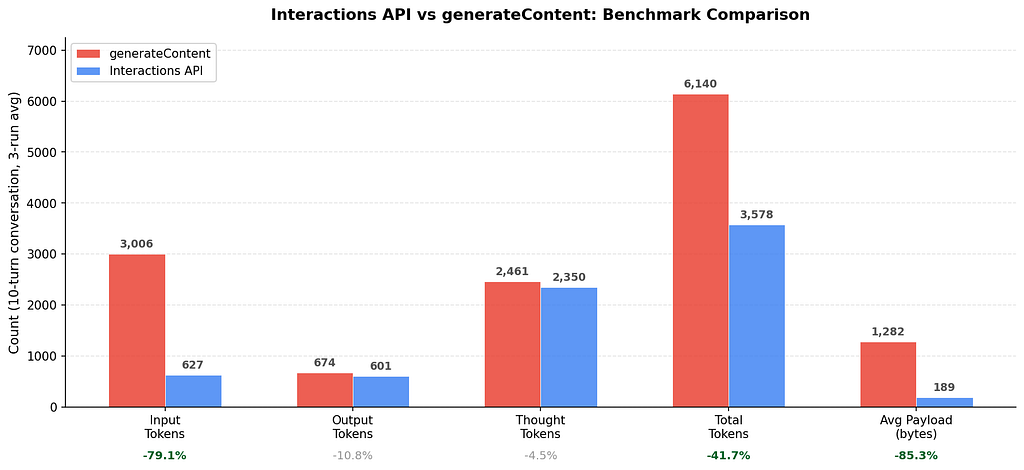
To see how these differences play out in practice, I built the same 10-turn patient intake conversation using both APIs and traced the native SDK usage metadata across 3 averaged runs. Same model (gemini-3-flash-preview), same system instruction, same patient messages.
The conversation covers registration, insurance, chief complaint, medication history, allergies, and family history — a realistic clinical intake flow.
What I measured
Both APIs expose token usage natively. generateContent returns response.usage_metadata with prompt_token_count, candidates_token_count, and cached_content_token_count. The Interactions API returns interaction.usage with total_input_tokens, total_output_tokens, and total_cached_tokens.
What I observed
https://medium.com/media/63f22cafd112cd59341c7aa59f027ad2/href
Input tokens dropped 79%. With generateContent, the full history is re-sent every turn, causing input tokens to compound. The Interactions API sends only the new message.
Total tokens fell 42%. Output and thought tokens were comparable, so the savings come from eliminating redundant input processing.
Payload size was 85% smaller on average. By the final turn, the generateContent payload was 13.1x larger.
What this suggests
- Token and payload savings are structural. They follow directly from the architecture (server holds history vs client re-sends it) and will hold regardless of conversation topic.
- Cost impact scales with conversation length. At 10 turns the input reduction is 79%. With longer conversations and thousands of concurrent sessions, this compounds.
- These are observations from one experiment — one model, one conversation pattern, 3 runs. Your results will vary.
Production Considerations
The Interactions API is in Beta. Features and schemas may change. For production workloads requiring API stability, generateContent remains the recommended path.
Error handling. Check interaction.status for failed or requires_action states. Implement retry logic with exponential backoff for rate limits, especially in high-throughput clinical workflows.
When to use which. Use the Interactions API for stateful conversations, agent-based workflows, and scenarios where server-side persistence or background execution adds value. Use generateContent for single-shot generation, latency-sensitive production workloads, and anywhere you need API stability guarantees.
Summary
The Interactions API introduces four capabilities that generateContent cannot provide: server-side state management, agents with background execution, built-in persistence, and a unified models-and-agents surface. It also simplifies multimodal input, structured output, function calling, and streaming through a cleaner developer interface.
For multi-turn, tool-heavy applications where input tokens and payload size compound with each turn, the architectural advantages are measurable.
Get started:
- Interactions API documentation
- API reference
- Quickstart notebook
Gemini Interactions API: A Unified Interface for Models and Agents was originally published in Google Cloud – Community on Medium, where people are continuing the conversation by highlighting and responding to this story.
Source Credit: https://medium.com/google-cloud/gemini-interactions-api-a-unified-interface-for-models-and-agents-b8d1e6e660d2?source=rss—-e52cf94d98af—4
About the Author





