

Every time we have a room full of developers, I like to ask them:
“What is your favorite Google Cloud product?”
Cloud Run is almost always the top answer. It has become the gold standard for any serverless container needs in Google Cloud because it solves different top-of-mind problems for different roles:
- Developers love Cloud Run because it lets them focus solely on their application and stop at the container boundary. Google will handle the rest and can even help with patching their application through automatic base image updates.
- Operators appreciate Cloud Run for its reliable SLA and its automatic scaling that allows services to go from zero to thousands of instances in no time. The platform manages all the heavy lifting of operating a hyper-scalable service. It handles traffic spikes without manual intervention from the operations team.
- Businesses get to apply one of the most compelling features of a public cloud that is a true “pay for what you use” model. Their infrastructure costs scale linearly with the popularity of their service and they do not have to worry about wasting money on idle resources.
However, this incredible scalability can also create uncertainty or even anxiety for those responsible for keeping an eye on the cost. Because Cloud Run is very good at providing the necessary resources to keep up with demand, it can be difficult to predict the estimated cost. Especially for teams that came from a traditional virtual machine and license based world, this new hyper-elastic serverless model presents a big challenge as they try to fill in the same cost forecasting sheets that they used in the past. To get a more reliable cost estimate, teams now have to consider a few more attributes about their service and expected traffic.
In this blog, we want to help with exactly that. We start by exploring the most important cost-driving factors as well as looking at a couple of auxiliary services that can drive additional cost for certain use cases. We then dive into specific recommendations for cost optimization as well as the tradeoffs with other goals that they inherently bring. Together with the publicly available cost calculator these insights should hopefully equip you to come up with confident cost estimates for your Cloud Run services.
Exploring the Primary Cost driving-factors
In order to understand how Cloud Run Services are billed, we need to understand the basic billing components. In this section, we are going to look only at the pure Cloud Run service cost. In the next section we’ll walk through other services that are typically involved when using Cloud Run as part of a complete architecture.
The first dimension to consider when estimating the Cost for a Cloud Run service is the billing setting:
- Request-based billing (default): Cloud Run instances are only charged when they process requests, when they start, and when they shut down. In addition to the resources consumed by the instances, each request incurs a per-request cost.
- Instance-based billing: Cloud Run instances are charged for the entire lifecycle of instances, even when there are no incoming requests. There are no additional costs per request. This setting can be useful for running short-lived background tasks and other asynchronous processing tasks or in scenarios with a very high concurrency per instance and evenly distributed, constant load. In many of these cases, you should also assess if your use case is a better fit for Cloud Run workerpools, Cloud Run jobs, or potentially GKE Autopilot, as they might offer a better cost-to-performance ratio for steady-load services and long-running tasks.
If this sounds too complicated, start with the default billing setting and keep an eye on the Recommender. It looks at the traffic pattern of the past month and will recommend a switch to instance-based billing if that would have been cheaper.
The main pricing can be broken down into the following components:
- Request Cost (when using request-based billing)
- Request Count (when using request-based billing)
- CPU Cost (per vCPU second) that varies with region and billing setting
- Memory Cost (per GiB second) that varies with region and billing setting
- Request Processing Duration
Each billing account also has a monthly Free Tier that applies to both requests and resources. When trying to visualize the total monthly cost of a Cloud Run service with request-based billing it looks something like this:
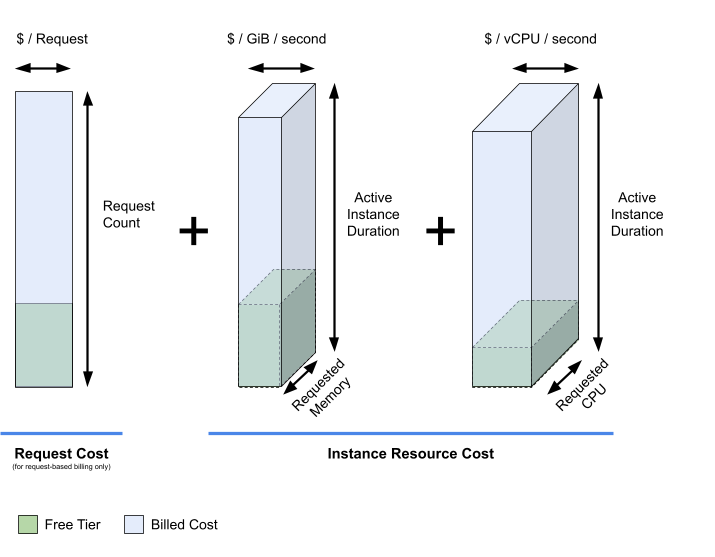
The illustration explains the total cost of a Cloud Run service, but in order to understand how traffic patterns influence the active instance duration we need to look at a timeline view of a Cloud Run service.
The illustration below illustrates exactly that timeline aspect of a container lifecycle and how the pattern of incoming requests keeps a Cloud Run instance active. With constant requests coming in, the Cloud Run service won’t be able to scale to zero or transition the minimum instances to the lower-priced “idle” state.

Primary Optimization Levers
From the visualization above we can already try to extract some of the most important optimization techniques.
The first and most trivial optimization you can perform is to consider the region in which your Cloud Run Service is running. Cloud Run splits Regions into Tier 1 and Tier 2 regions where Tier 1 regions have a lower cost profile than the Regions in Tier 2.
If you understand your application better, you can also start to optimize the utilization of your Cloud Run service. The good news is that compared to a node-based compute platform like GKE standard you do not have to worry about bin packing and only need to care about application rightsizing. In practice, this means answering the question of how much CPU and Memory does my application need to sustain a specific request concurrency.
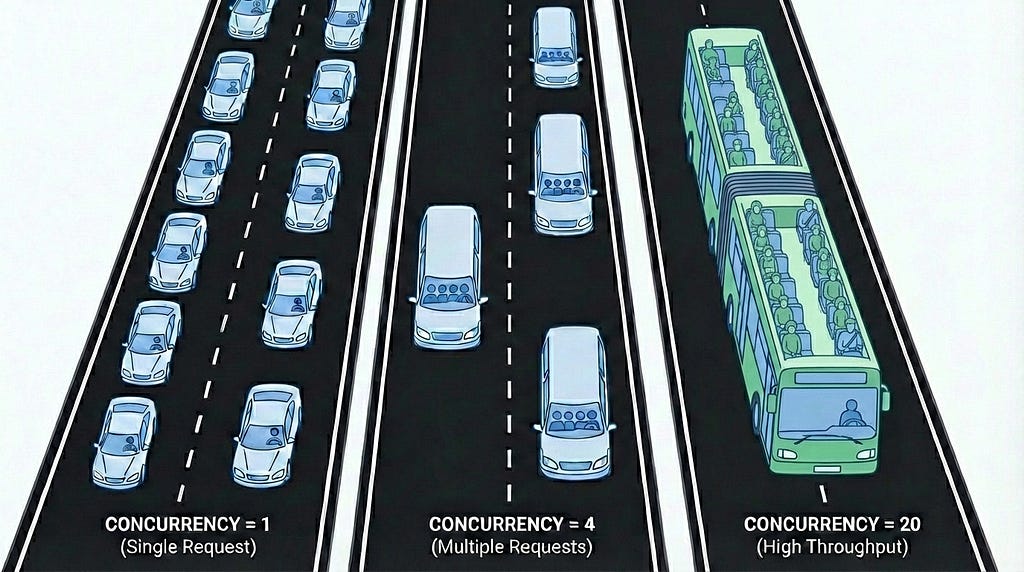
Let’s look at concurrency first. If your service cannot handle more than one request per instance you’d have to set this setting to 1 meaning you get exactly one instance per request that is made to your service. The higher the concurrency the lower the number of instances needed to serve a given request rate. As you are paying by the number of instances that are auto-scaled by Cloud Run, increasing the concurrency can have a big impact on the overall spend of your service and the maximum throughput it can handle. As a real-world analogy, consider a highway with cars with just one person per car compared to cars that can seat 4 or buses that seat an entire group of people. To achieve the same throughput of passengers, you need fewer cars on the road.
One way to reduce the concurrency requirement on your instances without increasing the instance count can be to reduce the request handling duration. The faster the request can be completed the lower the concurrency requirements are for a given request rate as there are fewer in-flight requests at any given time.
Whilst concurrency is mainly concerned with reducing the number of instances needed to serve the traffic your application receives, the other side of the equation is concerned with the resources that each instance requires to handle the configured level of concurrency. As a developer, it is your responsibility to set appropriate resource requests for each Cloud Run instance for both vCPU cores and memory. Giving your applications some extra slack can be a reasonable strategy for increasing the reliability of your service but keeping an eye on what your applications real resource consumption is can be helpful to ensure you are not wasting resources and money. A great starting point for right-sizing both CPU and Memory are the Cloud Monitoring metrics that are built-into Cloud Run.
If you see that your application’s resource usage only spikes at the start of your application but quickly goes down when it enters a running state, consider enabling startup CPU boost on your Cloud Run application and thus only providing it the necessary additional resources at startup without paying for them when they are not needed.
Of course, anything else you can do to reduce the resource footprint of your application such as re-writing your application based on a more efficient stack or using an optimized application logic will also help reduce the resource consumption.
Cost Factors Beyond the Container
In the section above we talked about the main cost factors of the Cloud Run service itself. In reality though a Cloud Run service rarely works in isolation. To build a complete solution, you need connectivity, storage, and other resources that are billed separately. Ignoring them would lead to an incomplete cost profile of your solution and in the worst case scenario to unpleasant surprises when you look at your actual bill.
- Network Egress: As with most cloud services Cloud Run does not charge for network ingress when you access it directly (via the Cloud Run provided endpoint) but you are charged for network egress traffic charged at Google Cloud networking pricing (with a free tier of 1GiB free data transfer within North America per month). For egress to internal networks you can use the direct VPC egress setting which is usually more performant and cost effective than the serverless connector.
- Custom Network Path: If you want to route traffic to your Cloud Run service through your own Endpoints e.g. a network load balancer and a serverless NEG, you are charged for the load balancing infrastructure and the data processing fees.
- GPU: In supported regions, you can attach a GPU to your Cloud Run service which will be another resource that is billed for the instance duration of your Cloud Run service just like vCPU or Memory.
- Storage: The default storage volume used by a Cloud Run service is an in-memory disk which is paid through the memory requests of the Cloud Run service. If you decide to instead mount an NFS volume or Google Cloud Storage FUSE-backed volume, you are billed for these services separately.
- Secret Manager: Using Secret Manager to externalize the configuration or manage API Keys adds a small cost per managed secret and access request.
- Container Images: If you store your container images in Artifact Registry you are billed for them too which can become a factor especially for very large container images or if you decide to retain a large number of past versions of an image. In addition to the storage of the images you might also want to consider automatically scanning your images for vulnerabilities through Artifact Analysis which is priced individually.
- Total Cost of Ownership (TCO): This is harder to quantify than the cost factors mentioned above but remains a crucial factor for your estimate. Because of the managed nature of the Cloud Run service, you and your team spend less time on scaling and patching infrastructure and more time on building features.
Additional Cost Optimization Strategies
Now that we understand the different billing components, we can start fine-tuning our configuration to optimize our deployments even more. Optimization in this space does not just mean picking the absolutely lowest priced option but to carefully tune your options such that they align with your overall business goals. The following strategies are meant to help you to protect your budget from unexpected surprises without sacrificing the service user’s experience.
- Configure Max Instances: Cloud Run allows you to limit the maximum number of instances for a service at both the service and at the revision level. Applying max instances can give you confidence that you can put a cap on how much you are willing your application to scale.
- Configure Min Instances: Configuring minimum instances for a service can help to improve the user experience by reducing the effects of cold starts of applications that scale to zero. Tweaking the number of minimum instances can help find a balance between these two conflicting goals. Minimum instances are also charged at a lower resource price compared to active instances when they are idle.
- Request Timeout: Cloud Run request timeouts can be used to prevent services from hanging unnecessarily long and this incurring cost. Similarly to the resource requests, finding an appropriate request timeout requires you to know your application and understand what a healthy state looks like.
- Early Request Blocking: If you can respond to a request before it hits your Cloud Run service that obviously reduces the Cloud Run cost. To block requests early and before they reach your Cloud Run service you can use IAP, Cloud Armor, or Apigee in front of your request. Additionally you can also decide to only allow access to the internal network to reduce the exposure to request flooding.
- Caching: Similar to request blocking, caching can also be used to reduce the number of requests that are handled by Cloud Run or at least reduce the request duration. To reduce the number of requests you can use a cache layer like Cloud CDN and or Apigee. For more complex requests such as AI inference you can also leverage services like Memory Store or database to fetch pre-cached results in Cloud Run and return responses more quickly.
- FinOps: For a highly scalable service like Cloud Run, FinOps presents an especially important concern. Start by tracking your spend in Cost Explorer and Cloud Billing. Once you have a better understanding of your expected cost, proceed to setting up appropriate budgets and budget alerts. If you want to put in a last-resort circuit-breaker you can also use the budget alerts to set up an automated overage response that could un-deploy the Cloud Run service.
- Discounts Discounts not only apply in the form of the earlier mentioned free tier but can also be obtained through flexible committed use discounts (CUDs). In exchange for committing to continuously use Cloud Run or one of the other included products such as GKE or Compute Engine, you get a discount on your service consumption cost without limiting yourself to specific projects, regions, or products ahead of time.
Get a quick Ballpark Estimate with the new Pricing Calculator
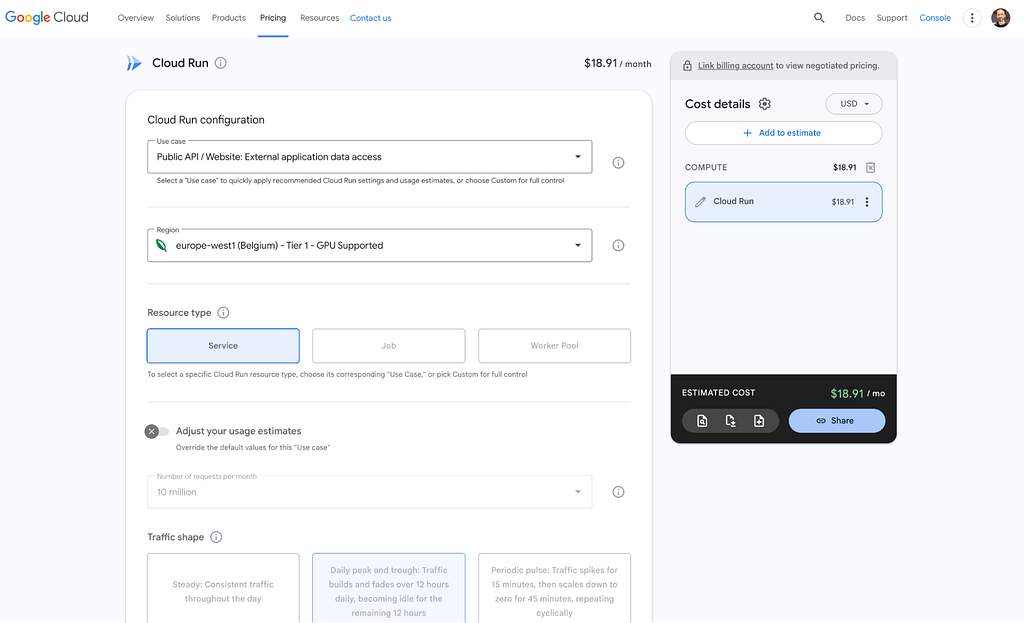
In situations where an in-depth analysis of the above factors is infeasible or just to get a quick estimate on the expected cost for a specific scenario you can use the official Google Cloud pricing calculator.
The calculator allows for coarse or granular configuration of your Cloud Run cost parameters that include amongst others:
- Scenario
- Region
- Request Volume and Distribution
- Resource Requirements
- Expected Min and Max instances
Note that the estimate automatically applies the free tier discount assuming that there are no other Cloud Run services in that billing account that already used up the free tier. This can be a factor especially when estimating the cost of multiple smaller Cloud Run deployments that are used in the same billing account.
Steps you can take to optimize your Cloud Run service today
Ready to apply all of these insights on your own infrastructure? Here’s a quick list of things you can implement right now:
- Understand your current spend: Look at your billing data and start slicing and dicing by projects and services. For a high-level overview and per-service drill down also take a look at the new granular Cloud Run breakdown in Cost Explorer.
- Budget Alerts: If you don’t have budget alerts, this should be the first thing you do to catch unexpected cost increases early on.
- Resource Utilization: Pull up the utilization dashboards for Cloud Run and compare your actual use with the resources that you requested. If you see that you have added a bit of a too conservative safety margin, consider running a right-sizing exercise for your application.
- Concurrency: If your application is thread-safe review and adjust your concurrency setting. Increasing concurrency is usually the easiest way to reduce the number of instances.
Min Instances: Does your application really require a set of always-on instances or can you find ways to reduce the startup time of your application through CPU boost or making your application run more efficiently?
Cloud Run Services: A Practical Guide to Getting More Bang for Your Buck was originally published in Google Cloud – Community on Medium, where people are continuing the conversation by highlighting and responding to this story.
Source Credit: https://medium.com/google-cloud/cloud-run-services-a-practical-guide-to-getting-more-bang-for-your-buck-a9fe18d7b598?source=rss—-e52cf94d98af—4
About the Author





