It’s gotta be DNS. Anytime you have trouble connecting to something, it’s always DNS. Well, okay. But if we’re talking about getting your cloud application to connect to your cloud database…it’s probably not DNS. But it can be every bit as frustrating!
In upcoming blogs I’m going to go deep into the ins and outs of connecting to, specifically, Cloud SQL and AlloyDB (and sort of Memorystore, but in a roundabout way). Why those? What about Spanner? Or BigQuery!? Well, there’s something that the three I bring up have in common, and it’s the topic of this blog post: Private Services. This applies only when you’re trying to do the right thing and connect over Private IP. Public IP has a different set of problems, but Private Services isn’t one.
Okay, so what are Private Services exactly? The simplest definition is that private services is a name given to any service that isn’t exposed to the public. In Google Cloud these could be VPC-hosted environments managed by Google or a third party producer. This could be an intermediate service that gets created to facilitate something else that is kind of an implementation detail in a larger system for example. But in Google’s case, particularly around these databases, this means something very specific. These services are things that Google creates, then enables you in your project to connect to them.
When you ask Google to create a Cloud SQL database for you, it kicks of a series of events:
First, a VM is allocated internally (in the Google-managed VPC place that you don’t see), and all the various scripts are kicked off behind the scenes. They’re going to find the right hardware configuration for you, part of a machine in the data center is allocated, the database engine that you requested is downloaded and installed, various users are created and permissions granted, so on and so forth.
Then the magical step, which makes everything else hard happens: That fully operational Cloud SQL (or AlloyDB, etc) instance is, behind the scenes, VPC peered into your project where you requested it. Herein lies the problem from which all other problems stem.
Networking is hard in general, and networking at scale is even harder. One of the quirks about VPC networks at Google is that VPC networks aren’t chainable. For the math minded folks in the audience, they are not transitively peered (transitive property from math: if A = B, and B = C, then A = C). What this means is this:
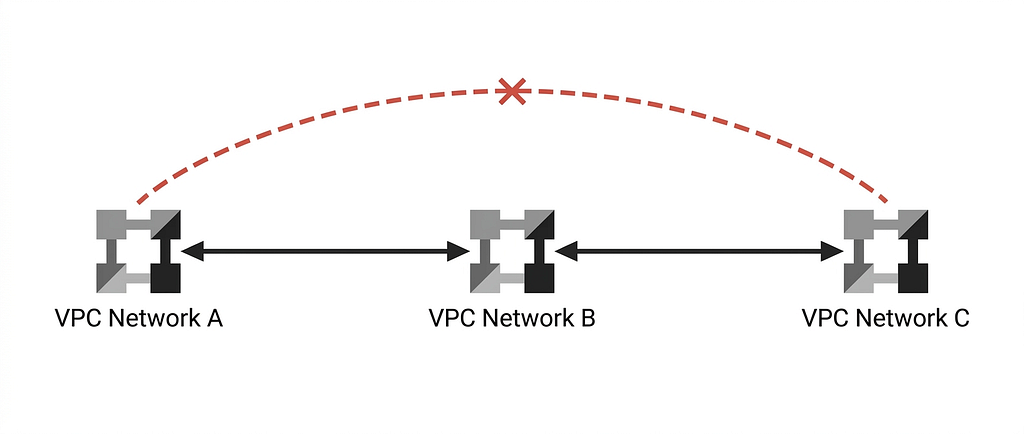
If I have three VPC networks, A, B and C. A and B are peered, and B and C are peered, services in network A cannot see services in network C. You might be getting an understanding already of why this might now be a problem given what I told you about how these private service based databases can be problematic!
If your application exists in a different network than the network you’ve asked your database to be deployed to (say your application is in a custom network and your database sits in the default one) you’re immediately in a situation where you’ve chained your VPC peering. The database ACTUALLY sits in the private services network, and is peered to the network you specified.
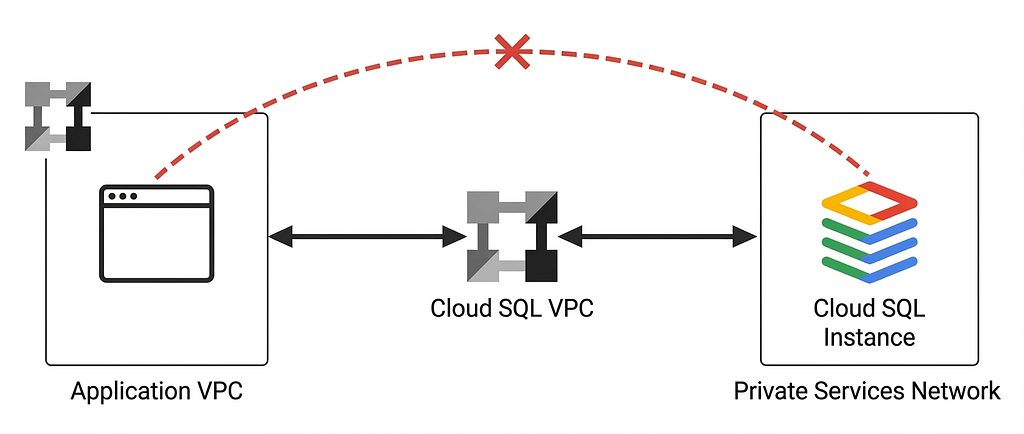
You’re stuck transitively peered across networks and won’t be able to connect.
This is ALSO why you may have encountered frustration when having created your database, and try to connect to it from Cloud Shell in the console. When your Cloud Shell is created, behind the scenes a virtual machine is allocated for it, in private services. Which means it’s in its own network. Same problem, the Cloud Shell’s network has been peered to your project (I honestly don’t even know what network it gets put into, but it’s definitely not your project’s default network) which means now it doesn’t have a network route to get to your database instance. You’ve probably encountered this when you set up a Cloud SQL instance, then try to connect to it from Cloud Shell using psql or the mysql client for example. Just times out. I know, so frustrating. I haven’t even started on serverless connectivity like Cloud Run to the database, which has it’s own complications (I’ll get there too).
The temptation here is just to make your database publicly available using Public IP. Then you too can have Database Center complaining that you have publicly accessible databases.
Please don’t have publicly accessible databases.
There’s actually a host of solutions here, depending on your use-case, and I’ll be diving into them in future blog posts. In this blog, I wanted to lay the foundation for how networking plays into the story here and why things are more complicated than they might seem on the surface.
I’ll leave you with this as a starting place: The simplest solution is to try where you can to keep only one level of VPC distance. Co-locate your application in the same network as your database. Then your one level of distance is private services to your project’s network, and all is well between your application and database.
Stay tuned, more coming on connectivity to your private services Cloud Databases coming soon.
If you really don’t care to dive deep about any of this, and just want an AlloyDB instance to use? Check out Abirami Sukumaran’s codelab for an AlloyDB Quick Setup.
What are Private Services? was originally published in Google Cloud – Community on Medium, where people are continuing the conversation by highlighting and responding to this story.
Source Credit: https://medium.com/google-cloud/what-are-private-services-a513d1d6a721?source=rss—-e52cf94d98af—4
About the Author