Until recently, building a voice-enabled AI agent was an exercise in high-friction pipeline engineering. Developers had to stitch together separate Automatic Speech Recognition (ASR), a large language model (LLM), and a Text-to-Speech (TTS) synthesizer. The cumulative latency of these steps — often hovering between 3 to 6 seconds — shattered any illusion of natural, conversational human-computer interaction.
The release of the Gemini Multimodal Live API has rewritten the rules. By processing voice, video, and text natively and bidirectionally over a single stateful WebSocket, Gemini enables natural, low-latency, full-duplex interactions.
In this deep dive, we will analyze a production-grade, highly optimized implementation of Gemini Live built in React and TypeScript, showing how to handle the real-world engineering challenges of thread-isolated AudioWorklet voice capture, real-time local Voice Activity Detection, asynchronous canvas compression, and auto-reconnections.
💡 Key Insight: Traditional voice bots simulate conversation. Gemini Live lives it. By operating directly on PCM binary data and JPEG image buffers over WebSockets, it has an instantaneous, human-like reaction time. Let’s explore how this system is architected.
1. High-Level Architecture
Before looking at the code, let’s trace how media buffers and network events flow through our system. The client establishes a WebSocket connection directly to Gemini’s stateful BidiGenerateContent endpoint.
https://medium.com/media/39523c35983d9bff0281c9e701f8f5f6/href
✦ Interactive Media & Signal Flow ✦
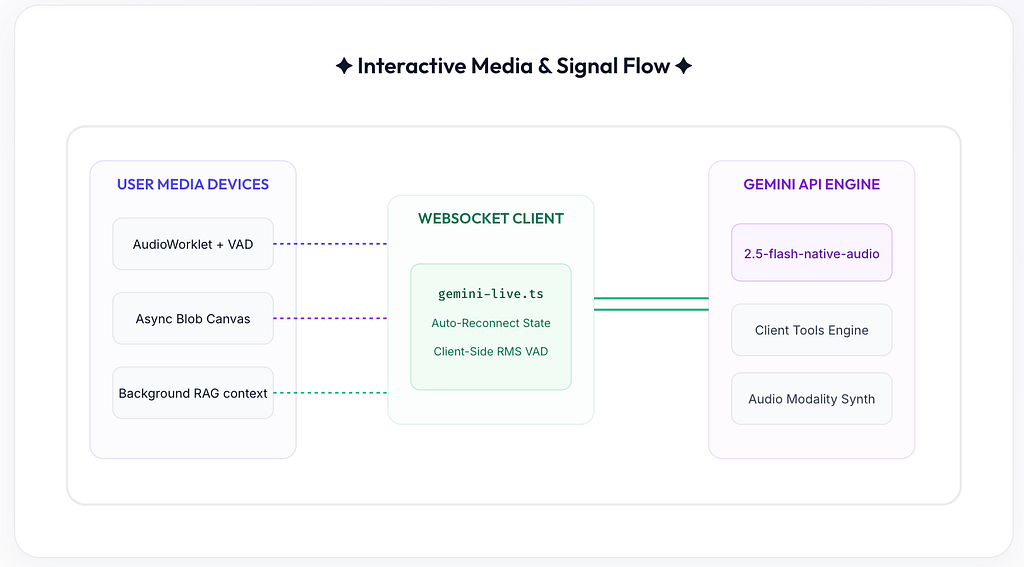
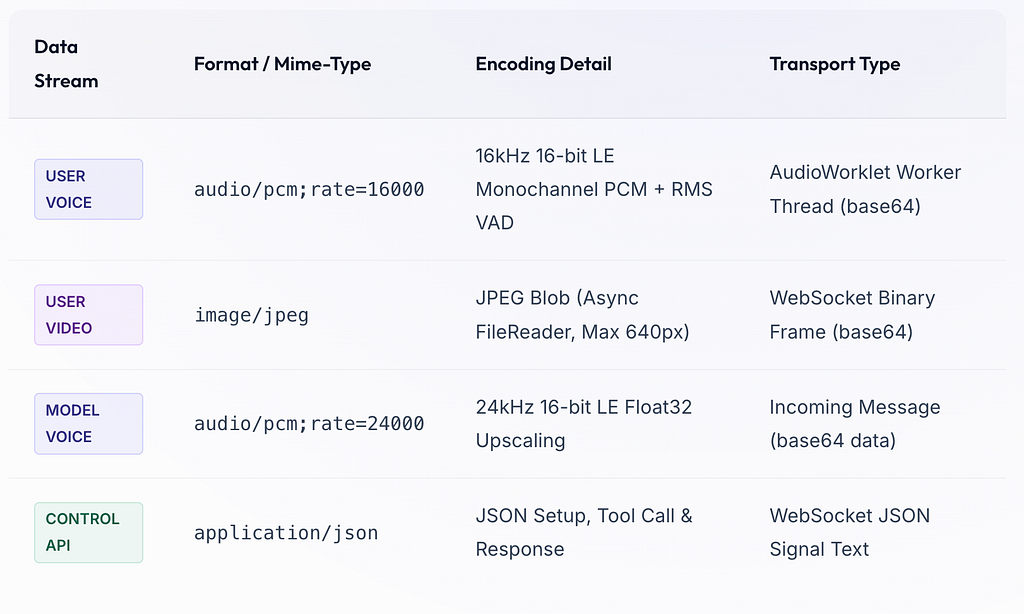
To coordinate this ecosystem of media signals, our React application utilizes specific protocols and sample rates tailored to Google’s streaming ingestion specifications:
2. Structuring the Stateful WebSocket Client & Proxy Security
⚠️Security Warning (API Key Exposure): Exposing your Gemini API key inside the frontend query parameter (`key=${this.apiKey}`) is a major security concern for production applications. Anyone inspecting the browser Network Tab can capture and misuse your credentials. For a production-grade solution, always establish your WebSocket connection through a backend Reverse Proxy Server (like Node.js/Express) that handles key injection in a secure backend environment.
Here is a robust architecture showing how you can delegate connection establishment to a backend proxy using Node.js and Express, preventing API Key leakage completely:
const express = require('express');
const expressWs = require('express-ws');
const WebSocket = require('ws');

const app = express();
expressWs(app);

const GEMINI_URL = "wss://generativelanguage.googleapis.com/ws/google.ai.generativelanguage.v1beta.GenerativeService.BidiGenerateContent";
const API_KEY = process.env.GEMINI_API_KEY; // SECURELY LOADED ON SERVER

app.ws('/v1/live-chat', (ws, req) => {
  // Establish secure backend WebSocket to Gemini
  const geminiWs = new WebSocket(`${GEMINI_URL}?key=${API_KEY}`);

  // Proxy message pipelines
  ws.on('message', (msg) => {
    if (geminiWs.readyState === WebSocket.OPEN) geminiWs.send(msg);
  });

  geminiWs.on('message', (data) => {
    if (ws.readyState === WebSocket.OPEN) ws.send(data);
  });

  ws.on('close', () => geminiWs.close());
  geminiWs.on('close', () => ws.close());
});

app.listen(3000, () => console.log("Secure WebSocket proxy active on port 3000"));
With this proxy in place, the React frontend simply connects to `ws://your-backend/v1/live-chat` without ever exposing credentials to the user!
In our local implementation, the `GeminiLiveClient` manages connection states, exposes clean event destructors to prevent garbage-collection leaks when React components unmount, and includes Exponential Backoff Reconnections to survive network drops:
export class GeminiLiveClient {
  private isSilent: boolean = false;
  private ws: WebSocket | null = null;
  private audioContext: AudioContext | null = null;
  private audioDestination: MediaStreamAudioDestinationNode | null = null;
  private audioQueue: Float32Array[] = [];
  private isPlaying = false;
  private currentSourceNode: AudioBufferSourceNode | null = null;

  // Reconnection State Machine
  private reconnectAttempts = 0;
  private maxReconnectAttempts = 3;
  private isExplicitDisconnect = false;

  constructor(
    private apiKey: string,
    private systemInstruction: string,
    private callbacks: GeminiLiveCallbacks,
    isSilent: boolean = false
  ) {
    this.isSilent = isSilent;
  }

  connect() {
    this.isExplicitDisconnect = false;
    const url = `${GEMINI_WS_URL}?key=${this.apiKey}`; // In production, connect to backend proxy URL
    this.ws = new WebSocket(url);

    this.audioContext = new (window.AudioContext || (window as any).webkitAudioContext)({ sampleRate: 24000 });
    this.audioDestination = this.audioContext.createMediaStreamDestination();

    this.ws.onopen = () => {
      console.log("Gemini WS connected, sending setup...");
      this.reconnectAttempts = 0; // Reset retries on success
      this.isExplicitDisconnect = false;

      // Send setup message...
      this.ws?.send(JSON.stringify(setupPayload));
    };

    this.ws.onclose = (event) => {
      console.log("WebSocket connection closed.");

      // Trigger Reconnect Routine if network drops unexpectedly
      if (!this.isExplicitDisconnect && this.reconnectAttempts < this.maxReconnectAttempts) {
        this.reconnectAttempts++;
        const delay = Math.pow(2, this.reconnectAttempts) * 1000; // Exponential Backoff
        console.log(`Retrying connection in ${delay}ms...`);
        setTimeout(() => {
          if (!this.isExplicitDisconnect) this.connect();
        }, delay);
      } else {
        this.callbacks.onConnectionChange(false);
      }
    };
  }

  disconnect() {
    this.isExplicitDisconnect = true;
    this.stopAudioPlayback();

    if (this.ws) {
      // Detach all event handlers to prevent memory leaks on unmount
      this.ws.onopen = null;
      this.ws.onmessage = null;
      this.ws.onerror = null;
      this.ws.onclose = null;

      try { this.ws.close(); } catch(e){}
      this.ws = null;
    }

    if (this.audioContext) {
      try { this.audioContext.close(); } catch(e){}
      this.audioContext = null;
    }
    this.audioDestination = null;
    this.audioQueue = [];
  }
}
3. Thread-Isolated Media Capturing & Asynchronous Canvas toBlob
To capture microphone audio, early implementations used the legacy ScriptProcessorNode. However, this runs on the browser's Main UI Thread, meaning any high-load JavaScript animations or rendering triggers will stutter your audio stream.
💡Modernization Note: In this project, we migrated our recording process to Web Audio’s high-performance AudioWorkletNode. The audio processor operates inside a dedicated background Thread (Web Audio Thread) completely isolated from the Main UI loop. We resolve the problem of loading extra files in Vite-bundling environments by packaging the worklet module dynamically as a blob URL.
Let’s study our modernized, high-performance `AudioCapture` class:
export class AudioCapture {
  private stream: MediaStream | null = null;
  private audioContext: AudioContext | null = null;
  private workletNode: AudioWorkletNode | null = null;

  constructor(private callbacks: AudioCaptureCallbacks) {}

  async start() {
    this.stream = await navigator.mediaDevices.getUserMedia({
      audio: { sampleRate: 16000, channelCount: 1, echoCancellation: true, noiseSuppression: true }
    });

    this.audioContext = new AudioContext({ sampleRate: 16000 });

    // Dynamic background worklet definition (VAD computation inside the background thread)
    const workletCode = `
      class PCMProcessor extends AudioWorkletProcessor {
        constructor() {
          super();
          this.speechFramesCount = 0;
          this.threshold = 0.015; // RMS volume threshold
        }
        process(inputs, outputs, parameters) {
          const input = inputs[0];
          if (input && input[0]) {
            const channelData = input[0];

            // Calculate Root Mean Square (RMS) amplitude for fast local VAD
            let sum = 0;
            for (let i = 0; i < channelData.length; i++) {
              sum += channelData[i] * channelData[i];
            }
            const rms = Math.sqrt(sum / channelData.length);

            // If RMS exceeds threshold for ~100ms (3 frames @ 4096 samples)
            if (rms > this.threshold) {
              this.speechFramesCount++;
              if (this.speechFramesCount >= 3) {
                this.port.postMessage({ type: "speech_detected" });
              }
            } else {
              this.speechFramesCount = 0;
            }

            const pcm = new Int16Array(channelData.length);
            for (let i = 0; i < channelData.length; i++) {
              const s = Math.max(-1, Math.min(1, channelData[i]));
              pcm[i] = s < 0 ? s * 0x8000 : s * 0x7FFF;
            }
            this.port.postMessage({ type: "pcm_chunk", buffer: pcm.buffer }, [pcm.buffer]);
          }
          return true;
        }
      }
      registerProcessor('pcm-worklet-processor', PCMProcessor);
    `;

    const blob = new Blob([workletCode], { type: "application/javascript" });
    const url = URL.createObjectURL(blob);
    await this.audioContext.audioWorklet.addModule(url);
    URL.revokeObjectURL(url);

    const source = this.audioContext.createMediaStreamSource(this.stream);
    this.workletNode = new AudioWorkletNode(this.audioContext, "pcm-worklet-processor");

    this.workletNode.port.onmessage = (e) => {
      const msg = e.data;
      if (msg.type === "speech_detected") {
        this.callbacks.onSpeechDetected?.();
      } else if (msg.type === "pcm_chunk") {
        const pcmBuffer = msg.buffer as ArrayBuffer;
        const bytes = new Uint8Array(pcmBuffer);
        let binary = "";
        for (let i = 0; i < bytes.length; i++) {
          binary += String.fromCharCode(bytes[i]);
        }
        this.callbacks.onChunk(btoa(binary));
      }
    };

    source.connect(this.workletNode);
    this.workletNode.connect(this.audioContext.destination);
  }
}
Optimized Asynchronous Frame Capture Loop (Canvas Re-use)
In our video capture loop, allocating a new `
We resolve both issues. First, we allocate a single canvas instance once outside the `setInterval` capture loop and reuse its context. Second, we replace the synchronous conversion with browser-asynchronous **Blob rendering** and `FileReader` streams, letting the browser complete JPEG compression in the background:
useEffect(() => {
  if (!connected || !cameraOn || !videoRef.current || !geminiRef.current) return;

  // Allocate ONCE - prevent garbage collection thrashing
  const canvas = document.createElement("canvas");
  const ctx = canvas.getContext("2d");

  const interval = setInterval(() => {
    const video = videoRef.current;
    if (!video || !video.videoWidth || !ctx) return;

    const scale = Math.min(640 / video.videoWidth, 1);
    const targetWidth = video.videoWidth * scale;
    const targetHeight = video.videoHeight * scale;

    if (canvas.width !== targetWidth || canvas.height !== targetHeight) {
      canvas.width = targetWidth;
      canvas.height = targetHeight;
    }

    ctx.drawImage(video, 0, 0, canvas.width, canvas.height);

    // Asynchronous Blob compression shifts workloads away from the Main UI thread
    canvas.toBlob((blob) => {
      if (!blob) return;
      const reader = new FileReader();
      reader.onloadend = () => {
        const base64 = (reader.result as string).split("1")[1];
        if (base64 && geminiRef.current) {
          geminiRef.current.sendVideo(base64);
        }
      };
      reader.readAsDataURL(blob);
    }, "image/jpeg", 0.6); // Asynchronous JPEG Compression
  }, 1000);

  return () => clearInterval(interval);
}, [connected, cameraOn]);
4. Reconstructing Audio Output & Jitter Buffering
As Gemini replies, the WebSocket receives base64 chunks of PCM audio (at 24kHz sample rate) inside the `serverContent` object. Because these chunks arrive in high frequency bursts, trying to play them immediately inside standard audio nodes creates popping noises or audio lag.
Our application resolves this by introducing an internal Audio Queue FIFO model. When a new audio packet arrives, we decode it, convert the raw Int16 buffer to standard Float32 arrays, enqueue it, and play it back in a continuous, self-triggering chain:
// Decode base64 binary data and buffer it in Float32 form
private async enqueueAudio(pcmData: ArrayBuffer) {
  if (!this.audioContext) {
    this.audioContext = new (window.AudioContext || (window as any).webkitAudioContext)({ sampleRate: 24000 });
    this.audioDestination = this.audioContext.createMediaStreamDestination();
  }

  // Convert native 16-bit PCM integers to Float32 floats (-1.0 to 1.0)
  const int16 = new Int16Array(pcmData);
  const float32 = new Float32Array(int16.length);
  for (let i = 0; i < int16.length; i++) {
    float32[i] = int16[i] / 32768.0;
  }
  this.audioQueue.push(float32);

  if (!this.isPlaying) {
    this.playNextChunk();
  }
}
Tackling Network Jitter (Jitter Buffer)
Under unstable mobile or Wi-Fi network connections, raw WebSocket audio packets can arrive in bursts rather than smooth constant streams.
To prevent voice stuttering, we recommend implementing a basic **Jitter Buffer**. Instead of triggering the playback of the very first chunk immediately, introduce a minor scheduling buffer delay (e.g., 50ms — 100ms) using `setTimeout` or scheduling in Web Audio clock time. This gives the incoming WebSocket stream a buffer cushion to absorb any packet transit jitters, ensuring perfectly smooth audio playback.
5. Conquering Barge-In Latency with Client-Side VAD
One of the most critical elements of a polished conversational system is handling **user interruptions** (barge-in). If the user starts speaking, any active playing model speech must stop immediately.
Relying purely on the Gemini Live server to detect user speech and send back a `content.interrupted` signal creates a latency of 200ms to 500ms. During this time, the model continues speaking in the user’s ears, creating a confusing and frustrating user experience.
🚀Architectural Breakthrough: We resolved this roundtrip lag by implementing Client-Side Voice Activity Detection (VAD) inside the isolated AudioWorklet thread. By computing the active energy (RMS) of the microphone input locally, we detect speech in 0ms. The worklet immediately signals the parent React application to mute and stop the playing AudioBufferSourceNode locally, before waiting for the server’s interruption packet to catch up!
When our `AudioCapture` thread triggers `onSpeechDetected`, the page controller silences model playback locally:
const capture = new AudioCapture({
  onChunk: (base64Pcm) => {
    geminiRef.current?.sendAudio(base64Pcm);
  },
  onSpeechDetected: () => {
    if (geminiRef.current) {
      console.log("Local Speech Detected. Silencing model immediately.");
      // Mute playback locally in 0ms to eradicate roundtrip latency
      geminiRef.current.stopAudioPlayback();
    }
  }
});
6. Executing Multimodal Client Tools
Unlike traditional text tools, Gemini Live supports real-time, low-latency tool calling directly within the WebSocket connection. The model sends a toolCall object, the client executes the corresponding code, and returns a toolResponse immediately over the socket without breaking the voice stream.
In this project, we implemented two high-impact tools:
- take_picture: Dynamically captures a high-resolution snapshot from the user’s webcam stream and sends it back to Gemini to inspect physical elements.
- draw_diagram: Receives dynamic Mermaid syntax generated by Gemini on the fly and renders live technical architectures in a persistent visual sidebar in the React UI.
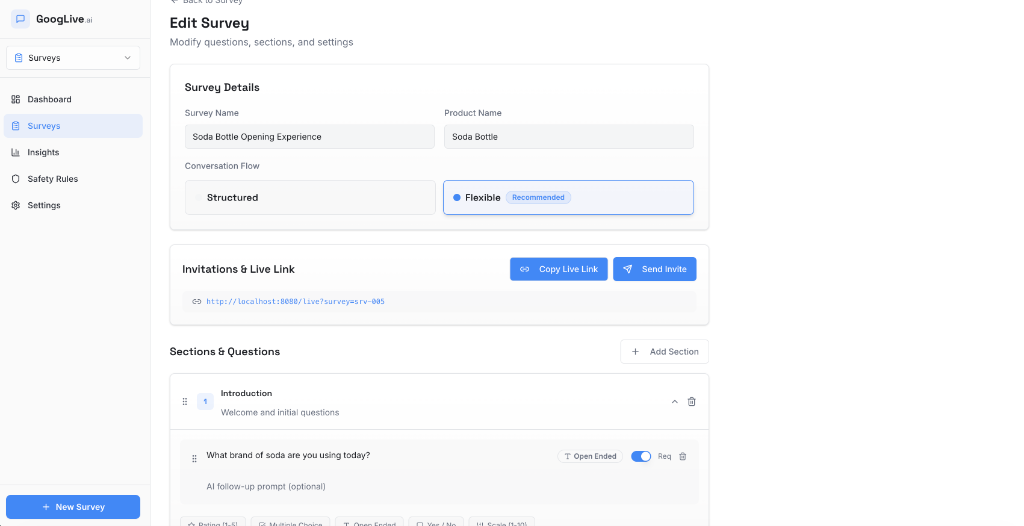
To configure these live interview flows, our React application includes a custom Survey Builder page that compiles the structured sections and question blocks into the system prompt instructions before opening the WebSocket:
7. Real-Time Recording, Audio Mixing & Desync Syncing
A common challenge when recording interactive AI sessions is that standard screen or media recording tools only capture one side of the conversation: either your microphone or the system speaker audio.
To capture both parties in a single, unified .webm video file, we mix the user's microphone stream and the model's speaker output stream into a custom MediaStreamAudioDestinationNode in real-time, combining it with the webcam's video track:
// Setting up the mixed recorder
const mixCtx = new (window.AudioContext || (window as any).webkitAudioContext)();
const mixDest = mixCtx.createMediaStreamDestination();

// Connect user microphone source to mixer destination
const micSource = mixCtx.createMediaStreamSource(userMicStream);
micSource.connect(mixDest);

// Connect model speaker stream to mixer destination
const geminiStream = geminiClient.getAudioStream();
if (geminiStream) {
  const geminiSource = mixCtx.createMediaStreamSource(geminiStream);
  geminiSource.connect(mixDest);
}
⚠️Latency desynchronization (Desync): In some environments, local sound cards or CPU queues can introduce a slight latency delay (100ms — 300ms) between the microphone track and the camera video capture track. In high-precision production, you can resolve this desync by introducing a Web Audio `DelayNode` on the faster stream track to delay and perfectly synchronize the audio chunks with the camera feed before sending them to `MediaRecorder`.
8. Post-Session Analysis via Gemini REST API
While real-time voice conversation requires a low-latency WebSocket connection, extracting structured summaries and structured insights from the conversation is better suited for a standard REST call.
When the user ends the session, we disconnect the WebSocket, compile the session transcript, and send a standard REST request to `gemini-2.0-flash` with the responseMimeType: "application/json" generation config. This allows us to structure the entire live interaction into a clean, predictable JSON format.
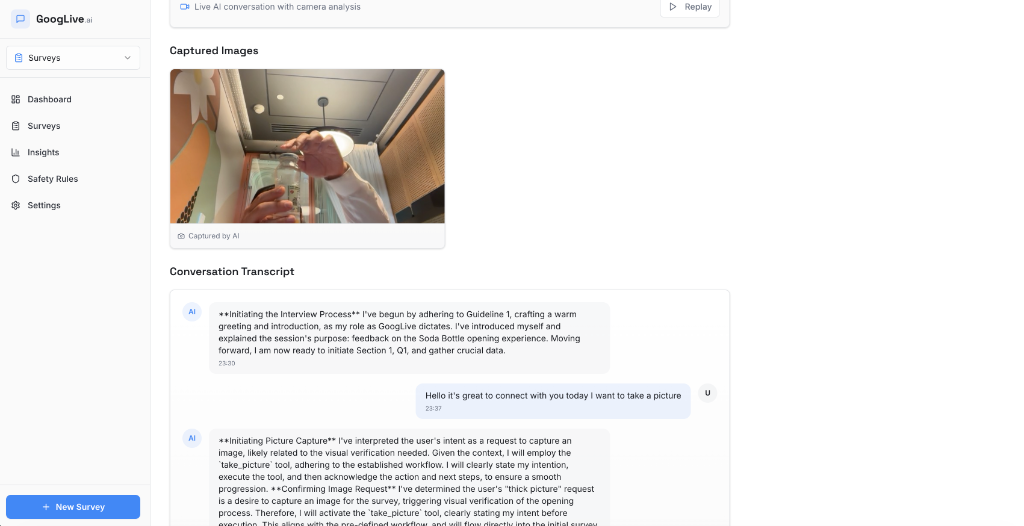
✦ Figure 4:GoogLive Session Results — The final synthesis displaying the conversation transcript and the visual snapshot captured by Gemini Live’stake_picturetool during the session.
9. Conclusion & Actionable Next Steps
By pairing low-latency WebSocket streaming with modern thread-isolated AudioWorklet capture nodes, reusable canvas contexts, local RMS Voice Activity Detection, and auto-reconnection states, we have built a highly responsive voice agent that feels incredibly natural and matches production engineering standards.
As you build your own voice agents, remember these key lessons:
- Use AudioWorklets: Never capture microphone feeds inside ScriptProcessorNode. Run Float32 to Int16 PCM downsampling inside a background Web Audio Thread.
- Perform Client-side VAD: Eradicate user barge-in roundtrip lag by muting active sound nodes as soon as local microphone amplitude spikes.
- Use Asynchronous canvas capturing: Offload JPEG compression tasks completely from the browser’s Main UI thread using asynchronous toBlob.
- Keep API Keys safe: Protect your Gemini API key by proxying WebSocket connections through a backend server rather than exposing them in the client.
This was built entirely using Antigravity. You can find the project’s code on my GitHub:
https://github.com/moshem-a/googlive
What will you build next with Gemini Live? The era of conversational computing is officially here.
Beyond the Pipeline: Building Low-Latency Voice Agents with Gemini Live API was originally published in Google Cloud – Community on Medium, where people are continuing the conversation by highlighting and responding to this story.
Source Credit: https://medium.com/google-cloud/why-your-voice-bot-feels-robotic-and-how-gemini-live-fixes-it-05c7a4d5355a?source=rss—-e52cf94d98af—4
About the Author