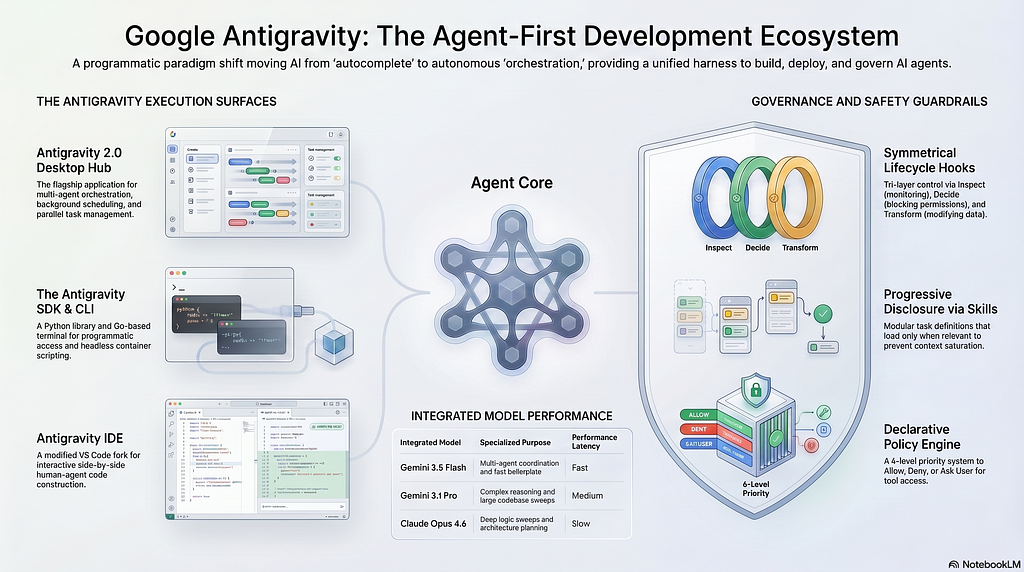
Google Antigravity 2.0 was launched on May 19, 2026, during the Google I/O event. Google Antigravity 2.0 is not simply an IDE update, but a massive paradigm shift toward an agent-first software development ecosystem. While the original 1.0 version acted as a traditional smart coding assistant, version 2.0 was rebuilt from the ground up to focus on multi-agent orchestration.
In this new era, the developer’s role shifts from writing every line of code to acting as a director or manager of builders. Powered by default by the Gemini 3.5 Flash model — which runs about four times faster than other frontier models to prevent latency compounding — Antigravity allows developers to deploy multiple AI agents that plan, execute, and verify their own work autonomously. The ecosystem spans four main interfaces: the Antigravity 2.0 Desktop App, the Antigravity CLI, the Antigravity IDE, and the Antigravity SDK.
Antigravity 2.0 introduces several groundbreaking features designed for agentic workflows:
- Parallel Multi-Agent Orchestration: Developers can spawn up to five parallel agents, each working on distinct tasks in separate workspaces simultaneously.
- The Artifacts System: To bridge the “trust gap” in AI coding, agents generate transparent, reviewable artifacts such as task lists, implementation plans, code diffs, and walkthroughs. Users can comment on these artifacts in a Google Docs-style format to provide feedback.
- Background Automation: You can set up scheduled tasks, allowing agents to automatically run periodic checks like daily PR digests or code quality audits in the background.
- Native Voice Commands: The platform integrates voice support, allowing users to control agents and orchestrate tasks using spoken instructions.
What is the Antigravity SDK
The Google Antigravity SDK is a programmatic Python library that allows developers to build, test, and deploy their own custom autonomous AI agents. It provides developers with direct access to the same agent harness, execution loop, and context management engine that powers Google’s flagship Antigravity applications. The SDK abstracts away the complex infrastructure of state management and tool execution, allowing engineers to focus entirely on defining the agent’s behavior and logic.
Differences of the Antigravity SDK
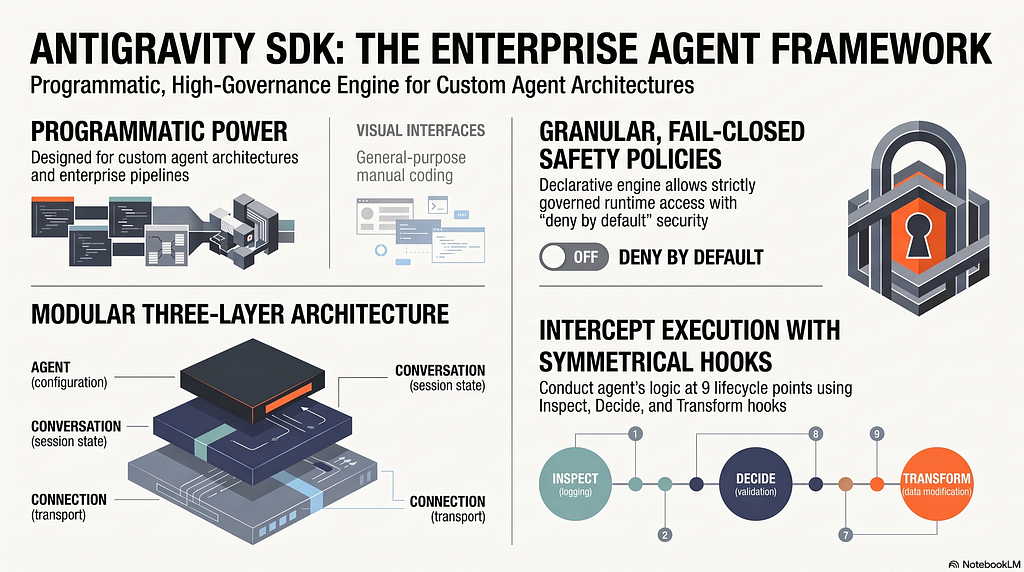
Unlike the Desktop App or the IDE, which provide visual interfaces for general-purpose coding, the SDK is fundamentally designed for custom, programmatic agent architectures and enterprise pipelines. It differs through its deep extensibility and governance features:
- Three-Layer Architecture: It decouples high-level behaviors from low-level communication protocols through a three-layer model: the Agent (user-facing configuration), the Conversation (session state layer), and the Connection (transport layer).
- Declarative Safety Policies: The SDK features a granular, fail-closed policy engine that allows developers to configure runtime access to tools strictly.
- Symmetrical Lifecycle Hooks: Developers can intercept and conduct the agent’s execution at nine distinct lifecycle points using Inspect (read-only logging), Decide (blocking validations), and Transform (modifying data in transit) hooks.
Antigravity SDK Components
The programmatic architecture of the Google Antigravity SDK is designed to decouple high-level behaviors from low-level communication protocols. For advanced projects, the SDK offers modular access to its internal components:
Agent
This is the primary, high-level “batteries-included” entry point. It acts as Layer 1 of the architecture, managing the entire lifecycle: binary discovery, tool wiring, hook registration, and default safety policies. All of this is safely handled under an asynchronous context manager
https://medium.com/media/e20b82ea96a1f4106cca33e6f4242194/href
Connections
This represents the transport and backend abstraction layer 3 of the architecture. It allows you to seamlessly route agent requests to run locally or directly against the cloud-hosted infrastructure of the Gemini Enterprise Agent Platform, formerly Vertex AI, without needing to rewrite your code.
https://medium.com/media/91c557282bf6bfb2a53398a25d7ebc68/href
Conversation
This is the stateful session management, layer 2 of the architecture. The Conversation class accumulates the history of the agent's steps, tracks token usage, and automatically truncates the step sequence if it exceeds maximum safe memory limits to prevent context overflow
https://medium.com/media/d3b9fccf5da4efb81ed862f5a0c244b8/href
Hooks
These intercept the agent’s lifecycle to apply execution policies and audits. There are nine (9) distinct lifecycle points where you can intercept actions using three types of hooks: Inspect (read-only for logging), Decide (blocking safety validations that can abort actions), and Transform (to modify or sanitize data in transit)
https://medium.com/media/c4fdd42886e5a3e6c0ede9658aab5f0e/href
Policies
The policy engine evaluates rules in a strict priority order, stopping at the first match:
- Specific Deny: Blocks a specific tool.
- Ask User: Pauses execution to require human approval.
- Specific Approve: Silently allows a specific tool.
- Wildcards: Global rules (Deny all, Ask User for all, or Approve all) applied to anything that didn’t match the specific rules
https://medium.com/media/c88b7a4bc14b5399d8acf9fb9ab70114/href
MCP (Model Context Protocol)
Enables seamless integration with external Model Context Protocol (MCP) servers. The SDK’s connection layer wraps the tools exposed by third-party MCP servers and automatically generates the required JSON schemas for the agent to interact with them
https://medium.com/media/9576ee1b2dbc071c37acd6c3c9a1b2b8/href
Tools
The mechanism for in-process tool execution. It allows you to register any standard or asynchronous Python function as a tool. The SDK autogenerates the schema, validates parameters, and automatically runs synchronous calls in a separate thread pool so as not to block the main event loop
https://medium.com/media/99838464aaf9e505972a5b1371fab803/href
Triggers
These are background tasks and external events that run concurrently with the agent session. Unlike hooks, which are inline and blocking, Triggers can monitor external system events like modified files, webhooks, or recurring schedules, and push notifications or reactive messages back into the active connection asynchronously
https://medium.com/media/c01de4329c1cb0e32e40212153e08ea0/href
Examples of Antigravity SDK Capabilities:
The Antigravity SDK is fundamentally built for “Governed Extensibility,” which means developers can customize and expand the agent’s capabilities while maintaining robust architectural guardrails and safety policies. Here is a closer look at its most powerful features
Fast Instantiation: the SDK abstracts complex infrastructure boilerplate, allowing you to create a fully functional agent with built-in tools like file I/O, code editing, and directory search in under 15 lines of idiomatic Python. By leveraging the asynchronous Agent context manager, the SDK automatically handles binary discovery, tool wiring, hook registration, and safety policies behind the scenes
Multimodal Ingestion: Agents are not restricted to text-only inputs. The SDK allows you to pass rich multimedia files such as images, videos, audio, and PDF documents alongside your textual prompts. By using the built-in from_file() helper method, you can attach files directly from local filesystem paths, and the SDK will automatically read the bytes and resolve the correct MIME formats
https://medium.com/media/fb484c7847e409954a380c92284fbc73/href
Custom Tools and MCP: While the agent starts with default system tools, you can seamlessly expose new capabilities through two main avenues: In-Process Custom Tool and Model Context Protocol (MCP)
https://medium.com/media/5ec6f596291b85997b16357c31f42b3d/href
Developed Use Case: UX Agent Audit
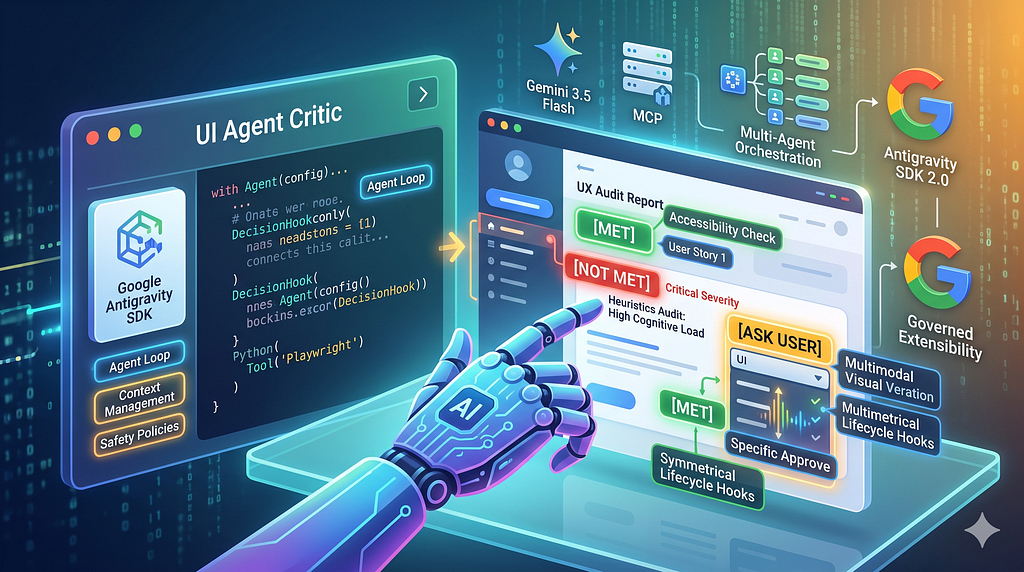
An excellent real-world application built on the Antigravity SDK is the open-source ux-agent-audit project, developed by me. It is an autonomous Senior UX/UI and Accessibility Audit Agent desktop application that combines the Google Antigravity SDK with the Playwright MCP server to interact with web browsers.
The following diagram illustrates the technical architecture of how the PySide6 UI thread, background threads, Google Antigravity SDK, and Playwright MCP interact during an audit
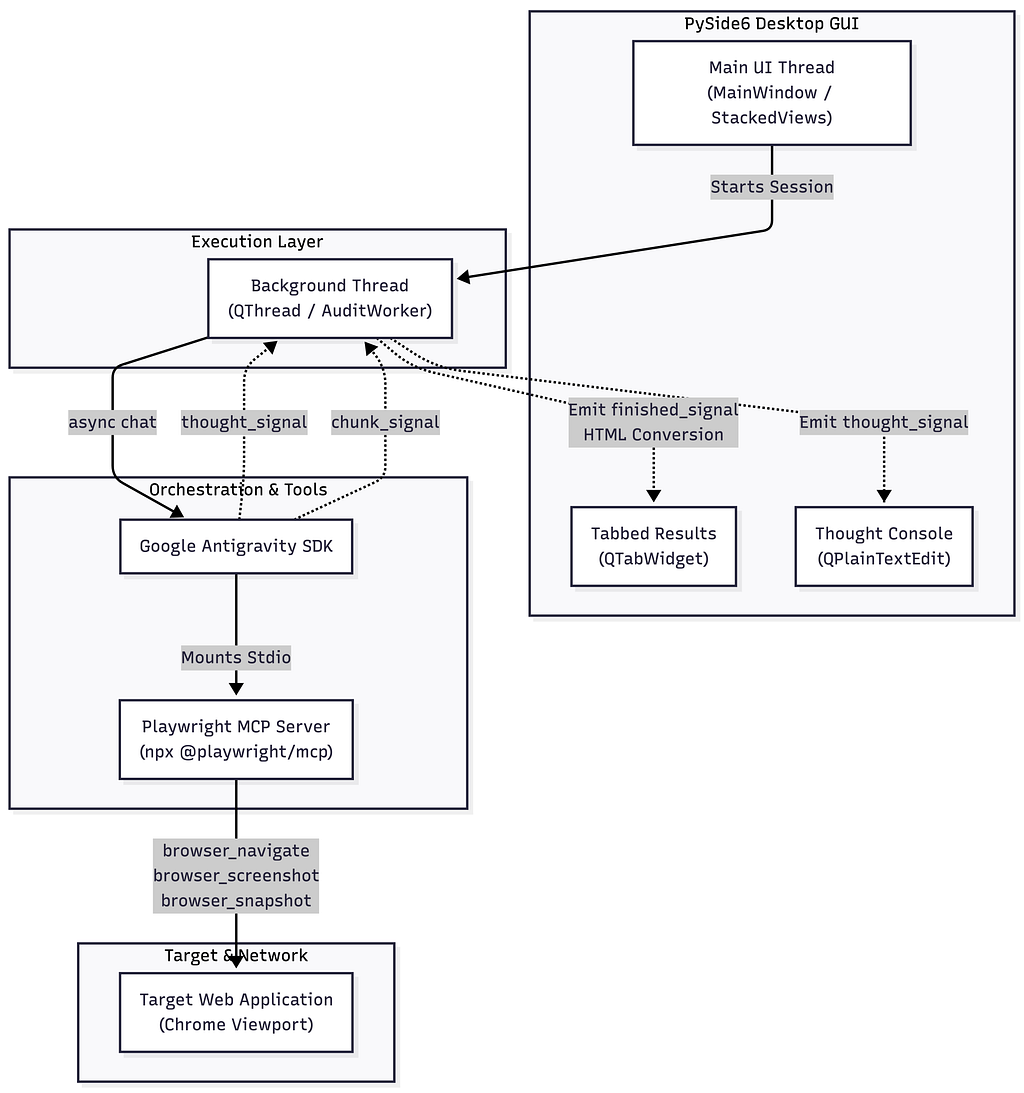
This tool showcases the programmatic power of the SDK by automating complex quality assurance workflows through several advanced features:
- Dual-Perspective Analysis: The agent bridges the gap between design and development. It evaluates design heuristics such as cognitive load, visual hierarchy, spacing, and Nielsen principles, while simultaneously performing a technical inspection of the HTML DOM structure, CSS selectors, and WCAG accessibility compliance. It goes beyond finding problems by providing production-ready code snippets (HTML/CSS/JS) to resolve the issues it detects.
- User Story Validation: Developers can input specific user stories and acceptance criteria (e.g., “As a registered user, I want to log in…”). The agent prioritizes navigating these specific user journeys and generates structured compliance cards marked as [MET], [PARTIALLY MET], or [NOT MET]. If no user stories are provided, it defaults to running a comprehensive site-wide heuristics audit.
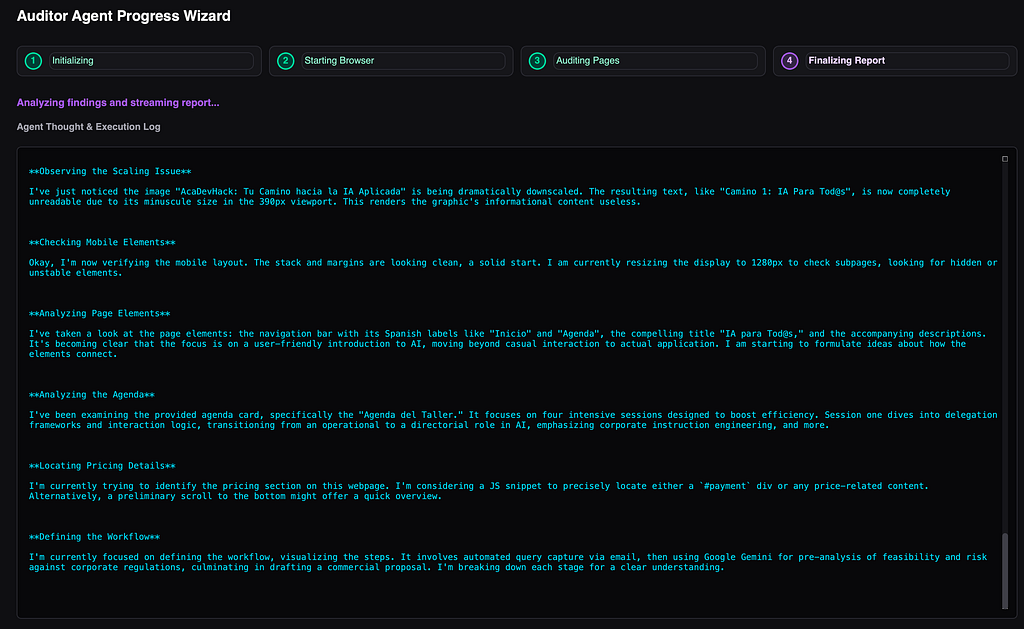
- Advanced Desktop GUI: The developer wrapped the SDK’s execution layer in a native PySide6 Python desktop interface, moving the agent completely out of the terminal. This GUI provides users with a guided wizard setup, a real-time monospace console to watch the agent’s concurrent thoughts, and a custom text field to provide specific “hints” or focus guidelines.
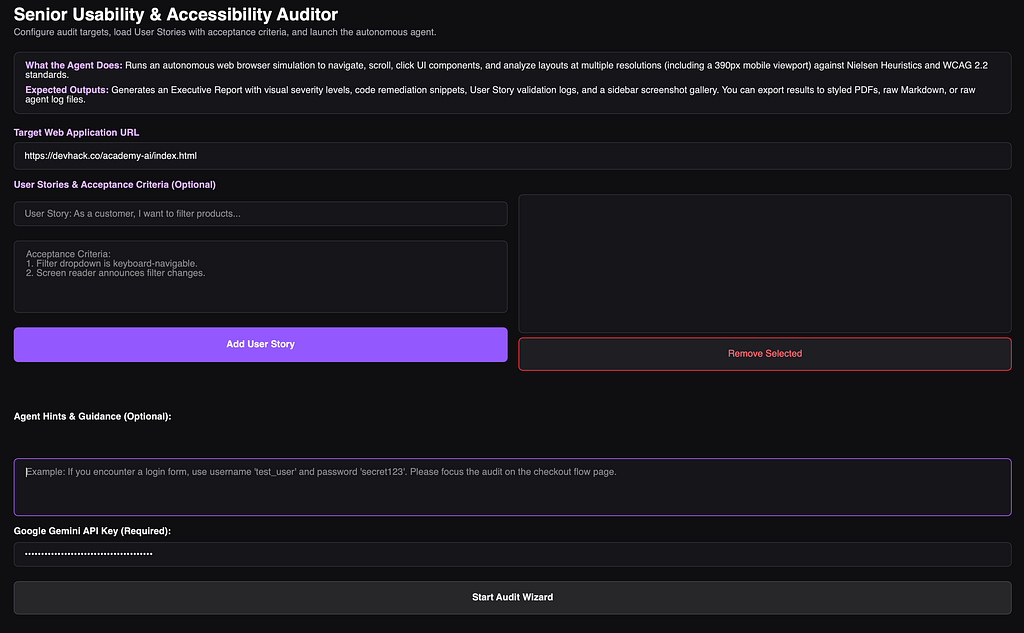
- Multimodal Visual Verification: Instead of merely parsing code, the agent visually inspects the website. It captures screenshots at multiple scrolling folds and resizes the layout to mobile viewports such as 390px to verify responsive scaling, check for overlapping elements, and spot text truncation.
- Comprehensive Reporting: The application features a tabbed results viewer separating the Agent’s Thinking Process from an elegantly styled Executive Report. This report categorizes findings with colored severity badges (CRITICAL, MAJOR, MINOR) and features a “Visual Audit Trail” — a scrollable gallery of screenshots captured by the agent during navigation. Users can easily export these results as styled PDFs, Markdown files, or raw text logs.
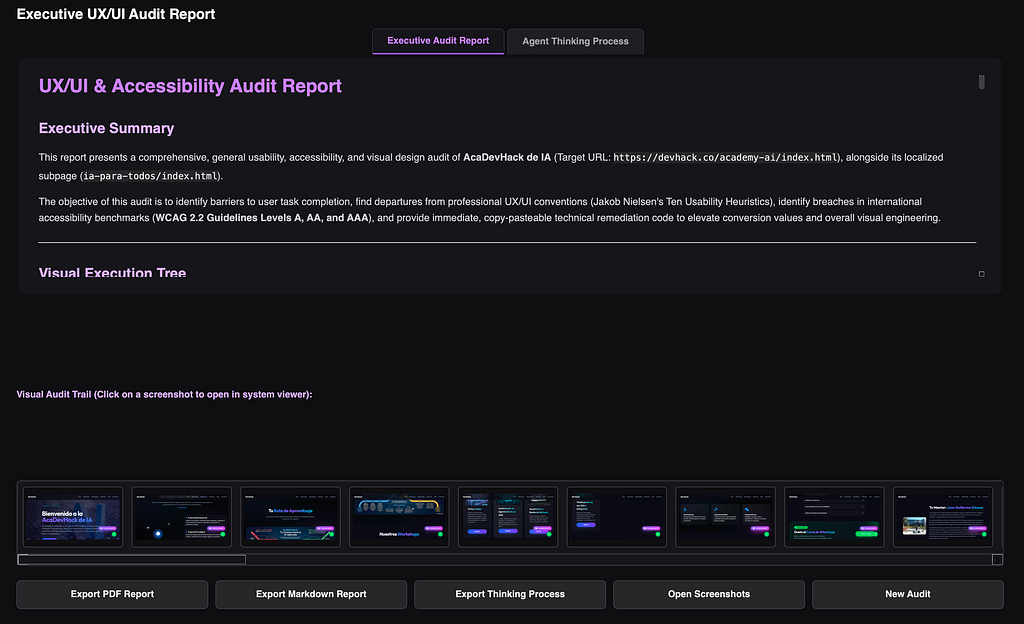
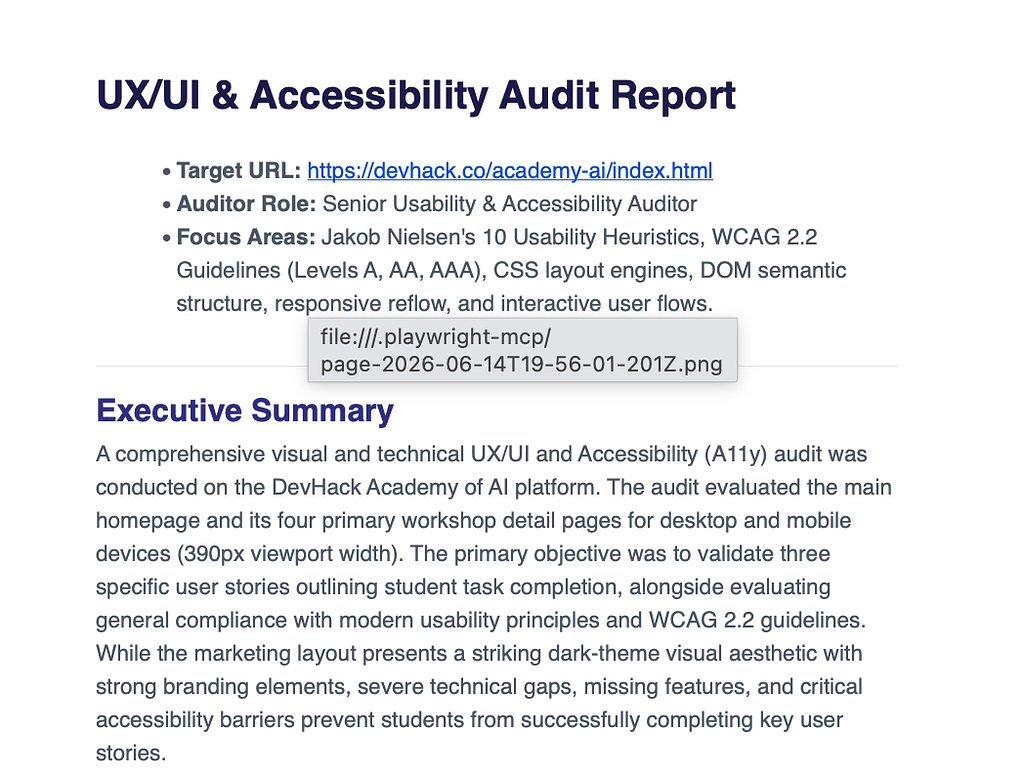
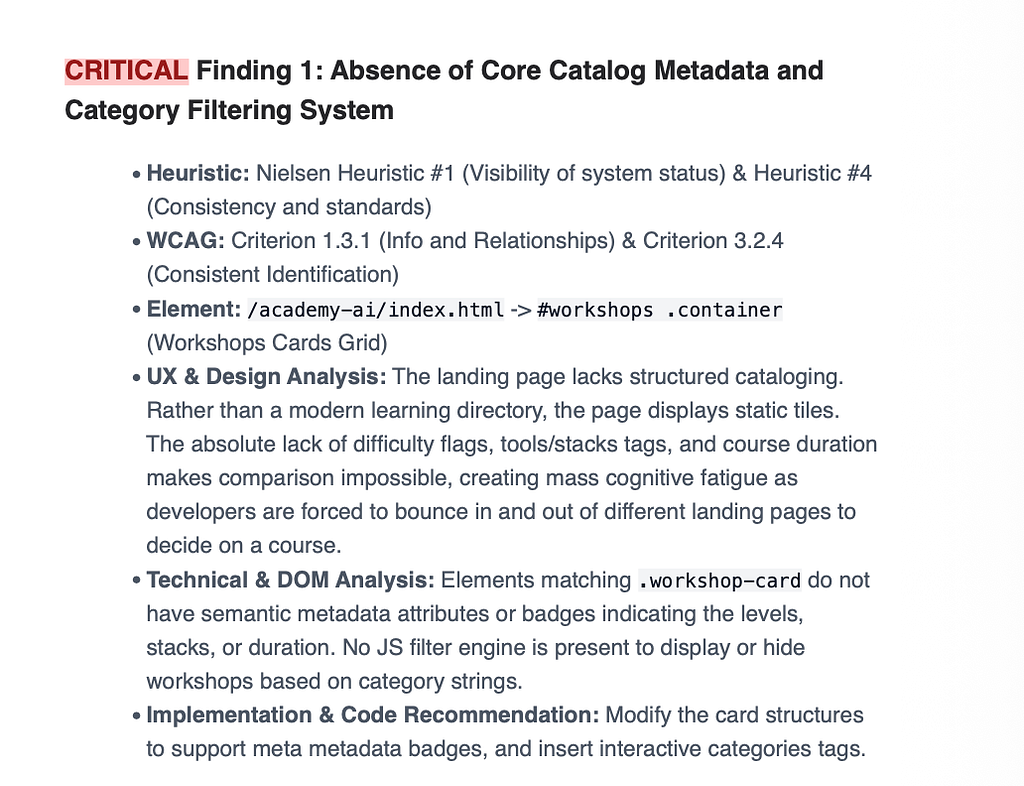
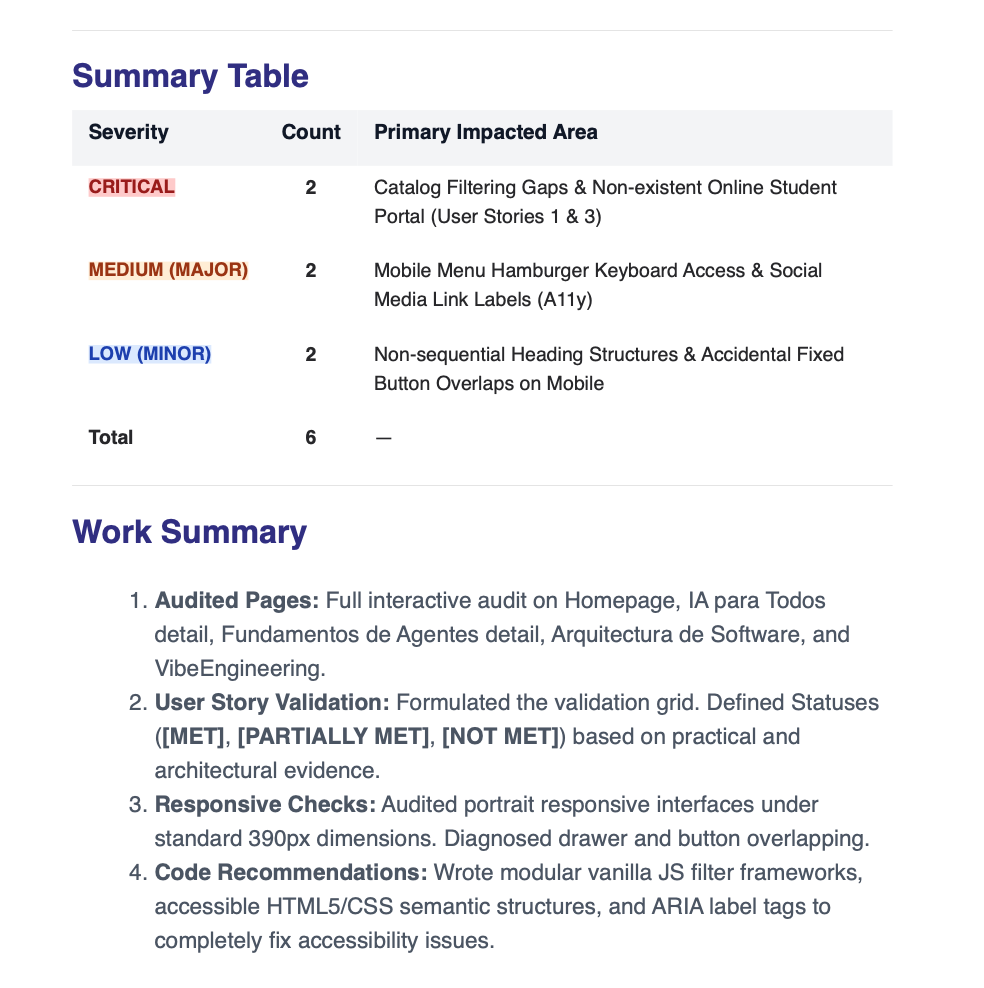
This project perfectly illustrates how the Antigravity SDK can be utilized to build standalone, multimodal, and highly autonomous AI workers tailored to specific enterprise quality assurance needs.
How to create the Senior UX/UI and Accessibility Audit Agent
We can walk through the agent code with the Antigravity SDK, focusing on four main components: config, MCP servers, hooks, and agent.
Agent Configuration: The LocalAgentConfigclass is the primary configuration object for instantiating an agent using the Google Antigravity SDK. Here is a detailed breakdown of its properties based on the official documentation
https://medium.com/media/520e64f3e6feb528560d264286035c85/href
MCP Servers: The MCP server used was Playwright, which gives the agent live browser tools such as browser_navigate, browser_click, browser_type, browser_screenshot, etc.
https://medium.com/media/9a515561c670369483d25853937e56ae/href
Hooks: enable two hooks for this project, the first one intercepts browser tool errors and returns a structured recovery message to the agent instead of exposing a raw Python traceback, allowing the agent to be guided to retry or skip rather than abort. The second one fires after every browser tool call completes successfully, allowing for intercepting browser_screenshot calls and saving the images locally so the user can inspect the visual audit trail.
One of these is something like this:
https://medium.com/media/7fed75fcdb2b36774c2befadae61c6e0/href
Agent: Executes the full autonomous UX/UI audit lifecycle. Some lines of code…
https://medium.com/media/502590ff8cc1ac83b337f874185e975c/href
By creating the main components, we can continue with the UI and other things, complementing the agent.
You can see the complete code on GitHub
Conclusions
The announcements at Google I/O 2026, culminating in the release of the Antigravity SDK, force the software industry to confront an uncomfortable but profound question: are we still coding, or are we managing builders?. We have moved past the era of AI acting as a simple autocomplete tool and entered a new phase of true delegation. By providing programmatic access to Google’s premier agentic harness, the SDK empowers engineering teams to build, govern, and deploy autonomous AI workers directly within their own infrastructure.
However, this shift does not render human developers obsolete; rather, it elevates their responsibilities. As AI agents handle the “boring middle” of software development — such as setting up projects, wiring authentication, and resolving environment issues — the true value of a developer shifts from raw typing speed to actual architectural momentum. Developers must evolve into directors, reviewers, and product thinkers.
Ultimately, the Google Antigravity SDK provides the ultimate toolkit for this new era. It will undoubtedly accelerate development, but it will also punish laziness. The most successful engineers moving forward will not be those who reject AI, nor those who accept its outputs without question. They will be the ones who use these powerful programmatic agents to ship faster while firmly retaining their engineering judgment.
Thank you for reaching the end of this article. Remember to visit our website, devhack.co, and leave your comments on what topics you want us to delve into. See you next time! Chao chao!
Visit my social networks:
- https://github.com/jggomez/ux-agent-audit
- https://devhack.co/
- https://twitter.com/jggomezt
- https://www.linkedin.com/in/jggomezt/
- https://www.youtube.com/devhack
References
1. Google Antigravity SDK Blog Announcement: https://antigravity.google/blog/introducing-google-antigravity-sdk
2. SDK Overview — Google Antigravity Documentation: https://antigravity.google/docs/sdk-overview
3. Google Antigravity SDK GitHub Repository: https://github.com/google-antigravity/antigravity-sdk-python
4. Choosing your surface: Antigravity 2.0, Antigravity CLI, IDE, or SDK: https://cloud.google.com/blog/topics/developers-practitioners/choosing-your-surface-antigravity-20-antigravity-cli-antigravity-ide-or-antigravity-sdk
5. GitHub — jggomez/ux-agent-audit: https://github.com/jggomez/ux-agent-audit
6. Google I/O 2026 made me ask an uncomfortable question: https://dev.to/_boweii/google-io-2026-made-me-ask-an-uncomfortable-question-are-we-still-coding-or-are-we-managing-1m14
7. Google I/O 2026: The Start of the Agentic Gemini Era: https://www.datacamp.com/blog/google-i-o-2026
8. Google Antigravity 2.0: The Full Developer Guide (I/O 2026): https://www.analyticsvidhya.com/blog/2026/05/google-antigravity-2-0/
9. Architectural Architecture, Governance, and Ecosystem Dynamics of the SDK: (Documento técnico interno en Markdown; no cuenta con URL web pública)
10. Agent Skills — Google Antigravity Documentation: https://antigravity.google/docs/skills
Building an Autonomous UI Agent Critic with the New Google Antigravity SDK 2.0 was originally published in Google Cloud – Community on Medium, where people are continuing the conversation by highlighting and responding to this story.
Source Credit: https://medium.com/google-cloud/building-an-autonomous-ui-agent-critic-with-the-new-google-antigravity-sdk-2-0-141232d21c4f?source=rss—-e52cf94d98af—4
About the Author