Imagine this: Sarah, a college student, is browsing an online sports store. She finds a rugged mountain bike, adds it to her cart, and… pauses. She looks at the price tag, hesitates, and begins moving her cursor toward the “Close Tab” button.
You have exactly two seconds to save this sale.
If you can instantly show her a personalized “10% Student Discount” coupon, or suggest a safety helmet that matches the bike, you win. If you show it three seconds too late, she is gone — and her shopping cart joins the billions graveyard of abandoned checkouts.
To address this challenge, we built an intelligent, real-time data processing solution. We chose Google Cloud Dataflow (built on Apache Beam) a fully managed, auto-scaling unified streaming and batch engine that can process high-throughput web telemetry with sub-millisecond event handling.
Crucially, Dataflow supports complex stateful processing (like keeping cart memory in real-time) and co-locating GenAI model execution directly inside the worker processes — making it the ideal choice for sub-second, intelligent streaming decisions.
Why Cloud Dataflow?
While there are many different ways to implement real-time recommendation loops (such as stitching together multiple serverless Cloud Run, message queues, and external database caches), the primary advantage of utilizing Dataflow is the ability to manage the entire cart lifecycle, stateful cooldowns, and GenAI execution in one single, unified, fully monitored, and auto-scalable pipeline.
The addition of the ADKAgentModelHandler acts as a force multiplier—enabling complex multi-turn GenAI agents, prompt rules, and tools to run directly inside worker memory with zero custom connection management.
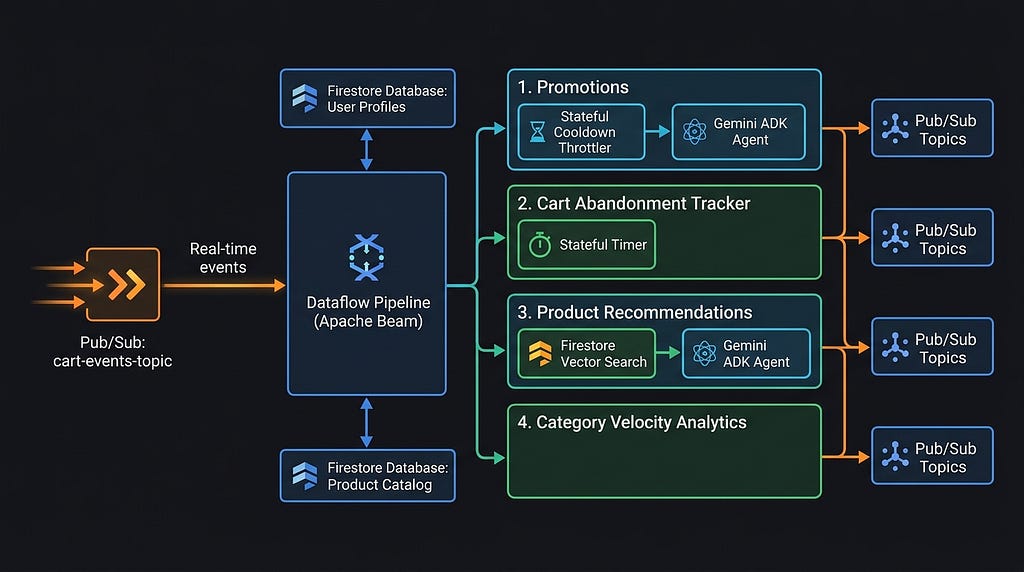
This pipeline is designed to process Sarah’s cart events in split-seconds across four parallel business flows:
- Personalized Promotions: The pipeline identifies Sarah’s demographic profile (student segment) and instantly generates a targeted discount coupon (STUDENT10).
- Complementary Recommendations: It queries a product catalog using real-time Vector Search, selecting an adult-appropriate safety Bicycle Helmet (matching a student) rather than a kids' helmet, with clear reasoning.
- Cart Abandonment Tracking: A stateful Beam timer is armed for 60 seconds. If Sarah remains inactive, an automated alert fires offering a free-shipping incentive to re-engage her.
- Category Demand Forecasting: It aggregates cart events across all users in real-time sliding windows. If category velocity spikes (e.g., sporting goods), it alerts inventory systems to auto-replenish stock before high-demand items (like helmets) sell out.
The Technical Challenge: The “5-Second Penalty”
Historically, bringing Generative AI (GenAI) into this decision loop meant building a streaming pipeline that called external LLM microservices. But in high-throughput streams, calling external APIs introduces sequential network roundtrips, request throttling, and complex scaling policies. By the time the LLM returns a response, Sarah has already closed the tab.
To break this latency bottleneck, we co-locate the AI agent inside the processing memory of the stream processor itself using Google Cloud’s new ADKAgentModelHandler in Apache Beam.
In this article, we’ll walkthrough a production-grade, low-latency streaming pipeline leveraging Apache Beam, Cloud Dataflow, Firestore Vector Search, and the Google Agent Development Kit (ADK) to process e-commerce telemetry in under 250 milliseconds (warm path).
🚀 The Architecture: Live Multi-Agent Event Processing
Rather than running AI agents in separate compute instances, this architecture runs them co-located with the streaming engine.
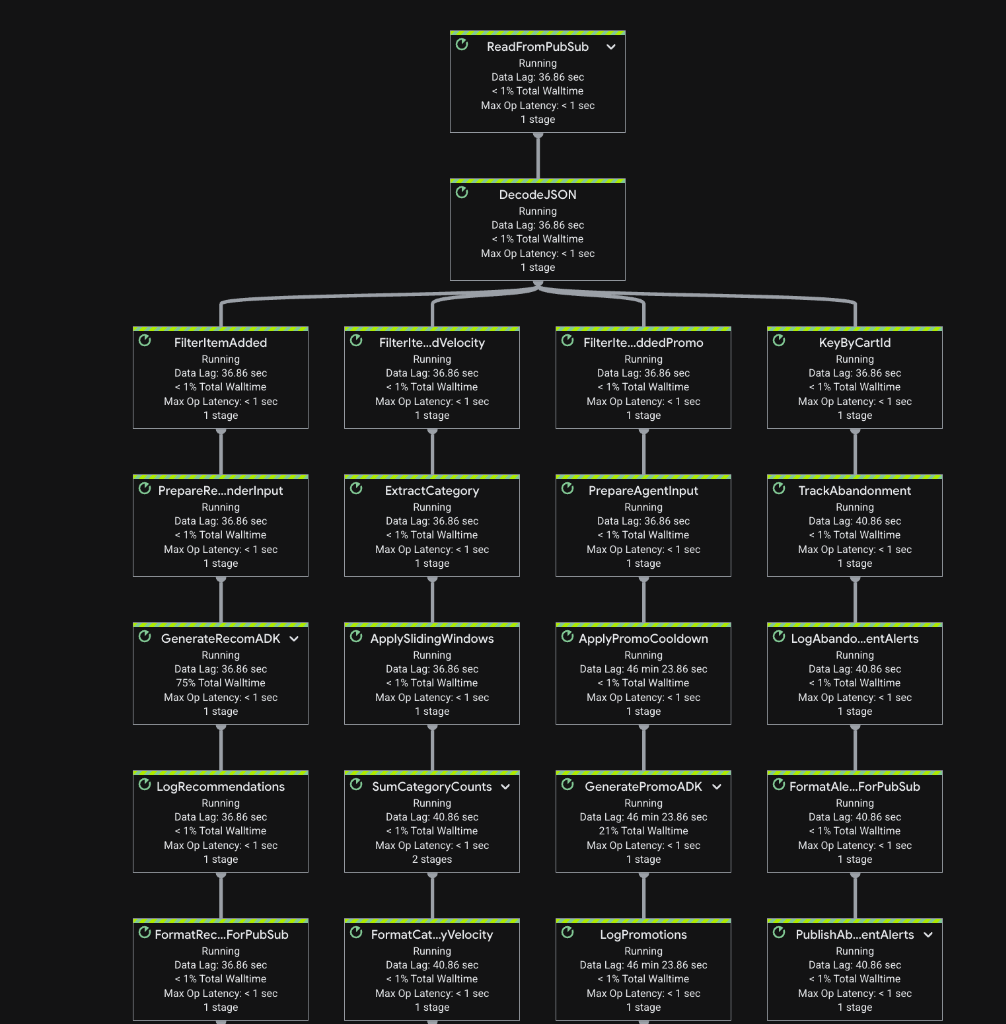
The Four Parallel Streams
- Personalized Promotions: Tailored marketing offers based on user segment and coupon responsiveness (e.g. STUDENT10 vs FREESHIP).
- Complementary Recommendations: Age-appropriate upsell offers generated via real-time vector similarity lookups in a product catalog.
- Cart Abandonment Alerts: Multi-stage campaign alerts triggered when a cart is left inactive for 60 seconds using stateful Beam timers.
- Category Velocity (Demand Tracking): Real-time rolling add-to-cart frequency per category across all shoppers, calculated using 10-minute sliding window aggregations to alert stock management systems of sudden demand surges.
🛠️ The Star of the Show: Apache Beam’s ADKAgentModelHandler
The Google Agent Development Kit (ADK) allows developers to define agents with highly specific prompts (“skills”) and tools. To run these agents scale-out inside Apache Beam pipelines, Google introduced the ADKAgentModelHandler.
By wrapping an ADK agent inside a Beam ModelHandler, developers can leverage the standard RunInference transform. This takes care of worker process management, model loading, and thread-safe execution out-of-the-box:
from apache_beam.ml.inference.agent_development_kit import ADKAgentModelHandler
from apache_beam.ml.inference.base import RunInference
from google.adk.agents import LlmAgent

# Define the agent with required skills and tools
promo_agent = LlmAgent(
    name="promo_agent",
    model="gemini-2.5-flash-lite",
    instruction="Generate personalized promotional offers based on user segment...",
    tools=[query_user_profile]
)

# Pass the agent (or a zero-arg factory function) to the handler
model_handler = ADKAgentModelHandler(agent=promo_agent)

# Ingest and infer inside the Beam pipeline
promotions = (
    raw_events
    | 'PrepareInput' >> beam.Map(lambda x: x['prompt'])
    | 'RunAgent' >> RunInference(model_handler)
)
⚡ Latency Breakthrough: Bypassing the Agent Loop (5.0s ➔ 0.5s)
During early design iterations, running a full multi-turn ADK agent loop (LlmAgent planning ➔ tool fetch ➔ evaluation) inside the pipeline could lead to execution latencies up to 5.0 seconds per event due to sequential network hops.
For high-volume streaming, this was a blocker. We optimized the architecture to achieve sub-second execution through three key design decisions:
1. Single-Turn Structured Outputs
To make dynamic decisions, traditional agents run in a loop: the LLM receives an event, requests user profile data via a tool call, waits for the database query, receives the data, requests a second tool call for product inventory, and finally renders the suggestion. This multi-turn roundtrip pattern introduces significant network and processing overhead, making sub-second streaming impossible.
To solve this, we pre-fetch Firestore records (like user profiles and complementary catalog products) in parallel before invoking the LLM.
For example, when Sarah (a student) adds a Mountain Bike to her cart, the pipeline queries Firestore for her segment and candidate products, then sends a single compiled prompt to Gemini:
"A customer who is a student added a Mountain Bike. From the catalog [Kids Helmet, Adult Helmet], output the best recommendation and student promo in JSON."
By co-locating all context in a single-turn structured output call to gemini-2.5-flash, the model returns a formatted JSON schema response in one trip, completely bypassing multi-turn database roundtrips.
2. Semantic Product Matching via Firestore Vector Search (KNN)
Hardcoding association rules (e.g., “If bicycle, then recommend helmet”) for an e-commerce catalog with thousands of items is unmaintainable.
To automate complementary product discovery, we utilize Firestore Vector Search directly inside the pipeline.
- When does it run? When a user adds an item (e.g., Mountain Bike), the pipeline triggers a vector query.
- How does it work? The pipeline fetches the added item’s vector embedding — a mathematical representation of the item’s features. We then execute a K-Nearest Neighbors (KNN) search (find_nearest) directly against the Firestore product catalog using Cosine Similarity.
- Why do we use it? Rather than relying on exact keyword matching or manual tables, the database automatically finds the top 5 most semantically related, in-stock products (e.g., retrieving Bicycle Helmet and Lock for a Mountain Bike event). These semantic candidates are fed straight into Gemini as context for the final, segment-aware recommendation decision.
3. Stateful Timers and Cooldowns (Localizing State)
Executing GenAI inferences on every single cart event can spam users and quickly inflate API costs. To prevent this, we utilize Apache Beam’s Stateful Processing (ReadModifyWriteStateSpec and TimerSpec) to cache transaction state locally on the worker process:
- Promotion Cooldowns: We record the timestamp of the last generated promotion inside local worker state (last_promo_time key-value cache). If the user adds another product within 2 minutes, the pipeline instantly throttles the event without calling Gemini.
- Cart Abandonment Alarms: We register stateful timers keyed by cart_id. If the cart remains idle, the timer fires after 60 seconds and issues an alert. If they checkout, the pipeline clears the state and cancels the timer.
Dataflow worker processes store this state locally , ensuring that checking cooldowns and updating cart timers takes less than 1ms without database roundtrips.
The Latency Metrics: Cold Starts vs. Warm Path
When testing the pipeline on remote Cloud Dataflow VMs, we measured the latency metrics for event processing:
- Cold Start Connection Warming (First request): ~2.0s. (A “cold start” occurs when a worker container first boots up or has been idle for a long time. The client must establish a new TCP connection, negotiate SSL/TLS certificates, and initialize the internal gRPC connection channels to Vertex AI).
- Warm Path Promotions (Flow 1): 245ms — 650ms (once the gRPC channels to Vertex AI are warmed, subsequent coupon decisions are returned in split seconds).
- Warm Path Vector Recommendations (Flow 3): 239ms — 450ms (achieved by caching Firestore database clients globally on worker threads to eliminate connection renegotiation overhead).
Below is a raw log snippet extracted from Google Cloud Logging showing a sequence of promotions and recommendations processed by the worker:
[2026-08-02T08:13:02.633Z] Sending out request, model: gemini-2.5-flash (Promotion Agent)
[2026-08-02T08:13:02.879Z] Response received from the model.
[2026-08-02T08:13:02.882Z] Generated Promotion for User 2: FREESHIP Promo (246ms)

[2026-08-02T08:13:04.949Z] User 1 is in cooldown. Last promo sent 4s ago. Throttling event.

[2026-08-02T08:12:58.340Z] Sending out request, model: gemini-2.5-flash (Vector KNN Recommender)
[2026-08-02T08:12:58.579Z] Response received from the model.
[2026-08-02T08:12:58.582Z] Recommender Output: Bicycle Helmet Recommended (239ms)
Notice how once the connection is warmed, consecutive promotion and recommendation requests process in rapid succession, with both inferences finishing in 230ms — 650ms!
🏁 Replicating the Solution Locally
You can test the entire pipeline locally using the DirectRunner with seeded Firestore records:
- Clone the Repository and Navigate to the Codebase:
git clone https://github.com/kfirnaftali/realtime-agents-utilizatation.git
cd realtime-agents-utilizatation
- Deploy GCP Pub/Sub & Firestore Indexes:
./deploy.sh
- Start the Glassmorphism Monitoring App (Port 8085):
python3 monitoring_app/app.py
- Execute the Streaming Pipeline Locally:
python3 cart_promo_pipeline.py \
    --project="YOUR_PROJECT_ID" \
    --runner="DirectRunner" \
    --input_subscription="projects/YOUR_PROJECT_ID/subscriptions/cart-events-sub" \
    --output_promo_topic="projects/YOUR_PROJECT_ID/topics/cart-promos-topic" \
    --bucket_name="YOUR_BUCKET" \
    --streaming
- Trigger Walkthrough Simulator:
python3 load_generator.py --project YOUR_PROJECT_ID --mode showcase
You can watch the timeline dashboard update live as customers checkout, trigger cooldowns, search vector spaces, and trigger abandonment alarms!
🏁 Summary & Conclusion
By embedding AI agents directly within the processing loops of Google Cloud Dataflow, we achieved a significant breakthrough: combining real-time, stateful event tracking with in-memory GenAI model inference. Under real-world streaming workloads, we optimized database client allocations to lower latency metrics from over 1.25 seconds down to a sub-300ms warm-path response time.
This enables e-commerce sites, fraud prevention systems, and industrial monitoring hubs to make intelligent GenAI-powered decisions at the speed of streaming events.
Disclaimer: The architecture and code presented in this article represent an offered demonstration design to show how you can build real-time multi-agent systems on Google Cloud. It is provided for illustrative purposes only, and you should customize it to fit your own production performance, key-rotation policies, and scaling requirements.
Full Cart Management Utilizing GCP Dataflow & Embedded AI Agents was originally published in Google Cloud – Community on Medium, where people are continuing the conversation by highlighting and responding to this story.
Source Credit: https://medium.com/google-cloud/full-cart-management-utilizing-gcp-dataflow-embedded-ai-agents-635b0f0a2865?source=rss—-e52cf94d98af—4
About the Author