From a Video to a Product Catalog: Combining Frame Extraction, Embeddings, and BigQuery Vector Search
You’re watching a live stream. A model walks out wearing an incredible outfit. You think, “I need that.” But now you need to pause, screenshot, and reverse-image-search — the moment is gone.
Now imagine the opposite: as the video plays, the system already knows what’s on screen, has matched it to the exact product in a catalog, and is ready to serve you a “Buy Now” button.
That’s what this project builds. A pipeline that connects video content to product catalogs automatically — so every frame becomes a potential point of sale.
Why Does This Matter?
Brands and creators pour effort into video content, but there’s a gap between what viewers see and what they can buy. On the other side, retailers have catalogs with thousands of products but no scalable way to connect them to video content.
This pipeline closes that gap. Give it a video and a catalog, and it will tell you exactly which product appears at which moment — ready to power shoppable videos, influencer verification, or live shopping overlays.
The Solution: Architecture Overview
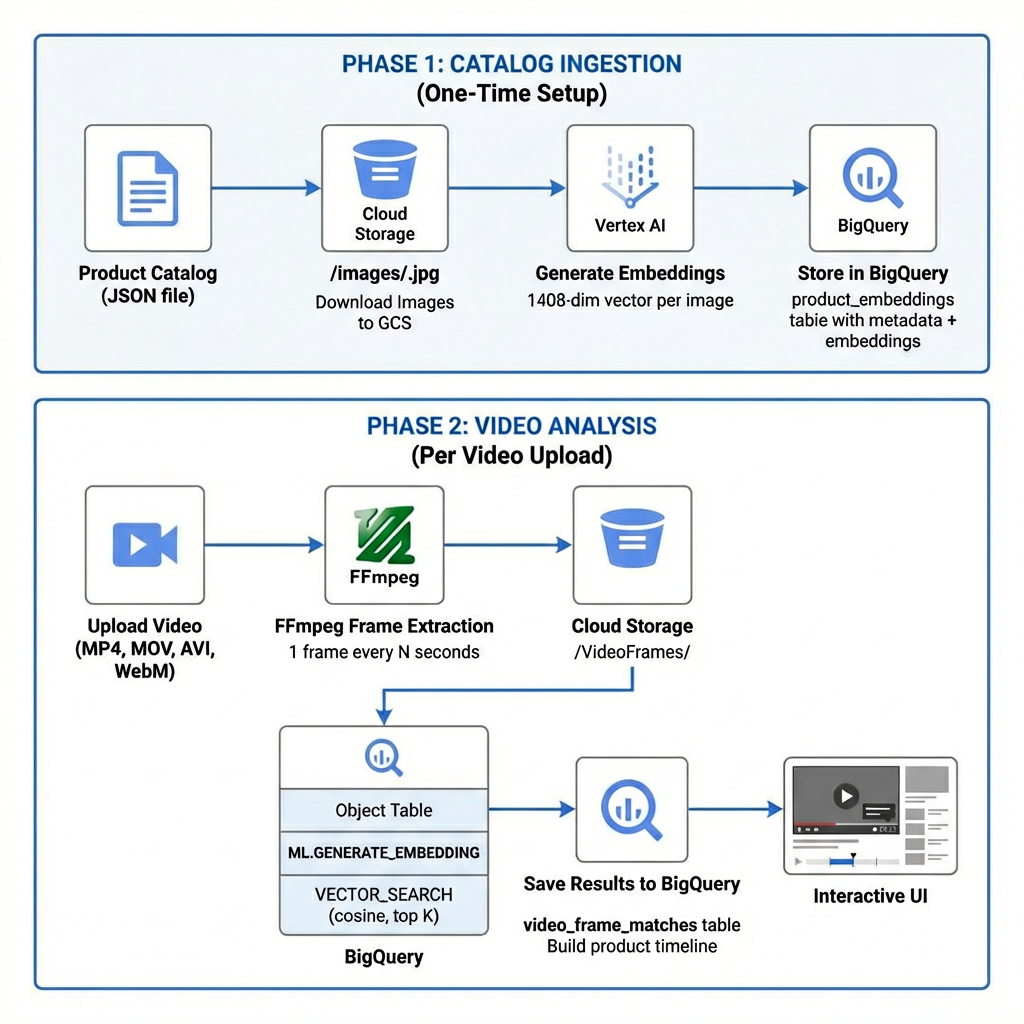
The solution is built on Google Cloud and combines several AI and data services into a two-phase pipeline:
Phase 1 — Catalog Ingestion (One-Time Setup)
Upload and index your product catalog so it’s searchable by visual similarity.
Phase 2 — Video Analysis (Per Video)
Upload a video, extract frames, and search each frame against the indexed catalog using vector similarity.
Here’s the high-level architecture:
Step-by-Step Breakdown
Phase 1: Teach the System Your Catalog
Before analyzing any video, we need to give the system a “visual memory” of every product. This is a one-time setup — think of it as building a searchable lookbook that the AI can flip through instantly.
Step 1 — Upload your catalog.
Start with a product catalog JSON (exported from Shopify, your own DB, or any e-commerce platform). Each product has a name, price, and images.
Step 2 — Store images in the cloud.
Product images are uploaded to Google Cloud Storage, organized by product. This gives BigQuery direct access to them later.
Step 3 — Create a visual fingerprint for each product.
Using Vertex AI’s multimodal embedding model, each product image is converted into a 1408-dimensional vector — a numerical “fingerprint” that captures what the product looks like. Two visually similar items will have similar vectors.
Step 4 — Index everything in BigQuery.
Each fingerprint is stored in a BigQuery table alongside the product metadata (name, price, type). This table is now a searchable visual index of your entire catalog.
The setup script is idempotent — you can re-run it anytime to add new products without duplicating existing ones.
CREATE VECTOR INDEX product_embedding_index
  ON `project.dataset.product_embeddings`(embedding)
  OPTIONS (
    index_type = 'IVF',
    distance_type = 'COSINE',
    ivf_options = '{"num_lists": 100}'
  );
The result table schema looks like this:
CREATE TABLE `project.dataset.product_embeddings` (
  image_id STRING,
  product_handle STRING,
  product_title STRING,
  product_type STRING,
  vendor STRING,
  price STRING,
  image_gcs_uri STRING,
  embedding ARRAY<FLOAT64>   -- 1408-dimensional vector
);
Phase 2: Analyze a Video
This is where it gets exciting. A user uploads a video, and the system figures out what's being shown at every point in time.
Step 1 — Break the video into frames.
FFmpeg extracts a snapshot every N seconds (configurable — default is 30). A 10-minute video at 5-second intervals produces 120 frames. These frames are uploaded to Cloud Storage.
Step 2 — Match every frame to the catalog.
Here's the clever part. Instead of downloading each frame and calling an API for each one, everything happens in a single BigQuery query. BigQuery reads the frames directly from Cloud Storage, generates a visual fingerprint for each one, and searches it against all the product fingerprints using vector similarity. One query, all frames, all results.
SELECT query.uri AS frame_uri, base.product_title, base.price, distance
FROM VECTOR_SEARCH(
    TABLE `project.dataset.product_embeddings`,
    'embedding',
    (
        SELECT uri, ml_generate_embedding_result AS embedding
        FROM ML.GENERATE_EMBEDDING(
            MODEL `project.dataset.multimodal_embedding_model`,
            (SELECT * FROM `project.dataset.video_frames`
             WHERE uri LIKE 'gs://bucket/VideoFrames/my_video_%'),
            STRUCT(TRUE AS flatten_json_output)
        )
    ),
    top_k => 5, distance_type => 'COSINE'
)
ORDER BY query.uri, distance
Step 3 — Build the timeline.
The results are saved to BigQuery and organized into a product timeline. Each frame gets its best match, and a confidence threshold filters out weak matches. The system now knows: “At 0:30, Product A is showing. At 1:00, it switched to Product B.”
Step 4 — Show it.
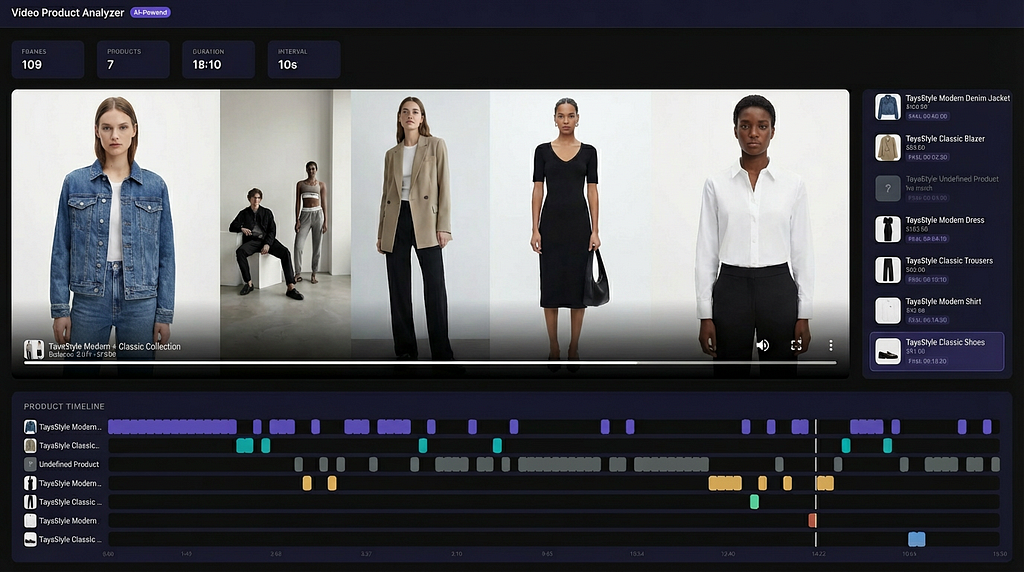
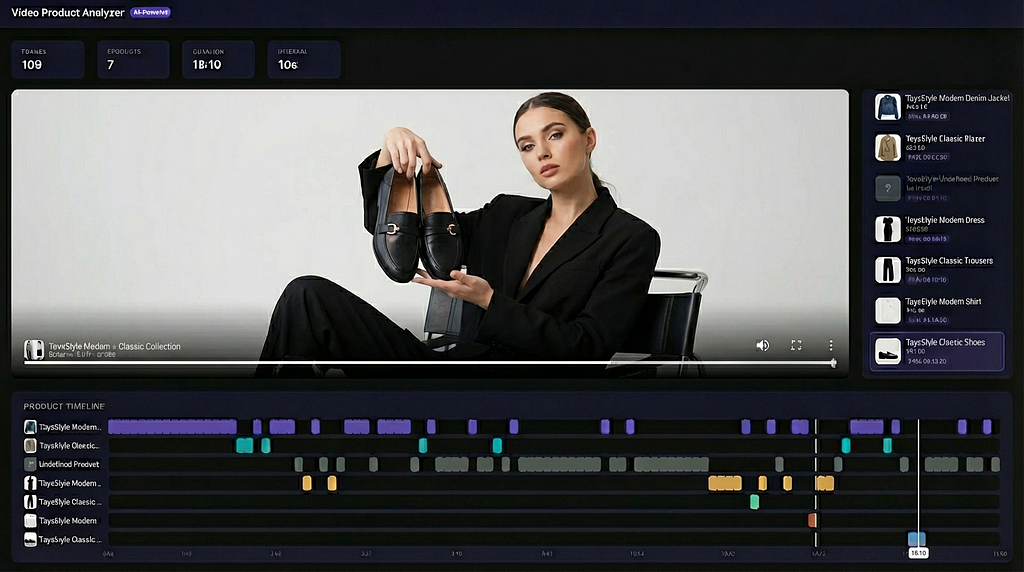
The frontend presents an interactive experience: a video player with a live product overlay, a sidebar listing every detected product, and a color-coded timeline showing when each product appears. Click any product or timestamp to jump to that moment.
Going Deeper: Item Detection with Gemini
The approach above matches each frame as a whole — great when one product dominates the shot. But what about frames showing multiple products at once, like a model wearing a top, pants, and sneakers?
This is where Gemini comes in. Instead of matching the whole frame, we first ask Gemini to find and locate individual items within it.
CREATE OR REPLACE MODEL `project.dataset.gemini_flash`
REMOTE WITH CONNECTION `project.us.vertex_connection`
OPTIONS (endpoint = 'gemini-2.5-flash');
Step 1 — Detect items.
A single BigQuery query runs Gemini on all frames at once via `ML.GENERATE_TEXT`. Gemini identifies the 1–2 main items in focus and returns their names and bounding box coordinates.
SELECT
    uri,
    ml_generate_text_llm_result AS result
FROM ML.GENERATE_TEXT(
    MODEL `project.dataset.gemini_flash`,
    (
        SELECT *, 'Analyze this image and detect the 1-2 fashion items
        in focus. Return a JSON array with "name" (descriptive, including
        colors) and "box_2d" ([ymin, xmin, ymax, xmax] normalized to
        0-1000).' AS prompt
        FROM `project.dataset.video_frames`
        WHERE uri LIKE 'gs://bucket/VideoFrames/my_video_%'
    ),
    STRUCT(TRUE AS flatten_json_output)
)
Step 2 — Crop each item.
The bounding boxes are used to crop individual product images from each frame — isolating a single clean product image from a cluttered scene.
Step 3 — Search each crop.
Each cropped item is then run through the same vector search pipeline. Since the crop contains just one product with no background noise, the matches are significantly more accurate.
This detect-then-search approach turns a single messy frame into multiple precise product matches.
Why BigQuery as the Vector Database?
A natural question: why not use a dedicated vector database like Pinecone, Weaviate, or Chroma?
The answer is operational simplicity and the BigQuery ML integration:
1. No separate infrastructure — BigQuery is a fully managed, serverless service. No clusters to provision or scale.
2. ML functions built in — `ML.GENERATE_EMBEDDING` and `ML.GENERATE_TEXT` call Vertex AI models directly from SQL. No SDK calls, no client-side processing.
3. Object tables— BigQuery can read images directly from GCS. The video frames never leave the cloud.
4. Single query pipeline— Embedding generation + vector search happens in one SQL statement. This eliminates the typical “generate embedding locally, then query vector DB” round-trip.
5. Analytics ready — Match results stored in BigQuery are immediately available for analytics queries, dashboards, and reporting.
Real-World Use Cases
This architecture unlocks several powerful business scenarios:
– Shoppable Videos — E-commerce brands can automatically tag products in their content videos, enabling viewers to click and buy
– Influencer Marketing — Brands can verify which of their products appear in influencer content and for how long
– Live Shopping — During live streams, detected products can be displayed to viewers in real-time
– Catalog Matching— Match products across different catalogs (your products vs. competitor products in a video)
– Advertising — Programmatically decide which ads to show based on what’s currently on screen
Conclusion
By combining frame extraction, multimodal embeddings, and BigQuery vector search, we’ve built a pipeline that automatically connects video content to product catalogs. The key insight is using BigQuery not just as a data warehouse, but as a unified engine that handles embedding generation, similarity search, and results storage — all in a single query.
Whether you’re building shoppable videos, verifying influencer content, or powering live shopping, this gives you a scalable foundation to turn any video into a commerce opportunity.
Try It Yourself
The full source code is available on GitHub: https://github.com/vovax-googler/Video-to-a-Product-Catalog
All you need to get started is:
1. A product catalog — a JSON file with your products and image URLs
2. An example video — any video showcasing products you want to match
Clone the repo, follow the setup instructions in the README, and you’ll have a working video-to-catalog pipeline in minutes.
From a Video to a Product Catalog: Combining Frame Extraction, Embeddings, and BigQuery Vector… was originally published in Google Cloud – Community on Medium, where people are continuing the conversation by highlighting and responding to this story.
Source Credit: https://medium.com/google-cloud/from-a-video-to-a-product-catalog-combining-frame-extraction-embeddings-and-bigquery-vector-192111a49dd5?source=rss—-e52cf94d98af—4
About the Author