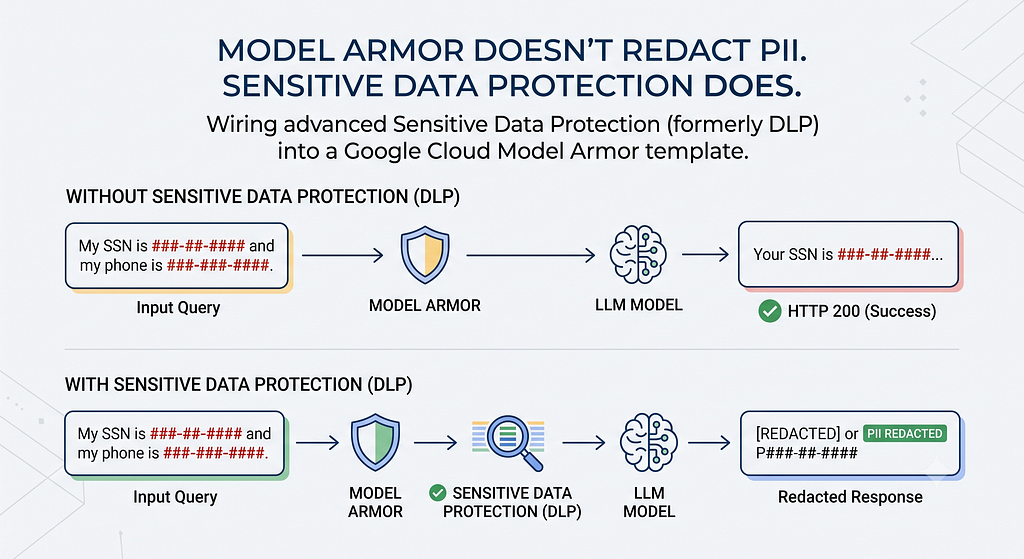
Wiring advanced Sensitive Data Protection (formerly DLP) into a Google Cloud Model Armor template, and the silent failure that returns HTTP 200 with nothing redacted.
Put a large language model in front of real customer data and you need something screening both directions: what users send in, and what the model sends back. On Google Cloud that something is Model Armor, a filter that inspects prompts before they reach the model and responses before they reach the user. It catches prompt injection, jailbreak attempts, harmful content, malicious URLs, and sensitive data.
By default it has one move. It blocks.
Against an attacker, that’s exactly right. Against a paying customer it’s a problem, because an assistant that refuses to answer whenever the answer contains an email address isn’t secure. It’s broken. The customer asking about their own account gets a refusal, and you get a support ticket.
What you want on that path is the answer itself, with the identifiers taken out. Google Cloud calls this de-identification, and wiring it into Model Armor takes three templates rather than a checkbox, for a reason worth understanding before you start.
Who actually does the redacting
Here is the part that isn’t obvious from the product page: Model Armor implements no PII logic of its own. That work belongs to Sensitive Data Protection (SDP, the service formerly branded DLP), which classifies text into infoTypes like EMAIL_ADDRESS and transforms what it finds.
Model Armor calls SDP on your behalf, using templates you supply:

Hence three templates: an SDP inspect template (what to look for), an SDP de-identify template (what to replace it with), and a Model Armor template pointing at both.
Redaction needs a de-identify template. Nothing else will do.
This is where afternoons disappear. A Model Armor template’s sdpSettings accepts either basicConfig or advancedConfig, and the de-identify template is an optional field inside advancedConfig. That gives you three outcomes, and the Model Armor template documentation is explicit about two of them:
If you specify only Inspect template, Model Armor reports the filter matches if sensitive data is detected. If you specify Inspect template and De-identify template, Model Armor returns the de-identified sensitive data.
Config Result basicConfig Detection only, from a fixed infoType set advancedConfig + inspect template Detection only advancedConfig + inspect + de-identify Redacted text returned
The middle row is the trap. You picked advanced SDP, you attached an inspect template, the API accepted the template without complaint, and the call returns HTTP 200 with filterMatchState: "MATCH_FOUND". Everything looks correct. There is simply no redacted text in the response, and nothing tells you why: with no de-identify template, no transformation has been defined, so there is nothing to return.
Basic config has a second problem worth knowing. Sent the same sentence, my advanced template produced six findings across four infoTypes; the basic template found one: the credit card number. It missed the name, the email address, and the phone number entirely. “I’ll start with basic and add redaction later” costs you most of your detection too.
Setting up the three templates
Enable both APIs:
gcloud services enable dlp.googleapis.com modelarmor.googleapis.com \
  --project=$PROJECT_ID
The inspect template defines what counts as sensitive. minLikelihood is your false-positive dial:
curl -X POST \
  "https://dlp.googleapis.com/v2/projects/$PROJECT_ID/locations/$REGION/inspectTemplates" \
  -H "Authorization: Bearer $(gcloud auth print-access-token)" \
  -H "x-goog-user-project: $PROJECT_ID" \
  -H "Content-Type: application/json" \
  -d '{
    "templateId": "demo-inspect",
    "inspectTemplate": {
      "displayName": "demo - inspect",
      "inspectConfig": {
        "infoTypes": [
          {"name": "EMAIL_ADDRESS"},
          {"name": "PHONE_NUMBER"},
          {"name": "CREDIT_CARD_NUMBER"},
          {"name": "PERSON_NAME"}
        ],
        "minLikelihood": "POSSIBLE",
        "includeQuote": true
      }
    }
  }'
The de-identify template says what each match becomes. replaceConfig gives you literal tokens, which read well in a chat response:
curl -X POST \
  "https://dlp.googleapis.com/v2/projects/$PROJECT_ID/locations/$REGION/deidentifyTemplates" \
  -H "Authorization: Bearer $(gcloud auth print-access-token)" \
  -H "x-goog-user-project: $PROJECT_ID" \
  -H "Content-Type: application/json" \
  -d '{
    "templateId": "demo-deidentify",
    "deidentifyTemplate": {
      "displayName": "demo - de-identify",
      "deidentifyConfig": {
        "infoTypeTransformations": {
          "transformations": [
            {"infoTypes": [{"name": "EMAIL_ADDRESS"}],
             "primitiveTransformation": {"replaceConfig": {"newValue": {"stringValue": "[EMAIL_ADDRESS]"}}}},
            {"infoTypes": [{"name": "PHONE_NUMBER"}],
             "primitiveTransformation": {"replaceConfig": {"newValue": {"stringValue": "[PHONE_NUMBER]"}}}},
            {"infoTypes": [{"name": "CREDIT_CARD_NUMBER"}],
             "primitiveTransformation": {"replaceConfig": {"newValue": {"stringValue": "[CREDIT_CARD_NUMBER]"}}}},
            {"infoTypes": [{"name": "PERSON_NAME"}],
             "primitiveTransformation": {"replaceConfig": {"newValue": {"stringValue": "[PERSON_NAME]"}}}}
          ]
        }
      }
    }
  }'
Then the Model Armor template that ties them together. Note the host. Template management requires a regional endpoint. Send the identical request to the global modelarmor.googleapis.com instead and you get this:
{
  "error": {
    "code": 403,
    "message": "Read access to project 'PROJECT_ID' was denied",
    "status": "PERMISSION_DENIED"
  }
}
Nothing there mentions the endpoint, so you go and audit your IAM bindings. The same call against the regional host returns 200.
curl -X POST \
  "https://modelarmor.$REGION.rep.googleapis.com/v1/projects/$PROJECT_ID/locations/$REGION/templates?template_id=demo-redact" \
  -H "Authorization: Bearer $(gcloud auth print-access-token)" \
  -H "x-goog-user-project: $PROJECT_ID" \
  -H "Content-Type: application/json" \
  -d '{
    "filterConfig": {
      "sdpSettings": {
        "advancedConfig": {
          "inspectTemplate": "projects/'"$PROJECT_ID"'/locations/'"$REGION"'/inspectTemplates/demo-inspect",
          "deidentifyTemplate": "projects/'"$PROJECT_ID"'/locations/'"$REGION"'/deidentifyTemplates/demo-deidentify"
        }
      }
    }
  }'
Two things that will bite you:
- Every infoType you transform must also appear in the inspect template. You cannot redact what you never looked for.
- gcloud auth print-access-token returns a user credential with no quota project attached, and SDP rejects it with a 403 naming a quota project. That is what the x-goog-user-project header above is for.
Where the redacted text actually lives
The redacted text is not near the top of the response. It lives under the SDP filter result:
const { sanitizationResult: r } = await res.json();
const sdp = r?.filterResults?.sdp?.sdpFilterResult;

// Advanced SDP + a de-identify template puts the masked text here.
// undefined means no de-identify template is attached.
const redacted = sdp?.deidentifyResult?.data?.text ?? null;

// Shapes differ: deidentifyResult.infoTypes is an array of strings,
// while inspectResult.findings is an array of objects.
const infoTypes = sdp?.deidentifyResult?.infoTypes ?? [];
Sent Contact Dana Whitfield at dana.whitfield@example.com or call 0412 345 678. Card on file: 4111 1111 1111 1111., that returns:
Contact [PERSON_NAME] at [PERSON_NAME][EMAIL_ADDRESS][PERSON_NAME] or call [PHONE_NUMBER]. Card on file: [CREDIT_CARD_NUMBER].
Not tidy. PERSON_NAME also matched inside the email address, so overlapping findings stack up. Narrowing or dropping PERSON_NAME cleans that up, and it's a good argument for testing against your real output rather than a sample sentence.
Block or redact: pick one per path
Both policies answer the same event, and they disagree. That response above carried filterMatchState: "MATCH_FOUND" and perfectly usable redacted text. So if your handler checks filterMatchState first and returns a refusal, the redaction branch is dead code and you'll never know.
Decide by who you’re talking to. A prompt that tries to extract your system instructions should be blocked. A response that merely mentions a customer’s own phone number should be redacted and delivered. Most applications need both, on different paths.
One IAM detail worth getting right, because it’s easy to assume the wrong identity. Model Armor calls SDP through its own service agent (service-PROJECT_NUMBER@gcp-sa-modelarmor.iam.gserviceaccount.com), not through your application's credentials. Inside a single project that agent's default role covers it; my templates worked with no additional grant. If your SDP templates live in a different project from your Model Armor template, the cross-project IAM requirement is granting that service agent roles/dlp.user and roles/dlp.reader on the project holding the templates.
Finally, check your filter version. Every response I got carried a warning that filter version V1 moves to LEGACY on 2026–09–01, with a recommendation to migrate templates to STABLE or LATEST.
Where this came from
This came out of “Build It, Guard It, Ship It”, a workshop I ran for GDG Melbourne on securing AI apps. If you’d rather work through it hands-on, the full codelab is here: you build a deliberately vulnerable chatbot, attack it, then fix it.
Model Armor Doesn’t Redact PII. Sensitive Data Protection Does was originally published in Google Cloud – Community on Medium, where people are continuing the conversation by highlighting and responding to this story.
Source Credit: https://medium.com/google-cloud/model-armor-doesnt-redact-pii-sensitive-data-protection-does-8a01aeea7f7a?source=rss—-e52cf94d98af—4
About the Author