Bridging GCP and GCVE: Load Balancing Traffic to VMware Engine VMs with an Internal Application Load Balancer
### How to front your Google Cloud VMware Engine workloads with a native GCP Regional Internal ALB — no third-party load balancer required
If you’re running Google Cloud VMware Engine (GCVE) alongside native GCP workloads, you’ll eventually hit a familiar problem: you have VMs living inside GCVE, and you want GCP-native services to route traffic to them intelligently — with health checks, load distribution, and centralized management — without deploying and licensing a separate virtual appliance.
The good news is that GCP’s **Regional Internal Application Load Balancer (ILB)** can do this natively. Using a **Hybrid Connectivity Network Endpoint Group (NEG)**, the ILB can treat your GCVE VMs as legitimate backends, health-check them, and distribute HTTP traffic across them — the same way it would for Compute Engine instances sitting in a GCP VPC.
This article walks through the architecture and the full implementation, based on a hands-on runbook I put together while wiring up this exact setup.
Why this matters
GCVE gives you a fully functional vSphere environment inside Google Cloud, connected back to your GCP VPC through a managed peering connection. That’s great for lift-and-shift workloads, but those VMs live outside the native GCP compute fabric — which normally means GCP’s load balancers can’t see them as backends.
The Hybrid Connectivity NEG closes that gap. It lets you register **any private IP address reachable from your VPC** — including GCVE VM IPs — as a backend endpoint, as long as routing and firewalling are set up correctly. Once that’s in place, the rest of the load balancer stack (backend service, health check, URL map, forwarding rule) works exactly like it would for a normal GCP-native deployment.
The architecture
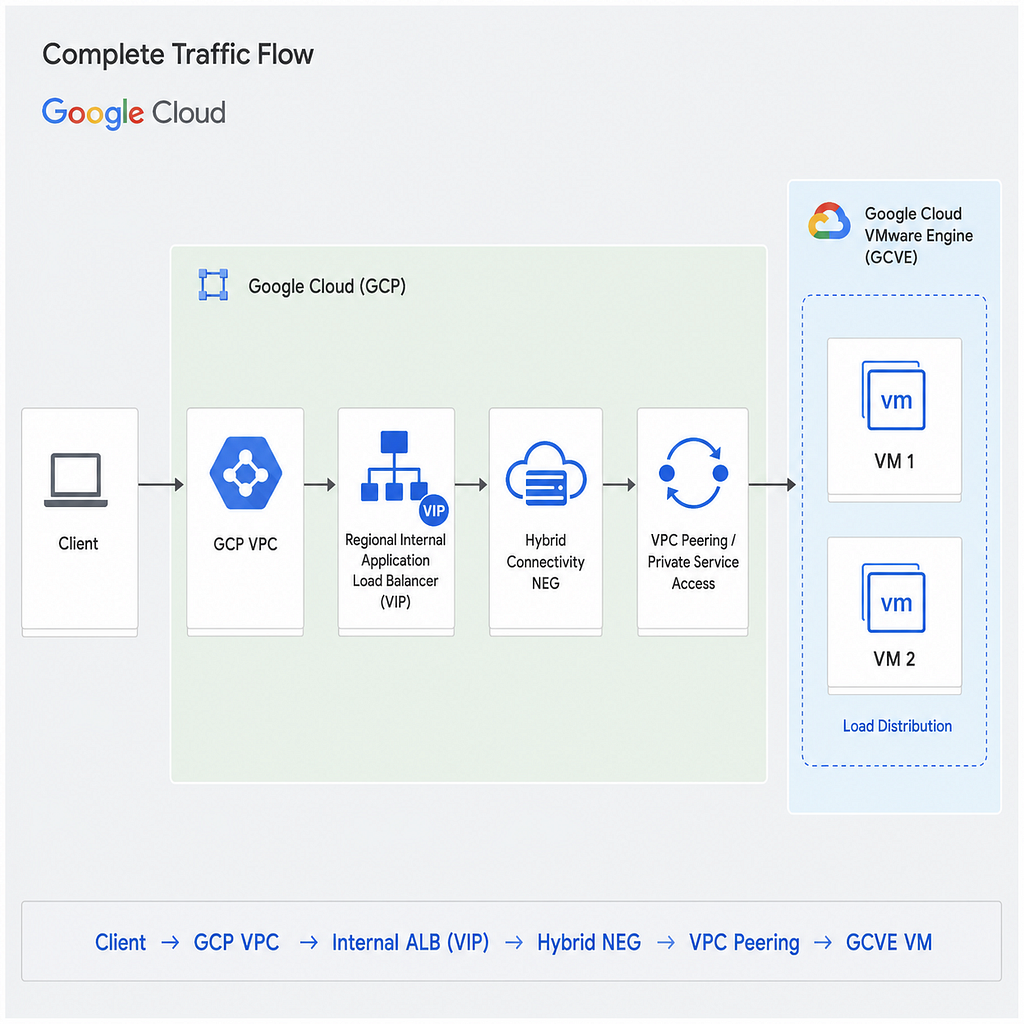
At a high level, traffic takes this path:
**Client → GCP VPC → Internal ALB (VIP) → Hybrid Connectivity NEG → VPC Peering → GCVE VM**
![Traffic flow from a client through the GCP VPC, Internal Application Load Balancer, Hybrid Connectivity NEG, and VPC peering, into GCVE VMs]
A few things worth calling out about this flow:
– The ILB’s VIP is a private IP that lives inside a GCP VPC subnet — it never leaves your network.
– The backend isn’t a managed instance group; it’s a Hybrid NEG, with each GCVE VM IP registered manually (or via Terraform) as an endpoint.
– Connectivity between the GCP VPC and GCVE runs over the managed VPC peering that GCVE creates automatically when the private cloud is provisioned.
– On the GCVE side, NSX-T’s Tier-0 router has to redistribute routes so those VM subnets are actually reachable from GCP — this is the step people most often forget.
With the architecture clear, here’s how to build it — covering the Console, `gcloud`, and Terraform paths so you can pick whichever fits your workflow.
Step 1 — Enable custom route exchange on the GCVE peering
GCVE automatically creates a managed VPC peering (commonly named servicenetworking-googleapis-com or vmware-engine-peering) when the private cloud is provisioned. By default, you still need to explicitly enable custom route import and export on it, or your GCP VPC won't learn the routes to your GCVE subnets.
gcloud compute networks peerings update vmware-engine-peering \
  --network=YOUR_VPC_NAME \
  --import-custom-routes \
  --export-custom-routes
resource "google_compute_network_peering_routes_config" "gcve_peering" {
  peering               = "vmware-engine-peering"
  network               = google_compute_network.vpc.name
  import_custom_routes  = true
  export_custom_routes  = true
}
Step 2 — Create the proxy-only subnet
Regional Internal Application Load Balancers require a dedicated proxy-only subnet in the same region — this is where the managed ALB proxies live. Never deploy VMs into it.
gcloud compute networks subnets create proxy-subnet \
  --purpose=REGIONAL_MANAGED_PROXY \
  --role=ACTIVE \
  --region=YOUR_REGION \
  --range=10.130.0.0/23 \
  --network=YOUR_VPC_NAME
Step 3 — Open the required firewall rules
Two ingress rules are needed on the GCP VPC side: one allowing GCP’s health probe ranges to reach your GCVE VMs, and one allowing the proxy-only subnet itself to forward traffic to those VMs.
# Allow GCP health probe ranges
gcloud compute firewall-rules create allow-health-probe-to-gcve \
  --network=YOUR_VPC_NAME \
  --action=ALLOW \
  --direction=INGRESS \
  --source-ranges=35.191.0.0/16,130.211.0.0/22 \
  --rules=tcp:80

# Allow the proxy subnet to reach backends
gcloud compute firewall-rules create allow-proxy-to-gcve \
  --network=YOUR_VPC_NAME \
  --action=ALLOW \
  --direction=INGRESS \
  --source-ranges=10.130.0.0/23 \
  --rules=tcp:80
Remember: these rules only cover the GCP side. NSX-T’s Distributed Firewall on the GCVE side needs a matching allow rule for the same ranges, or the health checks will pass the GCP firewall and still fail at the VM.
Building the load balancer
Step 4 — Create the Hybrid Connectivity NEG
This is the piece that makes the whole thing work: a NEG whose endpoints are IP:port pairs rather than GCE instances.
gcloud compute network-endpoint-groups create gcve-hybrid-neg \
  --network-endpoint-type=NON_GCP_PRIVATE_IP_PORT \
  --network=YOUR_VPC_NAME \
  --region=YOUR_REGION

gcloud compute network-endpoint-groups update gcve-hybrid-neg \
  --region=YOUR_REGION \
  --add-endpoint="ip=192.168.10.10,port=80"

gcloud compute network-endpoint-groups update gcve-hybrid-neg \
  --region=YOUR_REGION \
  --add-endpoint="ip=192.168.10.11,port=80"
In Terraform, this becomes a NEG resource plus one google_compute_network_endpoint per VM:
resource "google_compute_network_endpoint_group" "gcve_neg" {
  name                    = "gcve-hybrid-neg"
  network                 = google_compute_network.vpc.id
  network_endpoint_type   = "NON_GCP_PRIVATE_IP_PORT"
  default_port            = 80
  region                  = var.region
}

resource "google_compute_network_endpoint" "gcve_vms" {
  for_each                = toset(var.gcve_vm_ips)
  network_endpoint_group  = google_compute_network_endpoint_group.gcve_neg.name
  region                  = var.region
  ip_address              = each.value
  port                    = 80
}
Step 5 — Create the health check
The health check is what protects you from routing traffic to a VM that’s down. This assumes a lightweight /health endpoint on each VM.
gcloud compute health-checks create http gcve-http-hc \
  --port=80 \
  --request-path=/health \
  --check-interval=10 \
  --timeout=5 \
  --healthy-threshold=2 \
  --unhealthy-threshold=3 \
  --region=YOUR_REGION
⚠️ If NSX-T’s Distributed Firewall doesn’t allow TCP 80 from 35.191.0.0/16 and 130.211.0.0/22 to your GCVE VM IPs, every endpoint will show Unhealthy, regardless of how correct the rest of the configuration is. This is the single most common failure point in this whole setup.
Step 6 — Create the backend service and attach the NEG
gcloud compute backend-services create gcve-ilb-backend \
  --load-balancing-scheme=INTERNAL_MANAGED \
  --protocol=HTTP \
  --region=YOUR_REGION \
  --health-checks=gcve-http-hc \
  --health-checks-region=YOUR_REGION

gcloud compute backend-services add-backend gcve-ilb-backend \
  --network-endpoint-group=gcve-hybrid-neg \
  --network-endpoint-group-region=YOUR_REGION \
  --balancing-mode=RATE \
  --max-rate-per-endpoint=100 \
  --region=YOUR_REGION
Step 7 — URL map, target proxy, and forwarding rule
For a straightforward setup, a single catch-all routing rule is enough:
gcloud compute url-maps create gcve-ilb-urlmap \
  --default-service=gcve-ilb-backend \
  --region=YOUR_REGION

gcloud compute target-http-proxies create gcve-ilb-proxy \
  --url-map=gcve-ilb-urlmap \
  --url-map-region=YOUR_REGION \
  --region=YOUR_REGION
Finally, the forwarding rule is what actually creates the VIP your clients connect to:
gcloud compute addresses create gcve-ilb-vip \
  --region=YOUR_REGION \
  --subnet=YOUR_SUBNET_NAME \
  --address-type=INTERNAL

gcloud compute forwarding-rules create gcve-ilb-frontend \
  --load-balancing-scheme=INTERNAL_MANAGED \
  --address=gcve-ilb-vip \
  --ports=80 \
  --target-http-proxy=gcve-ilb-proxy \
  --target-http-proxy-region=YOUR_REGION \
  --subnet=YOUR_SUBNET_NAME \
  --region=YOUR_REGION
If you’d rather do all of this in one pass, the Console’s full ILB wizard (Network Services → Load balancing → Create load balancer → Application Load Balancer → Internal → Regional) walks you through backend, routing, and frontend configuration in a single guided flow, creating the URL map and target proxy for you automatically.
Prefer Terraform? Here’s the complete stack
For teams that want this fully codified, here’s a self-contained configuration covering every resource above — proxy subnet, firewall rules, NEG, health check, backend service, URL map, target proxy, and forwarding rule:
terraform {
  required_providers {
    google = { source = "hashicorp/google", version = ">= 5.0" }
  }
}

provider "google" {
  project = var.project_id
  region  = var.region
}

data "google_compute_network" "vpc" { name = var.vpc_name }
data "google_compute_subnetwork" "workload" {
  name   = var.subnet_name
  region = var.region
}

resource "google_compute_subnetwork" "proxy" {
  name          = "proxy-subnet"
  region        = var.region
  network       = data.google_compute_network.vpc.id
  ip_cidr_range = "10.130.0.0/23"
  purpose       = "REGIONAL_MANAGED_PROXY"
  role          = "ACTIVE"
}

resource "google_compute_firewall" "health_probe" {
  name           = "allow-health-probe-to-gcve"
  network        = data.google_compute_network.vpc.name
  allow          { protocol = "tcp", ports = ["80"] }
  source_ranges  = ["35.191.0.0/16", "130.211.0.0/22"]
}

resource "google_compute_firewall" "proxy_to_gcve" {
  name           = "allow-proxy-to-gcve"
  network        = data.google_compute_network.vpc.name
  allow          { protocol = "tcp", ports = ["80"] }
  source_ranges  = ["10.130.0.0/23"]
}

resource "google_compute_network_endpoint_group" "gcve_neg" {
  name                   = "gcve-hybrid-neg"
  network                = data.google_compute_network.vpc.id
  network_endpoint_type  = "NON_GCP_PRIVATE_IP_PORT"
  default_port           = 80
  region                 = var.region
}

resource "google_compute_network_endpoint" "gcve_vms" {
  for_each                = toset(var.gcve_vm_ips)
  network_endpoint_group  = google_compute_network_endpoint_group.gcve_neg.name
  region                  = var.region
  ip_address              = each.value
  port                    = 80
}

resource "google_compute_region_health_check" "hc" {
  name    = "gcve-http-hc"
  region  = var.region
  http_health_check {
    port         = 80
    request_path = "/health"
  }
  check_interval_sec    = 10
  timeout_sec           = 5
  healthy_threshold     = 2
  unhealthy_threshold   = 3
}

resource "google_compute_region_backend_service" "backend" {
  name                     = "gcve-ilb-backend"
  region                   = var.region
  load_balancing_scheme    = "INTERNAL_MANAGED"
  protocol                 = "HTTP"
  health_checks            = [google_compute_region_health_check.hc.id]
  backend {
    group                   = google_compute_network_endpoint_group.gcve_neg.id
    balancing_mode          = "RATE"
    max_rate_per_endpoint   = 100
  }
}

resource "google_compute_region_url_map" "urlmap" {
  name             = "gcve-ilb-urlmap"
  region           = var.region
  default_service  = google_compute_region_backend_service.backend.id
}

resource "google_compute_region_target_http_proxy" "proxy" {
  name     = "gcve-ilb-proxy"
  region   = var.region
  url_map  = google_compute_region_url_map.urlmap.id
}

resource "google_compute_address" "vip" {
  name          = "gcve-ilb-vip"
  region        = var.region
  subnetwork    = data.google_compute_subnetwork.workload.id
  address_type  = "INTERNAL"
}

resource "google_compute_forwarding_rule" "ilb" {
  name                    = "gcve-ilb-frontend"
  region                  = var.region
  load_balancing_scheme   = "INTERNAL_MANAGED"
  ip_address              = google_compute_address.vip.id
  ip_protocol             = "TCP"
  port_range              = "80"
  target                  = google_compute_region_target_http_proxy.proxy.id
  network                 = data.google_compute_network.vpc.id
  subnetwork              = data.google_compute_subnetwork.workload.id
  depends_on              = [google_compute_subnetwork.proxy]
}

output "ilb_vip" {
  value        = google_compute_address.vip.address
  description  = "ILB internal VIP — use this IP to test"
}
Bridging GCP and GCVE: Load Balancing Traffic to VMware Engine VMs with an Internal Application… was originally published in Google Cloud – Community on Medium, where people are continuing the conversation by highlighting and responding to this story.
Source Credit: https://medium.com/google-cloud/bridging-gcp-and-gcve-load-balancing-traffic-to-vmware-engine-vms-with-an-internal-application-7a8a176b6c52?source=rss—-e52cf94d98af—4
About the Author