

Written by:
- Haoyu Wang, Software Engineer @ Google (LinkedIn)
- Minh Nguyen, Group Product Manager @ Google (LinkedIn)
We’re making it easier for developers and data engineers to use Google Data Cloud services with leading coding agents like Antigravity, Claude Code, Cursor, Codex, and GitHub Copilot. Our plugins now follow the Agent Plugins standard. This helps your agents work with over 16 Google Data Cloud services including BigQuery, Cloud SQL, Spanner, and Cloud Storage.
Plugins provide coding agents with specialized expertise. A plugin bundles together preferred MCP servers and skills — for example, the BigQuery plugin helps teach agents how to connect to BigQuery to run queries and use AI functions like forecasting. Before today, every agent used a different packaging format, which made it hard to support plugins across different agents.
Now every Google Data Cloud plugin follows the open-source Agent Plugins specification, so any coding agent that supports this standard can use these plugins directly.
How plugins work
Each plugin integrates instructions, tools, and capabilities for your agent:
- MCP servers, including tools — outlines the preferred connection methods to Google Data Cloud services while providing tools to administer your database, and query your data.
- Skills — instructs the agent on how to utilize those tools and services effectively.
An MCP server provides the connection and tools to perform administrative operations like creating a database and running queries, while a skill provides the logic to determine how to run a query, such as how to use an AI predictive function. By shipping them together in a plugin, we ensure the agent has everything it needs to perform tasks correctly. This replaces a multi-step manual agent setup with a single installation.
For example, the BigQuery plugin includes the following agent skills, among others:
- Data: Helps an agent identify the right MCP tools required to perform specific functions.
- Analytics: Describes how to use BigQuery to extract valuable insights directly from data.
- AI & ML: Explains how to use BigQuery capabilities for AI and machine learning, such as data classification, forecasting, similarity search, and more.
Enter the Agent Plugins Standard
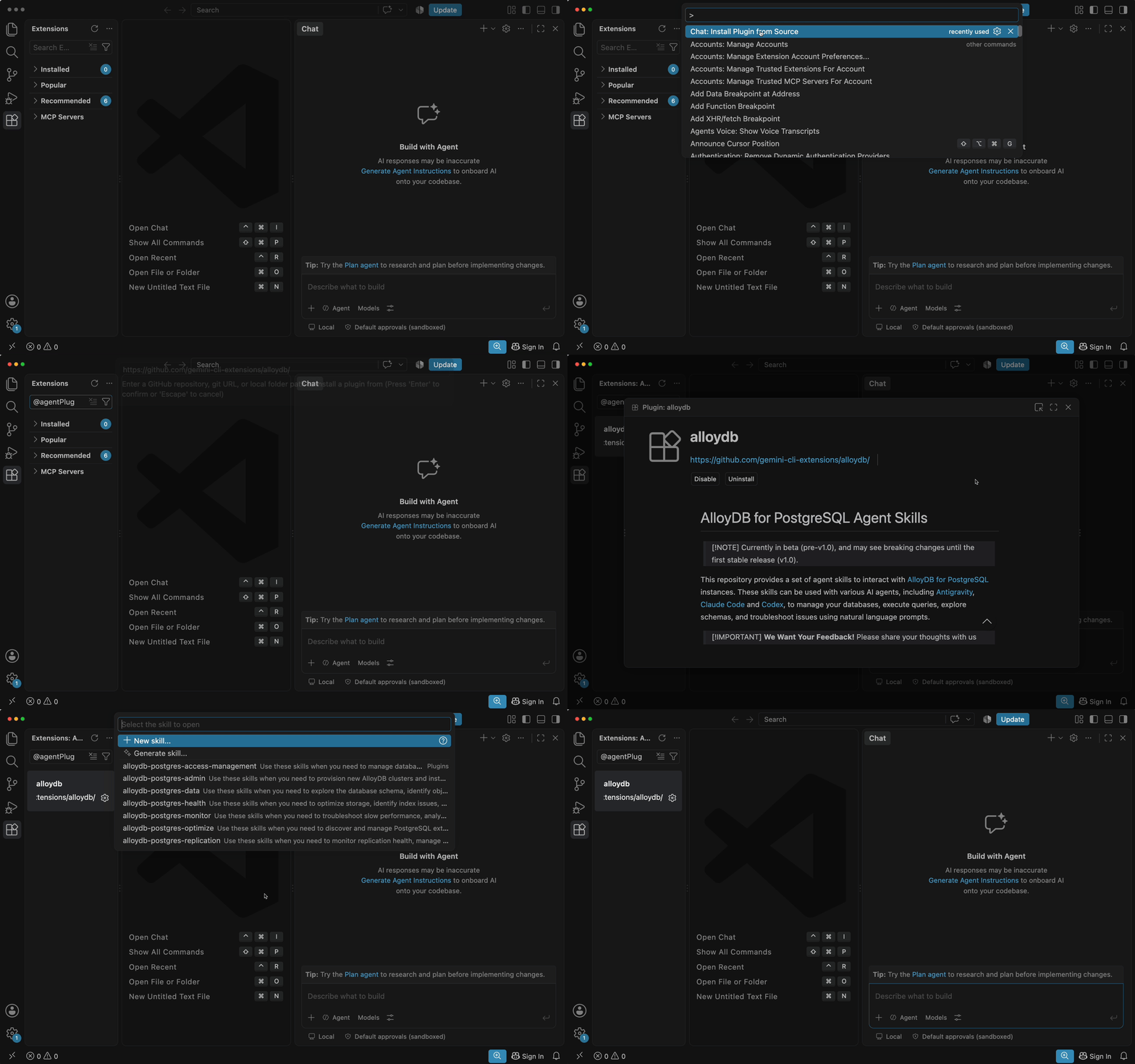
Instead of maintaining different plugins for every agent, we worked with the community to support a vendor-neutral format. The Agent Plugins specification uses a simple structure: a plugin.json manifest, a skills/ directory, and an mcp.json file. Compatible agents read this package natively. You can install a plugin by pointing your agent to the repository, which sets up both the connection and the expertise in one step.
These Google Data Cloud plugins now follow the standard:
- AlloyDB for PostgreSQL
- AlloyDB Omni
- BigQuery Data Analytics
- Bigtable
- Cloud SQL for MySQL
- Cloud SQL for PostgreSQL
- Cloud SQL for SQL Server
- Cloud Storage
- Context Engineering
- Data Agent Kit Starter Pack
- Dataproc
- Firestore
- Knowledge Catalog
- Looker
- Oracle Database
- Spanner
Choose your favorite coding agent and install the plugin for the Google Data Cloud products you use.
Get Started
Get started by visiting the plugin list: https://github.com/GoogleCloudPlatform/data-agent-kit. If these tools help you work faster, please give us a star on GitHub!
If you already use these plugins through Antigravity, Claude Code, or Gemini CLI, your experience stays the same. We will update your plugins to the new standard automatically.
This is a preview release. Please share your thoughts through our feedback form.
Standardizing Agent Plugins for Google Data Cloud was originally published in Google Cloud – Community on Medium, where people are continuing the conversation by highlighting and responding to this story.
Source Credit: https://medium.com/google-cloud/standardizing-agent-connectivity-for-google-data-cloud-b838eec8a505?source=rss—-e52cf94d98af—4
About the Author


![ChatGPT vs Claude vs Gemini: 56 vs 46 Satisfaction [2026] – tech-insider.org](https://lh3.googleusercontent.com/J6_coFbogxhRI9iM864NL_liGXvsQp2AupsKei7z0cNNfDvGUmWUy20nuUhkREQyrpY4bEeIBuc=s0-w300-rw "ChatGPT vs Claude vs Gemini: 56 vs 46 Satisfaction [2026] – tech-insider.org")