Deploying open-source (OSS) Kubernetes directly on Google Compute Engine (GCE) allows for deep customization of the stack, specifically when integrating specialized accelerators like the Cloud TPU v6e.
In this blog, we will explore a set up for bootstrapping an OSS Kubernetes cluster on GCE that leverages OSS Dynamic Resource Allocation (DRA) for networking and OSS DRA for TPUs. We will test and also run the Gemma 4 LLM.
You can jump right into a codelabs hands-on lab were you can build in your own environment.
📄 — OSS Kubernetes on GCE with TPUs, DRA for TPU, DRANET (OSS) and Gemma 4
What is Dynamic Resource Allocation (DRA), DRANET and DRA for TPU?
Dynamic Resource Allocation (DRA) is a Kubernetes resource management framework designed to handle specialized hardware that doesn’t fit the standard “count-based” model of CPUs or memory. It allows for a more flexible, claim-based system where drivers can perform complex initialization tasks — such as setting up PCI pass-through or configuring environment variables — before a pod starts.
DRANET is an open-source agent that implements the DRA specification specifically for networking. In high-performance AI environments, it dynamically binds host PCI interfaces into the pod’s network namespace, enabling workloads to utilize secondary high-speed VPCs.
DRA for TPU is the open source DRA driver for TPUs (version 6 and higher) which supports DRA features.
Design pattern example
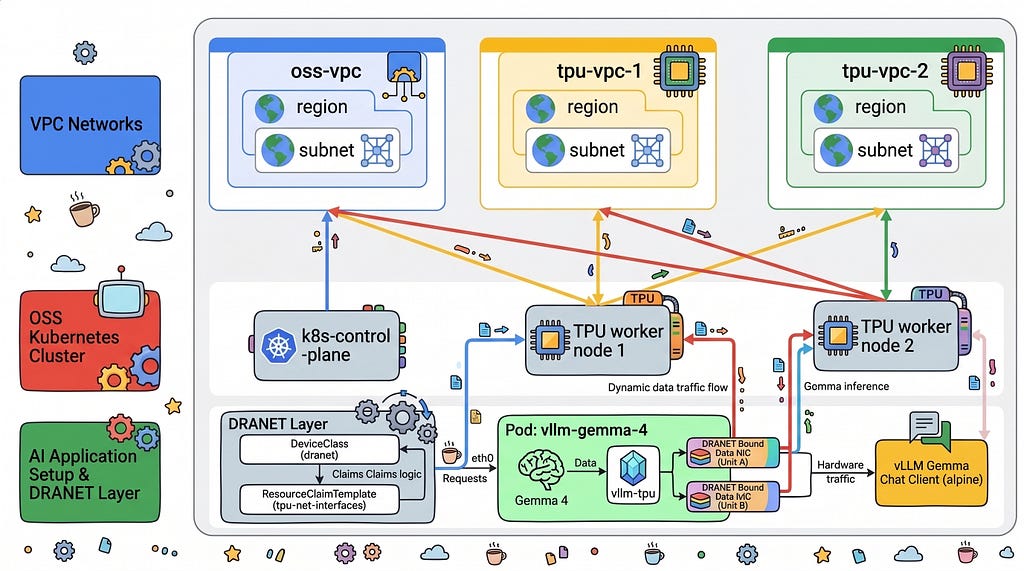
The architecture utilizes a multi-NIC configuration to separate management traffic from high-speed data planes. The setup comprises:
- Compute Engine — Provides the underlying virtualized infrastructure, including 1 * e2-standard-8 nodes for the control plane and 2 * ct6e-standard-4t instances for TPU worker nodes.
- Virtual Private Cloud (VPC) — A primary VPC for cluster management and multiple secondary VPCs with Jumbo Frames (MTU 8896) dedicated to TPU data traffic.
- Cloud Router and Cloud NAT — Enables private nodes within the VPC to access external repositories for software installation without requiring public IP addresses.
- OSS K8 and environment
- DRANET — For DRA networking
- TPU DRA Driver — A specialized driver that discovers and allocates TPU silicon to Kubernetes pods.
Architecture details and traffic flow
In the architectural design, the traffic flow is bifurcated to ensure performance isolation:
- Management Plane: The Kubernetes API server, kubelet heartbeats, and administrative SSH traffic flow through the primary VPC using a standard MTU of 1460.
- Data Plane (TPU Interconnect): High-speed tensor data propagates through dedicated TPU VPCs. The DRANET agent maps these secondary host interfaces directly into the workload container.
- Resource Claim Flow: When a pod requests a TPU, the DRA framework triggers the TPU driver to reserve the hardware and the DRANET driver to configure the high-speed network interfaces. Only after these “claims” are satisfied does the kubelet start the container.
1. Set up the environment and networking
Begin by defining your environment variables and creating the necessary VPC networks. We use a loop to provision multi-NIC networks with custom Jumbo Frames to support TPU communication.
Set your environment variables — all are customizable. (Replace the values with your own information).
export PROJECT_ID=$(gcloud config get-value project)
export REGION="europe-west4"
export ZONE="europe-west4-a"
echo "Project: $PROJECT_ID | Zone: $ZONE | Region: $REGION"
Create Primary Management VPC
gcloud compute networks create dra-oss-k8s-primary-vpc \
    --subnet-mode=custom \
    --mtu=1460

gcloud compute networks subnets create dra-oss-k8s-primary-subnet \
    --network=dra-oss-k8s-primary-vpc \
    --region=$REGION \
    --range=10.0.0.0/24

gcloud compute firewall-rules create dra-oss-primary-allow-internal \
    --network=dra-oss-k8s-primary-vpc \
    --allow=tcp,udp,icmp \
    --source-ranges=10.0.0.0/24

gcloud compute firewall-rules create dra-oss-allow-iap-ssh \
    --network=dra-oss-k8s-primary-vpc \
    --allow=tcp:22 \
    --source-ranges=35.235.240.0/20
Create TPU VPCs
for i in 1 2; do
  gcloud compute networks create "dra-oss-tpu-vpc-$" \
    --subnet-mode=custom \
    --mtu=8896

  gcloud compute networks subnets create "dra-oss-tpu-vpc-$ "op": "add", "path": "/spec/template/spec/containers/0/args/-", "value": "-filter=!(\"dra.net/type\" in attributes) -subnet" \
    --network="dra-oss-tpu-vpc-$ "op": "add", "path": "/spec/template/spec/containers/0/args/-", "value": "-filter=!(\"dra.net/type\" in attributes) " \
    --region=$REGION \
    --range="10.$ (attributes[\"dra.net/type\"].StringValue != \"veth\" && attributes[\"dra.net/type\"].StringValue != \"vxlan\" && attributes[\"dra.net/type\"].StringValue != \"bridge\")" 0.0.0/24"

  gcloud compute firewall-rules create "dra-oss-tpu${i}-allow-internal" \
    --network="dra-oss-tpu-vpc-${i}" \
    --allow=tcp,udp,icmp \
    --source-ranges="10.${i}0.0.0/24"
done
Configure Cloud NAT for internet egress
gcloud compute routers create dra-oss-k8s-router \
    --network=dra-oss-k8s-primary-vpc \
    --region=$REGION

gcloud compute routers nats create dra-oss-k8s-nat \
    --router=dra-oss-k8s-router \
    --region=$REGION \
    --auto-allocate-nat-external-ips \
    --nat-all-subnet-ip-ranges
2. Provision Kubernetes node VMs
Create the control plane and TPU worker instances. The workers require a specific machine type (`ct6e-standard-4t`) and a specialized accelerator image.
gcloud compute instances create k8s-control-plane \
    --zone=$ZONE \
    --machine-type=e2-standard-8 \
    --image-family=ubuntu-2204-lts \
    --image-project=ubuntu-os-cloud \
    --network-interface=network=dra-oss-k8s-primary-vpc,subnet=dra-oss-k8s-primary-subnet,no-address

gcloud compute instances create k8s-tpu-worker-1 k8s-tpu-worker-2 \
    --zone="${ZONE}" \
    --machine-type="ct6e-standard-4t" \
    --image-family="ubuntu-accel-2204-amd64-tpu-v5e-v5p-v6e" \
    --image-project="ubuntu-os-accelerator-images" \
    --boot-disk-size="200GB" \
    --provisioning-model="STANDARD" \
    --maintenance-policy="TERMINATE" \
    --network-interface="network=dra-oss-k8s-primary-vpc,subnet=dra-oss-k8s-primary-subnet,no-address" \
    --network-interface="network=dra-oss-tpu-vpc-1,subnet=dra-oss-tpu-vpc-1-subnet,no-address" \
    --network-interface="network=dra-oss-tpu-vpc-2,subnet=dra-oss-tpu-vpc-2-subnet,no-address"
3. Initialize the Control Plane
Connect to the k8s-control-plane node to install the container runtime and initialize the cluster using kubeadm.
gcloud compute ssh k8s-control-plane \
    --zone=$ZONE \
    --tunnel-through-iap
Install the container runtime and initialize the cluster using kubeadm.
#!/bin/bash
# Strict error handling: fail instantly if any command exits with a non-zero status
set -e

echo "=== 1. Neutralizing Background Updates & Preparing Base OS ==="
sudo systemctl stop apt-daily.timer apt-daily-upgrade.timer || true
sudo systemctl disable apt-daily.timer apt-daily-upgrade.timer || true
sudo systemctl mask apt-daily.service apt-daily-upgrade.service || true

sudo swapoff -a
sudo sed -i '/ swap / s/^\(.*\)$/#\1/g' /etc/fstab

cat <<EOT | sudo tee /etc/modules-load.d/k8s.conf
overlay
br_netfilter
EOT

sudo modprobe overlay
sudo modprobe br_netfilter

cat <<EOT | sudo tee /etc/sysctl.d/k8s.conf
net.bridge.bridge-nf-call-iptables  = 1
net.bridge.bridge-nf-call-ip6tables = 1
net.ipv4.ip_forward                 = 1
EOT
sudo sysctl --system

echo "=== 2. Installing Container Runtime (Containerd) ==="
sudo apt-get update
sudo apt-get install -y ca-certificates curl gnupg bash-completion

sudo install -m 0755 -d /etc/apt/keyrings
curl -fsSL https://download.docker.com/linux/ubuntu/gpg | sudo gpg --dearmor --yes -o /etc/apt/keyrings/docker.gpg
sudo chmod a+r /etc/apt/keyrings/docker.gpg
echo "deb [arch=$(dpkg --print-architecture) signed-by=/etc/apt/keyrings/docker.gpg] https://download.docker.com/linux/ubuntu $(. /etc/os-release && echo $VERSION_CODENAME) stable" | sudo tee /etc/apt/sources.list.d/docker.list > /dev/null

sudo apt-get update
sudo apt-get install -y docker-ce docker-ce-cli containerd.io

echo "=== 3. Configuring Containerd with Systemd Cgroups ==="
sudo mkdir -p /etc/containerd
containerd config default | sudo tee /etc/containerd/config.toml >/dev/null
sudo sed -i 's/SystemdCgroup = false/SystemdCgroup = true/' /etc/containerd/config.toml

sudo systemctl daemon-reload
sudo systemctl restart containerd
sudo systemctl enable containerd

if ! systemctl is-active --quiet containerd; then
    echo "❌ ERROR: Containerd failed to start properly."
    exit 1
fi
echo "✅ Containerd runtime is active and healthy."

echo "=== 4. Installing Kubernetes 1.36 Binaries ==="
curl -fsSL https://pkgs.k8s.io/core:/stable:/v1.36/deb/Release.key | sudo gpg --dearmor --yes -o /etc/apt/keyrings/kubernetes-apt-keyring.gpg
echo 'deb [signed-by=/etc/apt/keyrings/kubernetes-apt-keyring.gpg] https://pkgs.k8s.io/core:/stable:/v1.36/deb/ /' | sudo tee /etc/apt/sources.list.d/kubernetes.list

sudo apt-get update
sudo apt-get install -y kubelet kubeadm kubectl
sudo apt-mark hold kubelet kubeadm kubectl

kubectl completion bash | sudo tee /etc/bash_completion.d/kubectl > /dev/null
kubeadm completion bash | sudo tee /etc/bash_completion.d/kubeadm > /dev/null
if ! grep -q 'alias k=kubectl' ~/.bashrc; then
  echo 'alias k=kubectl' >> ~/.bashrc
  echo 'complete -o default -F __start_kubectl k' >> ~/.bashrc
fi

echo "=== 5. Initializing Control Plane Engine ==="
sudo kubeadm init --pod-network-cidr=192.168.0.0/16

echo "=== 6. Configuring Administrative Cluster Credentials ==="
mkdir -p $HOME/.kube
sudo cp -i /etc/kubernetes/admin.conf $HOME/.kube/config
sudo chown $(id -u):$(id -g) $HOME/.kube/config

echo "Waiting for local API server context..."
until kubectl cluster-info &>/dev/null; do
    sleep 2
done
echo "✅ Kubernetes API server is responding locally."

echo "=== 7. Deploying Calico Network Operator ==="
kubectl create -f https://raw.githubusercontent.com/projectcalico/calico/v3.27.3/manifests/tigera-operator.yaml

echo "Waiting for Tigera Installation CRD to register..."
kubectl wait --for=condition=established crd/installations.operator.tigera.io --timeout=60s

echo "=== 8. Deploying Calico Custom Resources ==="
cat << 'EOF' > custom-calico.yaml
apiVersion: operator.tigera.io/v1
kind: Installation
metadata:
  name: default
spec:
  calicoNetwork:
    nodeAddressAutodetectionV4:
      cidrs:
        - "10.0.0.0/24"
    ipPools:
    - blockSize: 26
      cidr: 192.168.0.0/16
      encapsulation: VXLANCrossSubnet
      natOutgoing: Enabled
      nodeSelector: all()
EOF
kubectl apply -f custom-calico.yaml

echo "Waiting 10 seconds for Calico system namespaces to initialize..."
sleep 10
kubectl get pods -n calico-system

echo "=== 9. Exporting Worker Cluster Join Token ==="
sudo kubeadm token create --print-join-command > ~/join.sh
chmod +x ~/join.sh

echo "--------------------------------------------------------"
echo "✅ CONTROL PLANE BOOTSTRAP COMPLETE!"
cat ~/join.sh
4. Set up worker nodes
Exit the control plane node and run the following script directly from your local Cloud Shell to configure and join the worker nodes concurrently.
#!/bin/bash
set -e
ZONE="europe-west4-a"

echo "Fetching join command from Control Plane..."
JOIN_CMD=$(gcloud compute ssh k8s-control-plane --zone=$ZONE --tunnel-through-iap --command="cat ~/join.sh" 2>/dev/null | grep -E "kubeadm join")

if [ -z "$JOIN_CMD" ]; then
    echo "❌ ERROR: Failed to retrieve the join command."
    exit 1
fi

echo "✅ Executing Join Command: $JOIN_CMD"

cat << 'EOF' > init-worker.sh
#!/bin/bash
set -e

echo "=== 1. Neutralizing Background Updates & Setting Non-Interactive Mode ==="
export DEBIAN_FRONTEND=noninteractive
sudo sed -i "s/#\$nrconf{restart} = 'i';/\$nrconf{restart} = 'a';/g" /etc/needrestart/needrestart.conf 2>/dev/null || true

sudo systemctl stop apt-daily.timer apt-daily-upgrade.timer || true
sudo systemctl disable apt-daily.timer apt-daily-upgrade.timer || true
sudo systemctl mask apt-daily.service apt-daily-upgrade.service || true

echo "=== 2. Base OS Prep ==="
sudo swapoff -a
sudo sed -i '/ swap / s/^\(.*\)$/#\1/g' /etc/fstab

cat <<EOT | sudo tee /etc/modules-load.d/k8s.conf
overlay
br_netfilter
EOT
sudo modprobe overlay
sudo modprobe br_netfilter

cat <<EOT | sudo tee /etc/sysctl.d/k8s.conf
net.bridge.bridge-nf-call-iptables  = 1
net.bridge.bridge-nf-call-ip6tables = 1
net.ipv4.ip_forward                 = 1
EOT
sudo sysctl --system

echo "=== 3. Installing Containerd ==="
sudo apt-get update && sudo apt-get install -yq ca-certificates curl gnupg bash-completion
sudo install -m 0755 -d /etc/apt/keyrings
curl -fsSL https://download.docker.com/linux/ubuntu/gpg | sudo gpg --dearmor --yes -o /etc/apt/keyrings/docker.gpg
sudo chmod a+r /etc/apt/keyrings/docker.gpg
echo "deb [arch=$(dpkg --print-architecture) signed-by=/etc/apt/keyrings/docker.gpg] https://download.docker.com/linux/ubuntu $(. /etc/os-release && echo $VERSION_CODENAME) stable" | sudo tee /etc/apt/sources.list.d/docker.list > /dev/null

sudo apt-get update && sudo apt-get install -yq docker-ce docker-ce-cli containerd.io
sudo mkdir -p /etc/containerd
containerd config default | sudo tee /etc/containerd/config.toml >/dev/null
sudo sed -i 's/SystemdCgroup = false/SystemdCgroup = true/' /etc/containerd/config.toml
sudo systemctl daemon-reload
sudo systemctl restart containerd
sudo systemctl enable containerd

if ! systemctl is-active --quiet containerd; then
    echo "❌ ERROR: Containerd failed to start."
    exit 1
fi

echo "=== 4. Installing Kubernetes 1.36 Binaries ==="
curl -fsSL https://pkgs.k8s.io/core:/stable:/v1.36/deb/Release.key | sudo gpg --dearmor --yes -o /etc/apt/keyrings/kubernetes-apt-keyring.gpg
echo 'deb [signed-by=/etc/apt/keyrings/kubernetes-apt-keyring.gpg] https://pkgs.k8s.io/core:/stable:/v1.36/deb/ /' | sudo tee /etc/apt/sources.list.d/kubernetes.list
sudo apt-get update && sudo apt-get install -yq kubelet kubeadm kubectl
sudo apt-mark hold kubelet kubeadm kubectl
EOF

echo "echo \"=== 5. Joining Cluster ===\"" >> init-worker.sh
echo "sudo $JOIN_CMD" >> init-worker.sh

echo "Starting concurrent bootstrap on both workers..."

(
    echo "[Worker 1] Copying script..."
    gcloud compute scp init-worker.sh k8s-tpu-worker-1:~ --zone=$ZONE --tunnel-through-iap --quiet
    echo "[Worker 1] Executing script..."
    gcloud compute ssh k8s-tpu-worker-1 --zone=$ZONE --tunnel-through-iap --command="bash ~/init-worker.sh"
    echo "✅ [Worker 1] Bootstrap and Join complete!"
) &

(
    echo "[Worker 2] Copying script..."
    gcloud compute scp init-worker.sh k8s-tpu-worker-2:~ --zone=$ZONE --tunnel-through-iap --quiet
    echo "[Worker 2] Executing script..."
    gcloud compute ssh k8s-tpu-worker-2 --zone=$ZONE --tunnel-through-iap --command="bash ~/init-worker.sh"
    echo "✅ [Worker 2] Bootstrap and Join complete!"
) &

wait

echo "--------------------------------------------------------"
echo "✅ BOTH WORKERS HAVE FINISHED PROCESSING"
echo "--------------------------------------------------------"

echo "Verifying cluster node status..."
sleep 5
gcloud compute ssh k8s-control-plane --zone=$ZONE --tunnel-through-iap --command="kubectl get nodes -o wide"
5. Deploy TPU DRA and DRANET
Run inside k8s-control-plane:
# 1. Label Nodes with the complete label set (including exact chip count keys)
kubectl label node k8s-tpu-worker-1 \
  cloud.google.com/gke-tpu-accelerator=tpu-v6e-slice \
  cloud.google.com/gke-tpu-topology=2x2 \
  cloud.google.com/gke-tpu-dra-driver=true \
  cloud.google.com/gke-accelerator-count=4 \
  cloud.google.com/gke-tpu-count=4 \
  --overwrite

kubectl label node k8s-tpu-worker-2 \
  cloud.google.com/gke-tpu-accelerator=tpu-v6e-slice \
  cloud.google.com/gke-tpu-topology=2x2 \
  cloud.google.com/gke-tpu-dra-driver=true \
  cloud.google.com/gke-accelerator-count=4 \
  cloud.google.com/gke-tpu-count=4 \
  --overwrite
Clone and install TPU DRA Driver:
git clone https://github.com/kubernetes-sigs/dra-driver-google-tpu.git ~/dra-driver-google-tpu || true
cd ~/dra-driver-google-tpu
rm -f *.pack *.tgz

helm install dra-driver-google-tpu ./deployments/helm/dra-driver-google-tpu \
  -n dra-driver-google-tpu \
  --create-namespace \
  --set 'kubeletPlugin.env[0].name=NODE_NAME' \
  --set 'kubeletPlugin.env[0].valueFrom.fieldRef.fieldPath=spec.nodeName'

cd ~
Validate TPU DRA Driver setup
kubectl get pods -n dra-driver-google-tpu -o wide
kubectl get resourceslices
kubectl get resourceslices -o json | jq -r '.items[] | select(.spec.driver=="tpu.google.com") | [.spec.nodeName, (.spec.devices | length), .spec.devices[0].attributes.tpuGen.string] | @tsv'
kubectl logs -n dra-driver-google-tpu -l app.kubernetes.io/name=dra-driver-google-tpu -c tpu-dra-plugin --tail=20
6. Deploy DRANET
Run inside k8s-control-plane
The open-source DRANET agent implements the Kubernetes DRA specification, dynamically binding and mapping host PCI interfaces inside the pod network namespace.
kubectl apply -f https://raw.githubusercontent.com/kubernetes-sigs/dranet/refs/heads/main/install.yaml

kubectl patch daemonset dranet -n kube-system --type='json' -p='[ { "op": "add", "path": "/spec/template/spec/containers/0/args/-", "value": "-filter=!(\"dra.net/type\" in attributes) || (attributes[\"dra.net/type\"].StringValue != \"veth\" && attributes[\"dra.net/type\"].StringValue != \"vxlan\" && attributes[\"dra.net/type\"].StringValue != \"bridge\")" } ]'

kubectl rollout status daemonset/dranet -n kube-system
kubectl get pods -n kube-system -l app=dranet -o wide
kubectl get clusterrole,clusterrolebinding,sa dranet -n kube-system
kubectl logs -n kube-system -l app=dranet --tail=20
Install the DeviceClass, resource claim and validate
cat << 'EOF' | kubectl apply -f -
apiVersion: resource.k8s.io/v1
kind: DeviceClass
metadata:
  name: dranet
spec:
  selectors:
    - cel:
        expression: device.driver == "dra.net"
---
apiVersion: resource.k8s.io/v1
kind: ResourceClaimTemplate
metadata:
  name: tpu-net-interfaces
  namespace: default
spec:
  spec:
    devices:
      requests:
      - name: tpu-net-interface
        exactly:
          deviceClassName: dranet
          count: 2
          selectors:
          - cel:
              expression: device.attributes["gce.dra.net"].networkName.startsWith("aw-tpu-vpc")
      config:
      - opaque:
          driver: dra.net
          parameters:
            interface:
              mtu: 8896
              gsoMaxSize: 65536
              groMaxSize: 65536
              gsoIPv4MaxSize: 65536
              groIPv4MaxSize: 65536
              disableEbpfPrograms: true
---
apiVersion: resource.k8s.io/v1
kind: ResourceClaimTemplate
metadata:
  name: tpu-device-template
  namespace: default
spec:
  spec:
    devices:
      requests:
      - name: tpu-devices
        exactly:
          deviceClassName: tpu.google.com
          allocationMode: ExactCount
          count: 4
EOF

kubectl get resourceslices -o custom-columns=NAME:.metadata.name,NODE:.spec.nodeName,DRIVER:.spec.driver | grep -E "dra.net|tpu.google.com"

kubectl get pods -n kube-system -l app=dranet -o wide
7. Benchmark with Neper
First, apply the StatefulSet to provision the test environment.
cat << 'EOF' | kubectl apply -f -
---
apiVersion: v1
kind: Service
metadata:
  name: neper
spec:
  clusterIP: None
  selector:
    app: neper
---
apiVersion: apps/v1
kind: StatefulSet
metadata:
  name: neper
spec:
  selector:
    matchLabels:
      app: neper
  serviceName: neper
  replicas: 2
  template:
    metadata:
      labels:
        app: neper
    spec:
      initContainers:
      - name: "network-optimization-sysctls"
        image: "busybox"
        securityContext:
          privileged: true
        command:
        - sh
        - -c
        - |
          echo 5000 > /proc/sys/net/ipv4/tcp_rto_min_us
          echo 1 > /proc/sys/net/ipv4/tcp_no_metrics_save
          echo 0 > /proc/sys/net/ipv4/tcp_slow_start_after_idle
          echo 131072 > /proc/sys/net/core/optmem_max
          echo "4096 41943040 314572800" > /proc/sys/net/ipv4/tcp_rmem
      containers:
      - name: neper
        image: ubuntu:22.04
        command:
        - /bin/bash
        - -c
        - |
          apt-get update && apt-get install -y iproute2 build-essential git jq python3-pip &&
          git clone https://github.com/google/neper.git /tmp/neper &&
          cd /tmp/neper && make &&
          cp tcp_stream /usr/local/bin/ &&
          sleep infinity
        securityContext:
          privileged: true
        resources:
          requests:
            cpu: "170"
            memory: "650Gi"
          limits:
            cpu: "170"
            memory: "650Gi"
          claims:
          - name: tpu-net-claim
          - name: tpu-hardware-claim
      resourceClaims:
      - name: tpu-net-claim
        resourceClaimTemplateName: tpu-net-interfaces
      - name: tpu-hardware-claim
        resourceClaimTemplateName: tpu-device-template
EOF
Then, run the benchmark test script:
cat << 'EOF' > run_dual_neper_test.sh
#!/bin/bash
set -e

SERVER_POD="neper-1"
CLIENT_POD="neper-0"

echo "================================================="
echo " PHASE 1: DUAL-INTERFACE HIGH-SPEED NETWORK TEST"
echo "================================================="
echo "=== Waiting for Pods to be Ready ==="
kubectl wait --for=condition=ready pod/$CLIENT_POD pod/$SERVER_POD --timeout=300s

echo "=== Waiting for neper compilation to finish inside Pods ==="
for POD in $SERVER_POD $CLIENT_POD; do
  until kubectl exec $POD -c neper -- sh -c 'command -v jq >/dev/null 2>&1 && command -v tcp_stream >/dev/null 2>&1'; do
    sleep 5
  done
done

echo ""
echo "=== Step 1: Extract Target IPs from $SERVER_POD ==="
# Using jq to parse the network interfaces directly from Linux JSON output
IFACE1=$(kubectl exec $SERVER_POD -c neper -- sh -c "ip -j -4 addr show | jq -r '.[] | select(.ifname != \"lo\" and .ifname != \"eth0\") | .ifname' | sed -n '1p'")
IFACE2=$(kubectl exec $SERVER_POD -c neper -- sh -c "ip -j -4 addr show | jq -r '.[] | select(.ifname != \"lo\" and .ifname != \"eth0\") | .ifname' | sed -n '2p'")

IP1=$(kubectl exec $SERVER_POD -c neper -- sh -c "ip -j -4 addr show | jq -r '.[] | select(.ifname != \"lo\" and .ifname != \"eth0\") | .addr_info[0].local' | sed -n '1p'")
IP2=$(kubectl exec $SERVER_POD -c neper -- sh -c "ip -j -4 addr show | jq -r '.[] | select(.ifname != \"lo\" and .ifname != \"eth0\") | .addr_info[0].local' | sed -n '2p'")

echo "   📍 Target IP 1 ($IFACE1): $IP1"
echo "   📍 Target IP 2 ($IFACE2): $IP2"

echo ""
echo "=== Step 2: Initialize TCP Servers on $SERVER_POD ==="
kubectl exec $SERVER_POD -c neper -- sh -c '
for i in 0 1; do
  nohup tcp_stream -C$((52279 + i)) --port=$((38339 + i)) --skip-rx-copy -rw -Z -B16384 \
    --test-length=60 --suicide-length=120 -F100 --num-threads=16 --num-flows=32 -D0 \
    --logtostderr > test${i}.log 2>&1 &
done
'
sleep 3

echo "=== Step 3: Generate Concurrent High-Throughput Load from $CLIENT_POD ==="
echo "Blasting Traffic via Interface 1 -> $IP1 ..."
kubectl exec $CLIENT_POD -c neper -- sh -c "nohup tcp_stream -C52279 --port=38339 --skip-rx-copy -rw -Z -B16384 \
  --test-length=60 --suicide-length=70 -F100 --num-threads=16 --num-flows=32 \
  --client -H $IP1 -D0 --logtostderr > test0.log 2>&1 &"

echo "Blasting Traffic via Interface 2 -> $IP2 ..."
kubectl exec $CLIENT_POD -c neper -- sh -c "nohup tcp_stream -C52280 --port=38340 --skip-rx-copy -rw -Z -B16384 \
  --test-length=60 --suicide-length=70 -F100 --num-threads=16 --num-flows=32 \
  --client -H $IP2 -D0 --logtostderr > test1.log 2>&1 &"

echo ""
echo "=== Testing in progress... Waiting 65 seconds for test completion ==="
sleep 65

echo ""
echo "=== Step 4: Evaluate Throughput Metrics ==="
RAW_BPS1=$(kubectl exec $CLIENT_POD -c neper -- grep -a "remote_throughput=" test0.log | cut -d= -f2 | tr -d '\r' || echo "0")
RAW_BPS2=$(kubectl exec $CLIENT_POD -c neper -- grep -a "remote_throughput=" test1.log | cut -d= -f2 | tr -d '\r' || echo "0")

GBPS1=$(awk -v bps="$RAW_BPS1" 'BEGIN { printf "%.2f", bps / 1000000000 }')
GBPS2=$(awk -v bps="$RAW_BPS2" 'BEGIN { printf "%.2f", bps / 1000000000 }')
TOTAL=$(awk -v b1="$RAW_BPS1" -v b2="$RAW_BPS2" 'BEGIN { printf "%.2f", (b1 + b2) / 1000000000 }')

echo "📊 --- NETWORK RESULTS ---"
echo "Interface 1 ($IFACE1) : ${GBPS1} Gbps"
echo "Interface 2 ($IFACE2) : ${GBPS2} Gbps"
echo "🔥 TOTAL AGGREGATE  : ${TOTAL} Gbps"
echo "--------------------------"


echo ""
echo "================================================="
echo " PHASE 2: TPU HARDWARE VALIDATION TEST"
echo "================================================="
echo "⏳ Installing Python and Google JAX on $CLIENT_POD (Takes ~1 minute)..."
kubectl exec $CLIENT_POD -c neper -- bash -c "apt-get update > /dev/null 2>&1 && apt-get install -y python3-pip > /dev/null 2>&1 && pip3 install jax[tpu] -f https://storage.googleapis.com/jax-releases/libtpu_releases.html > /dev/null 2>&1"

echo "🧠 Running matrix math directly on the TPU chips..."
kubectl exec $CLIENT_POD -c neper -- python3 -c "
import jax
import jax.numpy as jnp
print(f'✅ TPU Hardware Detected: {jax.device_count()} chips mapped via vfio')
print('🚀 Executing 5000x5000 Matrix Multiplication on TPU silicon...')
x = jnp.ones((5000, 5000))
y = jnp.dot(x, x)
print('✅ Success! The TPU driver is fully operational and executing math.')
"
EOF

chmod +x run_dual_neper_test.sh
./run_dual_neper_test.sh
8. Deploy Gemma 4 LLM workload
Clean up the benchmarking tests and establish the environment secret to download the LLM weights.
kubectl delete statefulset neper
kubectl wait --for=delete pod/neper-0 pod/neper-1 --timeout=60s
Secrets
Replace the <YOUR_ACTUAL_HUGGING_FACE_TOKEN> with your actual HF token.
# Export your Hugging Face Token in your session
export HF_TOKEN="<YOUR_ACTUAL_HUGGING_FACE_TOKEN>"

# Create the secret in your cluster
kubectl create secret generic hf-token --from-literal=token="${HF_TOKEN}"
Deploy the inference stack using vLLM paired with the Gemma 4 model utilizing the resourceClaims defined earlier.
cat << 'EOF' > gemma-inference.yaml
apiVersion: apps/v1
kind: Deployment
metadata:
  name: vllm-gemma-4
  labels:
    app: gemma-server
spec:
  replicas: 1
  selector:
    matchLabels:
      app: gemma-server
  template:
    metadata:
      labels:
        app: gemma-server
    spec:
      hostIPC: true
      containers:
      - name: vllm-tpu
        image: vllm/vllm-tpu:latest
        securityContext:
          privileged: true
        env:
        - name: HF_TOKEN
          valueFrom:
            secretKeyRef:
              name: hf-token
              key: token
        - name: JAX_PLATFORMS
          value: "tpu,cpu"
        - name: TPU_ACCELERATOR_TYPE
          value: "v6e-4"
        - name: TPU_WORKER_HOSTNAMES
          value: "127.0.0.1"
        - name: TPU_WORKER_ID
          value: "0"
        - name: LIBTPU_INIT_ARGS
          value: "--noenable_tpunetd_client"
        - name: BARE_METAL_MODE
          value: "true"
        - name: BYPASS_VBAR_CONTROL_SERVICE
          value: "1"
        - name: TPU_SKIP_MDS_QUERY
          value: "1"
        - name: TPU_DEFAULT_NETWORK_TYPE
          value: "loopback"
        - name: CHIPS_PER_HOST_BOUNDS
          value: "2,2,1"
        - name: HOST_BOUNDS
          value: "1,1,1"
        - name: ALT
          value: "false,false,false"
        - name: WRAP
          value: "false,false,false"
        command:
        - bash
        - -c
        - |
          export PYTHONUNBUFFERED=1
          sysctl -w net.ipv6.conf.all.disable_ipv6=0
          sysctl -w net.ipv6.conf.default.disable_ipv6=0
          sysctl -w net.ipv6.conf.lo.disable_ipv6=0
          ip link set lo up || true

          exec python3 -m vllm.entrypoints.openai.api_server \
            --model google/gemma-4-E4B-it \
            --tensor-parallel-size 4 \
            --trust-remote-code \
            --max-model-len 8192 \
            --max-num-batched-tokens 4096 \
            --host 0.0.0.0 \
            --port 8080
        ports:
        - containerPort: 8080
        resources:
          requests:
            cpu: "170"
            memory: "650Gi"
          limits:
            cpu: "170"
            memory: "650Gi"
          claims:
          - name: tpu-net-claim
          - name: tpu-hardware-claim
        volumeMounts:
        - name: dshm
          mountPath: /dev/shm
      volumes:
      - name: dshm
        emptyDir:
          medium: Memory
      resourceClaims:
      - name: tpu-net-claim
        resourceClaimTemplateName: tpu-net-interfaces
      - name: tpu-hardware-claim
        resourceClaimTemplateName: tpu-device-template
---
apiVersion: v1
kind: Service
metadata:
  name: vllm-gemma-service
spec:
  selector:
    app: gemma-server
  ports:
  - protocol: TCP
    port: 8080
    targetPort: 8080
  type: ClusterIP
EOF

kubectl apply -f gemma-inference.yaml
The set up will take about 25 minutes. You can stream the container logs kubectl logs -f -l app=gemma-server
9. Launch Real-Time Interactive CLI Chat Client
With your interfaces validated and the vLLM engine running, you can launch a lightweight test container inside your cluster to dispatch real-time, streaming inference requests directly against the Gemma 4 model. Run the following command in your k8s-control-plane terminal session to spin up the interactive chat client:
kubectl run gemma-chat --rm -i --tty --image=alpine --restart=Never -- sh -c '
  # 1. Silently install curl and jq
  apk add --no-cache curl jq > /dev/null

  echo -e "\n========================================================"
  echo -e "💬 Welcome to the Gemma 4 Real-Time CLI Chat client!"
  echo -e "========================================================"
  echo -e "   Type your prompt below. Type '\''exit'\'' or '\''quit'\'' to end."
  echo -e "========================================================\n"

  while true; do
    # Read user input
    echo -n -e "👤 \033[1;34mYou:\033[0m "
    read -r USER_INPUT

    # Handle exit conditions
    if [ "$USER_INPUT" = "exit" ] || [ "$USER_INPUT" = "quit" ] || [ -z "$USER_INPUT" ]; then
      echo -e "\n👋 Goodbye!"
      break
    fi

    echo -n -e "🤖 \033[1;32mGemma:\033[0m "

    # Use jq to safely escape double quotes and special characters in user input
    JSON_PAYLOAD=$(jq -n --arg msg "$USER_INPUT" '\''{
      model: "google/gemma-4-E4B-it",
      messages: [{role: "user", content: $msg}],
      temperature: 0.7,
      stream: true
    }'\'')

    # Stream the tokens in real-time with a typewriter effect
    curl -s -X POST http://vllm-gemma-service:8080/v1/chat/completions \
      -H "Content-Type: application/json" \
      -d "$JSON_PAYLOAD" | while read -r line; do
        # Extract SSE data streams
        if echo "$line" | grep -q "data:"; then
          DATA_CLEAN=$(echo "$line" | sed "s/^data: //" | tr -d "\r")
          if [ "$DATA_CLEAN" != "[DONE]" ] && [ -n "$DATA_CLEAN" ]; then
            # Parse and print only the token content
            TOKEN=$(echo "$DATA_CLEAN" | jq -r ".choices[0].delta.content // empty" 2>/dev/null)
            echo -n "$TOKEN"
          fi
        fi
      done
    echo -e "\n"
  done
'
10. Clean up resources
Once you are finished testing, use the following gcloud commands from your local Cloud Shell to tear down the environment to avoid incurring further charges. Resources must be deleted in dependency order (Instances → Routers/NATs → Firewalls → Subnets → VPCs).
gcloud compute instances delete k8s-control-plane k8s-tpu-worker-1 k8s-tpu-worker-2 \
    --zone=$ZONE \
    --quiet

# 2. Delete Cloud NAT and Router
gcloud compute routers nats delete dra-oss-k8s-nat \
    --router=dra-oss-k8s-router \
    --region=$REGION \
    --quiet

gcloud compute routers delete dra-oss-k8s-router \
    --region=$REGION \
    --quiet

# 3. Delete Firewall Rules
gcloud compute firewall-rules delete dra-oss-primary-allow-internal dra-oss-allow-iap-ssh dra-oss-tpu1-allow-internal dra-oss-tpu2-allow-internal \
    --quiet

# 4. Delete Subnets
gcloud compute networks subnets delete dra-oss-k8s-primary-subnet \
    --region=$REGION \
    --quiet

gcloud compute networks subnets delete dra-oss-tpu-vpc-1-subnet \
    --region=$REGION \
    --quiet

gcloud compute networks subnets delete dra-oss-tpu-vpc-2-subnet \
    --region=$REGION \
    --quiet

# 5. Delete VPC Networks
gcloud compute networks delete dra-oss-k8s-primary-vpc \
    --quiet

gcloud compute networks delete dra-oss-tpu-vpc-1 \
    --quiet

gcloud compute networks delete dra-oss-tpu-vpc-2 \
    --quiet
Check out other related DRANET blogs
Next blog we will explore this with TPUs. To learn more about DRANET checkout these other related experiments.
- Part I — Exploring DRANET on GKE with B200 GPUs and NCCL test
- Part 2 — Exploring DRANET on GKE with B200 GPUs exposed via Inference Gateway
- Part I : GKE Managed DRANET with TPUs
- Part I: Use GKE managed DRANET with GPUs and autopilot cluster
- Part II: Use GKE managed DRANET with TPUs and autopilot cluster
If you want to ask a question, find out more or share a thought? Please connect with me on LinkedIn or twitter @ammettw and send me a message.
I’ll be in touch.
Bootstrapping OSS Kubernetes on GCE with TPU6 and Open-Source DRANET with Gemma 4 LLM was originally published in Google Cloud – Community on Medium, where people are continuing the conversation by highlighting and responding to this story.
Source Credit: https://medium.com/google-cloud/bootstrapping-oss-kubernetes-on-gce-with-tpu6-and-open-source-dranet-with-gemma-4-llm-31d1bdd89cc6?source=rss—-e52cf94d98af—4
About the Author


![ChatGPT vs Claude vs Gemini: 56 vs 46 Satisfaction [2026] – tech-insider.org](https://lh3.googleusercontent.com/J6_coFbogxhRI9iM864NL_liGXvsQp2AupsKei7z0cNNfDvGUmWUy20nuUhkREQyrpY4bEeIBuc=s0-w300-rw "ChatGPT vs Claude vs Gemini: 56 vs 46 Satisfaction [2026] – tech-insider.org")