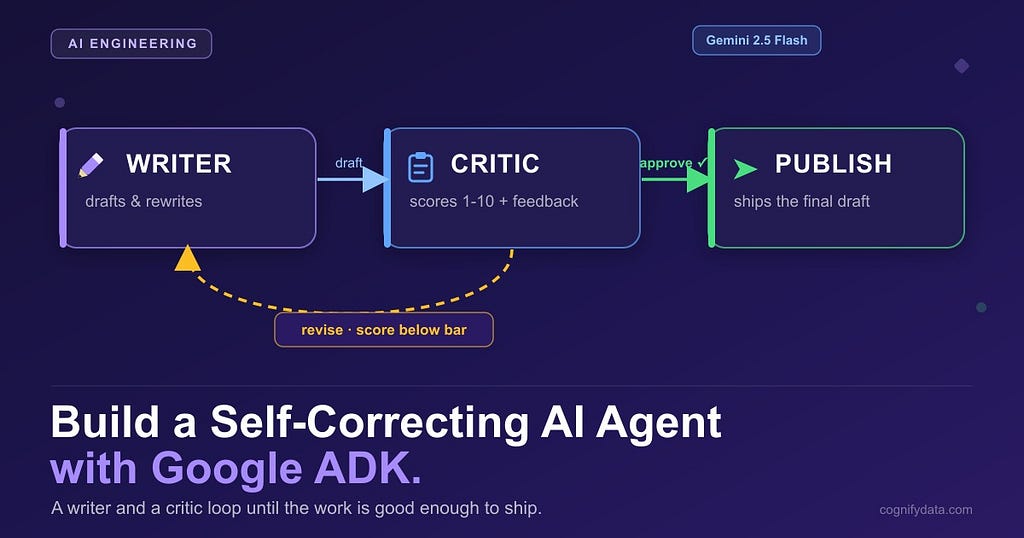
A writer node drafts. A critic node grades. They loop until the work is good. About 80 lines of Python on Google ADK’s new Graph Workflow Runtime.
Ask a typical AI agent to write something and it answers once. Whatever the model produces on the first try is what you get. No second look, no revision, no quality check. A human writer does not work like that. You draft, you read it back, you wince, you fix it, and only then do you send it.
In this hands-on walkthrough we build a self-correcting AI agent with Google ADK. One part writes a draft. Another part grades it like a demanding editor and either approves it or bounces it back with feedback. The two keep looping until the work clears a quality bar. It runs on a free Gemini API key, and the interesting part is the loop.
The engine that makes the loop clean is ADK 2.0’s Graph Workflow Runtime, the headline feature of the 2.0 release. Instead of hard-coding “call the model, then maybe call it again,” you describe the agent as a small graph of nodes and let ADK route work between them, including routing backwards to form a loop.
The idea: a writer, a critic, and a loop
Three nodes and one loop:
- Writer: takes the task and produces a draft. On later passes it also receives the critic’s feedback and rewrites.
- Critic: scores the draft 1 to 10 and writes one line of concrete feedback. If the score clears the bar (or we have looped enough times), it approves. Otherwise it sends the draft back.
- Publish: the terminal node. Whatever it returns is the agent’s output.
Drawn out, the flow looks like this. The back-arrow is the self-correction loop:
START --> writer --> critic --(revise)--> writer   (loop back with feedback)
                        |
                        +----(approve)---> publish
If you have used the older SequentialAgent or LoopAgent helpers, note that those are deprecated in ADK 2.x in favor of this graph runtime. The graph is more explicit, and it makes a loop like this trivial to express.
Setup takes about a minute
pip install google-adk google-genai
export GOOGLE_API_KEY=your_ai_studio_key   # https://aistudio.google.com/apikey
The free AI Studio tier is plenty. No Google Cloud project, no billing.
Give the critic a structured verdict
Parsing free-form text from a model is where demos break. Instead we ask Gemini for a structured object with a numeric score and a feedback string, using a response schema. That way the loop always gets something it can branch on.
from pydantic import BaseModel
from google.genai import Client, types

client = Client()  # reads GOOGLE_API_KEY
MODEL = "gemini-2.5-flash"

class Verdict(BaseModel):
    score: int
    feedback: str
Verdict is the contract between the critic and the loop. When the critic asks for JSON matching this schema, the SDK hands back a parsed Verdict with a real integer score. No string parsing, no regex.
Three nodes
In the graph runtime, a node is a function decorated with @node. It receives the context and its input, does its work, and yields an Event. Two fields matter: output, the data passed downstream, and route, a label that tells ADK which edge to follow.
The writer. On the first pass its input is the task text. On a loop-back its input is a dict carrying the previous draft and the critic’s feedback, so it rewrites instead of starting over:
from google.adk.workflow import node
from google.adk.events.event import Event

@node
async def writer(ctx, node_input=None):
    if isinstance(node_input, dict):          # looped back with feedback
        task = node_input["task"]
        attempt = node_input["attempt"]
        prompt = (
            f"TASK: {task}\n\n"
            f"Your previous attempt:\n{node_input['draft']}\n\n"
            f"An editor rejected it with this feedback:\n{node_input['feedback']}\n\n"
            "Write an improved version that fixes every issue."
        )
    else:                                     # first pass: input is the task
        task = node_input.parts[0].text if hasattr(node_input, "parts") else str(node_input)
        attempt = 1
        prompt = f"TASK: {task}\n\nWrite your best attempt."

    draft = ask_gemini("You are a sharp, concise writer.", prompt)
    yield Event(author="writer", output={"task": task, "draft": draft, "attempt": attempt})
The critic scores the draft, then decides the route. Good enough or out of rounds, it emits route="approve". Otherwise route="revise" with the feedback and an incremented counter:
QUALITY_BAR = 8   # score out of 10 needed to ship
MAX_ROUNDS = 3    # give up gracefully after this many rewrites

@node
async def critic(ctx, node_input=None):
    task, draft, attempt = node_input["task"], node_input["draft"], node_input["attempt"]
    resp = client.models.generate_content(
        model=MODEL,
        contents=f"TASK: {task}\n\nDRAFT:\n{draft}",
        config=types.GenerateContentConfig(
            system_instruction=(
                "You are a demanding editor. Score the draft 1-10 on how well it "
                "does the TASK, and give one line of concrete feedback. Be strict."
            ),
            response_mime_type="application/json",
            response_schema=Verdict,
        ),
    )
    verdict = resp.parsed
    if verdict.score >= QUALITY_BAR or attempt >= MAX_ROUNDS:
        yield Event(author="critic", output={"task": task, "draft": draft}, route="approve")
    else:
        yield Event(
            author="critic",
            output={"task": task, "draft": draft, "feedback": verdict.feedback, "attempt": attempt + 1},
            route="revise",
        )
That MAX_ROUNDS guard is the single most important safety line in any self-correcting agent. Without it, a picky critic and a stubborn writer can loop forever.
The publish node just returns the approved draft. With no outgoing edges, ADK treats it as terminal and its output becomes the workflow’s output:
@node
async def publish(ctx, node_input=None):
    yield Event(author="publish", output=node_input["draft"])
Wire the loop with a routing map
This is the whole agent. The graph is a list of edges. A plain tuple is an unconditional edge. A dict is a routing map: it reads the route the source emitted and follows the matching edge.
from google.adk import Workflow
from google.adk.workflow import START

agent = Workflow(
    name="self_correcting_agent",
    edges=[
        (START, writer),
        (writer, critic),
        (critic, {"revise": writer, "approve": publish}),
    ],
)
Read the last edge out loud: from the critic, on "revise" go back to the writer, on "approve" go to publish. That single line is the self-correction loop.
Run it and watch it argue with itself
import asyncio
from google.adk.runners import InMemoryRunner

TASK = "Explain database indexing to a 10 year old in exactly 4 short lines."

async def main():
    runner = InMemoryRunner(agent=agent, app_name="self_correct")
    session = await runner.session_service.create_session(app_name="self_correct", user_id="learner")
    message = types.Content(role="user", parts=[types.Part(text=TASK)])
    final = None
    async for event in runner.run_async(user_id="learner", session_id=session.id, new_message=message):
        if getattr(event, "output", None) is not None:
            final = event.output
    print(final)

asyncio.run(main())
A typical run:
WRITER (round 1): a clunky first attempt
CRITIC: score=5/10  feedback=Line 3 is too abstract; use a concrete example.
WRITER (round 2): tighter, with a library metaphor
CRITIC: score=7/10  feedback=Good, but line 4 runs long. Trim it.
WRITER (round 3): clean, four crisp lines
CRITIC: score=9/10  ->  approve
The draft that clears the bar is genuinely better than the first, and you never wrote an “if the answer is bad, try again” branch. The graph did the routing.
Where to take it next
- Make the critic pickier. Raise QUALITY_BAR to 9 and watch it work harder.
- Add a real rubric. Give the critic a checklist for your task: tone, factual accuracy, length limits.
- Give the writer tools. Turn it into a full ADK agent with web search or a database tool, so it revises with real information.
- Add a second critic. Fan out to two critics with different priorities and approve only when both agree. The graph runtime handles fan-out and fan-in for you.
A single model call gives you one opinion. A writer and a critic in a loop give you an opinion that has been challenged and improved. Small change in code, large change in output quality, and with ADK’s graph runtime it is just a routing map away.
The full runnable script is on GitHub.
Build an AI Agent That Critiques and Rewrites Itself (Google ADK, Hands-On) was originally published in Google Cloud – Community on Medium, where people are continuing the conversation by highlighting and responding to this story.
Source Credit: https://medium.com/google-cloud/build-an-ai-agent-that-critiques-and-rewrites-itself-google-adk-hands-on-9c412c57145d?source=rss—-e52cf94d98af—4
About the Author