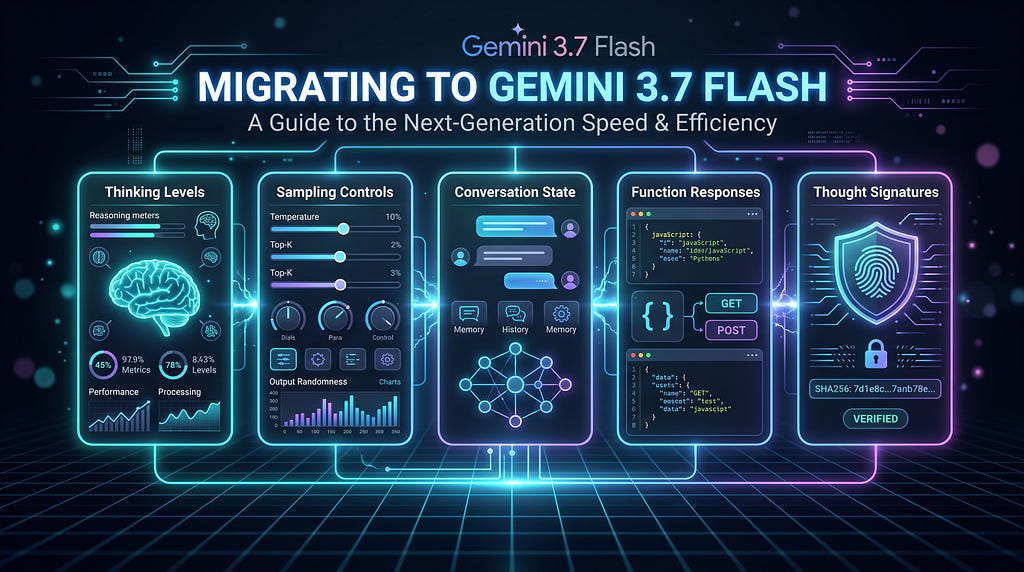
Thinking levels, sampling controls, conversation state, function responses, thought signatures, and the migration issues most likely to break an existing Gemini application.
Google released Gemini 3.7 Flash (gemini-3.7-flash) as Generally Available on August 13 2026.
But upgrading an existing application isn’t necessarily as simple as:
- model="gemini-3.6-flash"
+ model="gemini-3.7-flash"
Gemini 3.7 Flash continues the API changes introduced across the Gemini 3.x generation: reasoning is increasingly controlled through thinking levels, several explicit sampling overrides should be removed during migration, multi-turn applications can use server-side interaction state, and agentic applications need to pay closer attention to function-call state and thought signatures.
If you’re upgrading an existing Gemini application, these are the changes I would audit first.
The migration mindset: Don’t treat Gemini 3.7 Flash as a model-ID replacement. Audit three layers: generation configuration, conversation state, and agent/tool protocol state.
The 30-Second Migration Checklist
Start here if you already have a Gemini application.
- model="gemini-3.6-flash"
+ model="gemini-3.7-flash"

- temperature=0.2
- top_p=0.95
- top_k=40
- candidate_count=1

- thinking_budget=4096
+ thinking_level="medium"
Then audit your conversation and tool loop:
✓ Remove prefilled model turns

✓ Prefer previous_interaction_id for stateful
  multi-turn applications using the Interactions API

✓ Preserve thought signatures when manually
  managing Gemini 3.x conversation history

✓ If using generateContent, verify FunctionResponse
  call_id and name

✓ If you see Malformed_Function_Call, inspect
  structured pre-tool text and inline instruction

✓ Upgrade google-genai before migration
These requirements come directly from Google’s Gemini 3.7 Flash migration checklist.
1. First, Know Which Gemini API Surface You’re Using
Before changing your code, establish which API surface your application actually uses.
This matters because some migration requirements differ between them.
Gemini API / Google AI Studio
Google AI Studio provides the fastest path for experimenting with Gemini and obtaining an API key for the Gemini Developer API.
With the Google Gen AI SDK:
from google import genai
client = genai.Client()
For new Gemini API applications, Google now recommends the Interactions API.
Google describes Interactions as the preferred API for building with Gemini models and agents. As of June 2026, it is GA and recommended for new projects.
The existing generateContent API remains supported, but Google now describes it as the legacy API for new development.
Gemini on Google Cloud
Gemini 3.7 Flash is also available through Google’s Cloud AI platform, with Google Cloud authentication, IAM, quotas, billing, governance, and enterprise deployment capabilities.
Google’s current Gemini 3.7 Flash model documentation is available under the Gemini Enterprise Agent Platform documentation.
The important rule for the rest of this article is:
Don’t assume a requirement documented for generateContent, the Interactions API, or a particular Google Cloud API surface automatically applies identically to all the others.
I’ll call out those boundaries explicitly.
2. Upgrade the SDK and Model ID
First, upgrade the Google Gen AI SDK:
pip install --upgrade google-genai
Then change your model identifier:
MODEL_ID = "gemini-3.7-flash"
Gemini 3.7 Flash supports a 1,048,576-token input context window and up to 65,536 output tokens.
The model supports multimodal input — including text, images, video, audio, and PDFs — along with function calling, structured outputs, code execution, and grounding capabilities.
Because feature availability can vary by API/platform, use the relevant model card as your source of truth when deploying.
3. Move from thinking_budget to thinking_level
If your existing application controls reasoning with a numeric thinking budget, this is one of the first configurations to revisit.
Older configuration:
config={
    "thinking_budget": 4096
}
For Gemini 3.7 Flash, migrate to:
config={
    "thinking_level": "medium"
}
Google’s Gemini 3.7 migration checklist explicitly instructs developers to replace thinking_budget with thinking_level.
Gemini 3.7 Flash supports:
low
medium
high
with medium as the default.
A practical starting point is:
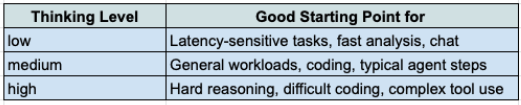
Thinking level is a reasoning-effort control, not a replacement name for sampling temperature.
Higher isn’t automatically better: increasing reasoning effort can affect latency and token consumption, so benchmark thinking levels against your workload rather than defaulting every request to high.
4. Migration Gotcha: minimal Isn't Supported
Don’t assume thinking levels supported by another Gemini model carry over unchanged.
Gemini 3.7 Flash supports:
low
medium
high
It does not support:
minimal
So this should not survive your migration:
config={
    "thinking_level": "minimal"
}
For latency-sensitive workloads, evaluate:
config={
    "thinking_level": "low"
}
instead.
This is exactly the kind of configuration that can be easy to miss when a migration appears to be only a model-ID change.
5. Stop Explicitly Overriding Deprecated Sampling Controls
This section needs an important distinction.
Google’s Gemini 3.7 migration guidance tells developers to remove explicit overrides for:
temperature
top_p
top_k
and rely on the model’s supported/default behavior.
So if your older configuration looks like:
config={
    "temperature": 0.2,
    "top_p": 0.95,
    "top_k": 40,
    "thinking_budget": 4096
}
the migrated configuration becomes much simpler:
config={
    "thinking_level": "medium"
}
Are temperature, top_p, and top_k completely gone?
This is where wording matters.
Google Cloud still documents model defaults for sampling configuration. The migration guidance, however, tells developers to remove explicit overrides.
So I would not describe these parameters as universally nonexistent.
The safer migration rule is:
For Gemini 3.7 Flash migration, remove explicit temperature, top_p, and top_k settings. Google recommends allowing Gemini 3.x models to manage sampling automatically. candidate_count is a separate case: it is unsupported in Gemini 3.x.
There’s a separate case:
candidate_count
Google’s 3.7 migration checklist explicitly identifies candidate_count as unsupported in Gemini 3.x.
That distinction is worth preserving:
temperature
top_p                 → remove explicit overrides
top_k
candidate_count → unsupported in Gemini 3.x
Also avoid interpreting the removal of explicit sampling controls as meaning Gemini 3.7 is “deterministic.”
6. For New Gemini API Applications, Understand the Interactions API
The model migration is also a good time to examine how you’re managing conversations.
For new Gemini API applications, Google recommends the Interactions API.
A basic interaction looks conceptually like:
from google import genai

client = genai.Client()

interaction = client.interactions.create(
    model="gemini-3.7-flash",
    input="Analyze this stack trace and propose a safe patch plan.",
    generation_config={
        "thinking_level": "medium"
    }
)
print(interaction.output_text)
The important architectural difference appears when you have a multi-turn conversation.
Instead of repeatedly rebuilding the entire conversation history, the Interactions API supports server-side state through:
previous_interaction_id
For example:
first = client.interactions.create(
    model="gemini-3.7-flash",
    input="Review this Python function for concurrency issues."
)

second = client.interactions.create(
    model="gemini-3.7-flash",
    input="Now rewrite it using a safer locking strategy.",
    previous_interaction_id=first.id,
)
Google’s Gemini 3.7 migration checklist specifically recommends standardizing multi-turn conversations around server-side previous_interaction_id.
7. previous_interaction_id preserves History—not Configuration
This is a subtle but important distinction.
When you use:
previous_interaction_id=first.id
the previous interaction provides conversation context.
But interaction-scoped configuration does not necessarily carry forward.
That includes settings such as:
- system instructions
- tools
- generation configuration
If your next interaction requires those settings, specify them again.
Think of it this way:
previous_interaction_id
        │
        ├── conversation context ✓
        │
        └── request configuration ✗
This is an easy source of confusing behavior when migrating a manually managed chat implementation to server-side state.
8. Server-Side State Also Has a Storage Implication
There is another production consideration developers shouldn’t overlook.
Interactions are stored by default when:
store=true
Google currently documents stored-interaction retention of:
- 55 days on the paid tier
- 1 day on the free tier
You can use:
store=false
when you don’t want the interaction stored.
But there’s a tradeoff:
An interaction created with store=false cannot subsequently be referenced through previous_interaction_id.
So conversation architecture and data-retention policy are connected decisions.
For a prototype, that may be easy to ignore.
For a production agent handling enterprise data, it shouldn’t be.
9. Remove Prefilled Model Turns
Google’s Gemini 3.7 migration checklist explicitly says to:
Remove prefilled model turns.
A prefilled model turn is a pattern where the application inserts the beginning of the model’s answer and expects Gemini to continue it.
Conceptually:
user:
Return the incident classification as JSON.
model:
{
  "severity":
That pattern shouldn’t be carried into a Gemini 3.7 migration.
If your goal is to constrain output shape, use supported structured output mechanisms instead of manufacturing a partial model response.
10. Agent Builders: Don’t Lose Thought Signatures
If you’re building agents or multi-step function-calling workflows, this is one of the most important Gemini 3.x concepts to understand.
Gemini uses thought signatures as encrypted representations of internal reasoning state that can be required to preserve context across multi-step and function-calling interactions
These signatures are protocol metadata — not chain-of-thought text for your application to inspect.
The problem typically appears when an application manually reconstructs model history.
Imagine Gemini returns something conceptually like:
model response
├── function call
└── thought signature
Your application extracts the function call:
function call
but discards the associated signature before constructing the next request.
You’ve potentially thrown away state Gemini expects to see again.
Google Cloud’s migration documentation notes that for newer Gemini 3 models, if a required thought signature is missing, the model can return an error rather than merely warning about it.
Practical rule
If you’re using generateContent and manually maintaining history:
Preserve the model response parts and required thought signatures exactly as documented.
If you’re using server-side state through the Interactions API, you substantially reduce the amount of conversation/protocol state your application has to reconstruct manually.
11. generateContent Users: Audit Your Function Responses
This requirement is specifically important if your application remains on the generateContent API.
Google’s Gemini 3.7 migration checklist says:
Only if using generateContent: ensure all FunctionResponse objects include call_id and name.
A note on API surfaces: The exact correlation field differs across Gemini API surfaces. The Gemini 3.7 migration checklist for generateContent refers to call_id and name, while Google Cloud documentation describes matching the FunctionResponse to the corresponding function-call id and name. Follow the contract documented for the API surface you are using rather than treating call_id and id as interchangeable.
Conceptually, every tool result needs to be correlated with the function call that produced it:
FunctionCall
     │
     │ correlation ID + function name
     ▼
Your tool executes
     │
     ▼
FunctionResponse
     │
     └── match the original call
Don’t treat function responses as anonymous blobs of JSON.
They are part of the agent execution protocol.
12. A Function-Response Mismatch May Fail Quietly
Here’s one of the migration behaviors I’d specifically test for.
Google Cloud’s migration documentation says function responses should:
- include the corresponding call ID
- use the matching function name
- provide exactly one response per function call
But the documentation also warns that the API may not currently return a direct validation error for every mismatch.
Instead, an incorrect mapping can result in an empty model response with:
finish_reason: STOP
That can be frustrating to debug because:
Tool executed successfully
        ↓
No obvious API error
        ↓
Model returns empty output
        ↓
"Why did my agent just stop?"
So if an agent unexpectedly terminates after tool execution, don’t inspect only the tool implementation.
Inspect the mapping between:
FunctionCall → FunctionResponse
as well.
13. Seeing Malformed_Function_Call? Inspect Pre-Tool Text
There’s another subtler failure mode.
Some agent prompts ask the model to produce structured status text immediately before invoking a tool.
For example:
<status>
Searching production logs...
</status>
followed immediately by a function call.
Google documents cases where structured pre-tool text can contribute to:
Malformed_Function_Call
Google’s Gemini 3.7 migration checklist specifically tells developers to review the documented workarounds when encountering this failure mode and also calls out separating inline instructions with:
\n\n
One possible workaround is to model progress reporting itself as a function:
update_tool = {
    "name": "update",
    "description": "Report progress during a multi-step task.",
    "parameters": {
        "type": "OBJECT",
        "properties": {
            "previous_step": {"type": "STRING"},
            "plan": {"type": "STRING"},
            "next_step": {"type": "STRING"}
        },
        "required": [
            "previous_step",
            "plan",
            "next_step"
        ]
    }
}
Then the model can produce structured progress through a tool call rather than generating custom XML or JSON immediately before another tool invocation.
But this distinction matters:
update() is a workaround/pattern—not a required Gemini 3.7 function.
Don’t add it to every agent simply because you’re upgrading.
14. Multimodal Application? Run a Separate Migration Evaluation
If your application processes images, video, audio, or PDFs, don’t stop after verifying that text prompts still work.
Google’s broader Gemini migration guidance documents changes across Gemini 3.x related to areas such as:
- media tokenization and resolution
- PDF handling
- usage metadata
- scanned PDF behavior
- multimodal function responses
- some image-processing capabilities
Those changes aren’t all unique to Gemini 3.7 Flash, so I wouldn’t classify them as “3.7 breaking changes.”
But they matter when the application you’re migrating is multimodal.
My rule would be:
Treat multimodal regression testing as a separate migration track.
If your production workload processes 100-page PDFs, don’t validate the migration with a two-line text prompt.
Test the PDFs.
If your agent reasons over video, benchmark video.
Migration testing should represent the actual workload.
15. Pricing: Watch Output and Thinking, Not Just Input
Gemini 3.7 Flash launched with introductory pricing.
Through December 31, 2026, Google’s published standard pricing is:
Input:   $0.75 / 1M tokens
Output:  $3.75 / 1M tokens
Beginning January 1, 2027:
Input:   $1.50 / 1M tokens
Output:  $7.50 / 1M tokens
Google states that the introductory pricing applies across Google AI Studio and Gemini Enterprise Agent Platform during the promotional period.
Google Cloud also provides different pricing modes, including Priority and Flex/Batch options, so check the pricing model corresponding to your deployment.
For agent developers, the important point isn’t simply the input price.
Your cost equation increasingly looks more like:
cost
 =
input tokens
+ output tokens (including thinking tokens)
+ additional calls/tool-loop iterations
+ any separately priced tools/grounding
So don’t choose:
thinking_level="high"
globally because it sounds better.
Benchmark quality, latency, and token consumption against your actual workload.
Before → After: What the Migration Really Looks Like
Suppose your older application has accumulated configuration like this:
config = {
    "temperature": 0.2,
    "top_p": 0.95,
    "top_k": 40,
    "candidate_count": 1,
    "thinking_budget": 4096,
}
and manually maintains:
user → model → user → model → tool → model
history.
It’s tempting to think the migration is:
- gemini-3.6-flash
+ gemini-3.7-flash
It’s better to think about it in three layers.
Layer 1 — Generation Configuration
- temperature=0.2
- top_p=0.95
- top_k=40
- candidate_count=1
- thinking_budget=4096
+ thinking_level="medium"
Layer 2 — Conversation State
For an appropriate Interactions API application:
- manually reconstruct every previous turn
+ previous_interaction_id=previous.id
Layer 3 — Agent Protocol State
- treat tool calls/results as ordinary JSON
+ preserve function-call correlation
+ preserve required reasoning metadata
That’s the real migration.
Production Migration Checklist
Before promoting Gemini 3.7 Flash into production:
Model
- Upgrade google-genai.
- Change the model ID to gemini-3.7-flash.
- Verify required capabilities against the model card for your API/platform.
Reasoning and generation
- Replace thinking_budget with thinking_level.
- Verify you aren’t using minimal.
- Remove explicit temperature overrides according to the migration guidance.
- Remove explicit top_p.
- Remove explicit top_k.
- Remove candidate_count.
Conversation state
- Remove prefilled model turns.
- For new Gemini API applications, evaluate the Interactions API.
- Consider previous_interaction_id for stateful conversations.
- Understand store=true and retention before using server-side state with production data.
- Re-specify request-scoped configuration where required.
Agents and tools
- Identify whether you’re using Interactions or generateContent.
- For generateContent, verify FunctionResponse call_id and name.
- Verify one response maps to the correct function call.
- Preserve required thought signatures when manually maintaining history.
- Investigate function-response mapping if the model unexpectedly ends with an empty response.
- Investigate structured pre-tool text if you’re seeing Malformed_Function_Call.
Evaluation
- Regression-test real production prompts.
- Regression-test complete tool loops — not only the first model call.
- Test low, medium, and high against quality and latency targets.
- Measure token consumption.
- Run separate multimodal evaluations if you use images, PDFs, audio, or video.
- Recalculate cost using the pricing mode you’ll actually deploy.
The Bigger Change Isn’t the Model ID
The most interesting part of this migration isn’t:
model="gemini-3.7-flash"
It’s what the surrounding API changes tell us about how Gemini applications are evolving.
The old mental model for an LLM application was roughly:
Prompt
  ↓
Model
  ↓
Text
An increasingly useful mental model for agentic systems is:
Interaction
     ↓
Reasoning state
     ↓
Tool call
     ↓
Tool result
     ↓
Continued reasoning
     ↓
Next action
     ↓
Final response
Once you see the system this way, some seemingly strange migration requirements make more sense.
thinking_level isn't just another generation knob.
previous_interaction_id isn't just a convenience method.
Thought signatures aren’t random metadata.
Function-call IDs aren’t bookkeeping you can casually discard.
They’re pieces of an execution protocol for models that increasingly operate across multiple reasoning and tool-use steps.
So if your application suddenly starts failing after:
- gemini-3.6-flash
+ gemini-3.7-flash
don’t only debug the prompt.
Debug the protocol around the prompt.
That may be the most useful Gemini 3.7 migration lesson of all.
Official Documentation
Gemini 3.7 Flash
- Google AI — Gemini 3.7 Flash
- Google AI — Gemini 3.7 Flash model card
- Google AI — Gemini API release notes
- Google Cloud — Gemini 3.7 Flash
- Google Cloud — Gemini migration guide
Interactions and State
- Google AI — Interactions API
- Google AI — Thought signatures
- Google AI — Thought signatures with generateContent
Tools and Structured Output
- Google AI — Function calling
- Google AI — Structured output
Platforms and Pricing
- Google AI Studio
- Gemini API documentation
- Gemini API pricing
- Google Cloud — Generative AI pricing
Migrating to Gemini 3.7 Flash: What Breaks, What Changed, and How to Fix Your Code was originally published in Google Cloud – Community on Medium, where people are continuing the conversation by highlighting and responding to this story.
Source Credit: https://medium.com/google-cloud/migrating-to-gemini-3-7-flash-what-breaks-what-changed-and-how-to-fix-your-code-8f18385f0833?source=rss—-e52cf94d98af—4
About the Author