Every data analyst knows the loop. Someone on the business team asks a question. You open BigQuery. You write a query. You format the results. You paste them into Slack. Twenty minutes later, a follow-up question arrives. Repeat.
What if the business team could just ask the question directly, and an AI agent would write the SQL, run it against BigQuery, and return the answer in plain English?
Google now runs a managed MCP server for BigQuery. Combined with the Google ADK, you can build a natural language analytics agent in about 15 lines of Python. No LangChain, no vector database, no middleware.
What Is the BigQuery MCP Server?
MCP (Model Context Protocol) is how AI agents talk to external tools. Google runs a managed MCP server for BigQuery at:
https://bigquery.googleapis.com/mcp
It exposes tools like execute_sql, list_dataset_ids, list_table_ids, and get_table_info. Your agent connects to it through the Cloud API Registry, which is Google’s discovery layer for managed MCP servers. No local server to run. No config files.
Prerequisites
· A GCP project with BigQuery enabled and at least one dataset with tables
· Cloud API Registry enabled
· IAM roles: roles/mcp.toolUser, roles/bigquery.jobUser, roles/bigquery.dataViewer
Enable the MCP Server
# Enable Cloud API Registry
gcloud services enable cloudapiregistry.googleapis.com — project=$PROJECT_ID
gcloud services enable apihub.googleapis.com — project=$PROJECT_ID# Enable the BigQuery MCP server
gcloud beta api-registry mcp enable bigquery.googleapis.com — project=$PROJECT_ID# Verify
gcloud beta api-registry mcp servers list — project=$PROJECT_ID
The Agent Code
pip install google-adk==1.28.0 google-cloud-aiplatform
import os
from google.adk.agents import LlmAgent
from google.adk.tools.api_registry import ApiRegistryPROJECT_ID = os.environ[“GCP_PROJECT_ID”]
def get_header(context):
return {“x-goog-user-project”: PROJECT_ID}api_registry = ApiRegistry(
api_registry_project_id=PROJECT_ID,
header_provider=get_header
)mcp_server_name = (
f”projects/{PROJECT_ID}/locations/global”
f”/mcpServers/bigquery.googleapis.com-mcp”
)
bigquery_tools = api_registry.get_toolset(mcp_server_name)root_agent = LlmAgent(
model=”gemini-2.5-flash”,
name=”data_analyst”,
instruction=(“You are a data analyst. When the user asks a question, “
“use the BigQuery tools to explore datasets, understand table schemas, “
“and write SQL queries to answer their question. “
“Always show the SQL you ran and explain the results clearly.”),
tools=[bigquery_tools],
)
That is the entire agent. The ApiRegistry discovers the managed BigQuery MCP server. The get_toolset() call returns tools like execute_sql, list_dataset_ids, get_table_info, and list_table_ids. The agent uses them automatically based on the question.
How It Handles a Question
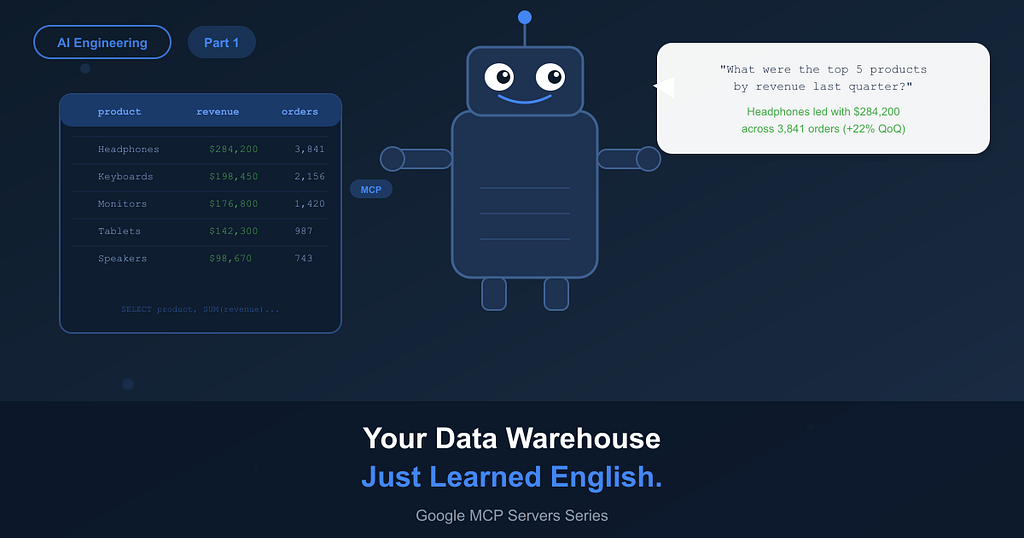
You ask: “What were the top 5 products by revenue last quarter?”
1. The agent calls list_dataset_ids to see what datasets exist in your project.
2. It calls list_table_ids and get_table_info to understand the schema.
3. It writes a SQL query based on the schema and your question.
4. It calls execute_sql to run the query against BigQuery.
5. It reads the results and gives you a plain English answer with the data.
All five steps happen automatically. No SQL routing logic, no schema parsing code, no result formatting. The agent handles it.
The System Instruction Makes or Breaks It
The agent can discover schemas on its own, but if you want fast, accurate results, give it context upfront. This is where most people underinvest.
SYSTEM_INSTRUCTION = (
“You are a data analyst for an e-commerce company.\n\n”
“Available dataset: `myproject.ecommerce`\n\n”
“Key tables:\n”
“- orders (order_id STRING, customer_id STRING, order_date DATE,\n”
“ total_amount FLOAT64, status STRING)\n”
“- order_items (order_id STRING, product_id STRING, quantity INT64,\n”
“ unit_price FLOAT64)\n”
“- products (product_id STRING, name STRING, category STRING,\n”
“ brand STRING)\n”
“- customers (customer_id STRING, email STRING, signup_date DATE,\n”
“ country STRING)\n\n”
“Rules:\n”
“- Always use SAFE_CAST when aggregating string columns\n”
“- Use DATE functions for time-based queries (DATE_TRUNC, DATE_SUB)\n”
“- Limit results to 20 rows unless the user asks for more\n”
“- Show the SQL query you ran before presenting results”
)
Without this, the agent spends extra tool calls discovering schemas and sometimes writes incorrect SQL because it does not know column types upfront. With it, responses are faster and more accurate.
What Real Questions Look Like
Trend analysis:
“How has monthly revenue changed over the past 6 months?
Break it down by product category.”
Cohort analysis:
“What is the average order value for customers who signed up
in Q1 2025 vs Q1 2026?”
Funnel investigation:
“How many orders were placed but never fulfilled last month?
Which products had the highest cancellation rate?”
Ad-hoc exploration:
“What is our fastest growing product category by unit volume?
Compare this quarter to the same quarter last year.”
The agent writes JOINs, window functions, DATE_TRUNC, CASE statements, and CTEs. It is not just running SELECT * FROM table. With a good system instruction, it generates the kind of queries a senior analyst would write.
Running Locally
gcloud auth application-default login
export GCP_PROJECT_ID=”your-project-id”
export GOOGLE_GENAI_USE_VERTEXAI=Trueadk web
This starts a local web UI at http://localhost:8000. You can chat with the agent and watch it discover your schemas and run queries in real time.
Deploying to Cloud Run
adk deploy cloud_run \\
— project=$GCP_PROJECT_ID \\
— region=us-central1 \\
my_analyst_agent/
One command. Builds a container, pushes to Artifact Registry, deploys as a Cloud Run service. You get a REST API endpoint back. Connect it to Slack, a web app, or any internal tool.
Why This Matters for Data Teams
Self-service analytics has been promised for a decade. Every BI tool claims it. In practice, business users still come to the data team with questions because writing SQL is hard and dashboards never have the exact cut they need.
This is different because the agent writes real SQL against your real data. It is not searching a pre-built dashboard. It is not matching keywords to saved queries. It writes a new query every time, tailored to the specific question.
The data team still owns the schema, the system instruction, and the IAM permissions. You control what the agent can access. But the question-answering loop, the part that eats 30% of an analyst’s week, that gets automated.
Limitations
· The BigQuery MCP server is in preview. Expect changes.
· The agent can only query data the service account has access to. IAM is the enforcement layer.
· Complex multi-step analytical questions sometimes need a more detailed system instruction.
· Large result sets get truncated. For heavy reporting, the agent works better as a starting point than a replacement for your BI tool.
The gap between “business question” and “data answer” just collapsed from 20 minutes to 20 seconds. And nobody had to learn SQL.
Google MCP Servers -Part 1: Your Data Warehouse Just Learned English was originally published in Google Cloud – Community on Medium, where people are continuing the conversation by highlighting and responding to this story.
Source Credit: https://medium.com/google-cloud/google-mcp-servers-part-1-your-data-warehouse-just-learned-english-57ce05aba0d7?source=rss—-e52cf94d98af—4
About the Author