
An early product breakdown for those evaluating Google’s latest conversational AI tooling — written by someone who’s tried the three generations.
The CX Bot Build Dilemma
Your CX team wants AI agents. Your engineers want flexibility. Your leadership wants something shipped. And somewhere in Google’s sprawling product portfolio, there’s a tool that promises to square that circle.
That tool is CX Agent Studio — Google’s latest entry in its conversational AI platform stack. But if you’re the decision maker trying to evaluate it, the marketing copy won’t tell you what you actually need to know: where it sits relative to what came before, what it genuinely unlocks, and where it will quietly frustrate you six months into a build.
I’ve built on Dialogflow, worked through Conversational Agents, and recently built a working demo on CX Agent Studio for a fictional D2C brand called April Threads. This is an early first look at what is good and what could be improved.
Where It Came From: The Lineage That Matters
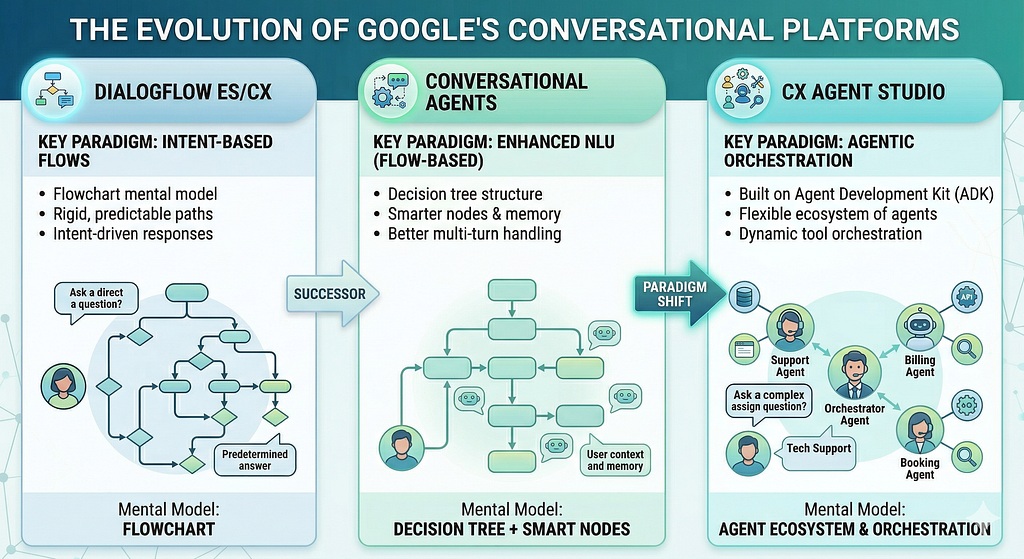
Understanding CX Agent Studio requires understanding the product decisions that preceded it. I first tried out Dialogflow (then called Api.ai) around 2018, by then it had already had some history. Google’s conversational AI tooling has gone through three meaningful generations, each reflecting a shift in how the industry thought about intelligent automation.
Dialogflow: Structured, Predictable, Limited
Dialogflow was the workhorse. Intent-based, flow-driven, and deeply deterministic. You defined what users could say, what the bot would respond, and exactly what would happen at each node. It was rigid, but it was predictable — a quality that enterprise CX teams valued highly. When I built on Dialogflow CX, the mental model was a flowchart. Every deviation felt like a bug.
Conversational Agents: More Power, Same Paradigm
Conversational Agents (the successor to Dialogflow CX) brought better NLU, more sophisticated session management, and improved tooling. But the underlying paradigm remained flow-based. You were still, fundamentally, building a decision tree, with the ability to add some smarter agents in between. The ceiling was clear: complex multi-turn interactions that required genuine reasoning, not just pattern matching, would always hit it.
CX Agent Studio: The Agentic Shift
CX Agent Studio represents a genuine paradigm shift, not just a version bump. It’s built on top of Google’s Agent Development Kit (ADK) and is oriented around agents, subagents, tools, and orchestration — not intents and flows. The product is asking a different question: not “what did the user say?” but “what does the user need, and which agent should handle it?”
That’s a meaningful evolution. And it creates a meaningfully different set of tradeoffs.
What’s New: Features That Stand Out
Rather than cataloguing every feature, I want to call out the ones that stood out in the 2 weeks I have tried it — and why they matter from a product perspective.
1. Visual Subagent Orchestration
CX Agent Studio gives you a visual UI to structure, connect, and order subagents within a parent agent. This is more significant than it sounds. In Dialogflow, as a product scaled, you’d end up managing a web of Flows and Pages and the flows became increasingly hard to organize. In my last implementation, hit the 250 pages limit for many flows. 200–300 pages would like like a literal web.
The new UI lets you think in terms of responsibilities — which agent handles returns, which handles order tracking, which escalates to a human — and see that structure clearly. And the UI improvement that seems small — the ability to move around the sub agents logically you want, a big improvement for someone who has built flows running into 100s of pages.
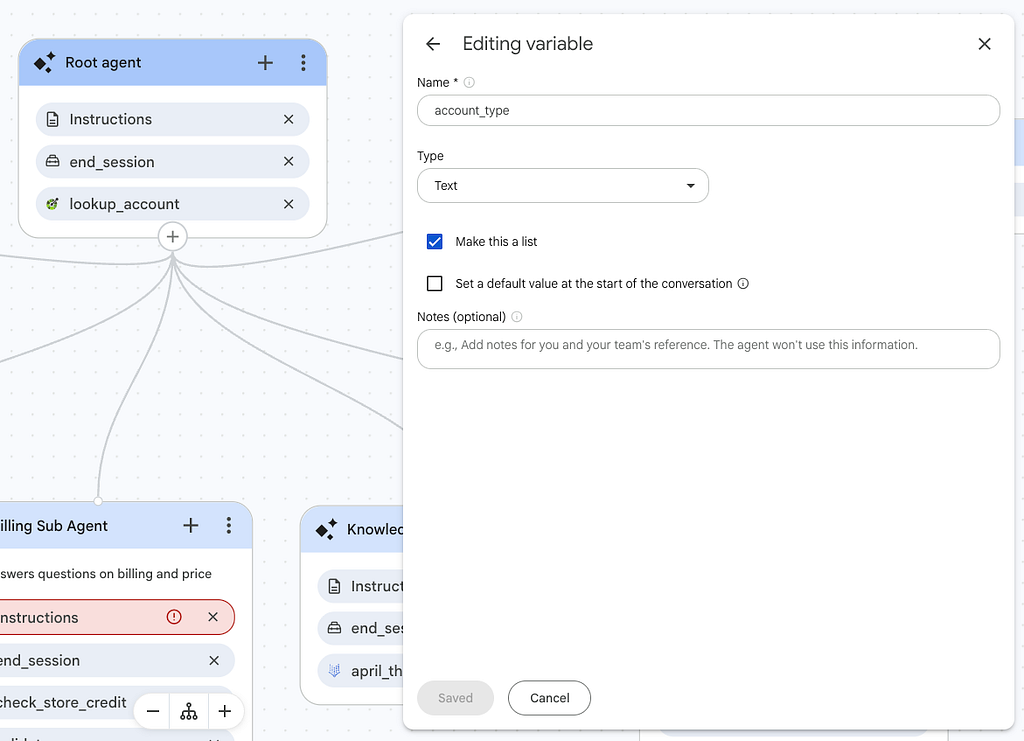
2. Global Variables Management Page
There’s a dedicated page for managing global variables across your agent — a small feature with outsized implications. State management has historically been one of the messiest parts of building conversational products. Variables would get set in one flow, referenced in another, and debugging a mismatch was painful.
Having a single place to define, view, and manage variables signals that Google is treating state as a first-class product concern, not an afterthought. I wrote in more detail about how I would have built this in a previous post — it’s worth reading if you’re planning to build anything with a meaningful session state.
3. Conversation Preview / Test Mode
Anyone who’s suffered through Dialogflow’s simulator will appreciate this one. The test and preview experience in CX Agent Studio is noticeably cleaner — faster to load, more readable, and better at surfacing what actually happened during a conversation turn. The visibility into agent reasoning and tool calls during testing makes debugging significantly less frustrating.
For teams iterating quickly, this isn’t a minor UX nicety — it’s a real velocity difference.
4. Widget Support
CX Agent Studio includes built-in widget support, which means you can deploy a conversational interface to an end user without needing a separate front-end build. For teams that want to ship fast — or run a proof of concept with real users — this removes a layer of dependency that often slows down CX projects.
It’s not a fully custom UI solution, but for many enterprise CX use cases it’s more than sufficient.
5. Eval and Testing
This I feel is a biggest feature change from the previous iterations of Dialogflow because of how this has incorporated AI into the process of testing. I am still exploring this feature but in a generative world, this assumes a lot of significance.
Scenario-based testing: Scenario tests are AI-powered. You describe a user’s goal — for example, “a customer wants to track their order and escalate if it’s delayed” — and the platform automatically simulates users, generates conversations, and tests your agent’s ability to handle that goal robustly. It surfaces edge cases you wouldn’t have thought to write manually. This is particularly valuable in the early stages of building, when you’re still discovering where your agent breaks.
Golden tests: Golden tests are ideal conversations you define as the correct path — including expected tool calls and agent responses. Once you’ve established a conversation that works well, you can save it directly from the simulator as a golden test case. These become your regression suite: every time you change the agent, you can run the goldens to verify that your critical paths haven’t broken.
The Build vs. Buy Lens
Every PM who’s evaluated a platform tool has asked some version of this question: do we build the scaffolding ourselves and get full control, or do we buy an abstraction layer and get speed with constraints?
CX Agent Studio sits clearly on the “buy” side of the spectrum — but understanding what it abstracts (and what it doesn’t) is the real evaluation question.
Raw ADK gives you full programmatic control over your agent’s behavior, tools, memory, and orchestration logic. You’re writing Python, managing your own infrastructure, and owning every design decision. The ceiling is very high. So is the overhead.
CX Agent Studio wraps ADK in a managed UI and opinionated structure. It handles agent orchestration, session management, evaluations, even deployment and monitoring for you. You move faster, but you’re operating within Google’s model of what an agent product should look like.
A rough heuristic: if your use case maps well to CX — customer support, order management, FAQ handling, escalation routing — CX Agent Studio will likely get you to production faster than raw ADK. If you have highly specialized agent behaviors, deep integration requirements, or need full observability into every layer, you’ll feel the ceiling.
What It’s Good For — And Where It Falls Short
Where it shines
- Enterprise CX teams that need to ship multi-turn conversational products without building AI infrastructure from scratch.
- Products with multiple distinct intents or domains that benefit from clear subagent separation.
- Teams that need a deployable, testable product quickly — the ability to add widgets and test mode make early validation accessible.
- Organizations already invested in the Google Cloud ecosystem, where native integrations reduce friction.
The one feature I would have added: Deterministic Flows
As a product person, if I had to add one feature that would be determinstic flows in some capacity. This is the most significant structural gap, and decision makers should go in with eyes open about it.
CX Agent Studio is fully committed to the agentic paradigm. Every conversation is handled by agents making decisions — there is no native ability to create new deterministic flows. You can import existing Dialogflow flows, but you cannot build new ones within the platform.
For many products, this is fine. But consider the use cases where certain paths must be predictable: regulatory disclosures, step-by-step troubleshooting scripts, compliance-driven conversation sequences. In these scenarios, the absence of deterministic flow creation is a real constraint, not a minor limitation.
This is an architectural bet by Google that the future is agentic. They may be right. But bet-hedging is a reasonable product strategy, and right now CX Agent Studio doesn’t give you that option natively.
Customization more broadly also remains a step behind raw ADK. The platform is maturing, and Google is clearly investing in it, but teams with highly specific requirements around agent behavior, memory, or tooling may find themselves working around the abstraction layer rather than with it.
The Honest Verdict
CX Agent Studio is a genuinely meaningful step forward from its predecessors. The shift from flow-based to agent-based is the right architectural direction. The UI improvements — subagent orchestration, global variables, better testing — reflect real product thinking, not just feature additions.
For most decision makers evaluating a CX AI platform today, it is the right starting point. It abstracts the complexity that would otherwise require a dedicated ML engineering team, while still giving you enough structure to build products that actually work.
But it is a foundation, not a finished product. Go in knowing the customization ceiling. Keep an eye on how the ADK integration deepens over time — that’s the key indicator of how far the platform can grow. And if your product has deterministic flow requirements, either plan to manage that within your agent’s prompt logic or keep a Dialogflow component in your architecture for those specific paths.

In Part 2 of this series, I’ll walk through exactly how I built the April Threads CX agent from scratch . If you want to see how CX Agent Studio works in practice rather than in theory, that’s the post for you.
If you resonate with the post and have worked on any of these products, how has your experience been, leave a comment. You can also connect with me on LinkedIn
CX Agent Studio: The Evolution of Google’s Conversational AI Stack — A first look was originally published in Google Cloud – Community on Medium, where people are continuing the conversation by highlighting and responding to this story.
Source Credit: https://medium.com/google-cloud/cx-agent-studio-the-evolution-of-googles-conversational-ai-stack-a-first-look-09d87a95a093?source=rss—-e52cf94d98af—4
About the Author





