Three ways to diagnose the same database outage where the LLM is absolutely confident that it knows the answer. And it’s wrong.
It is Friday afternoon. Your monitoring alerts you that postgres://prod-db is not responding. Connection refused (you have proactive monitoring that alerts you of database problems ahead of angry users noticing that their Production system can’t handle the Friday payroll, right?)
What do you do?
This is the first post in this blog series where we’ll be exploring various failure scenarios and see if the models are any good at handling them. “Good” as in both: figuring out the root cause (diagnosis) and rectifying a failure (remediation).
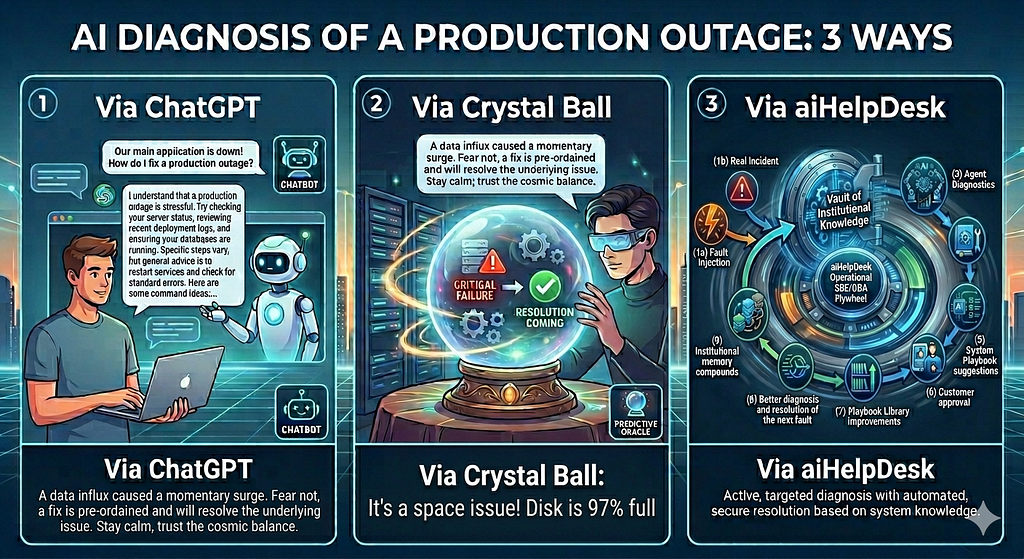
To kick start this series we chose the most trivial failure scenario imaginable. We simply manually stop a Docker container holding a presumably Production PostgreSQL database: `docker stop prod-db`. What happens next is that we run this artificial “failure scenario” through AI diagnosis. Three different ways of AI diagnosis in fact.
To be sure, this type of failure can be more than easily diagnosed by following a runbook or by a human on-call engineer just reviewing the logs. In a few minutes. Even on a Friday afternoon when everybody is in a rush to get out of the office for a long weekend. Even at 2am in a half asleep state, if needed.
So why use this scenario and why would you even consider asking AI to help dealing with it? Well, the choice is deliberate, because this failure is trivial, but the real ones won’t be. In fact, our prediction is that the outages caused by the upcoming avalanche of AI generated apps will be of… unknown failure modes. Very likely with no runbook to follow the exact steps to troubleshoot them.
So what do you do then?
Well, you can start the normal investigation routine of digging through the logs, collecting artifacts and forming hypotheses. Or perhaps ask ChatGPT (or an AI-Assistant installed in house) for some ideas on the snippets of errors you paste from the logs?
That later mode seems to become an emerging trend. And so we figured we need a testing framework. A systematic way of checking how good the models are. Enter the “three approaches” methodology:
The Three Approaches
One. Ask a general-purpose LLM like ChatGPT. No knowledge of your infrastructure. Just the error message.
Two. Ask aiHelpDesk in “ — crystal-ball mode”: a new flag that we built specifically for this comparison.
The idea is simple. When you prompt ChatGPT with your problem, you never know whether you provided enough context and the right context. Or perhaps the info you supplied together with your error is suggestive and possibly pointing AI to a completely wrong direction? Should you share your OS settings? Your memory config? Your DB flags? Your Pod and event logs if your database runs on K8s?
So the idea with the Crystal Ball is to let AI decide what it needs based on your prompt to build the context it needs. It has access to the full tool set, live infrastructure context, and recent telemetry. It knows your servers, your configurations, your file layout. What it does not have is the playbook guidance, structured output requirements, or escalation chaining. The LLM reasons freely over real data about your real environment.
Three. Ask aiHelpDesk for real. Playbooks tested and validated against the real and injected failures. Chaining where a Database Agent may escalate and chain-execute a next Playbook by the SysAdmin Agent. Structured hypotheses with the clearly presented observed artifacts. Strictly curated Tool Registry. Approval-gated remediation. The whole shebang.
For fair comparison, the user prompt and the provided context is the same for all three approaches.
Failure Scenario
And so to kick-off of this blog series, we start off with `docker stop prod-db`, because if the frontier models stumble and can’t (at least be helpful in) diagnose and remedy the most trivial database downtime… well, nothing good would happen at 2am with a real cascading failures across three interdependent services.
So here is what we found:
Approach One: The General-Purpose LLM
Prompt: PostgreSQL connection refused on prod-db. What do I do?
ChatGPT’s response was confident and thorough. Six probable causes: disk space exhaustion, OOM kill, misconfigured pg_hba.conf, network firewall rules, PostgreSQL process crash, authentication failure.
Actionable recommendations too: check df -h, review /var/log/postgresql/, run pg_lsclusters, verify max_connections hasn’t been exhausted.
Except that none of it was the problem. The container was stopped.
To be fair: the LLM had no way to know. It was pattern-matching “connection refused” against training data that contains thousands of real PostgreSQL incidents where those causes were genuine. The answer was statistically reasonable given the input. It just had nothing to do with the actual state of the actual system.
This is the first failure mode: answers without evidence. Plausible. Coherent. Irrelevant.
You could improve it with providing more data to ChatGPT, e.g. mentioning that your Postgres runs in a Docker container could help, but again, this is just a trivial example. In real failure scenarios, without being able to “touch and feel” your database, your OS, your infra, that’s likely going to be an uphill battle because you don’t always know what details are critical and needs to be explicitly stated and which ones to be omitted to avoid sending AI on the wrong investigation path that may result in some red herring conclusion.
Even if ChatGPT nails the root cause, it won’t rectify it for you. It will give you suggestions, perhaps exactly the right ones, but it’s up to you to implement them.
But more importantly, do you get a clear, traceable, reproducible audit record of the ChatGPT’s analysis? The one that you perhaps can convert to a playbook for next 2am failure? The one that you can test against an injected fault to see how to learn from it and improve going forward?
And the responsibility for the accuracy of the diagnosis and the precision of the remedial actions? That’s 100% on you. Blaming ChatGPT for it would be like blaming a stranger you meet on a street who may turn out to be a world renowned expert or a con artist.
Approach Two: The Crystal Ball
This is where it gets interesting.
The “ — crystal-ball” mode gives the agent real tools and real context. Before the failure, our fleet runner had captured a baseline snapshot of the host (see our best practices). The agent knew the server. It knew the disk was at 97% utilization. It could call tools like check_host, get_host_logs and anything else from the Tool Registry.
# N.B: The Gateway is started with the --crystal-ball flag,
# which emits the following warning in the log:
# level=WARN msg="⚠️  CRYSTAL-BALL MODE ENABLED — playbook guidance, hypothesis format, and escalation chaining are bypassed. NOT recommended for production use."

$ docker stop prod-db
prod-db

$ docker inspect prod-db | jq '.[0].State.Status'
"exited"

$ TASK_ID=$(curl -s -X POST http://localhost:1103/invoke \
     -H "Content-Type: application/json" \
     -d '{ "jsonrpc": "2.0",
           "id": "task-022",
           "method": "message/send",
           "params": {
                "message": {
                    "role": "user",
                    "parts": [
                       {
                       "kind": "text",
                       "text": "The database prod-db is not responding. Check the status and investigate why."
                       }
                    ]
                 }
           }
        }' | jq -r '.result.id')

$ curl -s -X POST http://localhost:1103/invoke \
     -H "Content-Type: application/json" \
     -H "Authorization: Bearer $KEY" \
     -d "{\"jsonrpc\": \"2.0\", \"id\": \"req-002\", \"method\": \"tasks/get\",
          \"params\": {\"id\": \"$TASK_ID\"}}" \
     | jq -r '.result.artifacts[0].parts[] | select(.kind == "text") | .text'

FINDINGS: The 'prod-db' container is not running, and the host's `/System/Volumes/Data` partition is 97% full.
ROOT_CAUSE: Disk exhaustion.
ACTION_TAKEN: none — escalation recommended
ESCALATE_TO: playbook-disk-full-remediation
As you can see from the above snippet, it concluded that a disk pressure was likely causing PostgreSQL write failures, leading to connection refusals. It recommended checking df -h inside the container and reviewing pg_wal for accumulation.
The disk was genuinely at 97%. That part was true.
It had nothing to do with the stopped container.
The agent found a real signal in real data about the real environment, constructed a coherent causal story around it, and delivered that story with confidence. The story was plausible. It was internally consistent. It referenced actual numbers from the actual infrastructure. And it pointed directly away from the actual problem.
This is the second failure mode, and it is the more dangerous one.
A generic LLM answer that lists six possible causes is easy to approach skeptically. You know it has no system context; you treat it as a starting checklist. But an answer that cites your disk utilization, your server name, your runtime configuration? That sounds authoritative. An operator under pressure at 2am might spend an hour investigating WAL accumulation before anyone thinks to run docker ps -a.
Real information, wrong conclusion. The LLM optimized for coherence. It found a real signal and built the most plausible story it could. What it did not do, and could not do really, without structured scaffolding, was ask whether that signal was actually causally relevant to the symptom at hand.
More context made the wrong answer more convincing. That is not a safety improvement. That is a liability.
To be fair, it may be worth pointing out that the Crystal Ball mode doesn’t give LLM a free reign to write any arbitrary queries. That’s architecturally not possible in aiHelpDesk. It’s a deliberate choice to allow LLMs only chose from the pre-approved, proven, vetted, deterministic tools from the Tool Registry that do their narrow tasks well.
So be clear however, it’s the scaffolding that’s stripped with the Crystal Ball mode, not the tool access. The agent is still operating within the same sandbox. It just has no expert guidance on how to use it.
What that means is that the Crystal Ball mode still has policy enforcement and approval gating on tool calls. It’s not “ — no-guardrails”. The relaxed piece is the diagnostic structure, not the safety constraints. The reason we point out this distinction is to emphasize that the Crystal Ball mode is about model’s reliability and explainability, not about security.
Approach Three: aiHelpDesk
Same failure. Same infrastructure. But now the playbooks, chaining, system prompts, structured output, all of it is enabled.
Step 1: Database Agent (pbs_db_restart_triage)
The agent called check_connection tool. Got connection refused. The playbook told it: for a Docker-hosted database, the DB Agent cannot read container logs directly because that requires the SysAdmin Agent and its host tools. Before escalating, the agent was required to form and rank its hypotheses with confidence scores:
HYPOTHESIS_1: process crashed or OOM killed |
   CONFIDENCE: 0.45 |
   EVIDENCE: "connection refused"
HYPOTHESIS_2: container stopped cleanly |
   CONFIDENCE: 0.45 |
   EVIDENCE: "connection refused"
HYPOTHESIS_3: disk exhaustion |
   CONFIDENCE: 0.05 |
   REJECTED: disk pressure does not produce clean connection refusal without write errors

ROOT_CAUSE: HYPOTHESIS_1
FINDINGS: docker container state unknown - escalating to sysadmin agent for host inspection
ESCALATE_TO: pbs_sysadmin_docker_inspect
Notice what happened to disk exhaustion: confidence 0.05, immediately rejected. Not because the agent was unaware of the 97% utilization. It was. But the structured reasoning requirement forced a specific question: does this symptom fit this hypothesis? A clean connection refusal, with no write errors and no WAL warnings, does not fit disk exhaustion. The disk signal was real. It was correctly identified as causally irrelevant.
Now the other two hypotheses had the same confidence of 45%. Low, definitely not enough to act on, hence the escalation to gather more data to narrow down the root cause.
Step 2 — SysAdmin Agent (pbs_sysadmin_docker_inspect)
The Gateway chained the playbooks automatically to the SysAdmin Agent, passing the DB Agent’s findings as prior context. SysAdmin made two tool calls:
check_host:
 exited (running=false, restarting=false, oomkilled=false, dead=false, exitcode=0)
get_host_logs:
 LOG: database system was shut down at 2026–05–01 16:42:03 UTC
ExitCode 0. Not a crash. Not OOM because OOM produces ExitCode 137. A clean stop. The log confirmed it: an orderly shutdown, not a failure. The SysAdmin Agent revised the initial hypotheses further:
HYPOTHESIS_1: container stopped cleanly (intentional or scheduled) |
  CONFIDENCE: 0.97 |
  EVIDENCE: "exitcode=0, database system was shut down at 16:42:03"
HYPOTHESIS_2: OOM kill |
  CONFIDENCE: 0.01 |
  REJECTED: exitcode=0 contradicts OOM kill (OOM = exitcode 137)
HYPOTHESIS_3: crash |
  CONFIDENCE: 0.01 |
  REJECTED: exitcode=0 and clean shutdown log contradict uncontrolled exit

ROOT_CAUSE: HYPOTHESIS_1
FINDINGS: container stopped cleanly - restart required, no data recovery needed
ESCALATE_TO: pbs_db_restart_action
The analysis of steps 1 and 2
All it took for the aiHelpDesk to correctly, definitively diagnose the problem is one API call. Internally, the Gateway dispatched the Database Agent first that came out with two well substantiated hypotheses (not counting the disk pressure one that was immediately dismissed due to the lack of supporting evidence). Both hypotheses were well substantiated, but didn’t have sufficient confidence level and so Gateway received back the recommendation to chain to the SysAdmin Agent for further diagnosis.
To summarize, we one call to aiHelpDesk resulted in…
- A chain calls of playbooks across different agents: two entries, one per agent, each with full, shared, combined findings.
- A diagnostic report: merged hypotheses from both agents, ranked by confidence, with clear collected evidence and explicit rejection reasons for every alternative
- Suggested next steps: a pre-filled request body for the next playbook (pbs_db_restart_action), which can be either triggered automatically or ready for the operator to review and approve, which is configurable, but it deserves a separate conversation, see here… <…link…>.
The operator reviewed the diagnosis. ExitCode 0, clean shutdown log, no corruption indicators, no data recovery needed. They fired the restart. The container was back in four seconds.
What Actually Happened
Three approaches. Same failure. Same prompt. Same infrastructure.
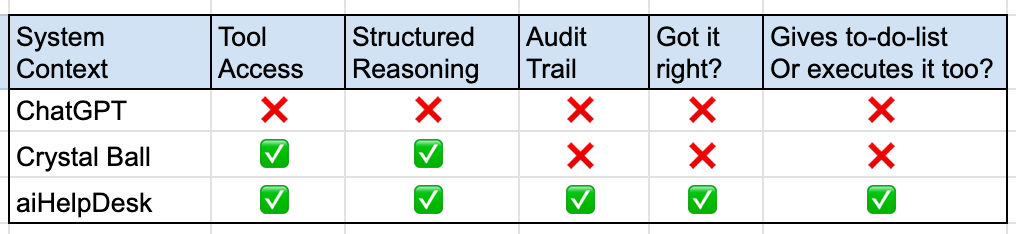
This table perhaps understates what matters. The Crystal Ball response wasn’t just wrong. It was wrong about something true. The disk really was at 97%. The answer was wrong not because the data was bad, but because there was nothing forcing the connection between “disk pressure” and “this specific connection refusal symptom” to be examined. The LLM assumed the connection and built a story.
This point is fascinating to me. The stranger (aka Web’s ChatGPT) didn’t have access to the system, couldn’t interrogate it by running the queries, checking the infra, the OS, the logs and yet the Crystal Ball that had all of that… produced worse result.
It’s not just about correctness though. You certainly may get the right verdict from ChatGPT or the Crystal Ball diagnosis… if you run it enough times (hello, consistency), but you won’t get a structured response with clear set of hypotheses, confidence scores, supporting evidence, rejected alternatives… all of which gets revised as they are passed among the agents to narrow down the root cause. What you get instead is… a freeform prose.
And no, it won’t act on its how-to-fix recommendations either. You are on your own with that one. But more importantly…
The aiHelpDesk response didn’t just arrive at the right answer. It showed its work. And that’s critical. Every tool call, every hypothesis, every confidence score, every rejection reason preserved in the audit trail. Guaranteed. You can reconstruct exactly how the diagnosis was reached, which explanations were considered and eliminated, and what evidence drove each decision. In a regulated environment that is not a nice-to-have. It is a baseline requirement.
The Gap Is Not Intelligence. It Is Epistemology.
The Crystal Ball agent is not less intelligent than the playbook-guided agent. It is the same model. What differs is the question it is answering.
An unconstrained LLM answers: what is the most plausible explanation for this symptom given my training data?
A playbook-guided agent answers: given the evidence that you need to gather first from this specific system, which hypothesis is best supported, and what evidence explicitly rules out the alternatives?
These are different questions. The first optimizes for coherence with priors. The second optimizes to fit with observed facts. In a live production diagnosis, only the second is trustworthy. More importantly, only the second leaves behind irrefutable record that is worth anything when reviewed after the fact.
This is not a criticism of LLMs. It is a statement about what reliability requires. Pattern-matching produces plausible answers. Systematic evidence gathering produces dependable ones. Playbooks, structured output, and chaining are the mechanisms by which aiHelpDesk forces the second mode. It makes the model reason like a careful diagnostician rather than a confident, but lacking evidence, oracle.
The Crystal Ball sees a real signal and tells you a story. aiHelpDesk playbook asks whether the story holds up against the evidence. That distinction is everything.
Why aiHelpDesk Playbooks are trustworthy?
Because we give you, the customer, an ability to vet, verify and improve them through the methodology that we refer to as Operational SRE/DBA Flywheel, see here and here for details.

And yes, as a customer, you can not only confirm that the playbooks that you get with aiHelpDesk out of the box work for your environment, but you can easily bring your own. Both: BYO playbooks (by either importing your existing runbooks or clonning and customizing one of our’s or by creating one from scratch) + BYO faults as well.
On the “ — crystal-ball” flag
We built “ — crystal-ball” into aiHelpDesk because we think the comparison is worth making. And worth repeating. Run it yourself. Take a real failure in your environment. Compare the crystal-ball response to the structured playbook run, side by side. We find the difference quite instructive.
We also think the comparison will evolve. As frontier reasoning models improve rapidly and so we expect that the gap between crystal-ball and structured diagnosis should narrow. Running both modes against the same scenario, say quarterly, against the same infrastructure, with the
same injected failures, gives you a concrete, reproducible measure of whether “LLMs are improving” translates into “LLMs are more reliable in your specific environment.” That is a more useful benchmark than any leaderboard.
For now, the “ — crystal-ball” flag is for demos, comparisons, and curiosity. For anything that matters, we encourage you to use the normal aiHelpDesk mode, i.e. the playbooks and we have a big WARN disclaimer about the Crystal Ball mode in the logs:
time=... level=WARN msg="⚠️ CRYSTAL-BALL MODE ENABLED — playbook guidance, hypothesis format, and escalation chaining are bypassed. NOT recommended for production use."
The “ — crystal-ball” mode is available as of aiHelpDesk v0.12. The full three-way comparison is reproducible using the fault injection framework with any docker_stop fault entry, although the unconstrained, not playbook-guided LLMs are inconsistent and so the actual diagnosis may vary (and also sensitive to the exact model used).
Next Steps
- Review the quick startup guides for deploying aiHelpDesk directly on a VM, on Docker/Podman or on K8s
Related Reading
- aiHelpDesk Flywheel official documentation
- Your SRE On-Call Runbook Is Already Obsolete. Here’s Why That’s Not Your Fault: Introducing aiHelpDesk Operational SRE/DBA Flywheel
- The Missing Test Suite for AI Database Operations: You’re about to bet your SRE/DBA on-call rotation on an AI agent. Want to know if it’s any good before the 2am page goes off?
- Runbooks Rot. Playbooks Learn: Operational SRE/DBA Flywheel: Ops Knowledge That Compounds. Automatically. Improving with every incident.
aiHelpDesk is available in Beta. If you’re running PostgreSQL in production and would like to get help in preparing for the avalanche, consider aiHelpDesk. Reach out to us at info@aiHelpDesk.biz and we’ll be happy to show you what it looks like in practice.
Don’t Ask Your AI to Diagnose Production (unless you’ve given it a structured guided playbook) was originally published in Google Cloud – Community on Medium, where people are continuing the conversation by highlighting and responding to this story.
Source Credit: https://medium.com/google-cloud/dont-ask-your-ai-to-diagnose-production-unless-you-ve-given-it-a-structured-guided-playbook-46195c2aae71?source=rss—-e52cf94d98af—4
About the Author