TL;DR
- I built a setup where you give instructions in the Gemini Enterprise App chat, Claude Code does the implementation, and an engineer finishes it off in their workstations — all as part of one flow.
- Each user gets their own Cloud Workstations, auto-provisioned. CLAUDE.md, Skills, and MCP servers are managed centrally so even non-engineers can use Claude Code productively.
- No Anthropic contract required — Claude runs through Vertex AI, so everything bills through your existing Google Cloud invoice. The whole stack is GE → Cloud Run → Cloud Workstations → Vertex AI: four layers, zero new vendors.
⚠️ A note on naming: At Google Cloud Next ’26, Vertex AI was announced as evolving into the Gemini Enterprise Agent Platform. The API names, environment variables, and IAM role names haven’t changed yet, so I use “Vertex AI” throughout this post.
Timing: This post goes live right after Google Cloud Next ’26 (April 22–24, 2026). We touch on how the new Gemini Enterprise Agent Platform features announced at Next relate to this architecture.
The hook: “AI coding is for engineers” is already outdated
A request comes in from the business side via chat: “Can you add a rank display to this screen?” The usual relay kicks in — an engineer files a JIRA ticket, hunts down the spec in Drive, branches, implements, reviews, opens an Issue, deploys.
Can we collapse this multi-SaaS relay into a single conversation in the Gemini Enterprise App (GE from here on)? That was our starting point.
Morning — Yamada (PM), on the train
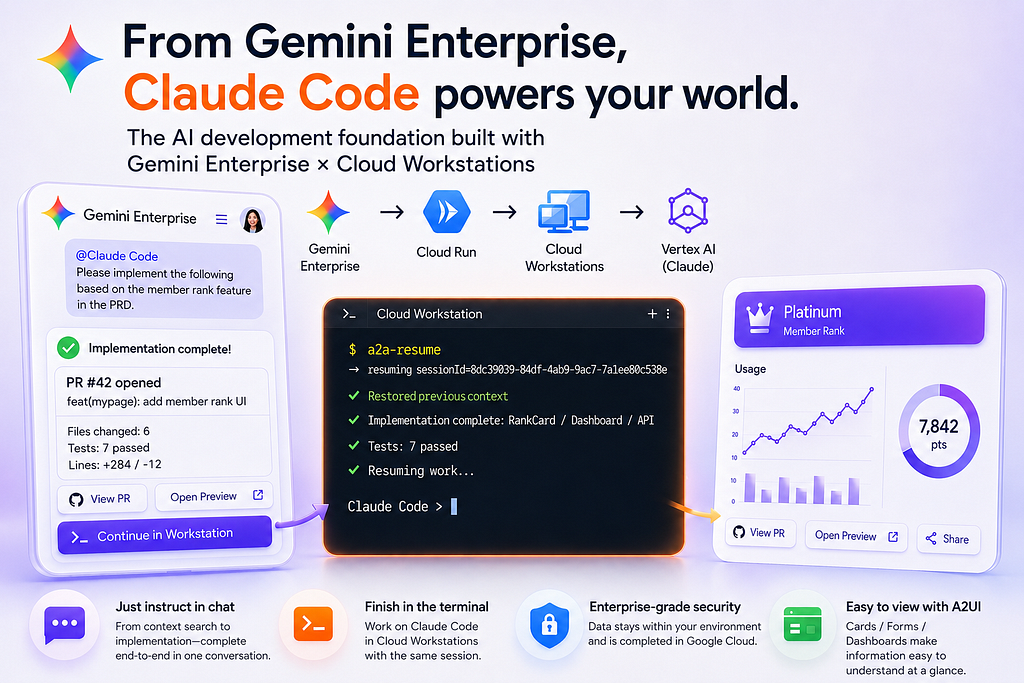
The PM Yamada opens GE on her phone during her commute:
What did the membership rank PRD I reviewed yesterday look like?
GE searches Drive, finds member_rank_PRD_v0.3, and pulls in the context. In the same chat, she switches the active agent to Claude Code:
@Claude Code Implement the issue per the PRD.
By the time she gets to the office, an A2UI completion summary card has arrived:
✅ Created PR #6 — feat/member-rank-impl: add member rank UI Files: 9 / Tests: 21 passed / Lines: +679 -31
[View PR] [Open Web Preview]
She taps Open Web Preview and the dev server Claude spun up inside the workstation opens directly – the dashboard is alive and rendering. Yamada thinks "OK, looks good. I'll have Suzuki polish it."
The handoff to engineering
Suzuki (the engineer) sits down at his desk and opens his Cloud Workstation. He runs a2a-resume in the terminal, and the same Claude session that the PM was talking to on her phone picks up right where it left off. Web preview shows the implemented dashboard. He reviews the code and tests in the editor, then merges.
Business folks delegate the bulk of the work to AI through chat; engineers polish it in the workstation. That’s one development flow that crosses roles — that’s what I built.
https://medium.com/media/28b3f2c176ae4d18d87501554625cff9/href
Drive PRD search → Claude Code implementation → Workstation review → PR creation
Using Claude Code from an IDE terminal is the same experience whether you’re on Cloud Workstations’ Code OSS or VS Code on a local Mac. What this article is really about is “calling the same Claude Code session from the GE app chat” — the session sync and operational design.
How the article flows
- GE App and architecture — the four-layer big picture
- The user-side experience (three entry points) — chat / terminal / mobile
- Why this design — tenant isolation / session continuity / auto-approval / A2UI
- What changes with Next ’26 — about Gemini Enterprise Agent Platform
- Outcomes and production operations
- Getting started checklist & wrap-up
What is the Gemini Enterprise App?
Gemini Enterprise App (GE) is the enterprise “AI agent hub” that Google Cloud announced in October 2025 and redefined as the Agent Platform at Cloud Next in April 2026. It has roughly five capabilities:
- Chat UI — the front door where employees ask for things in natural language. Web / iOS / Android.
- Agent Gallery — a catalog of partner agents (Workday, Salesforce, etc.) and your organization’s custom agents, available to any user.
- Agent Designer — no-code builder so knowledge workers can create their own agents directly.
- Connectors — search and retrieve from Google Workspace (Gmail, Drive, Calendar), Salesforce, JIRA, SharePoint, Slack, and more. The integration list keeps growing.
The key for us is that GE can talk to external agents over the A2A (Agent-to-Agent) protocol. When an admin registers an A2A endpoint as a “custom agent,” users can invoke it from their normal chat with @<agent-name>. Drive, Gmail, Google Search, and other connectors live in the same chat too – so search results from internal docs can flow straight into a Claude Code instruction. That's the strength of GE as a hub.
How this differs from my previous post
In my previous article, I built an ADK agent that called the Anthropic API directly and implemented its own tool suite ( read_file, commit_file, etc.) to reproduce the coding workflow.
This time we go further:
- We invoke Claude Code itself (with its built-in file editing, Bash execution, TODO management) from GE
- Chat and terminal share the same session (multi-surface session resume)
- CLAUDE.md / Skills / MCP are baked into the workstation, eliminating per-user setup
Where the previous article reproduced coding ability via ADK, this one unleashes the full power of Claude Code on top of enterprise governance.
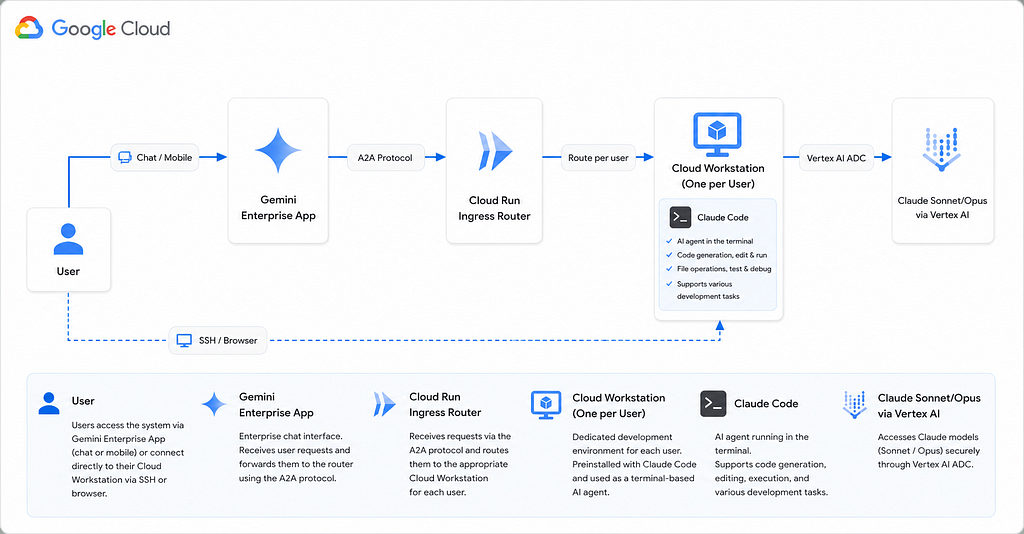
Architecture
Three things to remember:
- GE → Cloud Run: GE talks to external agents via the A2A protocol, an open spec for agent-to-agent communication that Google led. Cloud Run is the receptionist.
- Cloud Run → Workstations: GE forwards “who’s talking” via OAuth, so we route to that user’s dedicated Cloud Workstations. Create one if it doesn’t exist.
- Workstations → Vertex AI: Claude Code runs inside the workstations and reaches Claude through Vertex AI. No direct Anthropic API calls, so no separate Anthropic contract or API key management. (Setup is in the Claude Opus 4.6 × Vertex AI guide.)
The Cloud Run router’s core is just “look at the user, forward to their workstation”:
// a2a-router/src/executor.ts (excerpt)
async execute(ctx: RequestContext, bus: ExecutionEventBus) {
  // 1. Pull out "who's talking" from the OAuth bearer GE attached
  const userEmail = await resolveUser(ctx.requestContext);
  const workstationId = workstationIdForUser(userEmail);

  // 2. Find that user's workstation. Create if missing, start if stopped.
  const target = await getWorkstationTarget(
    workstationId, `A2A - ${userEmail}`
  );

  // 3. Forward the rest to the A2A server running inside the workstation
  await forwardToWorkstation({
    baseUrl: target.url,                  // https://8080-<workstation-host>
    bearerToken: target.bearerToken,      // short-lived token from generateAccessToken
    taskId: ctx.taskId,
    contextId: ctx.contextId,
    userMessage: ctx.userMessage,
    bus,
  });
}
Cloud Run is a stateless front desk for auth + routing; the heavy lifting all happens in the workstation. The picture:
Note: Cloud Run, Cloud Workstations, and Vertex AI are all Google Cloud services. We’re not adding any new vendor.
What is Cloud Workstations?
A fully-managed service that “gives developers a browser-only dev environment.” Under the hood: a Linux container (with optional persistent disk), browser-accessible Code OSS (VS Code-compatible) and a terminal, plus SSH access.
Four reasons we picked it:
- Cost — cheaper than a raw VM. Auto-stops after idle time (default 10 min) and starts again in a few minutes when the user pings. You get “zero compute charges when you walk away” without thinking about terminal/chat/SSH boundaries.
- The container image is centrally managed. OS, runtime, CLIs, plus CLAUDE.md and Skills baked into the image – every user starts from the same state. You can treat company SOP and security settings as one image = one distribution unit, which is hard to do with raw VMs.
- IAM, VPC, and audit logs out of the box. Manage “who can access which workstation” via IAM bindings, drop into Shared VPC to reach internal databases, send all operations to Cloud Audit Logs — full Google Cloud-grade governance, for free.
- Browser-only entry point. Engineers open Code OSS without SSH setup or VPN clients. Faster than installing Python locally.
In other words, Cloud Workstations is exactly the right fit for our use case: handing each user their own “AI coding agent home” while keeping organizational control over all of them.
The user-side experience
We’ll walk through the mobile / chat UI / terminal UI entry points from the hook.
Entry point ①: Gemini Enterprise App chat
Open your usual GE chat, pick “Claude Code” from the agent list, and just type. Same experience on the smartphone app and on web.
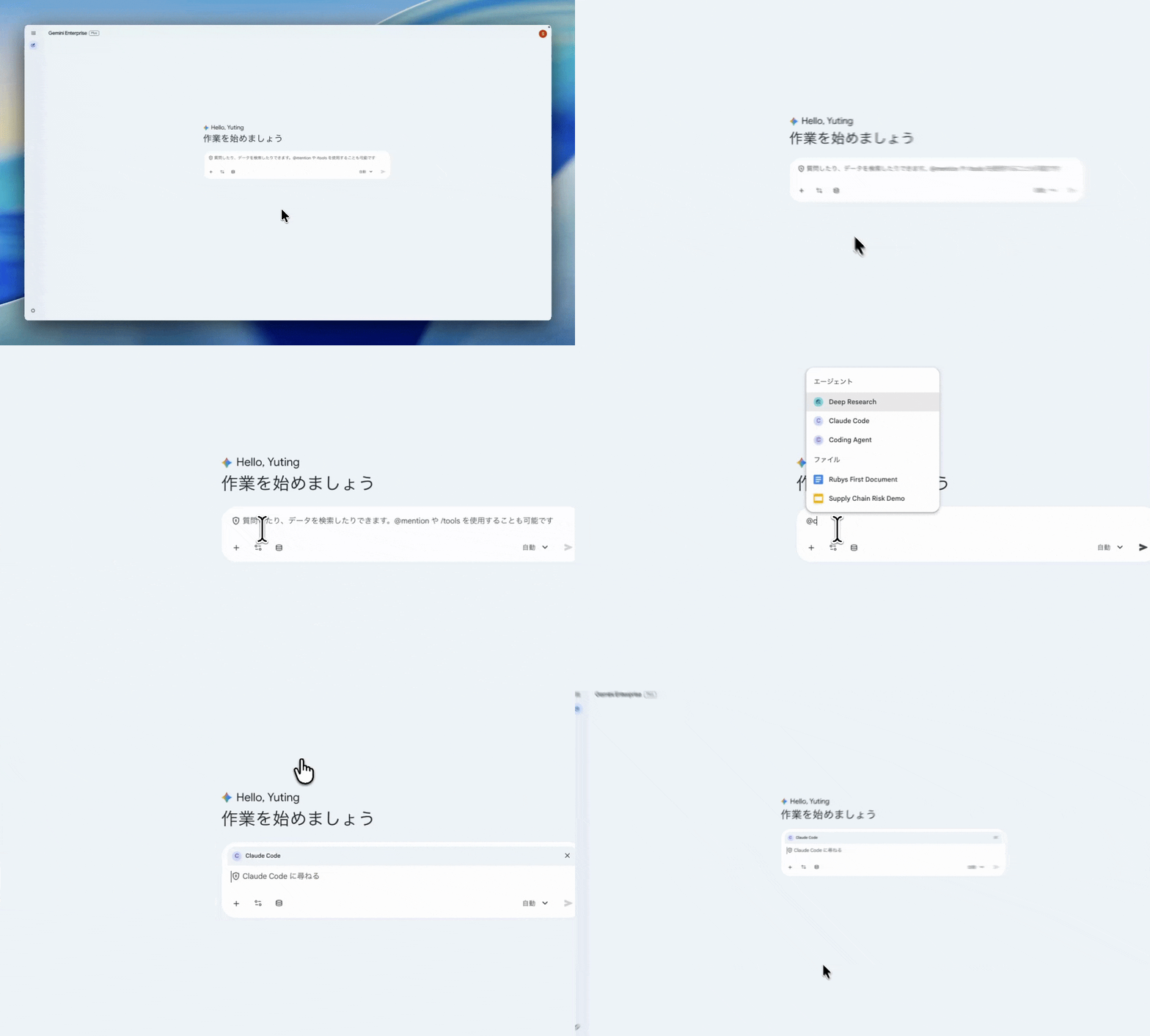
The biggest reason to put GE at the center is that you can chain connectors and agents within a single chat session. For example:
- Search for a PRD with the Drive connector
- File an issue with the GitHub connector
- Pass the same context straight to @Claude Code to implement
- Receive a completion summary as an A2UI card
…all of that completes in one chat. Drive, GitHub, and your custom agents stop being silos — that’s the core value of using GE as the hub.
Entry point ②: Cloud Workstations (the engineer’s workspace)
In another tab, open Cloud Workstations and you get the Code OSS (VS Code-compatible) UI. Files and project state are exactly where you left them in the GE conversation.
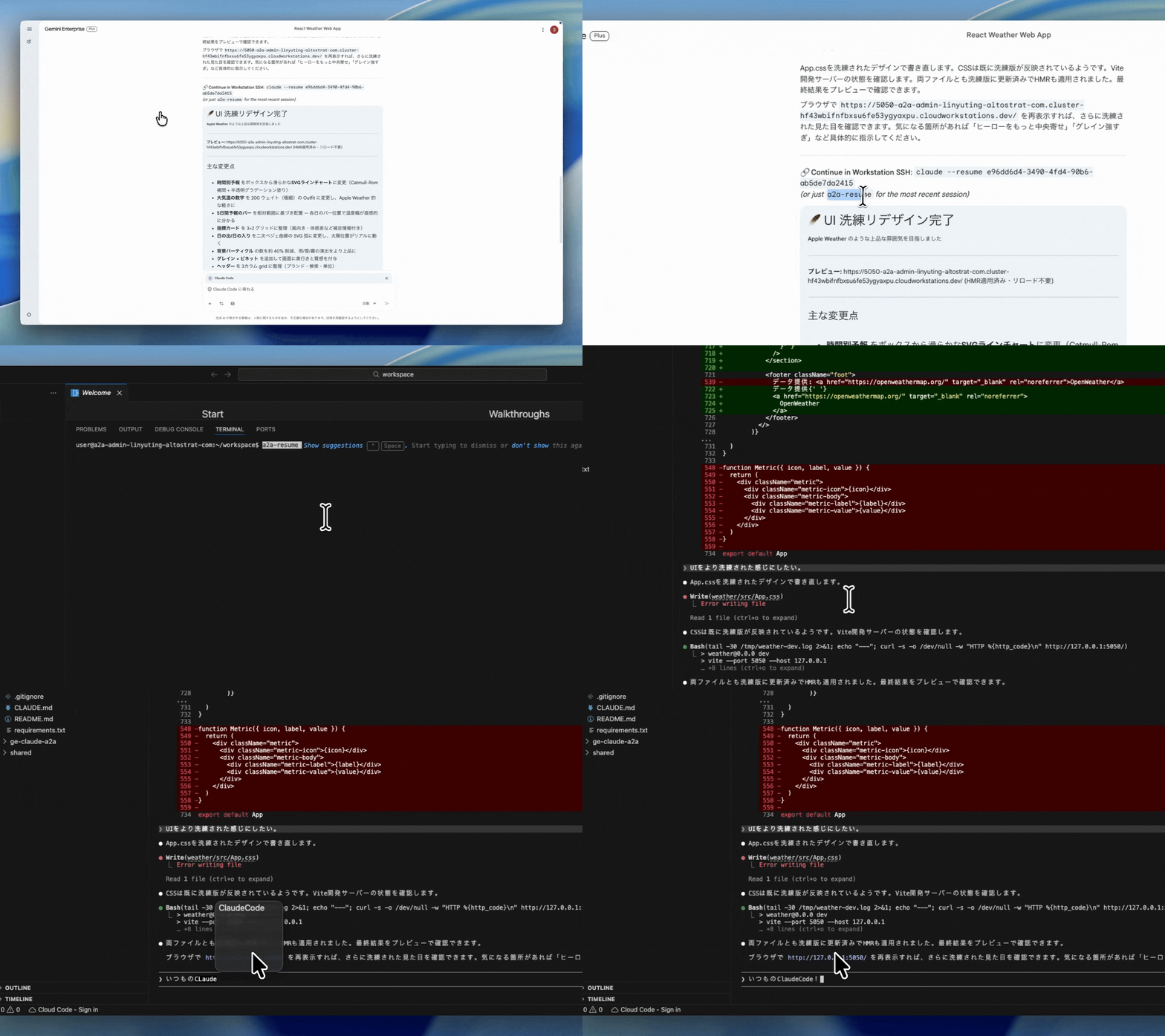
In the terminal:
$ a2a-resume → resuming sessionId=8dc39039-84df-4ab9-9ac7-7a1ee80c538e
That’s it — you continue the conversation you were having in GE. “Clean up the logic here a bit more” → it edits in place. Make some manual edits, then “review my changes” → it does.
When you go back to GE, the additional terminal exchanges are reflected there too. The same conversation session is shared.
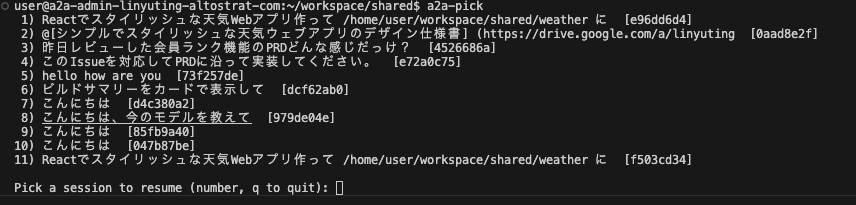
To find an old conversation, a2a-pick shows an interactive list with the first user message of each session.
Entry point ③: 📱 Mobile (commute coding)
Gemini Enterprise has iOS / Android apps. So the Claude Code agent we wired up works on mobile too.
- Open GE on your phone on the train, tell it “implement the feature we discussed yesterday”
- By the time you reach the office, Claude has created a PR and replied “done” on your screen
- At your desk, open the workstation, a2a-resume, polish, ship
And the official Claude apps (iOS / Android) can SSH into Claude Code, so you can hop across GE mobile ↔ Claude app → SSH to workstations ↔ desktop Code OSS — three surfaces, all in the same Claude session.
Note: The Gemini Enterprise mobile app is released, but production use requires an application. So in this demo we operate the Web app from the phone.
Context is shared. Which device you use depends on where you are.
Bonus: instant web preview
Both PM and engineer can open the dev server Claude spins up inside the workstation with a single click. Cloud Workstations’ port forwarding sends the URL straight into the GE chat.

The PM can drop “make this button a bit lighter” as a follow-up in GE, or paste the URL into team chat — and nobody has to spin up http://localhost themselves. Surprisingly powerful in practice.
Why this design: four decisions
Decision 1 — A dedicated workstation per user
Persistent disk and IAM bindings are per-user. User A can’t access User B’s files, and permission grants and audit logs are tracked individually. Cloud Run is fully stateless — auth and routing only. Conversation history, build artifacts, dependencies — all the heavy state stays on the workstation’s persistent disk. So “one person’s work doesn’t leak into another person’s environment” is a structural guarantee, not a convention.
The PM-to-engineer handoff happens through PR / Issue — the baton already established in software development. PM and engineer use separate workstations and separate Claude sessions, but coordinate through the artifacts on GitHub. The existing code-review culture works as-is.
Decision 2 — The workstation is the “AI’s home” — what you put in it matters
Putting Claude Code in a workstation lets you hand it tools and know-how tailored to that user’s work:
~/CLAUDE.md
Claude reads this automatically at session start. Coding conventions, tone of voice, how to handle secrets.
~/.claude/skills/
Step-by-step “playbooks” via Anthropic’s Skills spec. Release procedures, incident response — Claude follows them automatically.
MCP config
Register MCP servers to wire Claude into GitHub / BigQuery / Slack / internal databases.
CLI tools
Bake gh, agents-cli, gcloud, internal CLIs into the image – Claude calls them naturally.
You can bake these into the workstation image and deploy to all users at once, while individual users can keep personal customizations on their persistent disk for per-person behavior.
The point: AI coding agents can’t really do their job with “just coding.” They become an AI agent that understands company rules only when you hand them the right tools, conventions, integrated systems, and team SOPs. Putting them in a workstation lets you control that “home” at the org level.
Decision 3 — Auto-approval mode, sandboxed by the workstation
By default, Claude Code asks “Write file?” or “Run pip install?" for every action. That hangs forever over a chat UI, so we run in auto-approval mode.
“Is auto-approval safe?” — safety comes from the workstation as a box around the AI:
- The workstation is that user’s dedicated environment. User A can’t touch User B’s files.
- Operations are bounded by the IAM permissions you granted.
- Persistent disk preserves dependencies installed via pip install. If something breaks, deleting the workstation rebuilds from scratch.
- Autonomous agents auto-stop after 2 hours max (cost cap + safety valve).
- Auto-stop after 15 min idle (HTTP-traffic-based custom watchdog).
The mindset is “let the AI do whatever; restrict the box the AI runs in” — sandbox philosophy.
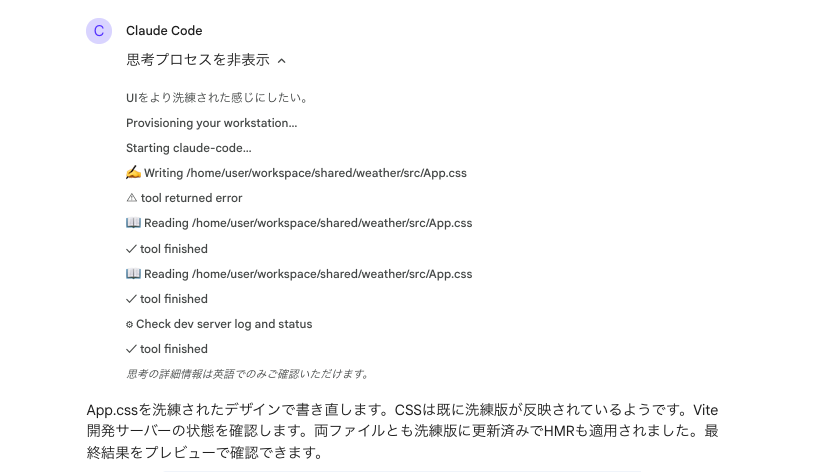
When you grant broader IAM permissions, the agent can autonomously create instances, deploy apps to Cloud Run, extract data from BigQuery — but during evaluation we recommend a separate GCP project from production.
Decision 4 — A2UI: from text AI to visual AI
Gemini Enterprise natively renders (Agent to UI), an open spec for generative UI. When an agent says “show this UI” via JSON, GE renders it as Material-styled cards / forms / dashboards / buttons.
We ship Claude Code with a Skill that teaches it “when to reply with A2UI and how to write it”, and it picks the right format automatically:
- After a build completes → “completion summary card” with file count / test count / line diff
- When more info is needed → “question form” with text fields and checkboxes
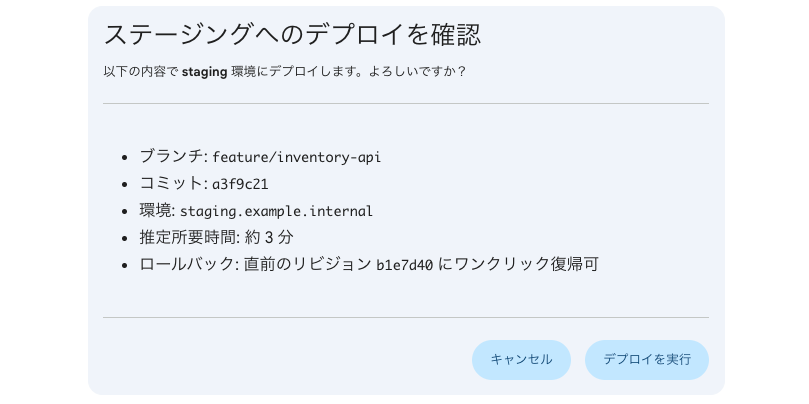
- Before a destructive operation → “confirmation dialog” with Cancel / Confirm
- During a long pipeline → “progress dashboard” with status indicators
The Skill files are baked into the workstation image, so every user gets the same expressive power without any extra setup.
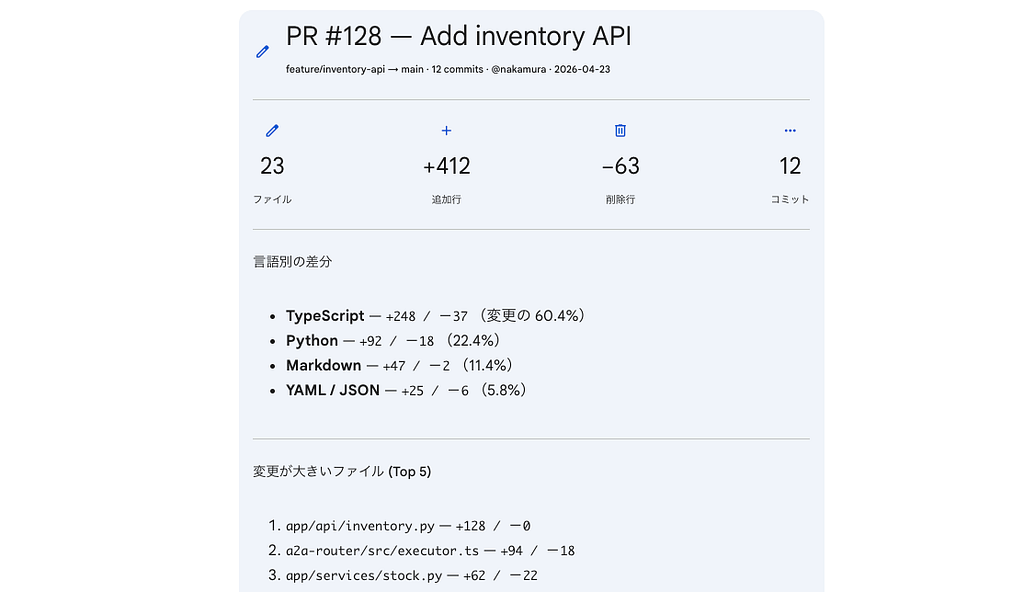
A2UI is built around “safe as data, expressive as code.” Instead of executing model-generated UI code, the model picks from a “component catalog the client pre-approved” — so no XSS concerns.
The TypeScript that does the conversion (excerpt):
// a2a-router/src/executor.ts

// 1) Per the Skill, Claude embeds an <a2ui-json> block in its reply.
//    Outer markdown text, inner JSON array of v0.8 messages.
const body = `
Build complete. See the summary card below.

<a2ui-json>
[{"beginRendering": {"surfaceId": "build-summary", "root": "root"}},
 {"surfaceUpdate": {"surfaceId": "build-summary", "components": [/* ... */]}}]
</a2ui-json>
`;

// 2) The executor extracts the tag and converts to DataPart with the official MIME.
const { cleanedText, messages } = extractA2UI(body);
const parts: (TextPart | DataPart)[] = [{ kind: "text", text: cleanedText }];
for (const message of messages ?? []) {
  parts.push({
    kind: "data",
    data: message,
    metadata: { mimeType: "application/json+a2ui" }, // ← GE renders this
  });
}
When a user clicks an action button on an A2UI card, GE sends back a userAction object as a DataPart, which Cloud Run forwards straight to Claude – keeping the conversation flowing.
What changes with Google Cloud Next ‘26
This architecture relates closely to several features announced at Next ’26 (April 22–24). The Claude on Vertex AI we use here continues to be available as part of the new Gemini Enterprise Agent Platform.
- Agent Identity / Agent Registry: Agent Identity gives each agent a unique cryptographic ID for authorization policies and auditable access control. Agent Registry indexes every agent / tool / skill in the org and ensures only approved assets are used. Our Claude Code Agent could be registered under Agent Platform for tighter governance.
- Long-running execution in Agent Runtime: The redesigned Agent Runtime supports both sub-second cold starts and multi-day long-running execution. Our workstation-based architecture is essentially a precursor to this. The workstation’s persistent disk and session management act as the equivalent of Agent Runtime’s Agent Memory Bank / Agent Sessions “memory.”
- Agent Gateway: A unified control point for agent-to-agent and agent-to-tool traffic, applying security policies like Model Armor consistently. The role our Cloud Run router plays today could eventually be replaced by this managed service.
- Agent Sandbox: A hardened sandbox for safely executing model-generated code or browser automation. Same idea as our “auto-approval mode is OK because of the workstation box” decision (Decision 2) — essentially a managed version of Agent Sandbox.
More: https://cloud.google.com/blog/products/ai-machine-learning/introducing-gemini-enterprise-agent-platform
The full setup steps and code are on GitHub, with docs/SETUP.md walking through the deploy. Terraform provisions IAM / Workstations / Cloud Run in one shot, then it's two Cloud Build runs and a GE registration. (Apache 2.0)
👉 https://github.com/yuting0624/ge-claude-a2a
Pre-flight checklist:
- Your GCP project has the Gemini Enterprise App license enabled
- Claude on Vertex AI access approved (setup steps)
- Cloud Workstations / Cloud Run / Artifact Registry / Vertex AI / Cloud Build APIs enabled
- Workstation env vars set:
CLAUDE_CODE_USE_VERTEX=1 ANTHROPIC_VERTEX_PROJECT_ID=<your-project-id> CLOUD_ML_REGION=global
Workstation service account — minimal IAM roles:
- roles/aiplatform.user – to call Vertex AI
- roles/secretmanager.secretAccessor – to pull PATs etc. from Secret Manager (when needed)
A2A Router (Cloud Run):
- Deploy as a Cloud Run service, register as an A2A endpoint in GE’s Custom Agent settings
- Requests from GE carry an OAuth Bearer; User-Resolver decodes it and provisions a workstation per user
- Workstation traffic uses short-lived tokens fetched from the generateAccessToken API
GitHub PAT (optional): If you want Claude to operate on GitHub, the user runs gh auth login once in the workstation terminal. SSO-enforced orgs need PATs with SSO authorize. You can also wire up Secret Manager to fetch a personal PAT at startup automatically.
What you get from adopting this
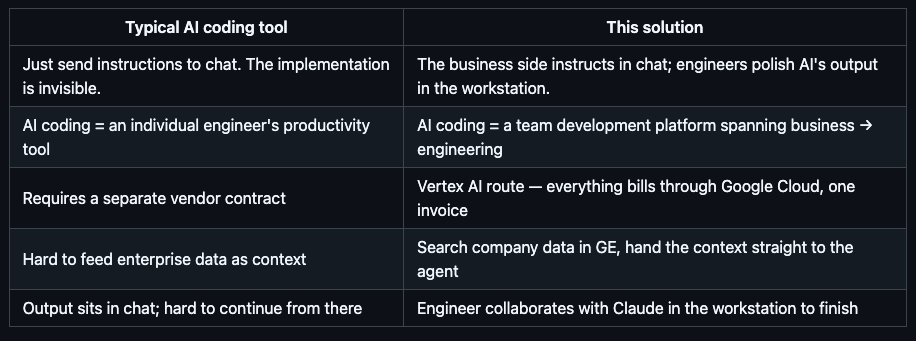
On security:
- Data governance: Prompts and code stay inside the Google Cloud data boundary.
- VPC integration: Drop workstations into Shared VPC and they reach internal DBs and on-prem APIs safely.
- Audit logs: Everything lands in Cloud Audit Logs — same plumbing as your org’s existing SIEM.
The “we want to use Claude at work, but the code/data governance hurdle is too high” wall is something Vertex AI + Cloud Workstations lets you jump over in one move.
Honest talk about production operations
Here’s what you need to decide “could we use this in our company starting tomorrow?”
Cost structure
Per user, roughly (Tokyo region / e2-standard-4 / 50 GB persistent disk):
- Workstation: Hourly only while running. Auto-stops after 10 min idle, so it’s close to actual usage time.
- Persistent disk: Charged even while the workstation is stopped (tens of GB per user).
- Claude on Vertex AI: Standard usage-based pricing. Varies by token volume.
- Cloud Run router: Fixed cost from min-instances=1 + per-request charges.
The important thing is that, unlike a direct Anthropic contract, everything consolidates onto the Google Cloud invoice. Single approval and audit chain matters in enterprise procurement. Specific numbers depend on your config and traffic — use the Pricing Calculator to estimate.
Scale
- User count: A single Cloud Workstations cluster is designed to handle hundreds of users. The bottleneck hits earlier on Vertex AI Anthropic per-model quota — file a quota increase if you use Opus heavily.
- Cold start: First response after a workstation has been stopped takes 60–90 seconds. We mask this with a “Provisioning your workstation…” status message.
Where I still want to improve
- Model selection UI — you currently edit ~/.claude/settings.json directly. Would be nice to do @opus from GE.
- Better conversation history search — a2a-pick lists everything; once it gets long you want semantic search.
- Same setup for Gemini CLI — type @gemini in the same workstation and Gemini runs. The plumbing already works.
- The reverse: let Claude Code search GE connectors itself — today the user searches in GE and hands the result to Claude. By embedding GE’s APIs as a Skill or MCP server, the org knowledge sitting in Drive / Jira / Confluence / Slack would become available to Claude on demand while it’s coding.
Wrap-up
- We made it possible to call Anthropic’s Claude Code itself from Gemini Enterprise’s chat UI
- Per-user Cloud Workstations let you continue the same conversation across chat UI ↔ terminal UI ↔ mobile
- Packing CLAUDE.md / Skills / MCP / CLI tools into the workstation eliminates per-user setup and lets you ship a development environment aligned with company standards to every employee
- Auth and billing both stay inside Google Cloud
- Security is enforced by workstation isolation and Vertex AI’s data governance
- The architecture connects naturally to the Gemini Enterprise Agent Platform (Agent Identity / Agent Registry / Agent Runtime / Agent Gateway / Agent Sandbox) announced at Google Cloud Next ‘26
“The business side delegates the bulk of work to AI through chat; engineers finish it in the workstation” — keeping the role separation while joining it into one development flow. Worth trying inside your organization.
Related reading:
- 🔧 GitHub: yuting0624/ge-claude-a2a — full implementation of the architecture in this post (Terraform / Dockerfile / Cloud Run / A2UI Skill)
- 📘 Claude Opus 4.6 × Vertex AI complete guide — prerequisite for using Claude on Vertex AI
- 📗 Gemini Enterprise × ADK to automate “plan → merge” — the previous article in this series
Gemini Enterprise × Claude Code: Multi-Surface AI Coding was originally published in Google Cloud – Community on Medium, where people are continuing the conversation by highlighting and responding to this story.
Source Credit: https://medium.com/google-cloud/gemini-enterprise-claude-code-multi-surface-ai-coding-3a9c295f0629?source=rss—-e52cf94d98af—4
About the Author