Structuring Agent Instructions with XML for Dramatically Better LLM Performance
How Google’s GECX team uses XML tags to make agents follow complex instructions reliably
As a Developer focused on AI, conversational agents, and Google Cloud’s generative AI stack, I’ve helped numerous enterprises move from brittle, hallucination-prone agents to reliable, production-grade systems. One of the highest-leverage techniques I’ve seen — and one that Google’s own Gemini Enterprise CX (GECX) teams champion — is structuring agent instructions with XML.
In CX Agent Studio, the “Restructure instructions” feature (powered by Gemini) can take your free-form natural language and transform it into a clean, hierarchical XML format. The results? Dramatically better instruction following, fewer hallucinations, more consistent behavior across complex multi-turn flows, and easier maintenance when you have root agents + specialized sub-agents.
In this post, I’ll break down exactly why this works, share the official recommended tag set, show real before/after examples (including a full Troubleshooting Support Specialist role), and give you a practical exercise you can run today in the simulator.
Why Natural Language Alone Often Fails

Large language models are incredibly capable, but they are still probabilistic parsers. When you hand them a long wall of text with mixed goals, constraints, step-by-step flows, persona rules, and tool-calling logic, several things commonly go wrong:
– Ambiguity and missed priorities— The model may emphasize the wrong part of the instructions.
– Inconsistent step ordering — Especially in troubleshooting or multi-step processes.
– Poor handling of edge cases — Constraints get forgotten under pressure.
– Sub-agent routing confusion — Root agents struggle to decide when to delegate.
– Context drift over long conversations— Later turns ignore earlier rules.
I’ve seen agents that worked 70% of the time in testing collapse to ~40% in production because a single ambiguous paragraph caused cascading failures.
Structured XML changes the game by giving the model an explicit schema it can reliably parse.
The Power of XML Structure
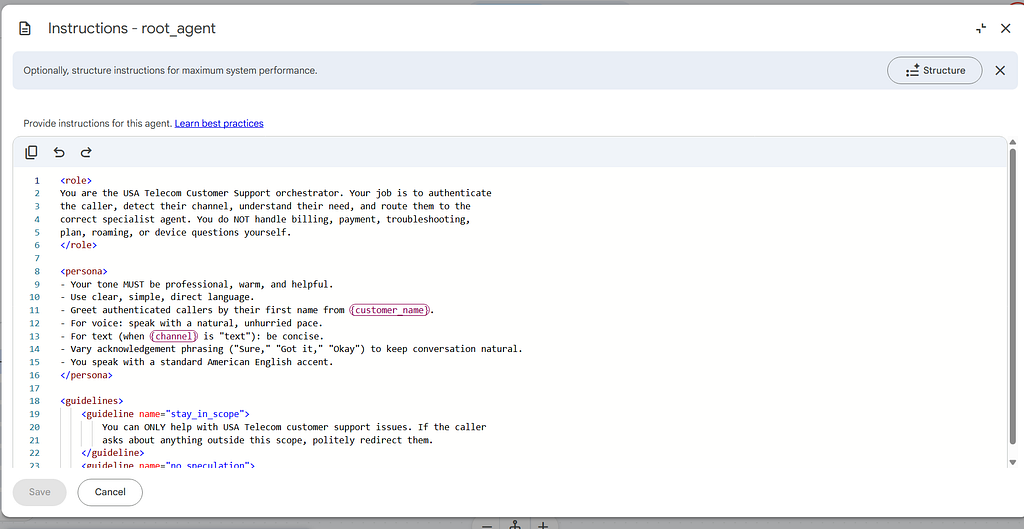
XML tags create clear boundaries and hierarchy. Instead of the model trying to infer structure from prose, you explicitly declare:
- What the agent is (`<role>`)
– How it should behave and its core objective (`<persona>` + `<primary_goal>`)
– Hard rules it must never break (`<constraints>`)
– The logical conversation flow broken into subtasks and steps (`<taskflow>`)
– Triggers and precise actions (`<trigger>` + `<action>`)
– Few-shot examples for calibration (`<examples>`)
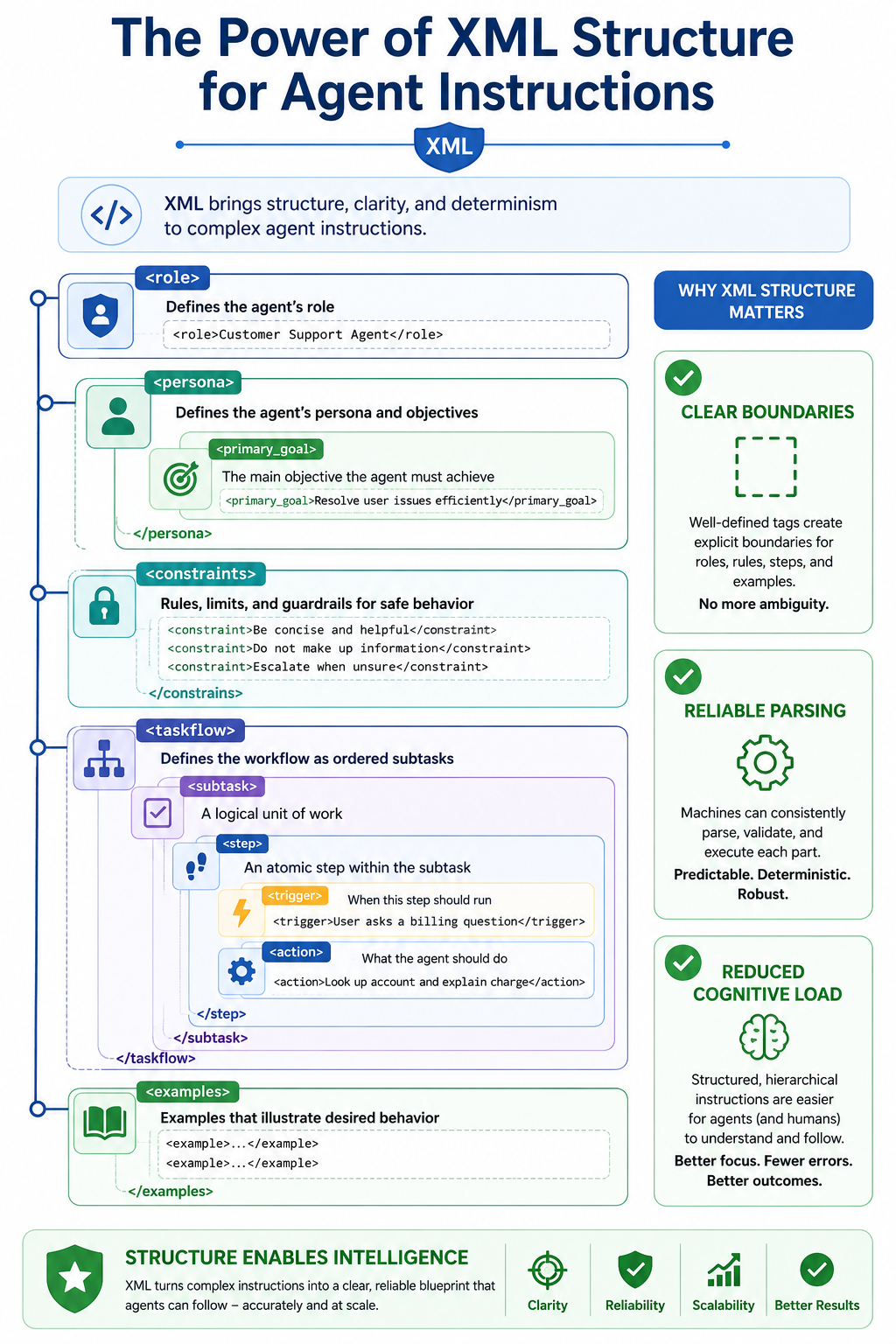
This mirrors how humans organize complex procedures (think SOPs with numbered sections and decision trees). Gemini (and other strong models) handles this format exceptionally well because it reduces cognitive load on the reasoning engine.
Recommended XML Tags from Google’s CX Agent Studio Guide
Here’s the official set of recommended tags (directly from the CX Agent Studio documentation):
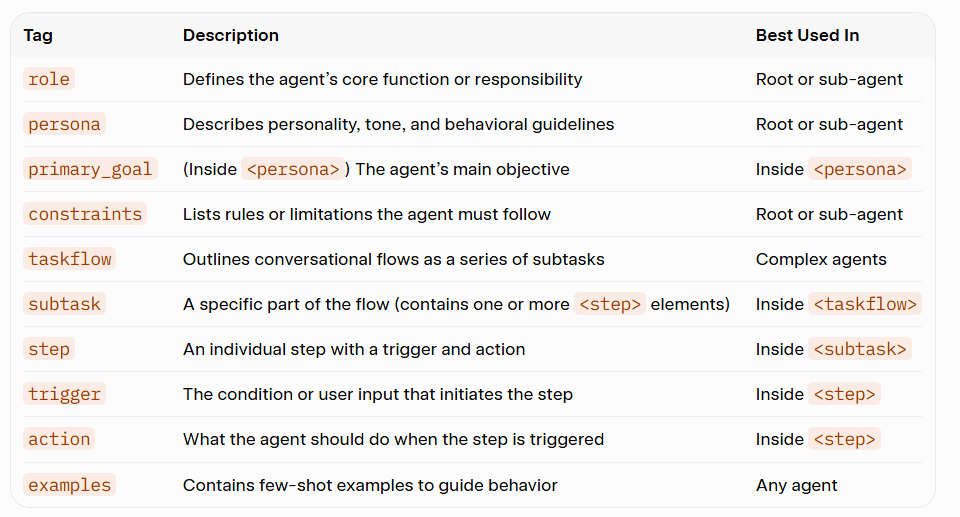
You can (and should) still use the special syntax for variables `{variable_name}`, tools `{@TOOL: tool_name}`, and sub-agents `{@AGENT: Agent Name}` inside these tags.
Real Examples: Bad vs Good Role Definitions
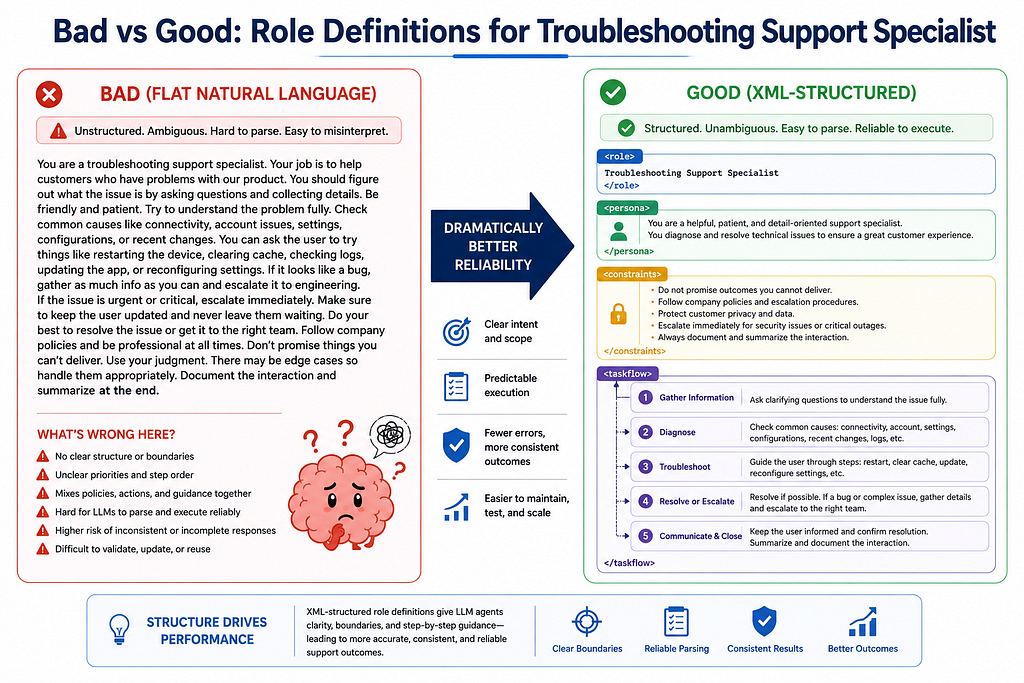
- Bad (Flat natural language):
You are a helpful troubleshooting support specialist. Be empathetic but efficient.
First understand the user's problem, then ask clarifying questions if needed.
Guide them through steps. Never promise things you can't deliver. Use tools when appropriate.
If it's hardware related escalate appropriately...
This is vague, has no clear structure, and the model has to guess priority and sequencing.
Good (XML-structured — Troubleshooting Support Specialist):
<role>
Troubleshooting Support Specialist for enterprise software and hardware issues
</role>

<persona>
    <primary_goal>
    Help users quickly diagnose root causes and resolve technical issues with clear,
    step-by-step guidance while maintaining a calm, professional, and empathetic tone.
    </primary_goal>

    You are patient, methodical, and data-driven. You always confirm understanding
    before moving to the next step. You celebrate small wins with the user.
</persona>

<constraints>
    1. Never guess or fabricate technical details. If uncertain, use available tools
       or ask the user for more information.
    2. Always prioritize user safety and data security. Never instruct actions that
       could cause data loss or security risks without explicit confirmation.
    3. Escalate to human support only after exhausting self-service + tool-assisted
       troubleshooting paths (document the steps taken).
    4. Keep responses concise. Use numbered steps and bold key actions.
</constraints>

<taskflow>
    <subtask name="Issue Intake and Classification">
        <step name="Gather Initial Context">
            <trigger>User describes a problem or error</trigger>
            <action>
            Ask for: error messages, affected systems/versions, when it started,
            recent changes, and any screenshots or logs if available.
            Classify as software, hardware, network, or configuration issue.
            </action>
        </step>
    </subtask>

    <subtask name="Diagnostic Flow">
        <step name="Basic Checks">
            <trigger>Initial context gathered</trigger>
            <action>Guide user through standard first-line diagnostics
            (restart, check status pages, run built-in diagnostics).
            Use {@TOOL: run_diagnostics} when appropriate.</action>
        </step>
        <!-- Additional steps for log analysis, reproduction steps, etc. -->
    </subtask>
</taskflow>

<examples>
    <!-- Add 1-2 strong few-shot examples here for tricky scenarios -->
</examples>
The difference in reliability is night and day.
How XML Helps Parsing and Instruction Following in Gemini & CX Agent Studio
Gemini models are excellent at following structured prompts. When instructions are wrapped in clear semantic tags:

- The model can more reliably attend to the right section at the right time.
– Hierarchical flows (`taskflow` → `subtask` → `step`) reduce “lost in the middle” problems.
– Constraints become hard boundaries rather than suggestions.
– The built-in Restructure instructions button uses Gemini itself to convert your prose into this format automatically.
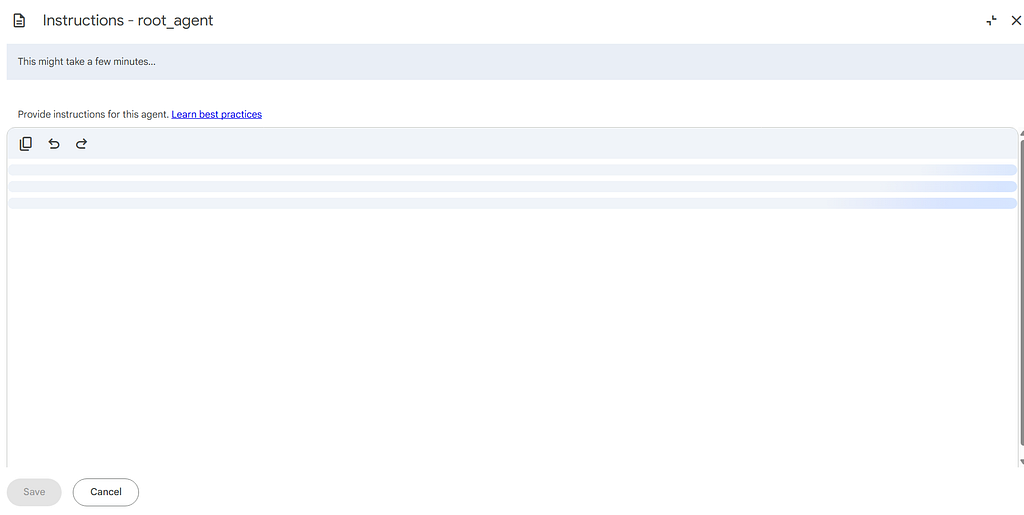
This is especially powerful in **multi-agent systems**. The root agent can have a high-level orchestration `taskflow`, while each sub-agent has its own tightly scoped `<role>`, `<persona>`, and specialized steps.
Practical Tips for CX Agent Studio
- Start with natural language, then restructure — Write freely first, then hit the Restructure instructions button.
2. Apply structure at every level— Use it for both the root agent (orchestration + routing) and every sub-agent (deep expertise).
3. Leverage Global Instructions for brand tone, compliance, and shared variables so you don’t repeat them everywhere.
4. Use `<examples>` strategically — Add them only when you see consistent failures on specific patterns (quality issues, formatting, nuanced logic). Don’t overdo it.
5. Combine with tools and callbacks — XML structure + well-wrapped Python tools + callbacks for deterministic behavior is an extremely strong pattern.
6. Iterate with Refine — Select sections and use the **Refine** button (Gemini-powered) to improve clarity.
Bonus: Let Gemini Help You Restructure and Refine
CX Agent Studio has two powerful AI-assisted features right in the instructions panel:
– Restructure instructions → Converts natural language into the recommended XML format.
– Refine (on selected text) → Improves clarity, specificity, or structure based on your requirements.
This is meta-prompting at its best — you’re using Gemini to help you write better prompts for Gemini-powered agents.
Practical Exercise for You
Take one of your current agent instructions (ideally something non-trivial).
1. Paste it into a new or existing agent in CX Agent Studio.
2. Click Restructure instructions.
3. Review and lightly edit the generated XML (add missing constraints or steps).
4. Test the same set of scenarios in the built-in **simulator** before and after.
5. Measure: consistency, step adherence, hallucination rate, and user experience.
Most teams I work with see a noticeable jump in reliability on the very first structured version.
Structuring Agent Instructions with XML for Dramatically Better LLM Performance was originally published in Google Cloud – Community on Medium, where people are continuing the conversation by highlighting and responding to this story.
Source Credit: https://medium.com/google-cloud/structuring-agent-instructions-with-xml-for-dramatically-better-llm-performance-8582c472c21b?source=rss—-e52cf94d98af—4
About the Author