This integration pattern showcases Apache Iceberg on GCS using a Hadoop catalog with Spark-based processing and BigQuery analytics.
Architecture
This pattern will introduce 2 types of Iceberg Tables in Bigquery and their integration with Spark.
- Iceberg External Tables (formerly Apache Iceberg External Tables)
- Apache Iceberg tables managed by BigQuery (formerly BigLake tables for Apache Iceberg in BigQuery)
The names of the tables displayed above keeps on evolving with major release and product consolidation, this is true at the time of writing.
Dataproc Cluster (Managed Apache Spark)
The first step in setting this architecture pattern is creation of a dataproc cluster which will act as Iceberg Catalog (Hadoop Catalog).
The Dataproc (Managed Service for Apache Spark) cluster can be created with optional component — Iceberg using below which can allow to skip passing the Iceberg jars during runtime.
gcloud dataproc clusters create dp-hadoop-catalog-iceberg \
--region us-central1 \
--optional-components=Iceberg \
--bucket=dp-stage-bucket \
--cluster-type=standard \
--subnet=https://www.googleapis.com/compute/v1/projects/<project>/regions/us-central1/subnetworks/vpc-network-1 \
--image-version=2.3-debian12
For creating a standard cluster without optional component, use the below
gcloud dataproc clusters create dp-hadoop-catalog-iceberg \
--region us-central1 \
--bucket=dp-stage-bucket \
--cluster-type=standard \
--subnet=https://www.googleapis.com/compute/v1/projects/<project>/regions/us-central1/subnetworks/vpc-network-1 \
--image-version=2.3-debian12
Spark Job Configuration
Now we are going to setup the spark job on Dataproc cluster that will initiate the catalog setup and creation of Apache Iceberg table on GCS bucket.
https://medium.com/media/ff8c788977811c76f20076fc2ed4a307/href
The key configuration in the above spark job to setup the Apache Iceberg catalog is below
spark = SparkSession.builder.appName("spark-hadoop-catalog-iceberg") \
                            .config("spark.sql.extensions", "org.apache.iceberg.spark.extensions.IcebergSparkSessionExtensions") \
                            .config(f"spark.sql.catalog.{catalog_name}", "org.apache.iceberg.spark.SparkCatalog") \
                            .config(f"spark.sql.catalog.{catalog_name}.type", "hadoop") \
                            .config(f"spark.sql.catalog.{catalog_name}.warehouse", f"gs://{bucket_name}/{folder_name}") \
                            .getOrCreate()
The property spark.sql.catalog.<catalog_name> is name of the catalog that is setup.
It is possible to reference multiple catalogs by defining these properties again for a different warehouse location.
spark.sql.catalog.<catalog_name>.type indicates the type of catalog which is initiated to Hadoop.
spark.sql.catalog.<catalog_name>.warehouse points to the GCS bucket where the Apache Iceberg tables will be created with metadata.
In this configuration, the Apache Iceberg Catalog and warehouse is completely managed in the GCS bucket.
The spark run time for Apache Iceberg provides additional configuration properties which can be referenced here
Execution of the Spark Job
Below command executes the spark job on the dataproc cluster created with optional component installed.
gcloud dataproc jobs submit pyspark \
--cluster dp-hadoop-catalog-iceberg \
--region us-central1 \
dp-hadoop-catalog-write.py
For dataproc clusters which do not have the Iceberg component installed, the spark run time jar needs to be passed explicitly.
gcloud dataproc jobs submit pyspark \
--cluster dp-managed-catalog-iceberg \
--region us-central1 \
--jars https://repo1.maven.org/maven2/org/apache/iceberg/iceberg-spark-runtime-3.5_2.12/1.9.1/iceberg-spark-runtime-3.5_2.12-1.9.1.jar \
dp-hadoop-catalog-write.py
Key thing while selecting the jar is to check
1. Which spark runtime is installed in Dataproc
2. What is the Scala version installed
3. Which iceberg jar version is used.
For the purposes of the demo, we will be using Spark 3.5 on Dataproc cluster.
Creation of Apache Iceberg Tables
Post execution of the job, the Apache Iceberg tables are created as below
As seen in the below path, the catalog, namespace within the catalog and table is setup as folders within the GCP bucket
Every Iceberg table has the data and metadata folder.
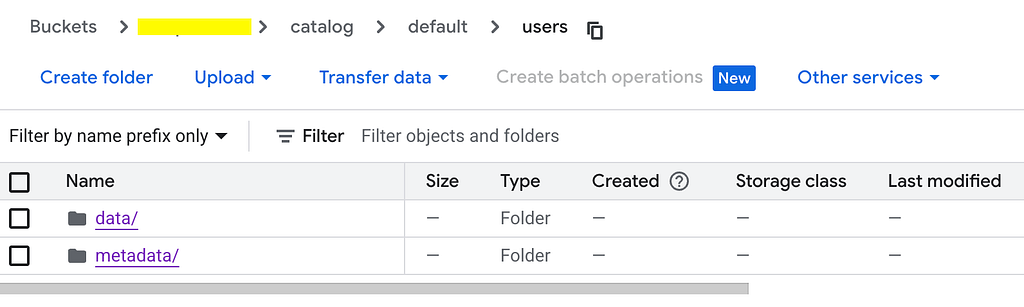
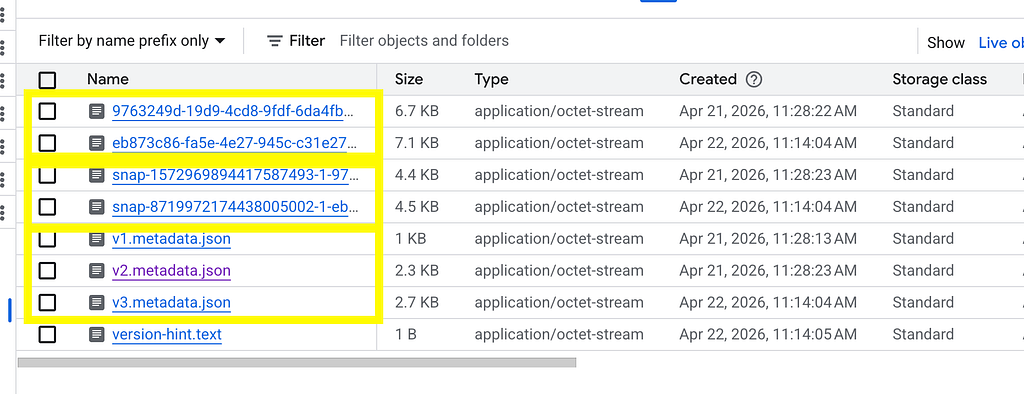
The first block in the above image displatys the manifest files followed by manifest lists and metadata files.
The version-hint.text is the key to identify the latest metadata file which is used by Hadoop Catalog to query the table metadata
Reading of Apache Iceberg Table
The below code snippet allows to read the previously written Apache Iceberg Table.
https://medium.com/media/97249801ed248374d28053bd6697099c/href
The command for the execution of the job is as below.
gcloud dataproc jobs submit pyspark \
--cluster dp-managed-catalog-iceberg \
--region us-central1 \
--jars https://repo1.maven.org/maven2/org/apache/iceberg/iceberg-spark-runtime-3.5_2.12/1.9.1/iceberg-spark-runtime-3.5_2.12-1.9.1.jar \
dp-hadoop-catalog-read.py

Creation of Iceberg External Table
The Apache Iceberg Tables created on the GCS bucket can be exposed as external tables on Bigquery for consumption.
The Apache Iceberg external tables are read-only tables and are restricted to single metadata file and requires the metadata file to be updated in the table definition.
CREATE EXTERNAL TABLE `<project_id>.iceberg_ds.external_iceberg_table`
  WITH CONNECTION `<project_number>.us-central1.iceberg`
  OPTIONS (
         format = 'ICEBERG',
         uris = ["<bucket_name>/catalog/default/users/metadata/v2.metadata.json"]
   )
The above command requires few setup to done beforehand
1. Creation of Bigquery Dataset and Bigquery Cloud Resource Connection
2. Granting of Storage User to Bigquery connection service account
3. Getting the Metadata file URI from the Apache Iceberg Table Metadata GCS location.

The second part of the integration shows the creation of Apache Iceberg tables managed in Bigquery and how the spark jobs can read such managed tables.
Apache Iceberg tables managed by BigQuery
GCP platform provides managed Apache Iceberg tables in which the data is stored in the GCS bucket and metadata is managed by Bigquery metastore.
A sample creation of Apache Iceberg table is as below
CREATE TABLE `<project>.iceberg_ds.managed_iceberg_table` (
    user_id int64,
    user_name string
)
with connection `<project_number>.us-central1.iceberg`
OPTIONS (
file_format = 'PARQUET',
table_format = 'ICEBERG',
storage_uri = 'gs://<bucket>/managed_users_table');
Notice the configuration above creates the table in dataset iceberg_ds and the data storage location is specificed in storage_uri property.
These tables are completely managed by Bigquery, even though the spark jobs can read/write to the location mentioned by the table uri, It is not recommended to write to the table managed by bigquery. Read more on the best practices

The Apache Iceberg tables currently at the time of writing has limitations documented here which will keep on evolving
Export Metadata Operation
At the time of writing, on creation of the Apache Iceberg tables, the metadata is not written to the location directly. This requires an export metadata operation to be performed for creation of the metadata file.
Once this operation is performed, the version-hint.text file is created in the metadata folder along with the metadata contents for the table.
bq query \
    --use_legacy_sql=false \
    'EXPORT TABLE METADATA FROM iceberg_ds.managed_iceberg_table'
Spark Job Configuration
Now we will configure the same spark job using the Hadoop Catalog and show the reading of the Apache Iceberg Table managed by Bigquery.
https://medium.com/media/4b186afc9e4239055d8e13018b177997/href
Key points to notice is the spark.sql.catalog.<>.warehouse is initiated to the bucket location used by the Apache Iceberg Table.
Secondly, when accessing the table via Hadoop Catalog, the name of the table referenced is the folder name and not the bigquery table name.
Executing the above job using the command shows the below results
gcloud dataproc jobs submit pyspark \
--cluster dp-managed-catalog-iceberg \
--region us-central1 \
--jars https://repo1.maven.org/maven2/org/apache/iceberg/iceberg-spark-runtime-3.5_2.12/1.9.1/iceberg-spark-runtime-3.5_2.12-1.9.1.jar \
dp-hadoop-catalog-read-managed.py

This shows the interoperability of using Hadoop Catalog with Spark Job and Bigquery Table (Managed Apache Iceberg and External Table)
Key Takeaways
Decoupled Storage and Compute: Data is stored cheaply in GCS in an open format (Iceberg/Parquet), allowing you to scale your Spark processing (Dataproc) and warehousing (BigQuery) independently.
No Vendor Lock-in for Data: Because Iceberg is an open-source specification, your underlying data asset isn’t locked into BigQuery’s proprietary storage format. If you ever want to migrate away from GCP, your data is already in standard Iceberg tables.
The “Hadoop Catalog” Bottleneck: The architecture relies on an external Hadoop Catalog to manage Iceberg metadata for Spark writes. Because BigQuery cannot automatically sync with a live Hadoop Catalog, BigQuery reads this data via an Iceberg External Table or BigLake Iceberg Table.
Apache Iceberg Managed Tables: Provides performance advantages of using Bigquery but the tables are completely managed within bigquery and OSS engines like Spark can only read at time of writing.
We will be diving in the different integration patterns with Apache Iceberg and GCP in next part — The BigQuery Iceberg Handbook: Data Integration Patterns — Part 3 Apache Iceberg Catalog.
Below are the links to the other parts
The BigQuery Iceberg Handbook: Data Integration Patterns — Part 1 Introduction
The BigQuery Iceberg Handbook: Data Integration Patterns — Part 2 Hadoop Catalog
The BigQuery Iceberg Handbook: Data Integration Patterns — Part 4 Apache Iceberg REST Catalog
Please connect with me on https://www.linkedin.com/in/murli-krishnan-a1319842/ for any queries.
Happy Learning.
References
Apache Iceberg External Tables
Apache Iceberg Tables
Dataproc Version Compatibility
Apache Iceberg Releases
Apache Iceberg Run Time Jars
The BigQuery Iceberg Handbook: Data Integration Patterns — Part 2 Hadoop Catalog was originally published in Google Cloud – Community on Medium, where people are continuing the conversation by highlighting and responding to this story.
Source Credit: https://medium.com/google-cloud/the-bigquery-iceberg-handbook-data-integration-patterns-part-2-hadoop-catalog-1b1db470f4cd?source=rss—-e52cf94d98af—4
About the Author