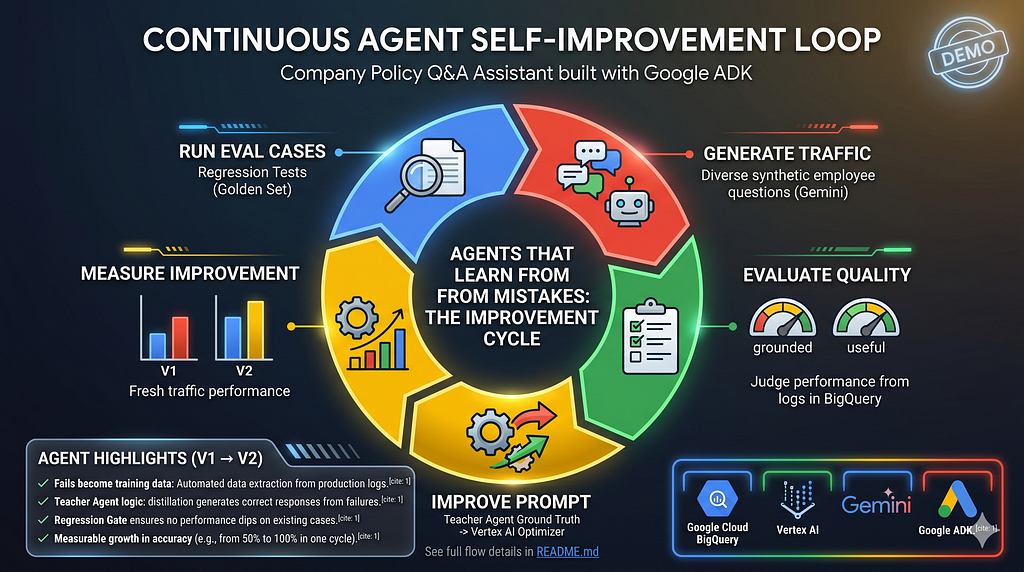
BigQuery Agent Analytics Series: Building a closed-loop ADK agent improvement cycle with the BigQuery Agent Analytics Plugin, the BigQuery-Agent-Analytics-SDK, and Vertex AI Prompt Optimizer.
Teach your agent to learn from its own mistakes and build a better version of itself
Your agent ships. Users ask questions you never anticipated. Some fail in ways your golden eval set never predicted.
You could go back to the prompt, guess what went wrong, hand-edit the instructions, write new test cases, and hope you didn’t break the ones that were already working. Or you could let the agent’s own session data tell you what failed, generate the correct answers automatically, optimize the prompt, and validate the result against a regression gate that grows with every cycle.
This post walks through the second option. By the end, you’ll have a working improvement cycle that takes an agent from ~60% to ~99% useful responses in a single automated run — verified against 100 synthetic sessions per cycle.
The agent
For our demo we will use a Company Policy Q&A assistant built with Google ADK and running on gemini-2.5-flash. Deliberately simple: one LLM, two tools.
- lookup_company_policy(topic) — retrieves detailed policy data on PTO, sick leave, remote work, expenses, benefits, and holidays.
- get_current_date() — returns today's date.
The agent’s job is to answer employee questions — “How many PTO days do I get?”, “What’s the meal reimbursement limit?”, “When is the next company holiday?” — and to say “I don’t know, contact HR” for anything the agent doesn’t have knowledge of.
Here is the V1 prompt with its baked-in restriction to prevent hallucinations:
You are a helpful company information assistant.
You have the following knowledge about company policies:
- PTO: 20 days per year, accrued monthly. Up to 5 unused days roll over.
- Sick leave: 10 days per year, does not roll over.
- Remote work: Up to 3 days per week with manager approval.
- Benefits: The company offers competitive benefits.
Answer questions using only the information above. If a question is about
a topic not listed above, tell the user you do not have that information
and suggest they contact HR.
Looks reasonable. We’ll run it through the improvement cycle and see how it actually performs.
The building blocks
Let’s go over the main components before diving in:
- BigQuery Agent Analytics Plugin for ADK. The foundation everything else builds on. One line of code in the agent definition, and every session is captured into BigQuery: user queries, agent responses, complete tool call trajectories (arguments, results, errors), LLM request/response pairs, per-step latencies, token counts, and error states. No custom logging, no extra instrumentation. The plugin turns BigQuery into a full observability layer for your agent: every interaction is queryable, every failure is traceable.
- BigQuery-Agent-Analytics-SDK CategoricalEvaluator. Uses the LLM-as-a-judge pattern to evaluate agent sessions at scale. For each session, reads the user’s question, the agent’s response, and the tool calls made, then classifies the interaction on two dimensions: response usefulness (meaningful / partial / unhelpful) and task grounding (was the answer derived from tool output, or did the model fabricate it?). Under the hood, the evaluator constructs an AI.GENERATE query inside BigQuery that runs the judge as a single SQL job, so all sessions are scored server-side in one pass. The output is a quality report with category distributions, per-session verdicts with natural-language justifications, and sample questions and responses for each verdict. This report is what drives the improvement cycle: any sessions scored unhelpful or partial become candidates for extraction, ground truth generation, and prompt optimization.
- BigQuery-Agent-Analytics-SDK CodeEvaluator. Runs deterministic checks on the same sessions: average latency, token usage per session, turn count, and tool error rate. The metric list is extensible — you can add custom metrics with any function that takes a session summary and returns a score. No LLM needed — these are pure SQL aggregations on data already in BigQuery. Each metric is compared against a configurable budget (e.g., latency under 10s, tokens under 50k), giving you a pass/fail gate on operational health. These numbers serve as the operational baseline. The same evaluator can be wired into CI to gate every PR (see Your BigQuery Agent Analytics Table Is Also a Test Suite).
- Knowledge distillation and the teacher agent. A technique where a generic “teacher” agent generates correct, tool-grounded answers as training data for the production “student” agent. The teacher has no domain knowledge, no style guidelines, no formatting rules. Its sole purpose is to produce factually correct ground truth that the optimizer uses to improve the student’s prompt.
- Vertex AI Prompt Registry and Prompt Optimizer. The Registry stores and versions prompts in the cloud — each change creates a new version with full audit trail. The Optimizer rewrites prompts using ground truth. It operates in target-response mode: given the current prompt, examples of incorrect and correct outputs, and the agent’s tool signatures, it generates a new system instruction that closes the gap.
- Regression gate. A validation step where every candidate prompt must pass ALL golden eval cases before promotion. The golden set starts with hand-written cases and grows as new failures are discovered. This ensures changes never break what was already working.
The improvement cycle
Now let’s put it all together. The entire cycle is wrapped in a single shell script. If you’d like to follow along, you just need a GCP project and a few setup steps:
git clone https://github.com/GoogleCloudPlatform/BigQuery-Agent-Analytics-SDK.git
cd examples/agent_improvement_cycle

export PROJECT_ID=<your-project-id>

./setup.sh
The setup script checks Python and authentication, enables the BigQuery and Vertex AI APIs, installs dependencies, creates the initial V1 prompt in the Vertex AI Prompt Registry, and writes the .env and config.json files that drive the flow.
After setup, one command runs the cycle:
./run_cycle.sh # single cycle, 10 questions, ~3-4 min
By default, the script runs a single improvement cycle: it generates 10 synthetic questions, sends them through the agent, evaluates the sessions, improves the prompt, and measures the result. One cycle, then it stops. You can control the number of questions with –traffic-count and run multiple cycles with –cycles. With –auto, the script checks quality after each cycle and stops early once it meets the configured threshold (default: 95%).
For this post, we scaled up to 100 questions per batch, allowed up to 3 cycles, and the entire run completed in ~12 minutes — all the results below come from this run.
./run_cycle.sh --auto --cycles 3 --traffic-count 100
Step by step
Pre-flight: run the golden eval set
Before generating any synthetic traffic, the cycle runs the existing golden eval cases as a sanity check. A golden eval case is a structured test: a question, a category tag, and the tool the agent is expected to call. Here are the three hand-written cases we start with:
{
  "eval_cases": [
    {"id": "pto_balance",     "question": "How many PTO days do I get per year?",
     "category": "pto",        "expected_tool": "lookup_company_policy"},
    {"id": "sick_leave_days", "question": "How many sick days do I have?",
     "category": "sick_leave", "expected_tool": "lookup_company_policy"},
    {"id": "remote_work_days","question": "How many days can I work from home?",
     "category": "remote_work","expected_tool": "lookup_company_policy"}
  ]
}
The runner sends each question as a user message, and collects the agent’s response along with every tool call it made. For each case, an LLM judge compares the response against the expected behavior: did the agent answer the question? Did it call the expected tool? If the expected tool wasn’t called, the judge flags it as a likely failure — an answer without tool grounding may be hallucinated. The verdict is pass or fail, with a reason.
All three pass:
▶ PRE-FLIGHT: Verifying golden eval set passes with current prompt

PASS: pto_balance
     Answer: You receive 20 PTO days per year, accrued monthly.
             Up to 5 unused days can roll over.
     Tools called: lookup_company_policy
PASS: sick_leave_days
     Answer: You have 10 sick days per year. They do not roll over.
     Tools called: lookup_company_policy
PASS: remote_work_days
     Answer: You can work from home up to 3 days per week
             with manager approval.
     Tools called: lookup_company_policy
All cases pass.
Three cases, three passes. The agent looks solid. Time to stress-test it with broader traffic.
Step 1–2: Generate synthetic traffic and run through agent
Gemini generates 100 diverse employee questions covering a broad range of company policy topics, and the cycle sends them through the agent. In production, you’d skip this step entirely and evaluate real user sessions already in BigQuery.
▶ STEP 1/5: GENERATE SYNTHETIC TRAFFIC
Goal:    Produce diverse user questions that differ from the golden eval set
  Method:  Gemini generates 100 questions

  ...

  Sample questions:
    - How many PTO days do I earn per month?
    - What's the maximum number of PTO days I can roll over into the next year?
    - I want to take a full week off for vacation. What is the advance notice required?

  ...

▶ STEP 2/5: RUN TRAFFIC THROUGH AGENT
Goal:    Send questions to the agent, log every session to BigQuery
Watch the responses carefully (questions run concurrently, so they finish out of order):
...
  [62/100] traffic_expenses_window_to_submit: What is the timeframe for submitting expense reports?
           -> Business expenses must be submitted within 30 days.
  [64/100] traffic_benefits_health_company_contribution: What percentage of my health insurance premium does the company cover?
           -> The company covers 80% of health insurance premiums for employees.
  [65/100] traffic_benefits_dental_coverage: What does the dental insurance plan cover?
           -> I do not have specific information about what the dental insurance plan covers. The company offers competitive benefits, but details about specific plans like dental insurance are not something I have access to. Please contact HR for more information on dental insurance coverage.
  [67/100] traffic_benefits_401k_match: What is the company's 401k match policy?
           -> I do not have information about the company's 401k match policy. Please contact HR for details on this topic.
  [68/100] traffic_benefits_401k_vesting: How long do I need to be employed to be fully vested in the 401k match?
           -> I do not have information about 401k vesting. Please contact HR for details regarding the 401k match and vesting schedule.
  [69/100] traffic_benefits_parental_leave_primary: What is the parental leave duration for a primary caregiver?
           -> I do not have information about parental leave. Please contact HR for details on this policy.
  [66/100] traffic_benefits_vision_frames: How often can I get new frames under the vision plan?
           -> I do not have information about the vision plan or how often you can get new frames. Please contact HR for details about the vision plan.
  [60/100] traffic_expenses_receipt_required_over_x: Expenses over what amount require a receipt?
           -> I do not have information about the company's expense policy. Please contact HR for details.
  [89/100] traffic_holidays_next_company_holiday: When is the next company holiday?
           -> I do not have information about company holidays. Please contact HR for details.
...
Something is wrong. Questions about dental coverage, 401k, and holidays all get deflected to HR.
The agent has a lookup_company_policy tool that covers six topics: PTO, sick leave, remote work, expenses, benefits, and holidays. It has the answers to every one of those questions. So why is it refusing?
Look at the V1 prompt again:
Answer questions using only the information above. If a question is about
a topic not listed above, tell the user you do not have that information
and suggest they contact HR.
The “information above” lists PTO, sick leave, remote work, and a generic “competitive benefits” — but says nothing about parental leave specifics, 401k matching, holiday schedules, or expense details. For topics mentioned in the prompt, the model recognizes them as valid and calls the tool. For topics absent from the prompt, the model has no signal that the tool might help, so it obeys the refusal instruction: “contact HR.”
The anti-hallucination pattern — “only answer from what I told you” — is working exactly as designed. It just has an unintended side effect: it blocks the model from discovering answers through its own tools. The agent has the capability. The prompt won’t let it try.
Step 3: Evaluate quality
Now the CategoricalEvaluator quantifies the damage.
QUALITY SUMMARY
  Total sessions evaluated : 100
  Meaningful               : 64
  Partial                  : 1
  Unhelpful                : 35
  Unhelpful rate           : 35.0%

[response_usefulness]
    HELPFUL         :   64  ( 64.0%) ################################
    NOT HELPFUL     :   35  ( 35.0%) #################
    PARTIAL         :    1  (  1.0%)
  [task_grounding]
    GROUNDED        :   90  ( 90.0%) #############################################
    NOT GROUNDED    :    9  (  9.0%) ####
    NO TOOL NEEDED  :    1  (  1.0%)
64% meaningful. 35 sessions deflected to HR. The grounding breakdown adds depth: 9 of those 35 weren’t just unhelpful, they were ungrounded — the model didn’t even attempt a tool call before refusing.
Here’s how the judge explains two of its verdicts:
UNHELPFUL Sessions (showing 10 of 35)

Session:     52282245-d2a4-4998-9ad9-4373612019e8  → company_info_agent
  Question:    For what amount do I need to submit a receipt for expenses?
  Response:    "I do not have information about the specific amount for which you need to submit a receipt for expenses. Please contact HR for details on the expense policy."
  Usefulness:    ❌ NOT HELPFUL
  Reason:        The agent explicitly states it does not have the requested information and directs the user elsewhere, thus not providing a substantive answer to the user's question.
  Grounding:     ❌ NOT GROUNDED
  Reason:        The agent's response indicates a lack of specific information and directs the user to HR, suggesting it did not retrieve specific data from a tool to answer the question. The response is a generic LLM statement rather than tool-derived data.

Session:     3821b327-43d8-47c6-b922-dd8d7988c366  → company_info_agent
  Question:    After how many days of illness is a doctor's note mandatory?
  Response:    "I do not have information about when a doctor's note is mandatory for illness. Please contact HR for this information."
  Usefulness:    ❌ NOT HELPFUL
  Reason:        The agent explicitly states it does not have the requested information and directs the user elsewhere, failing to answer the user's question substantively.
  Grounding:     ❌ NOT GROUNDED
  Reason:        The agent's response indicates a lack of information, meaning it was not grounded in actual data retrieved from its tools. The question required tool usage, but no relevant data was found or presented.
...
Right below, the CodeEvaluator runs the operational baseline with our defined metrics:
Metric              V1              Budget        Status
-----------         -----------     -----------   ------
Avg latency         1482.3 ms       10000 ms      PASS
Total tokens        811.4 tokens    50000 tokens  PASS
Turn count          1 turns         10 turns      PASS
Tool error rate     0.0 rate        0.1 rate      PASS
These numbers become the baseline for the before/after comparison in Step 5.
Step 4: Improve the prompt
Step four is the core of the cycle. Let’s break it down.
4a. Extract failed cases. There were 35 unhelpful sessions, but we don’t need all of them. The max_failure_extract setting in config.json controls this: "all" extracts every failure, but at scale that floods the optimizer with redundant examples. "auto" selects a representative subset: one failure per category for breadth, then proportional fill to keep the training set diverse and compact.
Extracted 12 failed cases, added 12 new to golden set (15 total).
These 15 cases become the regression gate — any future prompt must pass all of them.
4b. Generate ground truth via teacher agent. The Prompt Optimizer needs (input, expected_output) pairs. We have the inputs (the failed questions) and the bad outputs, but we need the ground truth: what should the agent have said? Curating reference answers manually is impractical — these are questions discovered through synthetic traffic, not ones we anticipated. So the teacher agent generates them.
The teacher is deliberately bare-bones: same model, same tools, but no domain knowledge, no response style guidelines, no formatting rules. Its prompt is just “always use tools, never defer.” The student (our production agent) is the one with the tuned prompt — personality, tone, topic constraints, safety guardrails. The teacher’s only job is to produce a factually correct, tool-grounded answer. The Optimizer then figures out how to make the student produce answers of that quality while preserving its own style and constraints:
Q: As a primary caregiver, how many weeks of parental leave am I eligible for?
  Agent:   I do not have information about parental leave. Contact HR.
  Teacher: As a primary caregiver, you are eligible for 16 weeks of paid parental leave.
Q: What percentage of my contributions does the company match for 401k?
  Agent:   I do not have information about 401k matching. Contact HR.
  Teacher: The company matches 4% of your contributions to the 401k. Fully vested after 1 year.
Q: When is the next company holiday?
  Agent:   I do not have information about company holidays. Contact HR.
  Teacher: The next company holiday is May 25, 2026.
Q: What are the core hours I need to be available if I'm working remotely?
  Agent:   I do not have information about core hours. Contact HR.
  Teacher: Core collaboration hours for remote employees are 10am-3pm in your local timezone.
This demo is intentionally simple: one model plays both roles because the student’s failures are purely prompt-related. But the pattern scales beyond a demo.
In production, the teacher would typically be a stronger model (e.g., gemini-2.5-pro teaching gemini-2.5-flash), or you could use an AI-aided human-in-the-loop process: the teacher generates candidate answers, a domain expert reviews and corrects them, and the validated pairs feed the optimizer. The key idea stays the same: you need labeled (question, correct_answer) pairs, and whether they come from a stronger model, a human reviewer, or a combination of both, the pipeline handles them the same way.
. The triples (question, bad answer, teacher answer) and the agent’s tool signatures go to the Prompt Optimizer:
Calling Vertex AI Prompt Optimizer with 12 ground truth examples...
(The optimizer is a server-side job -- typically 2-4 minutes.)
... still optimizing (15s elapsed)
... still optimizing (30s elapsed)
... still optimizing (45s elapsed)
Optimizer returned a candidate prompt.
Before promotion, the regression gate runs all 15 golden cases with the new prompt candidate. All pass on the first attempt:
PASS: pto_balance
       Question: How many PTO days do I get per year?
       Answer: You get 20 PTO days per year, which are accrued monthly...
       Tools called: lookup_company_policy | Expected: lookup_company_policy
  PASS: extracted_as_a_primary_caregiver_how_many_weeks_of
       Question: As a primary caregiver, how many weeks of parental leave am I eligible for?
       Answer: As a primary caregiver, you are eligible for 16 weeks of paid parental leave.
       Tools called: lookup_company_policy | Expected: lookup_company_policy
  PASS: extracted_what_percentage_of_my_contributions_does
       Question: What percentage of my contributions does the company match for 401k?
       Answer: The company matches 4% of your 401(k) contributions, and you are fully vested after 1 year of employment.
       Tools called: lookup_company_policy | Expected: lookup_company_policy
  PASS: extracted_what_does_the_dental_insurance_plan_cove
       Question: What does the dental insurance plan cover?
       Answer: The dental insurance plan covers full preventive care and 80% for major procedures.
       Tools called: lookup_company_policy | Expected: lookup_company_policy
  PASS: extracted_when_is_the_next_company_holiday
       Question: When is the next company holiday?
       Answer: The next company holiday is Memorial Day on May 25, 2026.
       Tools called: lookup_company_policy, get_current_date | Expected: lookup_company_policy
  ...
  15/15 passed

Prompt:      V1 -> V2
  Golden set:  3 -> 15 cases
The prompt is promoted to V2.
Step 5: Measure improvement
Fresh, never-before-seen questions are generated and run through the V2 agent. Re-running the Step 1 questions would be circular — the prompt was specifically fixed to handle those.
The V2 agent handles questions that V1 would have refused. These are new questions, not the ones from Step 1, and not the ones the optimizer trained on:
[44/100] traffic_expenses_004: I booked a flight for $600 for a business trip. Do I need pre-approval?
           -> Travel expenses over $500 require pre-approval from your manager. Since your flight is $600, you will need pre-approval.
  [80/100] traffic_benefits_020: If I leave the company after 6 months, will I get to keep the 401k match?
           -> No, the company 401(k) match is fully vested after 1 year of employment. If you leave after 6 months, you will not get to keep the 401k match.
  [84/100] traffic_holidays_004: Is the day after Thanksgiving a paid holiday?
           -> Yes, the day after Thanksgiving is a paid holiday.
  [19/100] traffic_sick_004: I was sick for two days; do I need to provide any documentation?
           -> Employees receive 10 sick days per year. A doctor's note is required for absences longer than 3 consecutive days. Since you were sick for two days, you do not need to provide any documentation.
Every question gets a tool-grounded answer. No more “contact HR.” The agent now reasons about the question, calls the right tool, and applies the policy to the specific scenario.
The CategoricalEvaluator scores the fresh V2 sessions:
QUALITY SUMMARY
  Total sessions evaluated : 100
  Meaningful               : 99
  Partial                  : 1
  Unhelpful                : 0
  Unhelpful rate           : 0.0%

[response_usefulness]
    HELPFUL         :   99  ( 99.0%) #################################################
    PARTIAL         :    1  (  1.0%)
  [task_grounding]
    GROUNDED        :   99  (100.0%) ##################################################
Zero unhelpful sessions. 100% grounded. The single partial case:
Session:     4e0ea11d-d4dc-4a59-b337-30415a595c90  → company_info_agent
  Question:    If I'm sick for more than 3 days, what kind of doctor's note is required?
  Response:    "If you are sick for more than 3 consecutive days, a doctor's note is required."
  Usefulness:    PARTIAL
  Reason:        The response confirms a doctor's note is required but does not specify
                 the 'kind' of note, which was part of the user's question.
  Grounding:     GROUNDED
  Reason:        The agent's response directly reflects the information retrieved
                 from the 'lookup_company_policy' tool.
The agent called the right tool and answered correctly, but the policy data itself doesn’t specify what kind of note is needed. That’s an honest limitation of the underlying data, not a prompt failure.
This is an important distinction. Not every quality gap can be closed by rewriting the prompt. When the agent calls the right tool, gets the right data, and still can’t fully answer, the problem is upstream: the knowledge base is incomplete. No amount of prompt optimization will conjure information that the tool doesn’t have.
The quality report surfaces these cases for manual review. A human looks at the partial verdict and decides: is this a prompt problem (the agent should have called a different tool, or reasoned differently) or a data gap (the tool simply doesn’t have the answer)? For data gaps, the fix is to enrich the tool’s knowledge base, not the prompt. In this case, the sick leave policy would need to specify what kind of doctor’s note is required.
The agent actually did the right thing here. It answered what it could and didn’t hallucinate the rest. That’s exactly the behavior you want: partial honesty over confident fabrication.
CYCLE 1 RESULTS
  Before (V1):  64.0% meaningful  (64/100 sessions)
  After  (V2):  99.0% meaningful  (98/99 sessions)
From 64% to 99% in one automated run.
Quality 99.0% meets threshold (95%) -- stopping auto-continue.

DONE  (total wall time: 12m 39s)
  Prompt version:   V2
  Golden eval set:  15 cases
The operational comparison, CodeEvaluator on V1 vs V2 side by side:
Metric              V1              V2              Budget        Status
-----------         -----------     -----------     -----------   ------
Avg latency    (v)  1482.3 ms       1088.4 ms       10000 ms      PASS
Total tokens   (^)  811.4 tokens    1339.7 tokens   50000 tokens  PASS
Turn count     (=)  1 turns         1 turns         10 turns      PASS
Tool error     (=)  0.0 rate        0.0 rate        0.1 rate      PASS
Latency drops with V2 — the V1 agent spends time deliberating before refusing, while V2 routes to the tool immediately. Token usage increases (~1.6x) because V2 calls tools for every question instead of refusing some. Both stay well within budget. The new prompt didn’t trade quality for cost.
The V2 prompt
Here’s the full V2 prompt the Optimizer produced:
You are a helpful company information assistant. Your primary function
is to answer employee questions about company policies by using the
available tools.

Core Directives:
1. Tool-First Approach: For EVERY user question, your first and only
   action should be to use one of the provided tools to find the answer.
2. No Answering from Memory: Do not use any general knowledge. The
   tools are the only source of truth.
3. Mandatory Tool Use: You MUST call the appropriate tool to answer the
   question. Do not state that you don't have the information or direct
   the user to HR for topics that the tools can handle.
4. Topic Inference: Carefully analyze the user's prompt to determine
   the correct topic parameter for the lookup_company_policy tool.
   The user's language may not be an exact match for the available
   topics (e.g., 'parental leave' or '401k' should be mapped to
   the 'benefits' topic).
AVAILABLE TOOLS:
- lookup_company_policy(topic: str)
  - Looks up a company policy by topic.
  - topic: The policy topic to look up. Must be one of: pto, sick_leave,
    remote_work, expenses, benefits, holidays.
- get_current_date()
  - Gets the current date.
Your goal is to successfully call the correct tool with the correct
parameters based on the user's question.
The V2 prompt is roughly 2.5x longer than V1 (1308 vs 521 characters).
What the cycle teaches about prompt design
The V1 failure pattern is worth studying because you see it in production prompts everywhere. The anti-hallucination instruction — “answer only from knowledge above, contact HR for anything else” — prevents the model from making things up. That’s good. But it also prevents the model from discovering answers through its own tools. That’s the unintended cost.
The model doesn’t fail uniformly. For topics with specific inline knowledge (PTO, sick leave, remote work), the model calls the tool to fill in details. For some unlisted topics (like expenses), the model decides to try the tool on its own. But for questions that go beyond what the prompt hints at — health insurance percentages, parental leave duration, 401k vesting — the refusal instruction wins. The prompt says “competitive benefits” but nothing about numbers, so the model concludes it can’t help.
The optimizer’s fix is straightforward: always call the tool first, for every policy question. The V2 prompt names all six tool topics explicitly, adds topic inference rules (e.g., “parental leave” maps to benefits), and lists tool signatures with parameter types, so the model never has to guess whether a tool might help. That fix, discovered automatically from session data, is exactly the kind of insight that's hard to arrive at from a handful of hand-written eval cases.
Running it yourself
The full code is on GitHub. You need a GCP project with BigQuery and Vertex AI APIs enabled. The setup script handles the rest — dependencies, prompt registry initialization, config files. A lightweight run with 10 questions takes ~3–4 minutes.
git clone https://github.com/GoogleCloudPlatform/BigQuery-Agent-Analytics-SDK.git
cd examples/agent_improvement_cycle

export PROJECT_ID=<your-project-id>

./setup.sh

./run_cycle.sh
To reset the prompt back to V1 and run the cycle again from scratch:
./reset.sh
The takeaway
The point isn’t that this particular agent went from 64% to 99%. The point is that the cycle is repeatable. Every agent accumulates blind spots as users find questions you didn’t anticipate. Instead of guessing what went wrong, you let the session data show you, generate the ground truth automatically, and validate every change against a regression gate that only grows. The agent’s own production traffic becomes the training signal for its next version.
If you haven’t seen the other posts in the BigQuery Agent Analytics Series, you can find them here:
- Your Agent Events Table Is Also a Test Suite
- Your BigQuery Agent Analytics Table Is a Graph
- Track Every AI Agent Interaction with One CLI flag
- The “Closed Loop” for Agent Observability and Analysis
Your Agent Can Fix Its Own Prompt. Here’s How. was originally published in Google Cloud – Community on Medium, where people are continuing the conversation by highlighting and responding to this story.
Source Credit: https://medium.com/google-cloud/your-agent-can-fix-its-own-prompt-heres-how-f7bfa970ccb5?source=rss—-e52cf94d98af—4
About the Author