Automating Real-time Data Pipelines: Deploying Pub/Sub to BigQuery with Dataflow Custom Template using Terraform
Introduction
In today’s data-driven world, real-time data processing is paramount for businesses to gain insights and make informed decisions. Google Cloud Platform (GCP) offers a robust set of tools to build scalable and efficient data pipelines.
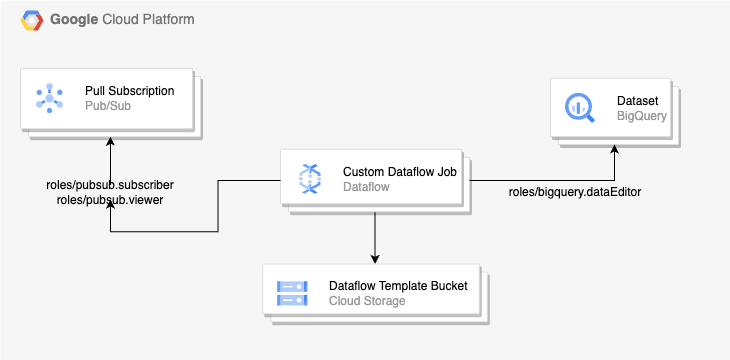
In this guide, we’ll explore constructing a real-time data pipeline on GCP, utilizing Pub/Sub, Dataflow, and BigQuery. We’ll delve into leveraging Terraform for infrastructure setup, alongside discussing permissions required for seamless integration.
Prerequisite
Before diving into the implementation, let’s ensure we have the necessary components set up in our GCP project:
- Enable the APIs : Enable all required APIs such as Pub/Sub, Dataflow, and BigQuery to ensure smooth functionality.
compute.googleapis.com
cloudresourcemanager.googleapis.com
pubsub.googleapis.com
dataflow.googleapis.com
bigquery.googleapis.co
iamcredentials.googleapis.com
iam.googleapis.com
storage.googleapis.com
storage-component.googleapis.com
- Service Account : Create two service accounts, each tailored with the necessary permissions for distinct tasks: one dedicated to Terraform for resource creation and the other for Dataflow.
- Terraform Service Account :
– roles/pubsub.editor
– roles/bigquery.dataEditor
– roles/dataflow.developer
– roles/storage.admin
– roles/storage.objectViewer
– roles/iam.serviceAccountUser - Dataflow Custom Worker Service Account : When we run our pipeline, Dataflow uses two service accounts to manage security and permissions:
– Dataflow Service Account : The Dataflow service uses the Dataflow. service account as part of the job creation request, such as to check project quota and to create worker instances on your behalf.
– Worker Service Account : Worker instances use the worker service account to access input and output resources after you submit your job. By default, workers use the Compute Engine default service account associated with your project as the worker service account.
It is highly recommended to create a user managed worker service account with only the roles and permissions that we need.
– roles/pubsub.subscriber
– roles/bigquery.dataEditor
– roles/dataflow.worker
– roles/storage.objectViewer
– roles/storage.objectCreator
For a comprehensive guide on security measures and permission settings, please refer to the official documentation provided by Google Cloud for Dataflow.
Dataflow security and permissions | Google Cloud
Once the required APIs is enabled and the service account is created — now we can move to the next section on how to create required terraform resources for the data pipeline
Terraform Resources
Pub/Sub Topic and Subscription: Create a Pub/Sub topic to publish messages and a Pull Subscription to consume these messages. For creating the Pub/Sub topic and pull subscription, we can use the Pub/Sub CFT module.
module "pubsub" {
  source  = "terraform-google-modules/pubsub/google"
  version = "~> 6.0"
  topic      = "tf-topic"
  project_id = "<ADD_YOUR_PROJECT_ID>"
  pull_subscriptions = [
    {
      name                         = "tf-pull-subs"                                               // required
      ack_deadline_seconds         = 20                                                   // optional
      enable_message_ordering      = false                                              // optional
      enable_exactly_once_delivery = false                                             // optional
    }
  ]
}
Note : Given that we’re utilizing a Dataflow custom template to extract messages from a Pub/Sub pull subscription, it’s essential to be mindful of certain unsupported features within Pub/Sub for this purpose.
BigQuery Dataset & Tables : Create a BigQuery dataset and tables where the custom dataflow template will write logs after processing.For creating the BigQuery dataset and tables, we can use the BigQuery CFT module.
module "bigquery" {
  source  = "terraform-google-modules/bigquery/google"
  version = "~> 7.0"

  dataset_id                  = "example_dataset"
  dataset_name                = "example_dataset"
  description                 = "Created one example BigQuery Dataset"
  project_id                  = "<PROJECT ID>"
  location                    = "US"
  default_table_expiration_ms = 3600000
  deletion_protection         = true

  tables = [
  {
    table_id           = "table1",
    schema             =  "<SCHEMA JSON DATA>",
    time_partitioning  = {
      type                     = "DAY",
      field                    = null,
      require_partition_filter = false,
      expiration_ms            = null,
    },
    range_partitioning = null,
    expiration_time = null,
    clustering      = []
  }
 ]
}
Develop Dataflow Pipeline: Write a Dataflow pipeline in your preferred language (e.g., Java, Python) to ingest data from Pub/Sub, perform necessary transformations, and write the processed data to BigQuery.
Leverage Dataflow’s flexibility to handle streaming data and perform real-time processing efficiently.
Create Custom Template:
Package your Dataflow pipeline as a custom template using the Dataflow SDK. Define pipeline options to parameterize the template, allowing customization during deployment. We can pass the required pipeline parameters in our terraform code while creating dataflow resource.
parameters = {
     //PASS THE PARAMETERS THAT ARE REQUIRED IN THE CUSTOM DATAFLOW CODE
  }
Creating classic Dataflow templates | Google Cloud
Google Cloud Storage Bucket (GCS Bucket) : Create a GCS bucket to store the custom template dataflow file and temporary job data.
Dataflow : Create a dataflow job. For creating the dataflow job, we can use the dataflow CFT module.
module "dataflow-job" {
  source  = "terraform-google-modules/dataflow/google"
  version = "0.1.0"

  project_id  = "<project_id>"
  name = "<job_name>"
  on_delete = "drain"
  zone = "us-central1-a"
  max_workers = 1
  template_gcs_path =  "gs://<path-to-template>"
  temp_gcs_location = "gs://<gcs_path_temp_data_bucket"
  parameters = {
     //PASS THE PARAMETERS THAT ARE REQUIRED IN THE CUSTOM DATAFLOW CODE
  }
}
Note: template_gcs_path should point to the bucket where the Dataflow custom template is stored.
Integrating Components
Once the infrastructure is provisioned, integrate the components to establish the data pipeline:
- Configure Pub/Sub Subscription: Point your Dataflow pipeline to the Pub/Sub Pull Subscription to consume incoming logs. For this, the custom Dataflow service account needs to have Pub/Sub Subscriber & Pub/Sub Viewer permission on the Pub/Sub Pull subscription.
- Specify BigQuery Destination: Define the BigQuery dataset and table where processed data will be stored. Also, the custom Dataflow service account needs to have BigQuery Data Editor permission to write to BigQuery table.
- Parameterize Dataflow Template: During deployment, provide configuration parameters such as Pub/Sub subscription ID, BigQuery table name, etc., to customize the Dataflow pipeline.
- Deploy Dataflow Custom Template: Use the gcloud command-line tool or Dataflow API to deploy the custom template, specifying the template location and required parameters and store the template in the GCS bucket.
Conclusion:
Building real-time data pipelines in GCP enables organizations to unlock valuable insights from streaming data. By leveraging Pub/Sub, Dataflow, and BigQuery, businesses can ingest, process, and analyze data at scale. Custom Dataflow templates offer flexibility in implementing complex data processing logic, while Terraform simplifies infrastructure management and deployment. With proper permissions and configurations, integrating these components empowers organizations to build robust and scalable data pipelines tailored to their specific needs.
By following the steps outlined in this guide and leveraging the provided Terraform code and permissions setup, you can seamlessly integrate Pub/Sub logs with BigQuery via Dataflow custom templates, paving the way for real-time data analytics and decision-making in your GCP environment
Automating Real-time Data Pipelines: Deploying Pub/Sub to BigQuery with Dataflow Custom Template… was originally published in Google Cloud – Community on Medium, where people are continuing the conversation by highlighting and responding to this story.
Source Credit: https://medium.com/google-cloud/automating-real-time-data-pipelines-deploying-pub-sub-to-bigquery-with-dataflow-custom-template-e7f5bc246dbc?source=rss—-e52cf94d98af—4
About the Author




![[Weekend Gaming] 77% of Game Companies Use Generative AI… "AI Skills" Top Hiring Priority Too – 아시아경제](https://lh3.googleusercontent.com/J6_coFbogxhRI9iM864NL_liGXvsQp2AupsKei7z0cNNfDvGUmWUy20nuUhkREQyrpY4bEeIBuc=s0-w300-rw "[Weekend Gaming] 77% of Game Companies Use Generative AI… \"AI Skills\" Top Hiring Priority Too – 아시아경제")